

Carta vs Capbase: A Complete Comparison for Startups Choosing Equity Management Software in 2026
Picking the right cap table and equity management platform can feel overwhelming. Two platforms keep coming up in conversations among startup founders: Carta and Capbase. Both promise to make equity management easier, but they take very different approaches to solving the same problem.
Carta is the industry giant. Over 40,000 companies use it. The platform handles everything from basic cap tables to complex fund administration. Capbase takes a different path. It positions itself as the founder-friendly option that bundles incorporation with cap table management from day one.
This comparison will break down how each platform handles pricing, features, ease of use, customer support, and more. By the end, you’ll know which tool fits your startup’s specific situation. Let’s dig in.
Understanding Cap Table Management: Why This Choice Matters
Before we compare Carta and Capbase directly, let’s talk about why cap table software matters in the first place. A cap table tracks who owns what in your company. It sounds simple. It isn’t.
What Happens Without Proper Cap Table Management
Early-stage founders often track equity in spreadsheets. This works for about five minutes. Then you issue a SAFE. Then another. An employee joins and wants stock options. Suddenly your spreadsheet has fifteen tabs and nobody trusts the numbers.
Investors will ask for your cap table during due diligence. If it’s a mess, that’s a red flag. They might walk away. Or they’ll demand you hire lawyers to clean it up before closing. That costs money and burns time you don’t have.
Common cap table disasters include:
- Forgetting to record stock option grants
- Losing track of SAFE conversion terms
- Miscalculating dilution during fundraising rounds
- Missing vesting milestones for employees
- Failing to maintain proper legal documentation
Good cap table software prevents these problems. It keeps records accurate. It generates reports investors expect. And it handles the legal paperwork automatically.
The Evolution of Cap Table Tools
Ten years ago, startups relied on lawyers and Excel sheets. Carta (then called eShares) changed that in 2012. The company built software specifically for managing startup equity. It grew fast and became the default choice for venture-backed companies.
Newer players like Capbase emerged to challenge Carta’s dominance. They noticed that Carta’s pricing climbed quickly as companies grew. They also saw an opportunity to bundle services that Carta sold separately.
The market now offers genuine choice. Carta remains the biggest player. Capbase appeals to early-stage founders who want simplicity and lower costs. Understanding where each excels helps you pick the right tool.
Company Backgrounds: Carta vs Capbase Origins and Market Position
Knowing where these companies come from helps explain their product decisions. Let’s look at each platform’s history and current market standing.
Carta: The Market Leader’s Journey
Carta launched in 2012 as eShares. The company rebranded to Carta in 2017. Based in San Francisco, California, Carta built its reputation on one core promise: replace paper stock certificates with electronic securities.
That promise resonated with venture capitalists and their portfolio companies. VC firms pushed their investments to use Carta. This created a network effect. The more companies on Carta, the easier it became for investors to manage their portfolios.
Key Carta milestones:
- 2012: Founded as eShares
- 2017: Rebranded to Carta
- 2019: Launched CartaX for secondary transactions
- 2021: Reached $7.4 billion valuation
- 2023-2024: Restructured pricing tiers
- 2026: Serves 40,000+ companies globally
Carta expanded beyond cap tables into fund administration. This means VC funds themselves use Carta to manage LP relationships, capital calls, and K-1 tax forms. This fund administration business sets Carta apart from smaller competitors.
The platform has facilitated over $332 billion in total raised funds across its ecosystem. That’s a staggering number. It shows how deeply embedded Carta is in the startup financing world.
Capbase: The Challenger’s Approach
Capbase took a different path into the market. Instead of focusing only on cap tables, Capbase built an all-in-one platform that handles incorporation alongside equity management.
The company targets founders at the earliest stage. Before you have investors. Before you have employees. Before you even have a Delaware C-corp. Capbase helps you create all of that in one place.
Capbase’s value proposition centers on three ideas:
- Bundle incorporation with cap table management
- Automate legal document generation
- Keep pricing simple and predictable
This approach appeals to founders who hate stitching together multiple tools. With Stripe Atlas, for example, you get incorporation but then need to add a separate cap table tool. Capbase eliminates that friction.
Capbase is smaller than Carta. Way smaller. But size isn’t everything. For early-stage startups, Capbase often delivers exactly what’s needed without the complexity of enterprise-focused features.
Pricing Comparison: How Carta and Capbase Stack Up on Cost
Pricing often decides which platform founders choose. Let’s break down what each service actually costs and what you get for your money.
Carta’s Pricing Structure
Carta offers a free tier called Carta Launch. This targets very early startups. You can use it if your company has raised less than $1 million historically and has 25 or fewer stakeholders.
The free tier includes:
- Basic cap table management
- Electronic security issuance
- SAFE and convertible note tracking
- Employee portal for vesting information
- Basic fundraising scenario modeling
Sounds great, right? Free is hard to beat. But there’s a catch. Most startups outgrow the free tier quickly. Once you raise a real round or your team expands, you’ll hit those limits.
Carta’s paid tiers escalate based on complexity:
| Tier | Target Company | Approximate Annual Cost |
|---|---|---|
| Launch (Free) | Pre-seed, under $1M raised | $0 |
| Grow | Seed to Series A | $3,000 – $5,000 |
| Scale | Series B and beyond | $8,000 – $15,000+ |
| Enterprise | Late-stage, pre-IPO | Custom pricing |
These numbers can climb higher depending on stakeholder count and features needed. Many founders report sticker shock when they graduate from the free tier. Going from $0 to $3,000 annually feels steep.
Carta also charges separately for 409A valuations. These typically cost $1,500 to $3,500 depending on complexity. You need a 409A annually if you’re issuing stock options. It’s not optional.
Capbase’s Pricing Structure
Capbase takes a simpler approach. The company charges a flat monthly fee that includes incorporation, cap table management, and basic legal document automation.
Capbase’s standard pricing in 2026:
- $99 per month (billed monthly or annually)
- Includes Delaware C-corp incorporation
- Includes registered agent service
- Includes cap table management
- Includes SAFE and convertible note generation
- Includes compliance reminders
That’s roughly $1,200 per year for everything bundled together. Compare that to using Stripe Atlas ($500 incorporation) plus Carta’s paid tier ($3,000+) plus a separate registered agent ($100-300/year). Capbase often costs less total.
Capbase also doesn’t charge per stakeholder at the same rate as competitors. This matters as your team grows. Adding employee number fifteen doesn’t trigger a pricing tier jump.
Direct Cost Comparison Table
| Service | Carta | Capbase |
|---|---|---|
| Incorporation | Not included (use separate service) | Included |
| Registered Agent | Not included | Included |
| Basic Cap Table | Free (with limits) | Included |
| Full Cap Table Features | $3,000-$5,000/year | Included in $99/month |
| 409A Valuations | $1,500-$3,500 each | Available (pricing varies) |
| SAFE Document Generation | Included in paid tiers | Included |
For a day-zero founder starting from scratch, Capbase typically offers better value. For a Series B company with complex needs, Carta’s higher price comes with features Capbase can’t match.
Cap Table Features: Detailed Functionality Comparison
Price matters. But features matter more if the cheaper tool can’t do what you need. Let’s examine what each platform actually does with your cap table.
Carta’s Cap Table Capabilities
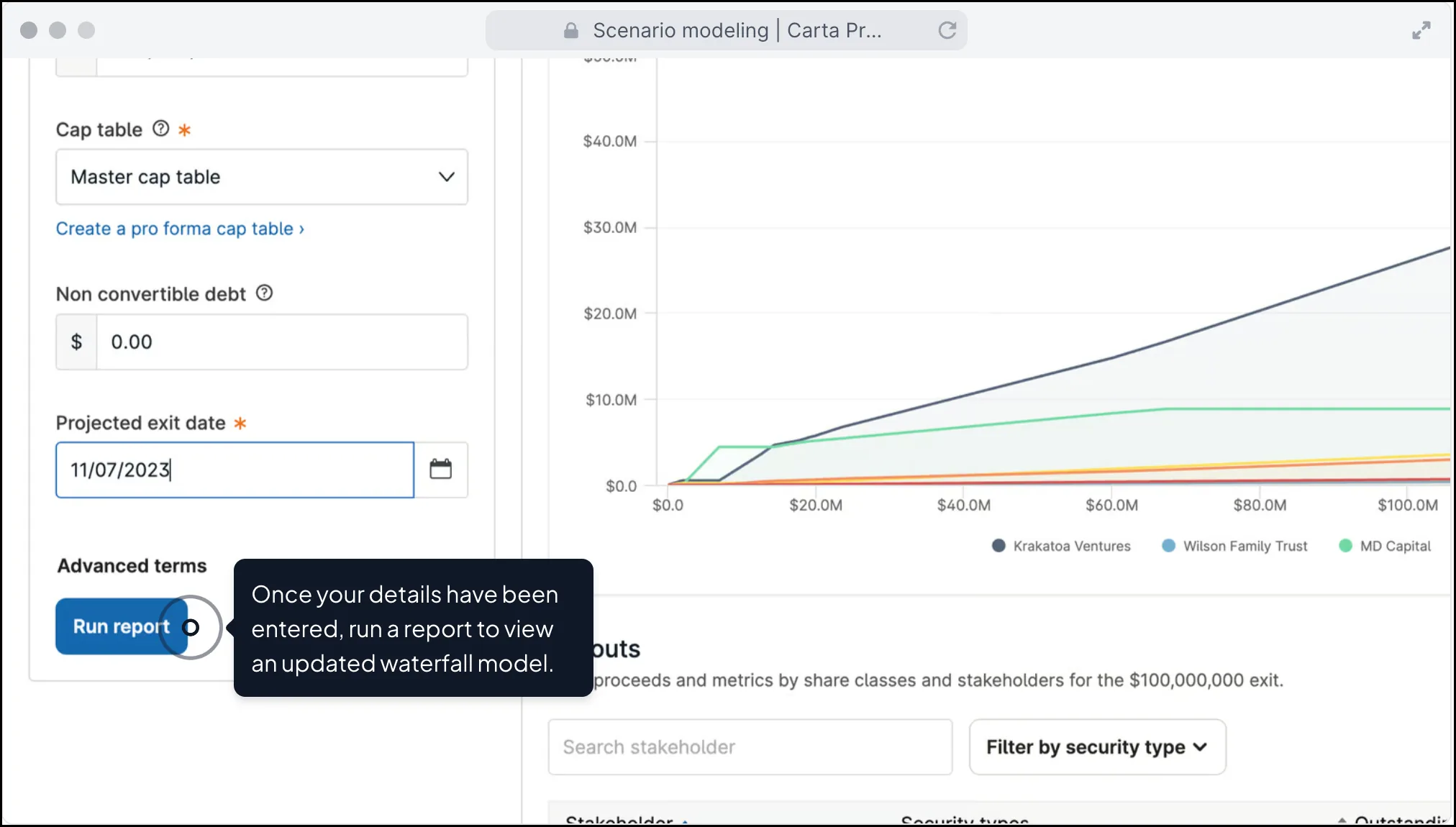
Carta’s cap table functionality reflects its position as the market leader. The platform handles scenarios that smaller competitors struggle with.
Core cap table features in Carta:
- Unlimited stakeholder tracking (in paid tiers)
- Multiple share class support
- SAFE and convertible note conversion modeling
- Waterfall analysis for exit scenarios
- Liquidation preference calculations
- Option pool dilution tracking
- Automatic dilution calculations across rounds
- Historical cap table snapshots
Carta shines when things get complicated. Multi-class stock structures with different liquidation preferences? Handled. Participating preferred shares with caps? Handled. Complex vesting schedules with acceleration triggers? Handled.
The waterfall modeling deserves special attention. When you’re negotiating a Series B, you need to show investors exactly what happens at different exit valuations. Carta’s modeling accounts for all the messy details: liquidation preferences, participation rights, option pool expansion, and more.
One founder described Carta’s modeling as “the only thing that kept my investors and me on the same page during negotiations.” That kind of clarity prevents misunderstandings that can blow up deals.
Capbase’s Cap Table Capabilities
Capbase offers solid cap table functionality for early-stage companies. It handles the basics well. But it wasn’t built for Series C complexity.
Core cap table features in Capbase:
- Stakeholder tracking and management
- SAFE issuance and tracking
- Convertible note management
- Basic equity dilution calculations
- Scenario modeling (limited)
- Automatic updates when securities are issued
- Document storage and organization
Capbase’s cap table updates automatically whenever you issue shares or sign a financing document through the platform. This tight integration between document generation and cap table management prevents the “out of sync” problems that plague spreadsheet users.
The scenario modeling in Capbase works fine for SAFE-stage founders. You can see what happens when your SAFEs convert. You can model basic exit scenarios. But the modeling struggles with complex multi-class structures.
If your company has one class of common stock, a founder pool, an option pool, and a few SAFEs, Capbase handles everything you need. Add Series A preferred with participating rights and a Series B with a different liquidation stack? You might hit limitations.
Feature-by-Feature Comparison
| Feature | Carta | Capbase |
|---|---|---|
| Basic Cap Table | Yes | Yes |
| SAFE Tracking | Yes | Yes |
| Convertible Note Tracking | Yes | Yes |
| Multi-Class Stock Support | Advanced | Basic |
| Waterfall Analysis | Advanced | Basic |
| Exit Scenario Modeling | Detailed | Simplified |
| Automatic Updates | Yes | Yes (integrated with docs) |
| Historical Snapshots | Yes | Limited |
| Investor Portal | Yes | Yes |
Equity Compensation and Stock Option Management
Stock options and equity compensation plans separate serious startups from hobby projects. Both Carta and Capbase handle equity compensation. The depth differs significantly.
How Carta Handles Employee Equity
Carta built its reputation partly on employee equity management. The platform handles the full lifecycle of stock option administration.
Carta’s equity compensation features include:
- Stock option plan creation and management
- Individual grant tracking
- Vesting schedule automation
- Employee portal with real-time vesting visibility
- Exercise processing and documentation
- Tax reporting (83(b) elections, ISO vs NSO tracking)
- Equity refresh and promotion grants
- Termination processing
Employees get their own login to Carta. They can see their grants, check vesting progress, and understand what their equity might be worth. This self-service reduces the burden on founders and HR teams.
The exercise processing in Carta is particularly valuable. When an employee exercises options, Carta generates all required documentation. It tracks the tax implications. It updates the cap table automatically. Manual processes create mistakes. Automation prevents them.
Carta also handles the 83(b) election process. This tax filing matters enormously for early employees receiving restricted stock. Missing the 30-day deadline costs real money. Carta reminds people and helps them file correctly.
For companies approaching 100+ employees, Carta’s equity compensation tools scale appropriately. The platform handles equity refresh programs, promotion grants, and complex vesting modifications that come with a growing team.
How Capbase Handles Employee Equity
Capbase includes equity compensation features, but they’re designed for smaller teams. The platform focuses on getting the basics right rather than handling every edge case.
Capbase’s equity compensation features include:
- Stock option plan setup
- Grant issuance and tracking
- Standard vesting schedules
- Employee access to grant information
- Basic exercise processing
- Document generation for grants
For a startup with five employees and a simple four-year vesting schedule, Capbase works fine. The platform generates the right documents. It tracks vesting correctly. Employees can see their information.
Where Capbase falls short is edge cases. Non-standard vesting? Custom acceleration triggers? Complex international employee situations? These push against Capbase’s limits.
The platform also lacks some of the reporting depth that larger companies need. CFOs preparing for audits want detailed equity compensation reports. Capbase’s reporting is adequate but not comprehensive.
Equity Management Comparison Summary
| Equity Feature | Carta | Capbase |
|---|---|---|
| Option Plan Creation | Full-featured | Basic templates |
| Grant Tracking | Detailed | Standard |
| Custom Vesting Schedules | Flexible | Limited templates |
| Employee Portal | Comprehensive | Basic |
| Exercise Processing | Automated | Semi-automated |
| Tax Reporting | Detailed | Basic |
| 83(b) Support | Yes, with reminders | Limited |
| Ideal Team Size | 5-5,000+ employees | 1-50 employees |
409A Valuations: What Each Platform Offers
If you issue stock options, you need a 409A valuation. This IRS requirement determines the fair market value of your common stock. Issuing options below fair market value creates tax problems for everyone involved.
Carta’s 409A Valuation Service
Carta provides 409A valuations as an add-on service. The company conducts thousands of these annually, giving them deep expertise in the process.
Carta’s 409A process:
- Gather company financials and projections
- Analyze comparable transactions
- Apply appropriate valuation methodologies
- Deliver audit-ready valuation report
- Automatic integration with your cap table
Pricing typically ranges from $1,500 to $3,500 per valuation, depending on company complexity. You need a new 409A at least annually. You also need one after any material event (like a funding round).
The integration between Carta’s 409A service and its cap table is seamless. When a new valuation completes, it automatically applies to future option grants. No manual updating required.
Carta’s valuations carry weight with auditors and the IRS. The company’s reputation means these reports rarely face challenges. That peace of mind matters when you’re defending your valuation to authorities.
Capbase’s 409A Approach
Capbase offers 409A valuation services, but it’s not their core strength. The company partners with third-party providers to deliver this service.
Key considerations for Capbase 409A:
- Available through partnerships
- Pricing competitive with market rates
- Integration with Capbase cap table
- May have longer turnaround times
For early-stage companies with straightforward situations, Capbase’s 409A offering works adequately. Simple cap tables and no unusual circumstances mean the valuation is fairly standard.
Companies with complex situations might prefer Carta’s in-house expertise. Series B companies with multiple preferred classes and unusual terms benefit from Carta’s deep experience with edge cases.
Fundraising Support and Investor Relations
Both platforms help with fundraising, but their approaches reflect different target customers. Let’s examine how each supports the fundraising process.
Carta’s Fundraising Tools
Carta positions itself as a full-cycle platform for private capital. The fundraising tools reflect this ambition.
Carta fundraising features:
- Data room management for due diligence
- Scenario modeling for negotiation prep
- Electronic securities issuance
- Investor onboarding workflows
- Board approval documentation
- Closing mechanics automation
When you’re raising a Series A, investors will ask for your cap table. Carta generates clean reports in formats investors expect. The data room feature lets you share documents securely during due diligence.
Carta’s scenario modeling proves invaluable during negotiations. You can show potential investors exactly what happens at different entry valuations and ownership percentages. This clarity speeds up negotiations.
After closing, Carta handles the mechanics. New securities get issued electronically. The cap table updates automatically. Investors can access their documents through the portal. The administrative burden decreases significantly.
Capbase’s Fundraising Support
Capbase focuses on early-stage fundraising, particularly SAFEs and convertible notes. The platform generates these documents and tracks them automatically.
Capbase fundraising features:
- SAFE document generation (YC templates)
- Convertible note creation
- Electronic signature integration
- Automatic cap table updates upon signing
- Basic investor communications
For pre-seed and seed fundraising via SAFEs, Capbase offers real convenience. You don’t need to hire a lawyer to generate standard SAFE documents. Capbase produces them using current Y Combinator templates.
The automatic cap table integration stands out. When an investor signs a SAFE through Capbase, your cap table reflects it immediately. There’s no manual data entry. No forgetting to update the spreadsheet. The system stays current.
Capbase’s limitations show with priced rounds. Series A negotiations involve complex term sheets, board seat provisions, protective provisions, and more. These situations typically require legal counsel that Capbase doesn’t replace.
Incorporation and Legal Document Services
This section highlights a major difference between the platforms. Capbase bundles incorporation. Carta doesn’t offer it directly.
Capbase’s All-in-One Incorporation
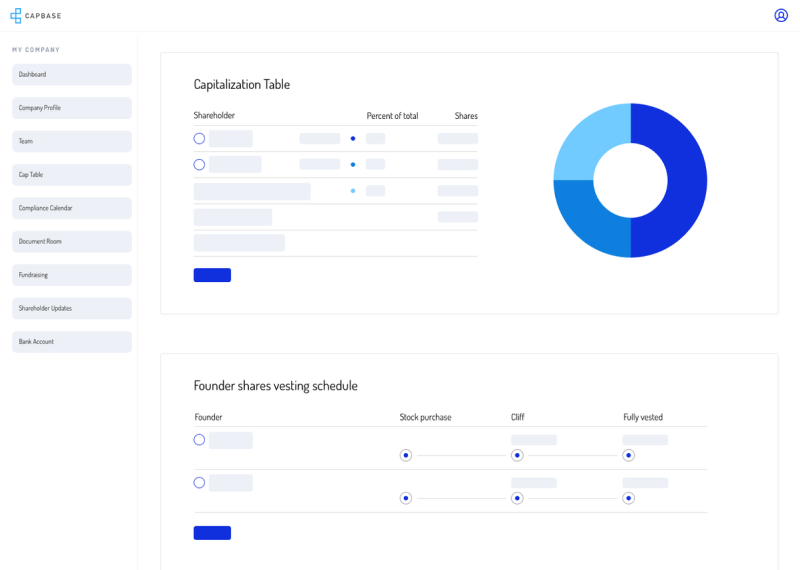
Capbase’s headline feature is combining incorporation with cap table management. The platform handles Delaware C-corp formation and sets up your cap table in one workflow.
Capbase incorporation includes:
- Delaware C-corp formation
- Registered agent service (ongoing)
- Initial bylaws and corporate documents
- Board consent templates
- Founder stock issuance
- Cap table initialization
- EIN (tax ID) filing assistance
This bundling solves a real pain point. Many founders use Stripe Atlas for incorporation, then realize they need a separate cap table tool. Then they need a registered agent. Then they need document storage. Capbase rolls everything into one subscription.
The integration between incorporation and cap table means your equity structure is correct from day one. Founder shares get issued properly. Vesting schedules attach correctly. The foundation is solid.
Capbase also provides ongoing compliance support. Delaware requires annual franchise tax filings. California (if that’s where you operate) has its own requirements. Capbase reminds you about deadlines and helps you file.
Carta’s Approach to Legal Documents
Carta doesn’t incorporate companies. The platform assumes you’re already a legal entity when you sign up. This limits the all-in-one appeal but reflects Carta’s focus on serving companies post-incorporation.
Carta does provide:
- Board consent document templates
- Option agreement generation
- Stock issuance documentation
- Investor agreement tracking
- Document storage and organization
For legal document needs beyond cap table management, Carta offers CartaCFO and partnerships with law firms. These services cost extra and serve later-stage companies.
Most Carta users incorporate through other channels: lawyers, LegalZoom, Stripe Atlas, or Clerky. Then they connect to Carta for cap table management. This works fine but requires coordinating multiple services.
Legal Services Comparison
| Legal Service | Carta | Capbase |
|---|---|---|
| Company Incorporation | Not offered | Included |
| Registered Agent | Not offered | Included |
| SAFE Generation | Yes (paid tiers) | Yes |
| Option Agreements | Yes | Yes |
| Board Consent Templates | Yes | Yes |
| Compliance Reminders | Limited | Comprehensive |
| EIN Filing Help | Not offered | Included |
User Experience and Interface Design
Software that’s hard to use doesn’t get used. Both platforms invest in user experience, but their design philosophies differ.
Carta’s Interface: Comprehensive but Complex
Carta’s interface reflects its comprehensive feature set. There’s a lot to navigate. The learning curve is real.
Carta UX strengths:
- Detailed dashboards with equity metrics
- Professional-looking reports for investors
- Robust search and filtering
- Mobile app for on-the-go access
- Employee portal with clean design
Carta UX challenges:
- Navigation can feel overwhelming initially
- Some features buried in submenus
- Enterprise features add complexity
- Occasional performance slowdowns with large datasets
Founders typically need 2-4 weeks to feel comfortable in Carta. The platform offers training resources and onboarding support, but the breadth of features means there’s always more to learn.
The employee portal gets better reviews than the admin interface. Employees can quickly see their vesting status, grant details, and potential value without getting lost in features they don’t need.
Capbase’s Interface: Simple and Focused
Capbase prioritizes simplicity. The interface is clean, modern, and designed for founders who aren’t finance experts.
Capbase UX strengths:
- Intuitive navigation structure
- Clear workflows for common tasks
- Guided setup for new users
- Fast page loads
- Minimal training required
Capbase UX limitations:
- Fewer customization options
- Some advanced users want more detail
- Reporting less flexible than Carta
Most founders report getting productive in Capbase within a day or two. The platform guides you through incorporation and cap table setup step by step. Error messages are clear. Help documentation is accessible.
This simplicity comes from scope limitations. Capbase doesn’t try to serve pre-IPO companies with 500 employees. By focusing on early-stage needs, the interface stays manageable.
Integration Capabilities and Third-Party Connections
Modern startups use dozens of software tools. Integration between these tools matters for efficiency and data accuracy.
Carta’s Integration Ecosystem
Carta has built extensive integrations over its years as market leader. The platform connects with accounting software, HR systems, and investor tools.
Key Carta integrations:
- QuickBooks and Xero for accounting
- Gusto, Rippling, and other payroll systems
- DocuSign for electronic signatures
- Slack for notifications
- Custom API access (enterprise plans)
The accounting integrations help with equity compensation expense tracking. When you issue stock options, Carta can push expense data to your accounting software. CFOs appreciate this automation.
Payroll integrations smooth the option exercise process. When an employee exercises options through payroll deduction, the systems communicate automatically. Less manual reconciliation means fewer errors.
Carta’s API availability (on enterprise plans) allows larger companies to build custom integrations. This flexibility matters for companies with unique workflows or custom internal tools.
Capbase’s Integration Approach
Capbase offers fewer integrations than Carta. The platform focuses on core functionality rather than extensive third-party connections.
Key Capbase integrations:
- Electronic signature for documents
- Banking connections for incorporation
- Basic accounting data export
For early-stage companies, limited integrations rarely cause problems. You probably don’t have complex accounting systems that need automatic data feeds. Manual export and import works fine.
As companies grow, integration limitations might push them toward other platforms. A Series B company with Rippling for HR, QuickBooks for accounting, and custom internal tools will want deeper integration than Capbase offers.
Customer Support and Service Quality
When something goes wrong with your cap table, you need help fast. Support quality differs significantly between platforms.
Carta’s Customer Support
Carta’s support varies by pricing tier. Free tier users get email support with longer response times. Paid customers get faster access and phone support.
Carta support options:
- Email support (all users)
- Phone support (paid tiers)
- Dedicated account manager (enterprise)
- Knowledge base and documentation
- Training webinars
Reviews of Carta support are mixed. Some users report quick, helpful responses. Others describe slow response times and difficulty reaching knowledgeable staff. Support quality seems inconsistent.
The scale of Carta’s user base creates challenges. Supporting 40,000+ companies with varying complexity strains any support organization. Enterprise customers get better treatment than free tier users.
Capbase’s Customer Support
Capbase positions responsive support as a competitive advantage. The smaller customer base allows more personalized attention.
Capbase support options:
- Email support
- Chat support
- Video call assistance (available)
- Help documentation
User reviews generally praise Capbase’s support responsiveness. Founders report getting useful answers within hours rather than days. The team seems accessible and knowledgeable about early-stage company needs.
The flip side: Capbase may lack deep expertise in complex situations that Carta handles routinely. If you have unusual equity structures or edge-case questions, Carta’s scale might mean they’ve seen your situation before.
Fund Administration: Where Carta Stands Alone
This section covers an area where Capbase simply doesn’t compete. If you’re managing a venture fund, Carta offers capabilities that Capbase doesn’t.
What Fund Administration Means
Fund administration covers the operational side of running a venture capital fund. This includes managing relationships with limited partners (LPs), processing capital calls, distributing returns, and handling tax reporting like K-1 forms.
Fund administration tasks:
- LP onboarding and documentation
- Capital call processing
- Distribution management
- NAV calculations
- Quarterly reporting to LPs
- K-1 tax document preparation
- Compliance monitoring
These services matter for venture fund managers, not startup founders. But if you’re raising a fund (rather than running a startup that raises from funds), this becomes relevant.
Carta’s Fund Administration Services
Carta Fund Admin is a separate product line that competes with traditional fund administrators like Standish, Aduro, and AngelList.
Carta Fund Admin features:
- LP portal for investor communications
- Automated capital call management
- Distribution waterfall calculations
- K-1 preparation and distribution
- Portfolio company integration
- Audit support
The integration between Carta’s fund administration and its company-side cap table management creates value. If a VC fund uses Carta Fund Admin and their portfolio companies use Carta, data flows between systems. Valuations, ownership stakes, and other metrics stay synchronized.
This network effect strengthens Carta’s position. More funds on Carta means more portfolio companies directed to Carta. More companies on Carta means funds benefit from easier data access.
Capbase’s Fund Administration Position
Capbase doesn’t offer fund administration services. The platform focuses entirely on operating companies, not investment funds.
If you’re a founder raising money from VCs, this limitation doesn’t affect you. If you’re a VC fund manager choosing your own software stack, Capbase isn’t an option for fund management.
Security and Data Protection
Cap tables contain sensitive information: ownership stakes, valuation details, employee compensation. Security matters.
Carta’s Security Measures
Carta invests heavily in security, which makes sense given the sensitive data they handle.
Carta security features:
- SOC 2 Type II certification
- Bank-level encryption (AES-256)
- Two-factor authentication
- Role-based access controls
- Activity audit logs
- Regular penetration testing
The SOC 2 certification means an independent auditor has verified Carta’s security controls meet industry standards. This matters when you’re sharing your cap table with investors who care about data protection.
Carta’s scale means they’re a bigger target for hackers. The company has had to build sophisticated security infrastructure to protect against threats. Larger customers often require security questionnaires and audits before onboarding. Carta can handle these requests.
Capbase’s Security Approach
Capbase implements standard security practices appropriate for a smaller platform.
Capbase security features:
- Encryption in transit and at rest
- Two-factor authentication
- Access controls
- Regular security updates
Capbase hasn’t published SOC 2 certification, which might matter for companies with strict compliance requirements. For early-stage startups, this is rarely a deal-breaker. For companies raising institutional capital from funds with security requirements, it might raise questions.
Migration and Switching Considerations
What happens if you start with one platform and want to switch? Migration isn’t always smooth.
Migrating to Carta
Carta has extensive experience migrating companies from spreadsheets and other platforms. The company offers migration services as part of onboarding.
Carta migration process:
- Data export from existing tools
- Carta team reviews and validates data
- Historical transactions recreated
- Document upload and organization
- Training on new platform
Migration to Carta typically takes 2-4 weeks depending on complexity. The Carta team handles most of the work. Companies with clean records migrate faster than those with messy historical data.
Migrating from Capbase
Capbase explicitly mentions that companies can migrate to Carta or Pulley after raising Series A. The platform is designed as a starting point, not necessarily a permanent home.
Capbase provides data export capabilities. Your historical records, documents, and cap table data can move to another platform. The receiving platform handles the import process.
Switching Costs and Lock-in
Neither platform creates artificial lock-in. Your data belongs to you. Both allow exports.
Real switching costs come from:
- Time spent learning a new interface
- Re-training team members
- Notifying stakeholders of new portals
- Verifying data accuracy post-migration
Starting with the right platform minimizes these switching costs later. But don’t let fear of switching prevent you from using the best tool for your current stage.
Who Should Choose Carta?
Carta fits specific company profiles better than others. Let’s outline who benefits most from choosing Carta.
Ideal Carta Users
Carta makes sense for:
- Companies post-Series A: Once you’ve raised institutional capital, Carta’s features justify its price
- Teams with 50+ employees: Equity compensation management at scale needs Carta’s tools
- Companies planning multiple rounds: Complex cap tables with multiple preferred classes benefit from Carta’s modeling
- Startups with institutional investors: Many VCs prefer portfolio companies on Carta for easier reporting
- Companies preparing for M&A or IPO: Auditors and acquirers expect Carta-quality records
If your VC investors strongly suggest Carta, that’s worth considering. They’ll interact with your cap table during reporting and future rounds. Making their job easier can help your relationship.
When Carta’s Free Tier Works
Carta Launch (the free tier) works well for companies that:
- Have raised less than $1 million
- Have fewer than 25 stakeholders
- Plan to raise VC funding eventually
- Want to be on Carta before they need paid features
Starting with Carta Launch and upgrading when needed is a valid strategy. You avoid migration later because you’re already on the platform.
Who Should Choose Capbase?
Capbase serves a different audience than Carta. Understanding this fit helps you decide.
Ideal Capbase Users

Capbase makes sense for:
- Day-zero founders: If you haven’t incorporated yet, Capbase’s bundled approach saves money and time
- Bootstrapped companies: Lower monthly cost fits limited budgets
- Solo founders and small teams: Simpler interface requires less training
- SAFE-stage fundraisers: Document generation and tracking work perfectly for early raises
- Founders who hate admin: Compliance reminders and automation reduce burden
One founder described Capbase as “the cheapest path from idea to Delaware C-corp with a clean cap table.” That summary captures the platform’s sweet spot.
When to Start with Capbase and Plan to Migrate
Some founders use Capbase knowing they’ll switch later. This makes sense when:
- You want to minimize early costs
- You value simplicity over advanced features
- You expect to raise a larger round within 1-2 years
- You don’t want to learn a complex platform while building your company
Starting with Capbase and migrating to Carta at Series A is a legitimate strategy. You get lower costs and simpler tools early. You get advanced features when you actually need them.
Alternative Platforms Worth Considering
Carta and Capbase aren’t your only options. A few other platforms deserve mention.
Pulley: The Modern Challenger
Pulley positions itself between Carta and Capbase. The platform offers strong UX, AI-assisted workflows, and competitive mid-market pricing.
Pulley highlights:
- Modern, clean interface
- AI-assisted scenario modeling
- Competitive pricing for Series A/B companies
- Strong employee equity features
Pulley closed significant feature gaps with Carta in 2024, particularly in scenario modeling. Companies that find Carta too expensive but need more than Capbase offers should evaluate Pulley.
Other Options
AngelList: Combines fundraising marketplace with cap table management. Good for companies raising via AngelList’s platform.
Capboard: European-focused alternative with lower per-stakeholder pricing. Worth considering for international companies.
Ledgy: Another European option with strong ESOP features.
Making Your Decision: A Framework
After all this information, how do you actually decide? Here’s a practical framework.
Decision Factors to Weigh
| Factor | Choose Carta If… | Choose Capbase If… |
|---|---|---|
| Stage | Post-Series A or funded | Pre-seed or bootstrapped |
| Budget | Can afford $3,000+/year | Need to stay under $1,500/year |
| Complexity | Multiple stock classes, priced rounds | SAFEs, simple cap table |
| Team Size | 50+ employees with options | Under 20 employees |
| Incorporation | Already incorporated | Need to incorporate |
| Investor Preference | VCs request Carta specifically | No strong preference |
| Time Horizon | Building for years | Getting started now |
Questions to Ask Yourself
Before choosing, answer these questions honestly:
- Have I incorporated my company yet?
- How much have I raised (or plan to raise in the next 12 months)?
- How many people will have equity in my company?
- Do my investors have a platform preference?
- What’s my monthly budget for administrative tools?
- How much time do I want to spend learning new software?
Your answers point toward one platform or the other. Day-zero founders with limited budgets lean toward Capbase. Funded companies with institutional investors lean toward Carta.
Conclusion
Carta and Capbase serve different needs at different stages. Carta offers power and comprehensiveness for growing companies. Capbase offers simplicity and value for founders just getting started.
Neither platform is universally “better.” The right choice depends on your specific situation. Early-stage founders without incorporation often find Capbase’s bundled approach perfect. Post-Series A companies with complex cap tables typically need Carta’s advanced features.
Start with what fits your current stage. Don’t overpay for features you don’t need yet. And remember: you can always migrate later.
Frequently Asked Questions: Carta vs Capbase
| What’s the main difference between Carta and Capbase? Carta is a comprehensive equity management platform for companies at all stages, with particular strength in serving funded startups through IPO. Capbase is an all-in-one platform that bundles incorporation with cap table management, targeting day-zero founders and early-stage companies. Carta offers more features but costs more. Capbase offers simplicity and lower cost but has limitations for complex situations. |
| Is Carta free for startups? Carta offers a free tier called Carta Launch for very early startups. You qualify if you’ve raised less than $1 million historically and have fewer than 25 stakeholders. Most companies outgrow this tier after their first significant funding round. Paid plans start around $3,000 annually and increase based on company complexity. |
| Does Capbase include company incorporation? Yes. Capbase bundles Delaware C-corp incorporation with cap table management. The service includes registered agent, initial corporate documents, and cap table setup. This bundling is one of Capbase’s main advantages over Carta, which doesn’t offer incorporation services. |
| Can I switch from Capbase to Carta later? Yes. Both platforms allow data export. Capbase explicitly positions itself as a starting point for companies that may migrate to Carta or Pulley after raising Series A. Migration typically takes 2-4 weeks. Starting with Capbase and switching to Carta later is a common and valid strategy. |
| Which platform is better for managing employee stock options? Carta offers more sophisticated equity compensation features, including detailed vesting tracking, exercise processing, tax reporting, and employee portals. Capbase handles basic stock option administration but lacks some advanced features. Companies with 50+ employees typically need Carta’s capabilities. |
| Do investors care which cap table software I use? Some do. Many venture capital firms prefer portfolio companies on Carta because it simplifies their own reporting and portfolio management. If your investors strongly suggest Carta, that’s worth considering. For angel investors or SAFE-based raises, platform choice rarely matters to investors. |
| How much does Capbase cost compared to Carta? Capbase charges approximately $99 per month, which includes incorporation, registered agent, and cap table management. Carta’s paid tiers start around $3,000 annually and can exceed $15,000 for larger companies. For early-stage startups, Capbase typically costs less than half of what Carta charges for comparable functionality. |
| Which platform handles 409A valuations better? Carta provides 409A valuations as a core service, conducting thousands annually with in-house expertise. The valuations integrate automatically with your cap table. Capbase offers 409A services through partnerships. For straightforward situations, both work fine. Complex situations may benefit from Carta’s deeper expertise. |
| Can Capbase handle Series A fundraising? Capbase handles SAFE and convertible note fundraising very well. For priced equity rounds like Series A, the platform tracks the resulting cap table accurately. The scenario modeling and waterfall analysis are less detailed than Carta’s, which can matter during complex negotiations. Many companies use Capbase through their seed stage and migrate before or after Series A. |
| What happens if my company gets acquired while using either platform? Both platforms support M&A transactions. Carta’s waterfall analysis helps model acquisition scenarios accurately, including complex liquidation preferences. Capbase provides basic exit modeling. During actual M&A, lawyers typically handle the detailed mechanics regardless of which platform you use. Having accurate cap table records on either platform makes the process smoother. |





 Stack Insight is intended to support informed decision-making by providing independent information about business software and services. Some product details, including pricing, features, and promotional offers, may be supplied by vendors or partners and can change without notice.