
Sweet Security vs Microsoft Defender for Cloud: The Complete 2026 Comparison Guide
Picking the right cloud security platform can feel overwhelming. You’ve got dozens of vendors, confusing feature lists, and marketing speak that all sounds the same. But when it comes down to protecting your cloud workloads, two names keep coming up in conversations: Sweet Security and Microsoft Defender for Cloud.
These aren’t identical products. They approach cloud protection from different angles. Microsoft brings its massive ecosystem and enterprise credibility. Sweet Security brings a runtime-first approach with AI-powered detection that’s turning heads in the industry.
In this comparison, we’re going to break down everything you need to know. We’ll cover detection capabilities, deployment options, pricing models, and real-world performance. By the end, you’ll have a clear picture of which platform fits your specific needs. No fluff. Just the facts you need to make a smart decision.
Understanding Cloud-Native Application Protection Platforms (CNAPP)
Before we dig into the comparison, let’s get clear on what we’re actually comparing. Both Sweet Security and Microsoft Defender for Cloud fall into the CNAPP category. But what does that mean in practice?
What CNAPP Actually Does
CNAPP combines several security functions into one platform. Think of it as your security Swiss Army knife for cloud environments. It pulls together:
- Cloud Security Posture Management (CSPM) to find misconfigurations
- Cloud Workload Protection Platform (CWPP) to secure your actual workloads
- Cloud Infrastructure Entitlement Management (CIEM) to handle identity and access
- Application security to protect your code and APIs
The goal? Give security teams one place to see and manage everything. No more jumping between ten different tools.
Why Runtime Matters in 2026
Here’s where things get interesting. Traditional security tools scan your environment at scheduled intervals. They look at configurations, check for known vulnerabilities, and flag issues. That’s useful, but it misses what’s happening right now.
Runtime security watches your applications as they actually run. It sees the real behavior, not just the theoretical risks. Think of it like the difference between checking if your car has airbags versus having sensors that detect a crash as it happens.
Sweet Security built their entire platform around this runtime concept. Microsoft Defender for Cloud added runtime capabilities to their existing toolset. That difference in approach shapes how each product works.
Company Background and Market Position
Understanding where these companies come from helps explain their product philosophy. Let’s look at who’s behind each platform.
Microsoft Defender for Cloud: The Enterprise Giant
Microsoft doesn’t need much introduction. They’re one of the largest technology companies on the planet. Defender for Cloud grew out of their Azure Security Center, which launched years ago.
According to recent market data, Microsoft ranks #4 in the CNAPP space with an average rating of 8.1. They hold about 7.6% of market mindshare. That’s a solid position backed by their massive customer base and brand recognition.
Microsoft’s strength comes from integration. If you’re already running Azure, Microsoft 365, or other Microsoft services, Defender for Cloud plugs right in. The learning curve shrinks because the interface feels familiar.
But being part of a giant company has downsides too. Innovation can move slower. Features might get designed for the broadest possible audience rather than specific use cases. And you’re sometimes dealing with enterprise sales cycles and support structures.
Sweet Security: The Runtime-First Challenger

Sweet Security takes a different path. They’re a newer player focused specifically on runtime cloud security. Their pitch? Real-time detection and response that traditional tools miss.
The numbers tell an interesting story. Sweet Security ranks #14 in the market but carries an average rating of 8.6. That higher rating suggests customers who use it tend to like it more than the bigger players.
Sweet’s approach centers on what they call “Runtime CNAPP.” They’ve built patented technology using large language models (LLMs) for correlation and investigation. Their system creates behavioral baselines for your specific environment, then spots deviations that might signal attacks.
As a smaller company, Sweet can move faster. They recently extended their platform to Windows environments, addressing a long-standing gap in cloud security. Their CEO noted: “By bringing the same depth of behavioral insight, AI-powered detection, and real-time investigation that we deliver for Linux to Windows environments, we are eliminating one of the most significant visibility gaps in cloud security.”
Core Architecture: How Each Platform Works
The technical foundation shapes everything else. Let’s examine how Sweet Security and Microsoft Defender for Cloud are actually built.
Microsoft Defender for Cloud Architecture
Microsoft Defender for Cloud works as a unified security management system. It connects to your cloud resources through APIs and agents. The architecture includes several key components:
The Central Dashboard: Everything flows into Microsoft’s security portal. You get a single view across Azure, AWS, and Google Cloud. Alerts, recommendations, and compliance status all live here.
Agent-Based Collection: For deeper workload protection, Defender uses agents installed on your virtual machines and containers. These agents gather telemetry and send it back for analysis.
API Connections: Agentless scanning pulls configuration data directly from cloud provider APIs. This gives you visibility without installing anything on every workload.
Threat Intelligence Integration: Microsoft’s massive threat intelligence network feeds into Defender. They see attacks across millions of customers and use that data to improve detection.
The architecture works well for organizations already invested in Microsoft’s ecosystem. If you’re running Azure-heavy workloads, the native integration feels smooth. Cross-cloud support exists but requires more setup.
Sweet Security Architecture
Sweet Security built their platform differently. Everything starts with runtime visibility. Their architecture reflects this priority:
Lightweight Sensors: Sweet deploys sensors that watch your workloads in real time. These sensors capture behavior at the application, workload, and infrastructure layers. The recent Windows extension brought this same capability to Windows environments.
Behavioral Baselines: Instead of just matching signatures, Sweet learns what normal looks like for your specific environment. When something deviates from that baseline, you get an alert.
L7 Visibility: Sweet operates at Layer 7 of the network stack. That means they see application-level traffic and behavior, not just packets moving around.
LLM-Powered Correlation: Here’s where Sweet’s patent comes in. They use large language models to correlate events across your environment. The AI helps connect dots that humans might miss.
Sweet positions their platform as “ADR, CDR, and CWPP combined.” That’s Application Detection and Response, Cloud Detection and Response, and Cloud Workload Protection Platform all in one. The unified approach aims to reduce tool sprawl.
Architecture Comparison Table
| Aspect | Microsoft Defender for Cloud | Sweet Security |
|---|---|---|
| Primary Approach | Unified security management | Runtime-first protection |
| Data Collection | Agents + API scanning | Lightweight runtime sensors |
| Detection Method | Rules + threat intelligence | Behavioral baselines + AI correlation |
| Network Visibility | Varies by configuration | Full L7 application-layer visibility |
| Multi-Cloud Support | Azure native, AWS/GCP supported | Cloud-agnostic design |
| AI/ML Usage | Threat intelligence correlation | Patented LLM investigation engine |
Detection and Response Capabilities
When something goes wrong, how fast can you find it? And what happens next? This is where cloud security platforms prove their worth.
Microsoft Defender for Cloud: Detection Approach
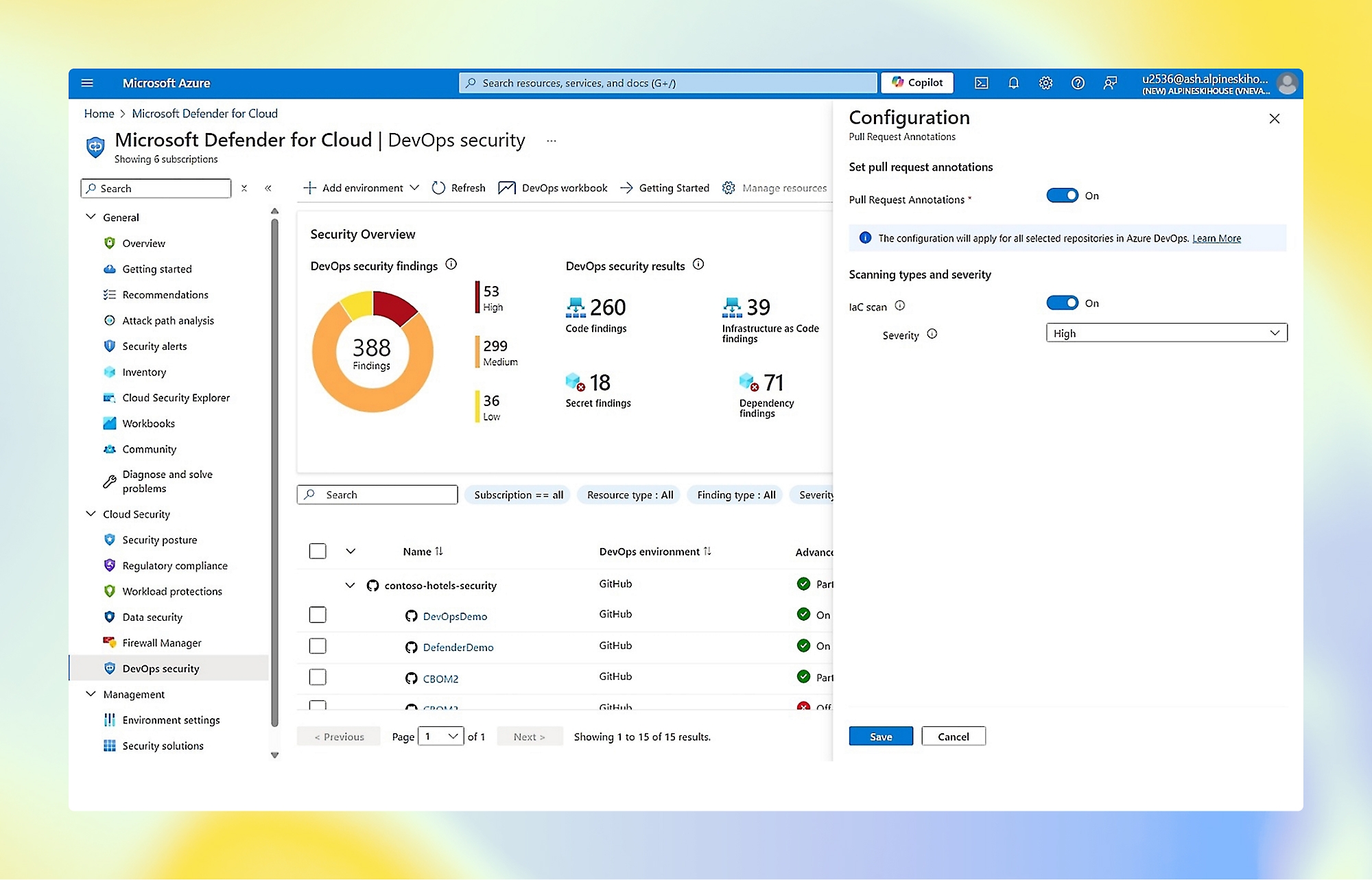
Microsoft Defender for Cloud detects threats through multiple methods. Their system combines several detection engines:
Security Alerts: Defender generates alerts when it spots suspicious activity. These come from behavioral analytics, machine learning models, and threat intelligence feeds. Microsoft’s global visibility helps them catch new attack patterns quickly.
Security Recommendations: Beyond active threats, Defender constantly checks your configuration against best practices. It tells you when resources are misconfigured or missing security controls.
Attack Path Analysis: This feature maps how an attacker could move through your environment. It shows which vulnerabilities or misconfigurations create paths to sensitive assets.
Integration with Microsoft Sentinel: For organizations using Microsoft’s SIEM, Defender feeds directly into Sentinel. This enables broader correlation and automated response through playbooks.
The response side relies heavily on automation rules and integration with other Microsoft services. You can set up automatic responses to specific alert types. Connecting to Logic Apps or Sentinel playbooks enables more complex workflows.
Microsoft’s detection works well for common attack patterns and compliance monitoring. Their threat intelligence catches known malicious actors effectively. The challenge comes with novel attacks or subtle behavioral changes that don’t match existing patterns.
Sweet Security: Runtime Detection and Response
Sweet Security takes a fundamentally different approach to detection. Their system watches what your applications actually do, then spots anomalies:
Cloud Detection and Response (CDR): Sweet monitors your cloud infrastructure in real time. They detect and investigate attacks as they happen, not after the fact. The speed difference matters when attackers can move through cloud environments in minutes.
Application Detection and Response (ADR): This goes beyond infrastructure to watch your applications themselves. Sweet sees when application behavior changes, when new processes spawn unexpectedly, or when network connections go somewhere unusual.
Cloud Application Detection and Response (CADR): Sweet combines cloud and application visibility into what they call “comprehensive visibility and threat detection across your cloud, workload, and applications.”
Identity Threat Detection and Response (ITDR): Identity attacks are everywhere now. Sweet monitors identity-related behavior to catch credential theft, privilege escalation, and account compromise.
Automated Investigation: Here’s where the LLM technology shines. When Sweet detects something suspicious, it automatically investigates. The AI correlates events, gathers context, and presents findings to your team. This cuts the time from alert to understanding dramatically.
Sweet’s response capabilities focus on speed. They claim to resolve cloud attacks “at the speed of cloud.” The platform provides the context needed for quick decisions and can trigger automated containment actions.
Detection Capabilities Comparison
| Capability | Microsoft Defender for Cloud | Sweet Security |
|---|---|---|
| Real-Time Detection | Near real-time with some delay | True real-time runtime monitoring |
| Behavioral Analysis | Available through ML models | Core capability with baselines |
| Application-Level Visibility | Limited without additional tools | Full L7 application insight |
| Automated Investigation | Through Sentinel integration | Built-in LLM-powered investigation |
| Identity Monitoring | Through Defender for Identity | Native ITDR included |
| API Security | Basic coverage | Dedicated API security features |
| Response Automation | Through Logic Apps/Sentinel | Built-in automated response |
Vulnerability Management: Finding and Fixing Weaknesses
Vulnerabilities are the doors attackers walk through. Both platforms help you find and close those doors, but they do it differently.
Microsoft Defender for Cloud Vulnerability Management
Microsoft built vulnerability management into Defender for Cloud through several mechanisms:
Qualys Integration: For workload scanning, Defender integrates with Qualys vulnerability scanners. This provides deep vulnerability assessment for virtual machines and containers.
Container Image Scanning: Defender scans container images in your registries. It checks for known vulnerabilities before those images ever run in production.
Recommendations Engine: The security recommendations feature constantly assesses your environment. It identifies vulnerable software, missing patches, and configuration weaknesses.
Secure Score: Microsoft gives you a security score based on how many recommendations you’ve addressed. This gamification helps teams prioritize and track progress.
Regulatory Compliance: Built-in compliance assessments check your environment against standards like PCI DSS, SOC 2, and ISO 27001. Vulnerabilities that violate compliance rules get flagged prominently.
Microsoft’s approach works well for scheduled scanning and compliance tracking. You get clear reports showing what’s vulnerable and why it matters. The challenge? Traditional scanning misses vulnerabilities that only manifest at runtime.
Sweet Security Vulnerability Management
Sweet takes their “from code to cloud” philosophy to vulnerability management:
Runtime Context: Sweet doesn’t just tell you a vulnerability exists. It shows you whether that vulnerability is actually reachable and exploitable in your running environment. A library with a critical CVE matters less if your code never calls the vulnerable function.
Risk Prioritization: Not all vulnerabilities deserve equal attention. Sweet’s platform prioritizes based on real risk factors: Is this exposed to the internet? Is the vulnerable component actually running? What could an attacker do if they exploited it?
Application Lifecycle Coverage: Sweet recently released vulnerability management that spans the entire cloud application lifecycle. They track vulnerabilities from code through deployment to production runtime.
Continuous Monitoring: Instead of scheduled scans, Sweet watches continuously. New vulnerabilities get flagged as soon as your environment becomes susceptible, not during the next weekly scan.
The runtime approach changes how teams think about vulnerabilities. Instead of drowning in thousands of CVEs, you focus on the ones that actually threaten your specific environment.
Vulnerability Management Comparison
| Feature | Microsoft Defender for Cloud | Sweet Security |
|---|---|---|
| Scanning Approach | Scheduled scans + registry scanning | Continuous runtime monitoring |
| Prioritization Method | Severity + compliance impact | Runtime exploitability + risk context |
| Container Support | Registry and runtime scanning | Full runtime container protection |
| Lifecycle Coverage | Focus on deployed resources | Code to cloud coverage |
| False Positive Rate | Can be high without tuning | Reduced through runtime validation |
Cloud Security Posture Management (CSPM)
Misconfigured cloud resources cause more breaches than sophisticated hacking. CSPM helps you find and fix these misconfigurations before attackers exploit them.
Microsoft Defender for Cloud CSPM
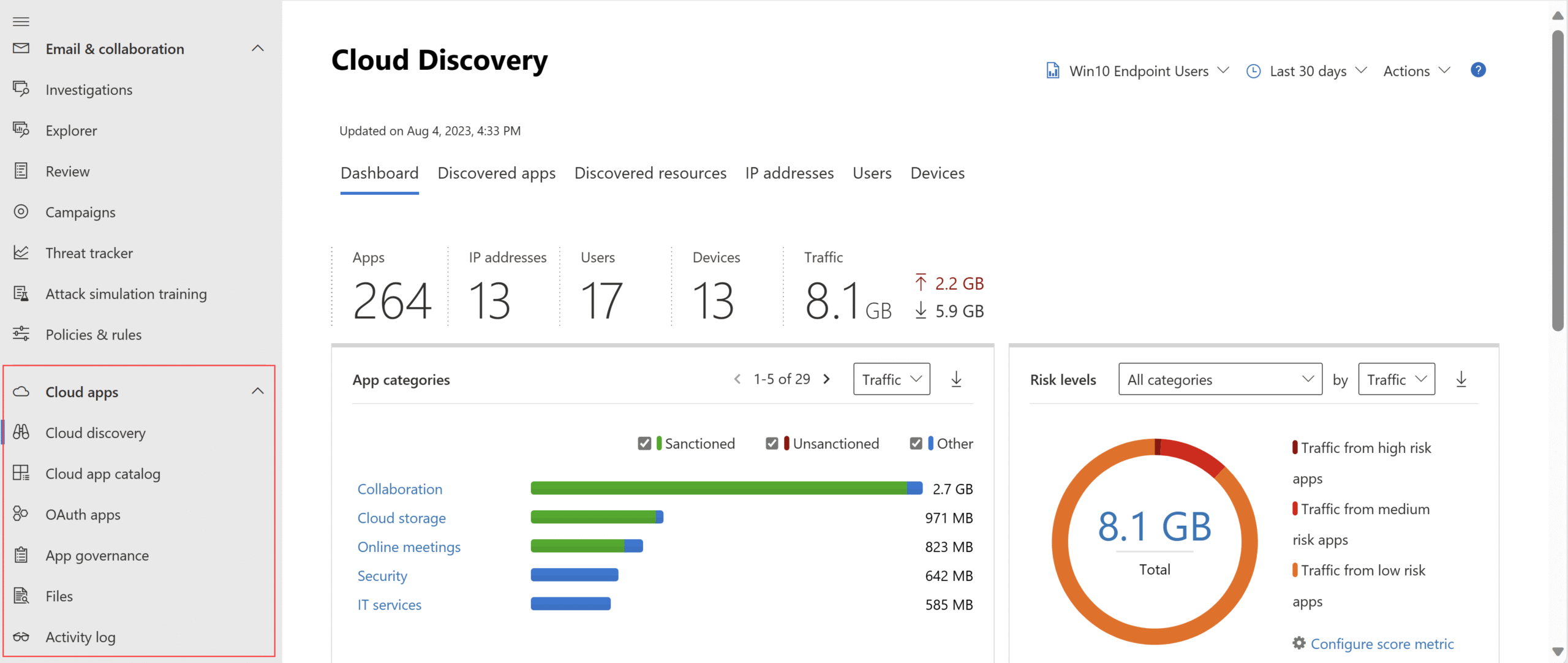
Microsoft offers two CSPM tiers: foundational (free) and Defender CSPM (paid). The paid tier includes:
Agentless Scanning: Defender scans your cloud resources without installing agents. It checks configurations against security benchmarks automatically.
Governance Rules: You can create rules that enforce security policies. When someone creates a non-compliant resource, they get notified or blocked.
Attack Path Analysis: This feature maps potential attack paths through your environment. It shows how misconfigurations could chain together to reach sensitive data.
Cloud Security Explorer: A graph-based tool for querying your security posture. You can ask questions like “show me all internet-exposed databases” and get instant answers.
DevOps Security: Defender integrates with development pipelines to catch security issues before deployment. This shift-left approach prevents misconfigurations from ever reaching production.
Microsoft’s CSPM covers Azure deeply and extends to AWS and Google Cloud with varying levels of detail. The native Azure integration provides the richest experience.
Sweet Security CSPM
Sweet includes CSPM as part of their unified platform, with some distinct characteristics:
Runtime-Enriched Posture: Sweet’s CSPM doesn’t just check configurations. It correlates posture findings with runtime behavior. A misconfigured storage bucket matters more if something is actively accessing it.
Unified Risk View: Rather than separating posture from threats, Sweet presents a single risk picture. You see how configuration issues relate to detected threats and vulnerabilities.
Cloud Infrastructure Visibility: Sweet provides visibility across your cloud infrastructure as part of their platform. The goal is giving teams “all the insights you need, in real time.”
Prioritized Findings: Sweet prioritizes CSPM findings based on actual risk, not just theoretical severity. A public S3 bucket with sensitive data ranks higher than one containing public marketing materials.
The key difference? Sweet sees CSPM as one input into overall cloud security, not a standalone function. Everything connects to the runtime view.
CSPM Feature Comparison
| CSPM Capability | Microsoft Defender for Cloud | Sweet Security |
|---|---|---|
| Configuration Scanning | Extensive across clouds | Included with runtime context |
| Attack Path Analysis | Advanced graph-based analysis | Risk-based path visualization |
| Compliance Benchmarks | 100+ built-in standards | Major frameworks covered |
| Multi-Cloud Support | Azure, AWS, GCP | Cloud-agnostic approach |
| DevOps Integration | Native Azure DevOps + GitHub | CI/CD pipeline support |
| Risk Prioritization | Severity-based | Runtime-context based |
Operating System and Platform Support
Your cloud runs on specific platforms. Can these security tools protect what you actually use?
Microsoft Defender for Cloud Platform Support
Microsoft supports a broad range of platforms:
Cloud Providers: Azure gets the deepest integration. AWS and Google Cloud work through connectors with slightly reduced functionality. On-premises environments connect through Azure Arc.
Operating Systems: Windows Server and multiple Linux distributions work with Defender agents. The Windows experience is naturally stronger given Microsoft’s expertise.
Container Platforms: Azure Kubernetes Service gets native support. Amazon EKS and Google GKE work through the multi-cloud connectors. Standalone Kubernetes clusters can connect via Arc.
PaaS Services: Defender protects Azure App Service, Azure SQL, Azure Storage, and other platform services. Third-party PaaS coverage varies.
Sweet Security Platform Support
Sweet Security recently expanded their platform coverage:
Linux Environments: Sweet’s original focus was Linux workloads. Their sensors provide deep visibility into Linux containers, VMs, and serverless functions.
Windows Extension: A major 2025 announcement brought Windows support. According to their release: “Sweet Security announced an extension of its Runtime CNAPP sensor to include Windows environments. With this launch, organizations can secure Windows workloads and applications in the cloud.”
This Windows capability brings “the same visibility, real-time detection, risk prioritization, and automated investigation that power Sweet’s Runtime CNAPP for Linux to one of the most complex and widely used operating systems in the enterprise cloud.”
Container Support: Sweet provides protection for containerized workloads across Kubernetes distributions. Their runtime approach works regardless of the underlying orchestration.
Cloud Providers: Sweet’s cloud-agnostic design works across major providers. They don’t favor one cloud over others.
Why Windows Support Matters
The Windows extension deserves extra attention. As Sweet noted: “Protecting cloud workloads running on the Windows operating system has long been a challenge due to the complexity and the wide range of attack vectors that adversaries can exploit.”
Many enterprises run Windows workloads in the cloud. Legacy applications, .NET services, and SQL Server databases often require Windows. Having runtime protection for these workloads closes a gap that many organizations struggle with.
Sweet’s Windows sensor provides:
- Full behavioral baseline capabilities
- L7 network visibility for Windows applications
- LLM-powered investigation for Windows-specific threats
- Real-time detection of Windows attack techniques
API Security: Protecting Your Interfaces
APIs are everywhere in modern cloud architecture. They’re also prime targets for attackers. How do these platforms protect your APIs?
Microsoft Defender for Cloud API Protection
Microsoft provides API security through several mechanisms:
API Management Integration: If you use Azure API Management, Defender can monitor those APIs. It checks for security misconfigurations and suspicious access patterns.
Defender for APIs: This specific Defender plan focuses on API protection. It inventories your APIs, assesses their security posture, and detects threats.
Web Application Firewall: Azure WAF provides protection against common API attacks like injection and broken authentication. It works at the network edge.
Microsoft’s API security works best in Azure-native environments. Third-party API gateways require additional configuration.
Sweet Security API Security
Sweet includes API security as part of their Runtime CNAPP platform. Their approach focuses on runtime API behavior:
API Discovery: Sweet automatically discovers APIs running in your environment. No manual inventory required.
Behavioral Monitoring: The platform watches how APIs are actually used. It spots unusual access patterns, data exfiltration attempts, and authentication anomalies.
L7 Visibility: Sweet’s application-layer visibility sees into API payloads and parameters. This enables detection of attacks that bypass network-level controls.
Runtime Context: When Sweet detects an API threat, it provides full context. What called the API? What data was accessed? What happened next? This context speeds investigation.
Identity Security and ITDR
Identity attacks dominate the threat landscape. Stolen credentials, privilege escalation, and account takeover cause major breaches. Both platforms address identity security, but differently.
Microsoft Defender for Cloud Identity Capabilities
Microsoft’s identity security spreads across multiple products:
Defender for Identity: This separate product monitors on-premises Active Directory for identity threats. It detects reconnaissance, lateral movement, and domain dominance attempts.
Entra ID Protection: For cloud identities, Microsoft Entra (formerly Azure AD) includes risk-based conditional access and threat detection.
CIEM Features: Defender for Cloud includes Cloud Infrastructure Entitlement Management. It analyzes permissions across clouds and identifies overprivileged accounts.
The challenge? These identity features live in different products. You need Defender for Cloud, Defender for Identity, and Entra ID Protection working together for full coverage.
Sweet Security ITDR
Sweet builds Identity Threat Detection and Response (ITDR) directly into their platform:
Unified Identity Monitoring: Sweet watches identity-related behavior as part of overall runtime monitoring. No separate product required.
Behavioral Baselines for Identities: The platform learns normal behavior patterns for each identity. When an account suddenly accesses unusual resources or operates at odd hours, Sweet flags it.
Privilege Escalation Detection: Sweet detects when identities gain unexpected privileges or access sensitive resources they haven’t touched before.
Correlation with Other Events: Identity events correlate with application and infrastructure events. If someone steals credentials and then accesses your database, Sweet connects those dots automatically.
Identity Security Comparison
| Identity Capability | Microsoft Defender for Cloud | Sweet Security |
|---|---|---|
| Cloud Identity Protection | Through Entra ID Protection | Native ITDR in platform |
| On-Premises AD | Defender for Identity required | Cloud-focused |
| Permission Analysis | CIEM features included | Runtime permission monitoring |
| Behavioral Analysis | Available with multiple products | Built-in behavioral baselines |
| Integration Complexity | Multiple products needed | Single platform |
AI and Machine Learning Capabilities
Both vendors talk about AI, but they use it differently. Let’s cut through the marketing and see what these AI features actually do.
Microsoft Defender for Cloud AI Features
Microsoft invests heavily in AI across their security portfolio:
Copilot for Security: Microsoft’s AI assistant helps analysts investigate threats, understand alerts, and take action. It uses natural language, so you can ask questions about your environment.
Machine Learning Detection: Defender uses ML models trained on Microsoft’s vast telemetry. These models identify patterns that rule-based systems miss.
Threat Intelligence Correlation: AI helps correlate signals from different sources. It connects an alert in Defender for Cloud with related activity in Defender for Endpoint or Microsoft 365.
Automated Recommendations: Machine learning helps prioritize security recommendations based on your specific environment and threat landscape.
Microsoft’s AI strength comes from scale. They see signals from millions of customers and use that data to train better models. The weakness? Generic models might not understand your specific environment as well as you’d like.
Sweet Security AI Features
Sweet built AI into their core architecture from the start:
Patented LLM Correlation: Sweet uses large language models for event correlation and investigation. The AI connects related events across your environment automatically.
Automated Investigation: When Sweet detects a threat, the LLM investigates it. It gathers relevant context, analyzes the attack chain, and presents findings. This dramatically reduces analyst workload.
Behavioral Baseline Learning: AI learns what normal looks like for your specific environment. Not generic “normal” but your actual application behavior.
Risk Prioritization: Machine learning helps prioritize findings based on actual risk to your environment, not generic severity scores.
Sweet’s AI focuses on investigation and correlation. The goal is getting analysts to understanding faster, not just generating more alerts.
AI Capabilities Comparison
| AI Feature | Microsoft Defender for Cloud | Sweet Security |
|---|---|---|
| Natural Language Interface | Copilot for Security | Investigation outputs |
| Detection Models | Trained on global telemetry | Environment-specific baselines |
| Automated Investigation | Through Copilot integration | Native LLM-powered investigation |
| Correlation Engine | ML-based alert correlation | Patented LLM correlation |
| Training Data | Microsoft’s global customer base | Your environment + threat intelligence |
Deployment and Integration
How hard is it to get these platforms running? What other tools do they work with? These practical questions matter when you’re actually implementing security.
Microsoft Defender for Cloud Deployment
Deploying Defender depends on your environment:
Azure Native: Enabling Defender for Azure resources takes minutes. You turn on the plans you want, and protection starts immediately. The experience is smooth and well-documented.
AWS and GCP: Multi-cloud deployment requires more work. You need to set up connectors, configure permissions, and possibly deploy additional components.
Agent Deployment: For workload protection, you’ll deploy the Defender agent to VMs and containers. Azure Arc helps manage agents across hybrid environments.
Integration Points: Defender integrates tightly with other Microsoft products. Sentinel, Microsoft 365 Defender, Intune, and Azure services all connect naturally. Third-party integrations exist but require more configuration.
Sweet Security Deployment
Sweet takes a different approach to deployment:
Sensor Deployment: Sweet’s lightweight sensors deploy to your workloads. The installation process focuses on minimal impact to running applications.
Cloud-Agnostic: Since Sweet doesn’t favor any cloud provider, deployment looks similar across AWS, Azure, and GCP. You’re not fighting against platform assumptions.
Container Deployment: For Kubernetes environments, Sweet provides Helm charts and manifests. The sensors run as DaemonSets alongside your workloads.
Time to Value: Sweet emphasizes fast deployment. The goal is getting runtime visibility quickly, not spending weeks on configuration.
Deployment Comparison
| Deployment Aspect | Microsoft Defender for Cloud | Sweet Security |
|---|---|---|
| Azure Deployment | Very easy, native integration | Straightforward sensor deployment |
| AWS/GCP Deployment | Requires connector setup | Similar process across clouds |
| Agent/Sensor Impact | Variable depending on plan | Lightweight runtime sensors |
| Microsoft Ecosystem | Deep native integration | API-based integration |
| Time to Protection | Fast for Azure, slower for others | Designed for quick deployment |
Pricing and Licensing Models
Cost matters. Let’s look at how each platform prices their services.
Microsoft Defender for Cloud Pricing
Microsoft uses a complex pricing model with multiple plans:
Free Tier: Basic CSPM features come free. You get security recommendations and a secure score at no cost.
Defender Plans: Advanced features require paid Defender plans. Each plan covers specific resource types:
- Defender for Servers (per server/month)
- Defender for Containers (per vCore/hour)
- Defender for Storage (per transaction)
- Defender for Databases (per instance/hour)
- Defender CSPM (per billable resource)
Enterprise Agreements: Large organizations often negotiate custom pricing through Microsoft enterprise agreements. This can reduce per-unit costs significantly.
Complexity: Understanding your total cost requires knowing exactly which resources you’ll protect and at what volume. Costs can surprise teams who didn’t model usage carefully.
Sweet Security Pricing
Sweet Security uses a different pricing approach:
Unified Platform: Rather than separate plans for each capability, Sweet prices their complete platform together. You get CDR, ADR, CSPM, and other features in one package.
Usage-Based Elements: Pricing typically relates to the number of workloads protected or the amount of telemetry processed.
No Feature Gating: Sweet doesn’t charge extra for specific capabilities. The full runtime platform comes together.
Transparency: Smaller vendors often provide more transparent, predictable pricing. You’re less likely to face unexpected charges.
Pricing Comparison
| Pricing Factor | Microsoft Defender for Cloud | Sweet Security |
|---|---|---|
| Model Type | Per-plan, per-resource | Unified platform pricing |
| Free Tier | Basic CSPM included | Trial available |
| Pricing Complexity | High, many variables | More straightforward |
| Enterprise Negotiation | Significant discounts possible | Startup/growth pricing |
| Hidden Costs | Data ingestion, add-on features | Generally inclusive |
Real-World Performance and User Feedback
What do actual users say about these platforms? Let’s look at real feedback and performance observations.
Microsoft Defender for Cloud User Experience
Users report several consistent themes:
Strengths:
- Excellent Azure integration, minimal friction for Microsoft shops
- Comprehensive compliance reporting and benchmarks
- Strong threat intelligence from Microsoft’s global visibility
- Familiar interface for teams using other Microsoft tools
Challenges:
- Alert fatigue from high volumes of recommendations
- Multi-cloud experience not as polished as Azure-native
- Complexity in understanding pricing and feature tiers
- Integration with non-Microsoft tools requires effort
The 8.1 average rating reflects solid capability with room for improvement. Teams heavily invested in Microsoft typically report better experiences than those using mixed environments.
Sweet Security User Experience
Sweet Security users highlight different aspects:
Strengths:
- Runtime visibility that other tools miss
- Fast detection and response times
- AI-powered investigation reduces analyst workload
- Single platform covers multiple security functions
- Higher customer satisfaction scores (8.6 average)
Challenges:
- Smaller vendor means smaller ecosystem
- Less name recognition in enterprise purchasing
- Fewer third-party integrations than established players
- Still building out some enterprise features
Sweet’s higher rating (8.6 vs 8.1) suggests strong satisfaction among those who adopt it. The runtime-first approach resonates with teams facing sophisticated threats.
Use Case Analysis: Which Platform Fits Your Needs
Different organizations have different needs. Let’s match platform strengths to specific scenarios.
When Microsoft Defender for Cloud Makes Sense
Azure-Heavy Environments: If you run primarily on Azure, Defender for Cloud is the natural choice. The native integration, consistent management experience, and tight coupling with other Azure services create a smooth experience.
Microsoft Ecosystem Investments: Organizations using Microsoft 365, Sentinel, Intune, and other Microsoft products benefit from integration. Alerts flow naturally, and teams use familiar interfaces.
Compliance-Driven Security: When compliance frameworks drive your security program, Defender’s extensive benchmark coverage helps. Built-in assessments for PCI, SOC 2, ISO, and others simplify audits.
Large Enterprise Procurement: Microsoft’s enterprise agreements and established procurement relationships make purchasing easier in some organizations. IT leadership often trusts the Microsoft brand.
Hybrid Environments: Azure Arc extends Defender to on-premises and edge environments. Organizations with hybrid infrastructure can manage security from one place.
When Sweet Security Makes Sense
Runtime Threat Detection Priority: If you need to detect attacks as they happen, not after the fact, Sweet’s runtime approach delivers. The behavioral baselines and real-time monitoring catch threats faster.
Multi-Cloud or Cloud-Agnostic: Organizations without strong vendor loyalty benefit from Sweet’s neutral approach. Every cloud gets similar treatment, and you’re not fighting platform assumptions.
Application-Centric Security: When your security concerns center on applications rather than infrastructure, Sweet’s L7 visibility helps. You see what applications actually do, not just what resources exist.
Alert Fatigue Problems: If your team drowns in alerts and struggles to prioritize, Sweet’s AI-powered investigation and risk-based prioritization help. Focus shifts to real threats, not endless triage.
Windows Cloud Workloads: Organizations running Windows in the cloud now have Sweet’s full runtime capabilities available. The recent Windows extension addressed a major gap.
Lean Security Teams: Smaller teams benefit from Sweet’s automated investigation. The LLM-powered correlation and analysis reduce manual work, letting small teams cover more ground.
Use Case Summary Table
| Use Case | Better Fit | Reason |
|---|---|---|
| Azure-primary infrastructure | Microsoft Defender | Native integration |
| Multi-cloud environment | Sweet Security | Cloud-agnostic design |
| Real-time threat detection | Sweet Security | Runtime-first architecture |
| Compliance-driven security | Microsoft Defender | Extensive benchmarks |
| Application security focus | Sweet Security | L7 visibility |
| Microsoft ecosystem user | Microsoft Defender | Product integration |
| Small security team | Sweet Security | Automated investigation |
| Windows cloud workloads | Both viable | Both now support Windows |
Future Direction and Roadmap Considerations
Security platforms evolve constantly. Where are these products heading?
Microsoft Defender for Cloud Direction
Microsoft continues investing heavily in cloud security:
Copilot Integration: Expect deeper AI assistant integration across all Defender products. Natural language security operations will expand.
Multi-Cloud Parity: Microsoft is working to close gaps between Azure-native and multi-cloud experiences. AWS and GCP support should improve.
DevSecOps Focus: Shift-left security integration with GitHub and Azure DevOps will likely deepen. Catching issues before deployment remains a priority.
Platform Consolidation: Microsoft tends to consolidate products over time. Defender for Cloud may absorb more functionality from other Defender products.
Sweet Security Direction
Sweet Security shows momentum in several areas:
Platform Expansion: The Windows extension shows commitment to covering enterprise environments completely. Expect continued expansion of supported platforms.
AI Innovation: As the company built on AI-powered investigation, expect continued advances in LLM capabilities and automation.
Enterprise Features: As Sweet grows, enterprise requirements like RBAC, SSO, and audit logging will likely expand.
Integration Ecosystem: Building more integrations with SIEM, SOAR, and ticketing platforms should be a priority for enterprise adoption.
Making Your Decision: Key Takeaways
After this deep comparison, here’s what matters most:
Choose Microsoft Defender for Cloud if:
- Azure is your primary or exclusive cloud platform
- You already use Microsoft security products heavily
- Compliance frameworks drive your security program
- Your organization prefers established enterprise vendors
- You need extensive built-in compliance benchmarks
Choose Sweet Security if:
- Real-time runtime detection is your priority
- You operate across multiple cloud providers
- Application-level security visibility matters most
- Your team struggles with alert fatigue
- You want AI-powered automated investigation
- You run significant Windows workloads in cloud
Consider both or neither if:
- Your needs span multiple categories above
- You have budget for multiple specialized tools
- Your environment is primarily on-premises (look elsewhere)
Conclusion
Sweet Security and Microsoft Defender for Cloud both provide strong cloud security capabilities, but they serve different needs. Microsoft excels with Azure integration, compliance coverage, and enterprise ecosystem connectivity. Sweet Security wins on runtime detection, AI-powered investigation, and cloud-agnostic design. Your best choice depends on your cloud platform, security priorities, and operational style. Test both platforms against your actual workloads before committing. The right tool is the one that fits your specific environment and team.
Frequently Asked Questions About Sweet Security vs Microsoft Defender for Cloud
| What is the main difference between Sweet Security and Microsoft Defender for Cloud? |
| The core difference lies in their approach. Microsoft Defender for Cloud works as a unified security management platform with strong Azure integration and compliance features. Sweet Security focuses on runtime detection and response, watching applications as they actually run and using AI to investigate threats automatically. Microsoft emphasizes posture management while Sweet emphasizes real-time threat detection. |
| Which platform is better for multi-cloud environments? |
| Sweet Security tends to work better in true multi-cloud environments because they designed the platform cloud-agnostic from the start. Every cloud provider gets similar treatment. Microsoft Defender for Cloud works across AWS and GCP, but the Azure experience is noticeably smoother and more feature-rich than other clouds. |
| Does Sweet Security support Windows workloads? |
| Yes, Sweet Security announced Windows support for their Runtime CNAPP sensor. This extension brings the same visibility, real-time detection, risk prioritization, and automated investigation that powers their Linux protection to Windows environments. This addressed a major gap for enterprises running Windows in the cloud. |
| How do the pricing models compare between these platforms? |
| Microsoft Defender for Cloud uses per-plan, per-resource pricing with separate charges for servers, containers, databases, storage, and advanced CSPM. This can get complex quickly. Sweet Security offers more unified platform pricing without charging separately for each capability. Microsoft offers a free tier for basic CSPM, while Sweet typically requires a paid subscription. |
| Which platform is better for small security teams? |
| Sweet Security’s AI-powered automated investigation helps small teams do more with less. When a threat appears, the LLM-powered system investigates automatically, gathering context and analyzing the attack chain. Microsoft Defender for Cloud offers automation through Sentinel integration, but requires more manual setup and potentially additional products. |
| How do Microsoft Defender for Cloud and Sweet Security handle API security? |
| Microsoft provides API security through Defender for APIs and integration with Azure API Management and WAF. Sweet Security includes API security in their runtime platform, automatically discovering APIs and monitoring their behavior at the application layer (L7). Sweet’s approach focuses on actual API usage patterns while Microsoft emphasizes configuration and known attack patterns. |
| Which platform has better threat detection capabilities? |
| It depends on the threat type. Microsoft’s massive threat intelligence network excels at catching known attack patterns and malicious actors across their global customer base. Sweet Security’s behavioral baselines and runtime monitoring catch unusual activity specific to your environment, including novel attacks that don’t match known signatures. For real-time detection, Sweet typically responds faster. |
| Can I use both Sweet Security and Microsoft Defender for Cloud together? |
| Yes, the platforms can complement each other. Microsoft Defender for Cloud provides strong posture management and Azure-native protection while Sweet Security adds runtime detection and AI-powered investigation. Some organizations use Microsoft for compliance and posture while relying on Sweet for active threat detection. Budget and operational complexity are the main considerations. |
| What are the user ratings for Sweet Security vs Microsoft Defender for Cloud? |
| According to market data, Microsoft Defender for Cloud ranks #4 in the CNAPP space with an average rating of 8.1 out of 10. Sweet Security ranks #14 with a higher average rating of 8.6 out of 10. The higher rating for Sweet suggests stronger satisfaction among users who adopt it, despite the smaller market presence. |
| How long does it take to deploy each platform? |
| Microsoft Defender for Cloud deploys very quickly for Azure resources since it’s native to the platform. Turning on protection takes minutes. Multi-cloud deployment requires more time for connector setup and permission configuration. Sweet Security focuses on fast time-to-value with lightweight sensor deployment, typically taking days rather than weeks for initial coverage across your environment. |




 Stack Insight is intended to support informed decision-making by providing independent information about business software and services. Some product details, including pricing, features, and promotional offers, may be supplied by vendors or partners and can change without notice.