
Qualys TotalCloud Review
Qualys TotalCloud Review: A Complete Analysis of This Cloud-Native Application Protection Platform
Cloud security has become one of the biggest headaches for IT teams everywhere. With workloads spread across AWS, Azure, Google Cloud, and private data centers, keeping track of vulnerabilities, misconfigurations, and threats feels like trying to catch water with your hands. That’s where Qualys TotalCloud comes in.
This review digs into every corner of Qualys TotalCloud. We’ll look at what it does, how it works, who it’s built for, and whether it’s worth your budget. We’ll cover the technical bits, the pricing model, real user feedback, and how it stacks up against competitors. By the end, you’ll know if this CNAPP solution fits your organization’s needs.
Qualys earned recognition as a Leader in The Forrester Wave™ for Cloud-Native Application Protection Solutions (CNAPP), Q1 2026. That’s a big deal. Only three vendors got that title. But awards don’t tell the whole story. Let’s break down what makes TotalCloud tick.
What Is Qualys TotalCloud? Understanding the Platform
Qualys TotalCloud is a cloud-native application protection platform, or CNAPP. That’s a mouthful, so let’s simplify it. A CNAPP combines several security tools into one package. Instead of buying separate products for vulnerability scanning, configuration checks, container security, and threat detection, you get everything under one roof.
The Core Components of TotalCloud
TotalCloud bundles together these main capabilities:
- Cloud Security Posture Management (CSPM) – Finds misconfigurations in your cloud setup
- Cloud Workload Protection (CWP) – Secures virtual machines, containers, and serverless functions
- Container Runtime Protection – Watches containers while they’re running
- Infrastructure as Code (IaC) Scanning – Catches problems before deployment
- AI-Powered Threat Detection – Uses machine learning to spot suspicious activity
The platform runs on what Qualys calls the Enterprise TruRisk Platform. This is the backend engine that powers all Qualys products. It’s been around for over two decades, which means the vulnerability detection technology isn’t something they built last year. They’ve refined it over time.
How TotalCloud Differs from Traditional Security Tools
Traditional vulnerability scanners were built for on-premises servers. They’d run periodic scans, generate reports, and call it a day. Cloud environments don’t work that way. Resources spin up and down constantly. IP addresses change. Auto-scaling groups create new instances without warning.
TotalCloud was designed for this reality. It connects directly to cloud provider APIs. It discovers new resources automatically. Scans happen continuously, not just once a week. When a developer launches a new EC2 instance at 3 AM, TotalCloud knows about it within minutes.
Here’s a quick comparison:
| Feature | Traditional Scanners | Qualys TotalCloud |
|---|---|---|
| Discovery Method | IP range scanning | Cloud API integration |
| Scan Frequency | Scheduled (weekly/monthly) | Continuous |
| Container Support | Limited or none | Full lifecycle coverage |
| Configuration Checks | Separate tool needed | Built-in CSPM |
| Auto-scaling Support | Poor | Native |
Qualys TotalCloud CNAPP Features: A Deep Technical Review
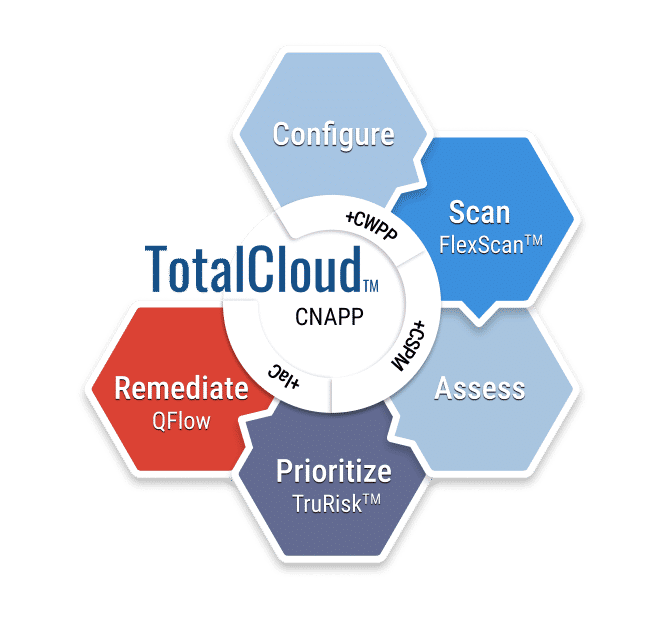
Let’s get into the technical details. Understanding what each feature does will help you figure out if TotalCloud matches your security requirements.
Cloud Security Posture Management (CSPM)
CSPM is about finding misconfigurations. These are settings that aren’t necessarily vulnerabilities in the traditional sense. Instead, they’re mistakes in how cloud resources are set up. A storage bucket left open to the public. A security group allowing SSH from anywhere. An encryption setting that’s turned off.
TotalCloud’s CSPM module provides:
- 1000+ out-of-the-box controls covering common misconfigurations
- Support for 30+ compliance mandates including PCI DSS, HIPAA, and SOC 2
- Complete CIS Benchmark coverage for AWS, Azure, and GCP
- Custom policy creation for organization-specific rules
- One-click remediation for many high-visibility controls
The one-click remediation feature deserves attention. Many CSPM tools just tell you what’s wrong. TotalCloud can actually fix certain issues automatically. You see a misconfigured S3 bucket, click a button, and the setting changes. No need to log into AWS, find the bucket, navigate to permissions, and make the change yourself.
But automatic remediation comes with risk. You don’t want a security tool accidentally breaking production systems. TotalCloud handles this with approval workflows. You can require human approval before any automated fix runs. Or you can set up rules where low-risk fixes happen automatically while high-risk ones need sign-off.
Agentless and Agent-Based Scanning
TotalCloud gives you two ways to scan workloads: with agents and without them. Each approach has trade-offs.
Agentless scanning works by taking snapshots of your cloud resources. TotalCloud reads the snapshot data to find vulnerabilities and misconfigurations. The big advantage? You don’t need to install anything on your workloads. The downside? You can’t see what’s happening in real-time.
Agent-based scanning puts a small piece of software on each workload. This gives you deeper visibility. The agent watches processes, monitors file changes, and detects threats as they happen. The challenge is getting agents installed everywhere, especially in environments with thousands of instances.
Here’s how Qualys describes the difference:
“Agent-based scanning provides real-time comprehensive vulnerability, configuration and security assessment. It can detect runtime threats but the challenge is to get access to all workloads to run agents.”
Most organizations use a hybrid approach. Agents go on long-running, business-critical systems. Agentless scans cover ephemeral workloads that spin up and down quickly. TotalCloud supports both methods from the same console.
FlexScan Technology
FlexScan is Qualys’s approach to flexible vulnerability assessment. It combines multiple scanning methods:
- Network-based scanning – Assesses vulnerabilities from the network perspective
- Agent-based scanning – Deep inspection from inside the workload
- Agentless scanning – Snapshot-based assessment without installing anything
- API-based scanning – Direct integration with cloud provider APIs
The technology aims to reduce false positives and false negatives. A false positive means the tool says there’s a vulnerability when there isn’t one. You waste time investigating nothing. A false negative means the tool misses a real vulnerability. That’s even worse because you think you’re safe when you’re not.
According to Qualys documentation, their detection accuracy comes from over 100 dedicated security researchers with two decades of experience. They’re not just pulling data from open-source threat intelligence feeds. They have an in-house research team constantly updating detection rules.
Container Security Throughout the Lifecycle
Containers create unique security challenges. They’re immutable, which is good for consistency but tricky for patching. They share a kernel with the host system. They often run for just minutes before being replaced.
TotalCloud covers containers at every stage:
| Stage | What TotalCloud Does |
|---|---|
| Build | Scans container images in registries for vulnerabilities |
| Deploy | Checks images against security policies before they run |
| Runtime | Monitors running containers for threats and anomalies |
| Orchestration | Assesses Kubernetes cluster configurations |
The runtime protection piece is particularly useful. It watches what containers are actually doing. If a container that’s supposed to serve web pages suddenly starts running cryptocurrency mining software, TotalCloud will flag it.
AI-Powered Threat Detection
TotalCloud uses artificial intelligence for threat detection. AI in security products can mean a lot of things, so let’s be specific about what it does here.
The AI looks at patterns across your environment. It learns what normal behavior looks like. When something deviates from that pattern, it raises an alert. This behavioral analysis catches threats that signature-based detection would miss.
For example, an attacker using stolen credentials might not trigger traditional security alerts. They’re using valid usernames and passwords. But their behavior differs from the real user’s patterns. They access different resources at different times. The AI spots these anomalies.
Qualys has also introduced what they call agentic AI. This goes beyond simple detection. The AI can take automated actions in response to threats. It’s still a developing technology, but it points to where the product is heading.
FedRAMP High Authorization: What This Means for Government and Regulated Industries
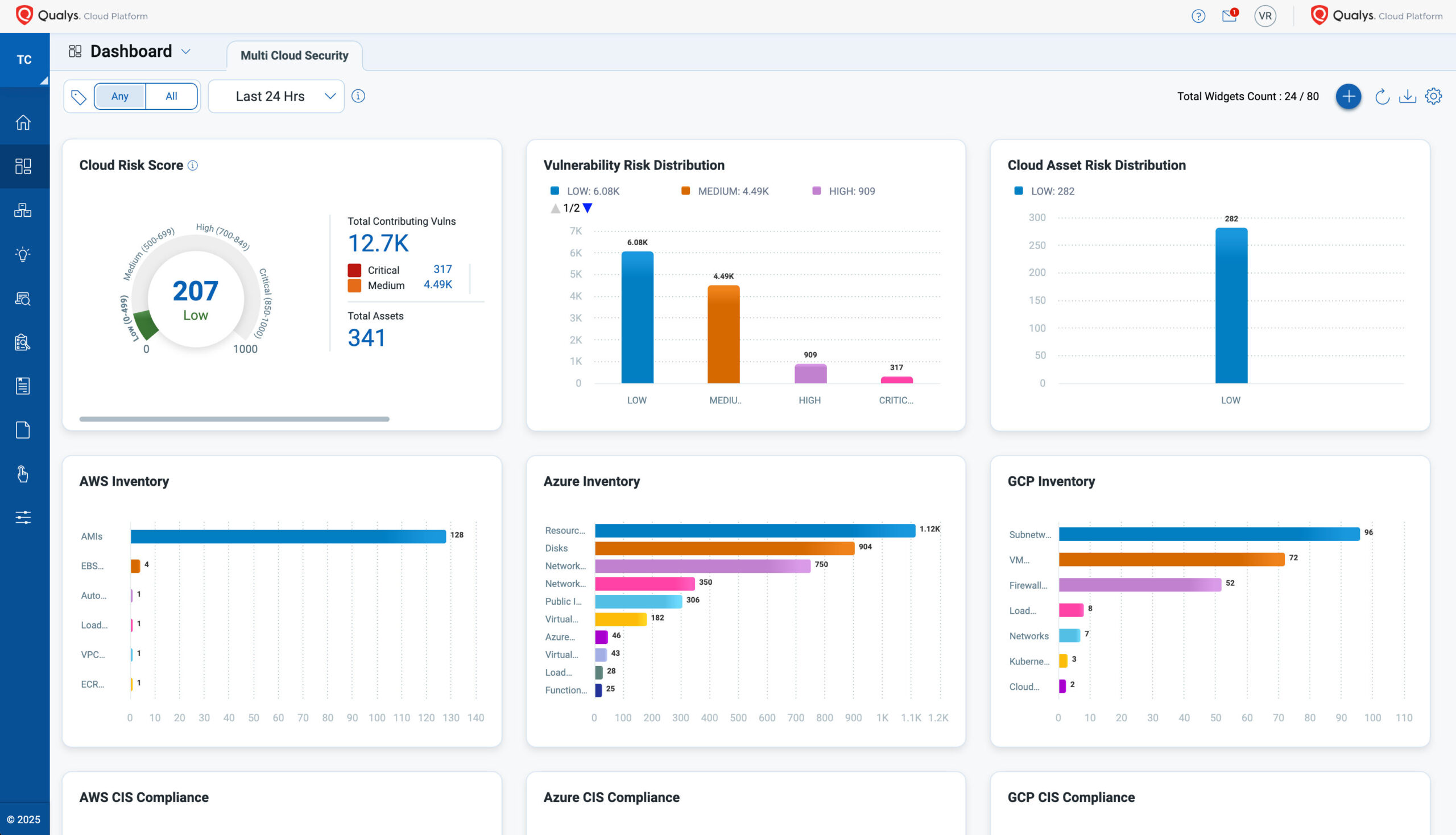
In May 2026, Qualys TotalCloud achieved FedRAMP High authorization. This is a big deal for organizations working with the U.S. federal government or handling sensitive data.
Understanding FedRAMP Levels
FedRAMP (Federal Risk and Authorization Management Program) has three authorization levels:
- Low – For systems where loss of confidentiality, integrity, or availability would have limited impact
- Moderate – For systems where loss would have serious impact
- High – For systems where loss would have severe or catastrophic impact
Getting FedRAMP High means TotalCloud meets the strictest security requirements. It’s validated against NIST SP 800-53 High controls. These controls cover everything from access management to incident response to physical security of data centers.
Who Cares About FedRAMP?
Obviously, federal agencies care. They often can’t buy cloud security tools without FedRAMP authorization. But it matters beyond government too.
Defense contractors need FedRAMP-authorized tools for CMMC compliance. Healthcare organizations find it useful because FedRAMP controls overlap with HIPAA requirements. Financial services firms appreciate the rigorous third-party validation.
If you’re in a regulated industry, FedRAMP High tells you that an independent assessor has verified the product’s security claims. You’re not just taking Qualys’s word for it.
Continuous Compliance Validation
TotalCloud doesn’t just help you get compliant. It helps you stay compliant. Continuous monitoring tracks your environment against compliance requirements in real-time. When something drifts out of compliance, you know immediately.
This matters because auditors don’t just care about point-in-time compliance. They want to see that you’ve maintained compliance over time. TotalCloud’s reporting can show your compliance posture across weeks or months, not just at the moment of the audit.
The Forrester Wave Recognition: What Analysts Say About TotalCloud
Industry analyst recognition helps validate vendor claims. Qualys was named a Leader in The Forrester Wave™ for Cloud-Native Application Protection Solutions (CNAPP), Q1 2026. Only three vendors earned that distinction.
Highest Scores in Key Criteria
Qualys received the highest possible scores in several areas. Let’s look at what Forrester specifically called out.
Administrator Management: Forrester gave TotalCloud the highest possible score here. Their report noted:
“Administrative user management (role-based access control, organizational hierarchy, and subtenant organization setup) is robust.”
This matters for enterprise deployments. Large organizations have complex requirements around who can see what and who can do what. TotalCloud lets you create detailed role hierarchies. A security analyst might see vulnerabilities but not be able to change policies. A cloud team lead might manage their own resources but not see other teams’ data.
The subtenant organization feature is useful for managed service providers or large enterprises with multiple business units. Each group can have its own TotalCloud environment while the parent organization maintains oversight.
Pricing Flexibility: Qualys also got the highest possible score for pricing. Forrester noted that “pricing flexibility is above par.”
This relates to the QFlex licensing model, which we’ll cover in more detail later. The short version: you can shift licenses between different capabilities without renegotiating contracts.
Single Administrative Backend
One thing that sets TotalCloud apart is its unified architecture. All the CNAPP submodules (CSPM, CWP, container security, etc.) run on the same backend. This might sound like a technical detail, but it has real practical benefits.
- Unified RBAC – Set up roles once, apply them across all features
- Single identity federation – Connect your SSO provider once
- Consolidated audit logging – One place to see all activity
- Consistent policy management – Policies work the same way across modules
Compare this to competitors who’ve built their CNAPP through acquisitions. They might have different backends for CSPM versus CWP. That means separate admin consoles, different user management, inconsistent policies. It creates operational headaches.
Real User Reviews: What Customers Actually Think
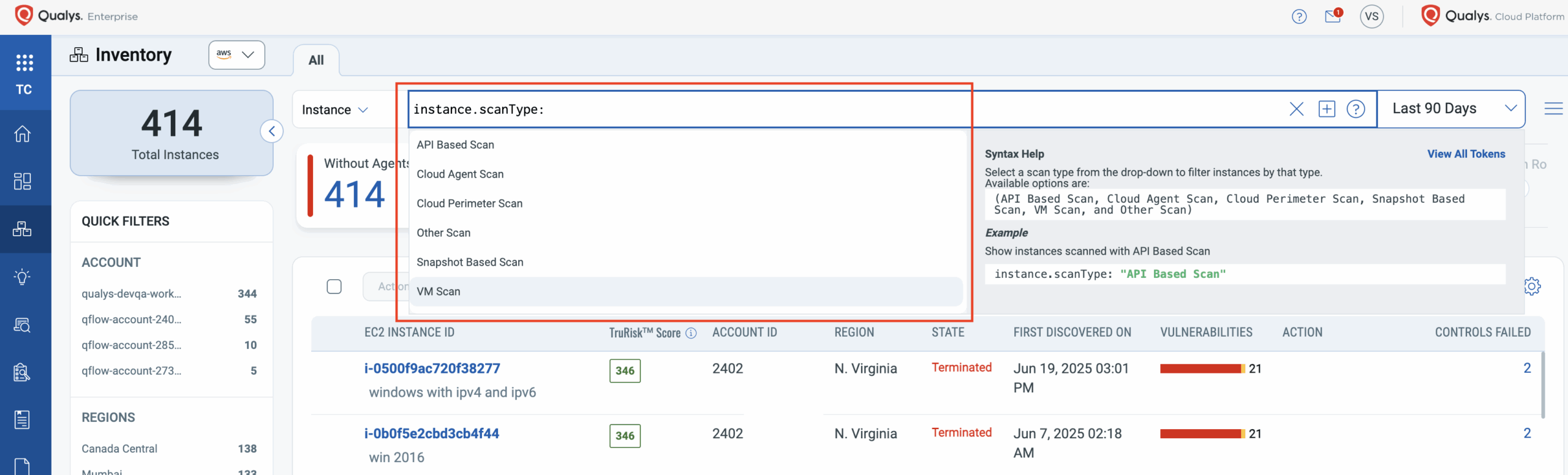
Analyst reports are useful, but nothing beats hearing from actual users. Let’s look at what customers say about TotalCloud in peer review platforms.
Ratings Overview
On Gartner Peer Insights, Qualys TotalCloud holds a 4.7 out of 5 rating based on 69 reviews. That’s a strong score. On PeerSpot, Qualys is ranked #6 in the CNAPP market with an average rating of 8.6 out of 10.
Perhaps more telling: 100% of Qualys users on PeerSpot say they would recommend the product. That’s unusual. Most products have at least some detractors.
What Users Like Most
Reading through reviews, several themes come up repeatedly:
Detection Accuracy: Users consistently praise the low false positive rate. One reviewer mentioned they previously spent hours chasing down phantom vulnerabilities with a competitor’s product. After switching to Qualys, that problem went away.
Comprehensive Coverage: Having CSPM, vulnerability management, and container security in one platform saves time. Users appreciate not having to correlate data from multiple tools.
Research Quality: The Qualys research team gets mentioned favorably. When new vulnerabilities emerge, Qualys typically has detection capabilities ready quickly.
Scalability: Large enterprises note that TotalCloud handles their scale without performance issues. One user mentioned running it across 50,000+ cloud assets without problems.
Common Criticisms
No product is perfect. Here’s what users complain about:
Learning Curve: New users sometimes find the interface overwhelming. There are many features, and it takes time to learn where everything is.
Agent Deployment: Getting agents installed across large environments takes effort. The agentless option helps, but some features require agents.
Report Customization: Some users want more flexibility in how reports are generated and formatted.
Support Response Times: A few reviews mention slow support responses for non-critical issues.
Comparison with Competitors
When compared head-to-head with other CNAPP solutions, how does TotalCloud stack up?
Against Prisma Cloud, users often cite Qualys’s superior vulnerability detection accuracy. Prisma has broader multi-cloud features but higher false positive rates.
Against Wiz, Qualys offers more mature agent-based capabilities. Wiz’s agentless-first approach is simpler to deploy but provides less runtime visibility.
Against Lacework, Qualys has better compliance reporting and more out-of-the-box controls. Lacework excels at behavioral analytics.
Mind share data shows Qualys holding about 2% of the CNAPP market. That’s smaller than giants like Palo Alto Networks but reflects Qualys’s enterprise-focused go-to-market approach.
Pricing and Licensing: Understanding the QFlex Model
Pricing is often the first question buyers ask. Qualys doesn’t publish specific numbers publicly, but we can explain how their licensing model works.
The QFlex Licensing Approach
Qualys introduced QFlex to address a common problem with security tool licensing. Traditional models lock you into specific products. You buy 1000 licenses for vulnerability scanning. Later, you need container security instead. Too bad. You’ve already committed those licenses.
QFlex works differently. You purchase a pool of credits. Those credits can be applied across any Qualys product, including TotalCloud. Need more CSPM coverage this quarter? Shift credits from vulnerability scanning. Your container environment grew? Reallocate from CSPM.
This flexibility happens without renegotiating contracts or involving procurement. You adjust allocations through the platform.
Single-SKU Simplicity
The QFlex model means you’re essentially buying one thing: Qualys credits. Compare this to competitors who sell separate SKUs for each capability. With them, you might need:
- SKU for CSPM
- SKU for workload protection
- SKU for container security
- SKU for IaC scanning
- SKU for compliance reporting
Each SKU has its own pricing, its own renewal date, its own contract terms. Managing all that creates administrative overhead. QFlex eliminates it.
What Affects Your Price
Several factors determine what you’ll actually pay:
| Factor | Impact on Price |
|---|---|
| Number of cloud assets | More assets = higher cost |
| Features enabled | Using all CNAPP capabilities costs more than just CSPM |
| Contract length | Multi-year deals typically include discounts |
| Support level | Premium support adds cost |
| Deployment model | On-premises options may have different pricing |
To get actual pricing, you’ll need to contact Qualys sales. They’ll scope your environment and provide a quote. Be prepared to share details about your cloud footprint, current security tools, and compliance requirements.
Total Cost of Ownership Considerations
The license cost is just part of the picture. Consider these additional factors:
Implementation time: How long until you’re getting value? Complex tools with long deployment cycles have hidden costs.
Training requirements: Will your team need extensive training? That’s time and potentially money.
Integration effort: Does it work with your existing tools? SIEM integration, ticketing systems, CI/CD pipelines?
Operational overhead: How many people does it take to run the platform day-to-day?
TotalCloud’s unified platform helps with several of these. Fewer tools to integrate means less implementation time. One console to learn reduces training needs. Automation features reduce operational overhead.
Setting Up TotalCloud: Deployment and Integration Guide
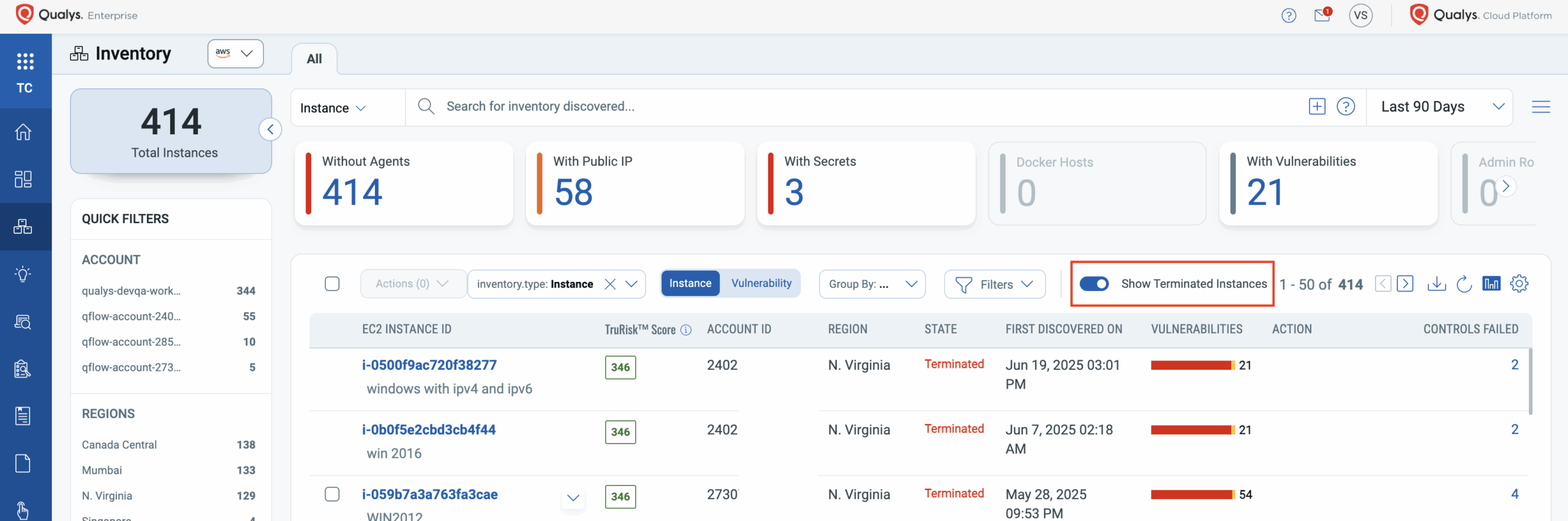
Understanding how to deploy TotalCloud helps you estimate implementation effort and identify potential roadblocks.
Cloud Provider Integration
The first step is connecting TotalCloud to your cloud accounts. Qualys supports:
- Amazon Web Services (AWS)
- Microsoft Azure
- Google Cloud Platform (GCP)
- Oracle Cloud Infrastructure
- Alibaba Cloud
For AWS, you’ll create an IAM role that grants Qualys read access to your resources. TotalCloud uses this role to discover assets and pull configuration data. Similar processes exist for other cloud providers.
The connection uses read-only permissions by default. TotalCloud doesn’t need write access to find vulnerabilities and misconfigurations. If you want automated remediation, you’ll grant additional permissions.
Agent Deployment Options
For agent-based scanning, you have several deployment methods:
Manual installation: Download the agent and install it on each machine. Works for small environments but doesn’t scale.
Configuration management: Use Ansible, Puppet, or Chef to push agents to servers. Better for larger environments with existing automation.
Golden images: Bake the agent into your base AMIs or VM images. New instances come with the agent pre-installed.
Container sidecars: For containerized workloads, deploy the agent as a sidecar container.
Kubernetes DaemonSet: In Kubernetes, a DaemonSet ensures an agent runs on every node.
CI/CD Pipeline Integration
TotalCloud can plug into your development pipelines to catch security issues before they reach production.
Common integration points:
- Container registry scanning: Check images when they’re pushed to registries like ECR, ACR, or Harbor
- IaC scanning: Validate Terraform, CloudFormation, or ARM templates before deployment
- Pre-deployment gates: Block deployments that don’t meet security thresholds
- IDE plugins: Give developers feedback while they’re writing code
Qualys provides APIs and CLI tools for these integrations. Most CI/CD systems (Jenkins, GitLab CI, GitHub Actions, Azure DevOps) can call the Qualys API as part of their pipelines.
SIEM and Ticketing Integration
Security findings need to flow into your existing workflows. TotalCloud integrates with:
SIEM platforms: Splunk, Microsoft Sentinel, IBM QRadar, and others can ingest TotalCloud alerts. This puts cloud security events alongside your other security data.
Ticketing systems: ServiceNow, Jira, and similar platforms can receive vulnerability findings as tickets. Assign them to the right teams automatically.
Communication tools: Slack and Microsoft Teams integrations push alerts to relevant channels.
These integrations use standard methods like webhooks, REST APIs, and pre-built connectors. Most organizations can set them up without custom development.
Compliance Capabilities: Meeting Regulatory Requirements
Compliance drives many CNAPP purchases. Organizations need to prove they’re meeting regulatory requirements. TotalCloud provides tools to demonstrate and maintain compliance.
Supported Compliance Frameworks
TotalCloud includes policies mapped to 30+ compliance mandates:
| Framework | Use Case |
|---|---|
| PCI DSS | Organizations handling payment card data |
| HIPAA | Healthcare organizations and their vendors |
| SOC 2 | Service providers demonstrating security controls |
| GDPR | Organizations handling EU personal data |
| NIST 800-53 | Federal agencies and contractors |
| CIS Benchmarks | Industry best practices for AWS, Azure, GCP |
| ISO 27001 | Information security management systems |
| FedRAMP | Cloud services for federal government |
How Compliance Reporting Works
TotalCloud maps its controls to framework requirements. When you run a compliance assessment, the platform checks your environment against relevant controls and shows you where you pass or fail.
Reports include:
- Overall compliance percentage
- List of passing controls
- List of failing controls with affected resources
- Remediation guidance for each failure
- Evidence collection for auditors
You can schedule reports to run automatically. Weekly compliance summaries go to security leadership. Detailed findings go to engineering teams. Auditors get comprehensive reports with evidence.
Continuous Compliance vs. Point-in-Time
Traditional compliance approaches check controls once or twice a year during audit periods. Between audits, you might drift out of compliance without knowing it.
TotalCloud enables continuous compliance monitoring. Every configuration change gets evaluated against compliance policies. Drift triggers alerts. You fix issues as they arise, not months later when auditors find them.
This approach has several benefits:
- Audits become less stressful because you’ve maintained compliance all along
- Security posture stays consistent rather than declining between audits
- Issues get fixed when they’re small, before they become major problems
- Teams develop better habits around compliant configurations
TotalCloud for Different Industries: Use Case Analysis
Different industries have different cloud security needs. Let’s look at how TotalCloud addresses specific vertical requirements.
Financial Services
Banks, insurance companies, and fintech firms face strict regulatory oversight. They also handle extremely sensitive customer data.
TotalCloud helps financial services organizations with:
- PCI DSS compliance for payment processing systems
- SOX controls for financial reporting systems
- Data residency tracking to ensure data stays in approved regions
- Encryption verification to confirm sensitive data is protected
- Third-party risk assessment when using SaaS financial tools
The FedRAMP High authorization matters here too. Financial regulators increasingly expect cloud security tools to meet government-grade standards.
Healthcare and Life Sciences
HIPAA compliance is the obvious concern, but healthcare organizations have broader security needs.
Relevant TotalCloud capabilities include:
- PHI protection verification across cloud storage and databases
- Access control monitoring to enforce minimum necessary access
- Audit logging validation to ensure required logs are captured
- Medical device security for IoT and connected devices in clinical settings
- Research environment isolation to separate clinical and research workloads
Government and Public Sector
Government agencies have perhaps the strictest requirements. The FedRAMP High authorization positions TotalCloud well for this market.
Government-specific use cases:
- NIST 800-53 High compliance for sensitive systems
- FedRAMP continuous monitoring as required by the authorization process
- Supply chain security to verify the security of software components
- Classified workload protection for approved environments
- Multi-agency coordination using subtenant features
Retail and E-commerce
Retailers handle payment data, customer information, and high-traffic web applications. They’re also frequent targets for attacks.
TotalCloud addresses retail needs through:
- PCI DSS compliance for payment systems
- Web application scanning for e-commerce platforms
- Container security for microservices-based architectures
- Seasonal scaling support as resources expand for peak periods
- Third-party integration security for payment processors and logistics partners
Technology and SaaS
Technology companies often have the most complex cloud environments. They’re also trying to demonstrate security to their own customers.
Relevant capabilities:
- SOC 2 reporting to show customers their data is protected
- CI/CD integration to shift security left in development
- Multi-cloud management for organizations using AWS, Azure, and GCP together
- Kubernetes security for container orchestration platforms
- API security for SaaS products exposing APIs
Performance and Scalability: Handling Large Environments
Enterprise environments can have tens of thousands or even hundreds of thousands of cloud assets. Can TotalCloud handle that scale?
Architecture Overview
TotalCloud runs on Qualys’s cloud infrastructure. The backend has been processing vulnerability data at scale for over 20 years. When you add cloud assets, you’re not spinning up your own servers. You’re using Qualys’s capacity.
This SaaS architecture has advantages:
- No infrastructure for you to manage or scale
- Processing power grows automatically as your environment grows
- Qualys handles availability and disaster recovery
- New features deploy without customer action
Scan Performance
Scanning speed depends on what you’re scanning and how. Some benchmarks from user reports:
- Agentless VM scanning: typically completes within hours for large environments
- Container image scanning: seconds to minutes per image
- CSPM assessment: near-continuous, with full environment refresh in under an hour
- Agent-based vulnerability scanning: depends on scan depth, but usually completes within the maintenance window
For network-based scanning, Qualys offers distributed scanners. You can deploy scanner appliances in different regions or network segments to reduce scan time and network traffic.
Data Retention and Storage
TotalCloud retains historical data for trending and compliance reporting. How long data is kept depends on your subscription tier and configuration.
Typical retention periods:
- Vulnerability scan results: 2+ years
- Configuration assessments: 2+ years
- Compliance reports: configurable based on audit requirements
- Runtime security events: depends on event volume and configuration
You can export data to your own systems for longer retention if needed. APIs make it possible to pull data into data lakes or SIEM platforms for extended storage.
TotalCloud vs. Competitors: Head-to-Head Comparison
The CNAPP market has many players. Here’s how TotalCloud compares to major alternatives.
TotalCloud vs. Palo Alto Prisma Cloud
| Aspect | TotalCloud | Prisma Cloud |
|---|---|---|
| Architecture | Unified platform, built organically | Multiple acquired products integrated |
| Vulnerability Detection | High accuracy, low false positives | Good coverage, higher false positive rate |
| Market Position | Leader (Forrester Wave) | Leader (multiple analyst reports) |
| Licensing | Flexible QFlex model | Module-based pricing |
| Best For | Enterprises prioritizing accuracy | Organizations wanting broad ecosystem |
Prisma Cloud has strong brand recognition and a broad feature set. TotalCloud wins on detection accuracy and administrative simplicity.
TotalCloud vs. Wiz
| Aspect | TotalCloud | Wiz |
|---|---|---|
| Scanning Approach | Agent and agentless options | Agentless-first |
| Runtime Protection | Full agent-based runtime coverage | Limited without agents |
| Deployment Speed | Moderate (especially with agents) | Very fast initial deployment |
| Compliance | Deep compliance mapping (30+ frameworks) | Good compliance coverage |
| Best For | Organizations needing runtime visibility | Fast initial visibility, agentless preference |
Wiz grew quickly by making deployment extremely simple. TotalCloud offers deeper capabilities, especially for runtime protection, but requires more deployment effort.
TotalCloud vs. CrowdStrike Falcon Cloud Security
| Aspect | TotalCloud | CrowdStrike |
|---|---|---|
| Heritage | Vulnerability management | Endpoint protection |
| Strength | Vulnerability and configuration accuracy | Threat detection and response |
| CSPM Maturity | Mature, comprehensive | Newer, growing |
| Unified Agent | Cloud-focused agent | Single agent for endpoint and cloud |
| Best For | Vulnerability-focused organizations | Organizations already using CrowdStrike endpoint |
CrowdStrike excels at threat detection given their EDR background. TotalCloud has stronger roots in vulnerability management and configuration assessment.
Choosing Between Platforms
The right choice depends on your priorities:
- Choose TotalCloud if: You prioritize vulnerability accuracy, need flexible licensing, want FedRAMP High authorization, or value a unified administrative experience
- Choose Prisma Cloud if: You want the broadest feature set and are already in the Palo Alto ecosystem
- Choose Wiz if: Speed to initial visibility matters most and you prefer agentless-only
- Choose CrowdStrike if: You’re already a CrowdStrike customer and want to consolidate vendors
Best Practices for Getting Value from TotalCloud
Buying the tool is just the start. Here’s how to actually get value from your TotalCloud investment.
Start with Visibility Before Policy
Resist the urge to create strict policies immediately. First, let TotalCloud discover your environment. See what you actually have. Understand your current security posture.
Many organizations are surprised by what they find. Shadow cloud accounts. Forgotten test environments. Third-party integrations nobody documented. Get that visibility first.
Prioritize Based on Risk, Not Volume
A fresh TotalCloud deployment will likely find thousands of issues. You can’t fix them all at once. Don’t try.
TotalCloud provides risk scoring to help prioritize. Focus on:
- Critical vulnerabilities on internet-facing systems
- Misconfigurations exposing sensitive data
- Issues affecting compliance requirements
- Problems in production versus development environments
Fix the high-risk items first. The long tail of low-risk findings can wait.
Integrate Into Developer Workflows
Security teams can’t fix everything themselves. Developers need to own security for their applications. Make it easy for them.
- Integrate TotalCloud into CI/CD pipelines so developers see issues before deployment
- Route findings to the teams that own the affected resources
- Provide clear remediation guidance, not just problem descriptions
- Celebrate security improvements, don’t just punish failures
Establish Baseline Metrics
Track your security posture over time. Useful metrics include:
- Number of critical vulnerabilities by month
- Mean time to remediate issues
- Compliance percentage by framework
- Coverage percentage (what portion of assets are scanned)
Without metrics, you can’t demonstrate improvement. With them, you can show leadership that security investments are working.
Use Automation Carefully
TotalCloud’s automated remediation is powerful but risky. Start with low-risk automations:
- Automatically tag resources for review
- Create tickets for findings
- Send alerts for new critical issues
Move to more aggressive automation only after you trust the accuracy and understand the impact:
- Auto-remediate specific low-risk misconfigurations
- Block non-compliant deployments in pipelines
- Isolate compromised resources automatically
Limitations and Challenges to Consider
No product is perfect. Here are TotalCloud’s limitations to consider before buying.
Agent Deployment Overhead
Full runtime visibility requires agents. Getting agents deployed across large, diverse environments takes effort. Organizations with thousands of servers, legacy systems, or strict change control processes will face challenges.
Mitigation strategies:
- Use golden images with pre-installed agents
- Deploy agentless first, add agents incrementally
- Automate agent deployment through configuration management
Learning Curve
TotalCloud has many features. New users often feel overwhelmed. The interface isn’t always intuitive for someone used to simpler tools.
Mitigation strategies:
- Take advantage of Qualys training resources
- Start with one module (like CSPM) before expanding
- Designate power users who learn the platform deeply
Cost for Small Organizations
TotalCloud is built for enterprises. Small organizations with limited cloud footprints may find it expensive relative to simpler alternatives.
Mitigation strategies:
- Evaluate whether you need full CNAPP or just specific capabilities
- Consider cloud provider native tools for basic needs
- Look at the QFlex model to right-size your investment
Multi-Cloud Complexity
While TotalCloud supports multiple cloud providers, the experience isn’t identical across all of them. AWS support is typically most mature, with Azure and GCP close behind. Smaller cloud providers may have fewer built-in controls.
Mitigation strategies:
- Verify coverage for your specific cloud providers before buying
- Create custom policies for gaps in built-in coverage
- Prioritize coverage for your primary cloud, accept limitations in secondary clouds
Summary: Is Qualys TotalCloud Right for You?
Qualys TotalCloud is a mature, full-featured CNAPP with strong roots in vulnerability management. The Forrester Wave Leader designation, FedRAMP High authorization, and positive user reviews all point to a solid product.
It’s best suited for enterprises with complex multi-cloud environments, strict compliance requirements, and a need for accurate vulnerability detection. The QFlex licensing model offers genuine flexibility. The unified administrative backend reduces operational complexity.
Smaller organizations or those wanting the fastest possible time-to-value might consider simpler alternatives. But for enterprises ready to invest in comprehensive cloud security, TotalCloud deserves serious consideration.
Frequently Asked Questions About Qualys TotalCloud Review
| Who should use Qualys TotalCloud? | TotalCloud is designed for mid-size to large enterprises with multi-cloud environments. It’s especially well-suited for organizations in regulated industries like finance, healthcare, and government that need strong compliance capabilities. Security teams looking to consolidate multiple point tools into a single platform will benefit most. |
| What cloud providers does TotalCloud support? | TotalCloud supports Amazon Web Services (AWS), Microsoft Azure, Google Cloud Platform (GCP), Oracle Cloud Infrastructure, and Alibaba Cloud. AWS and Azure have the most complete coverage, with GCP close behind. Support for smaller providers varies. |
| How is TotalCloud different from the free Qualys Community Edition? | The Community Edition offers basic vulnerability scanning for limited assets. TotalCloud provides full CNAPP capabilities including CSPM, container security, runtime protection, and compliance reporting. It also scales to enterprise environments and includes support and SLAs. |
| Does TotalCloud require agents? | No, agents aren’t required for all features. Agentless scanning provides visibility into vulnerabilities and configurations. Agents are needed for runtime protection and some deeper inspection capabilities. Most organizations use a combination of both approaches. |
| How long does TotalCloud implementation take? | Initial cloud account connection takes hours to days depending on your environment. Getting full visibility with agents deployed across all workloads can take weeks or months. Many organizations start with agentless scanning and add agents incrementally. |
| What compliance frameworks does TotalCloud support? | TotalCloud includes out-of-the-box policies for 30+ compliance frameworks including PCI DSS, HIPAA, SOC 2, GDPR, NIST 800-53, ISO 27001, FedRAMP, and complete CIS Benchmark coverage for major cloud providers. |
| How does TotalCloud pricing work? | Qualys uses the QFlex licensing model where you purchase credits that can be applied across different capabilities. This allows you to shift budget between CSPM, workload protection, and other features without renegotiating contracts. Contact Qualys for specific pricing based on your environment size. |
| Can TotalCloud replace multiple security tools? | For many organizations, yes. TotalCloud combines CSPM, vulnerability management, container security, IaC scanning, and compliance reporting. You may still need separate tools for specific needs like SIEM, identity management, or endpoint protection outside of cloud workloads. |
| What’s the difference between TotalCloud and Qualys VMDR? | VMDR (Vulnerability Management, Detection and Response) focuses on vulnerability management across all assets including on-premises. TotalCloud is specifically designed for cloud-native environments and includes CNAPP capabilities like CSPM and container security. TotalCloud builds on VMDR’s vulnerability detection technology. |
| Is TotalCloud suitable for government agencies? | Yes. TotalCloud achieved FedRAMP High authorization in 2026, making it one of few CNAPP platforms authorized for sensitive government workloads. It’s validated against NIST SP 800-53 High controls and supports continuous monitoring requirements. |





 Stack Insight is intended to support informed decision-making by providing independent information about business software and services. Some product details, including pricing, features, and promotional offers, may be supplied by vendors or partners and can change without notice.