
Check Point CloudGuard Review
Check Point CloudGuard Review: Complete Guide to Cloud-Native Security in 2026
Cloud security isn’t optional anymore. It’s the foundation of modern IT infrastructure. As organizations shift workloads to AWS, Azure, Google Cloud, and hybrid setups, the attack surface grows bigger every day. That’s where Check Point CloudGuard comes in.
This Check Point CloudGuard review breaks down everything you need to know about this cloud-native security platform. We’ll cover its core features, pricing structure, real-world use cases, and how it stacks up against competitors. Whether you’re a security engineer evaluating tools or a CTO looking for enterprise-grade protection, this guide will help you make an informed decision.
CloudGuard isn’t just another security tool. It’s a full platform that combines network security, posture management, workload protection, and application security into one package. Let’s dig into what makes it tick and whether it’s right for your organization.
What Is Check Point CloudGuard? Understanding the Platform
Check Point CloudGuard is a cloud-native security platform built by Check Point Software Technologies. The company has been in the cybersecurity game since 1993. They created the first commercial firewall. Now they’re applying decades of experience to cloud security.
At its core, CloudGuard is a Cloud Native Application Protection Platform (CNAPP). That’s a mouthful. Here’s what it actually means:
- It protects applications running in the cloud
- It secures the infrastructure those applications run on
- It monitors data flowing between cloud services
- It automates security across multiple cloud providers
CloudGuard works across public clouds like AWS, Microsoft Azure, and Google Cloud Platform. It also supports private clouds and hybrid environments. This flexibility matters because most enterprises don’t use just one cloud provider.
The Prevention-First Philosophy
Check Point takes a “prevention-first” approach to security. This sets them apart from vendors that focus mainly on detection and response. The idea is simple: stop threats before they cause damage, rather than cleaning up after an attack.
Detection matters too. But if you can block 99% of threats automatically, your security team can focus on the 1% that gets through. This reduces alert fatigue and speeds up response times.
CloudGuard uses Check Point’s ThreatCloud AI engine. This is a global threat intelligence network that analyzes millions of indicators of compromise daily. When a new threat appears anywhere in the world, CloudGuard customers get protection within minutes.
SaaS Delivery Model
CloudGuard runs as a Software-as-a-Service platform. You don’t need to install servers or manage infrastructure. Just connect your cloud accounts and start configuring policies.
This SaaS model offers several benefits:
- Faster deployment: Get up and running in hours, not weeks
- Automatic updates: New features and threat intelligence arrive continuously
- Lower overhead: No hardware to maintain or patch
- Elastic scaling: Protection grows with your cloud footprint
For organizations with strict data residency requirements, Check Point also offers on-premises deployment options for certain CloudGuard components.
Check Point CloudGuard CNAPP: The Eight Core Services
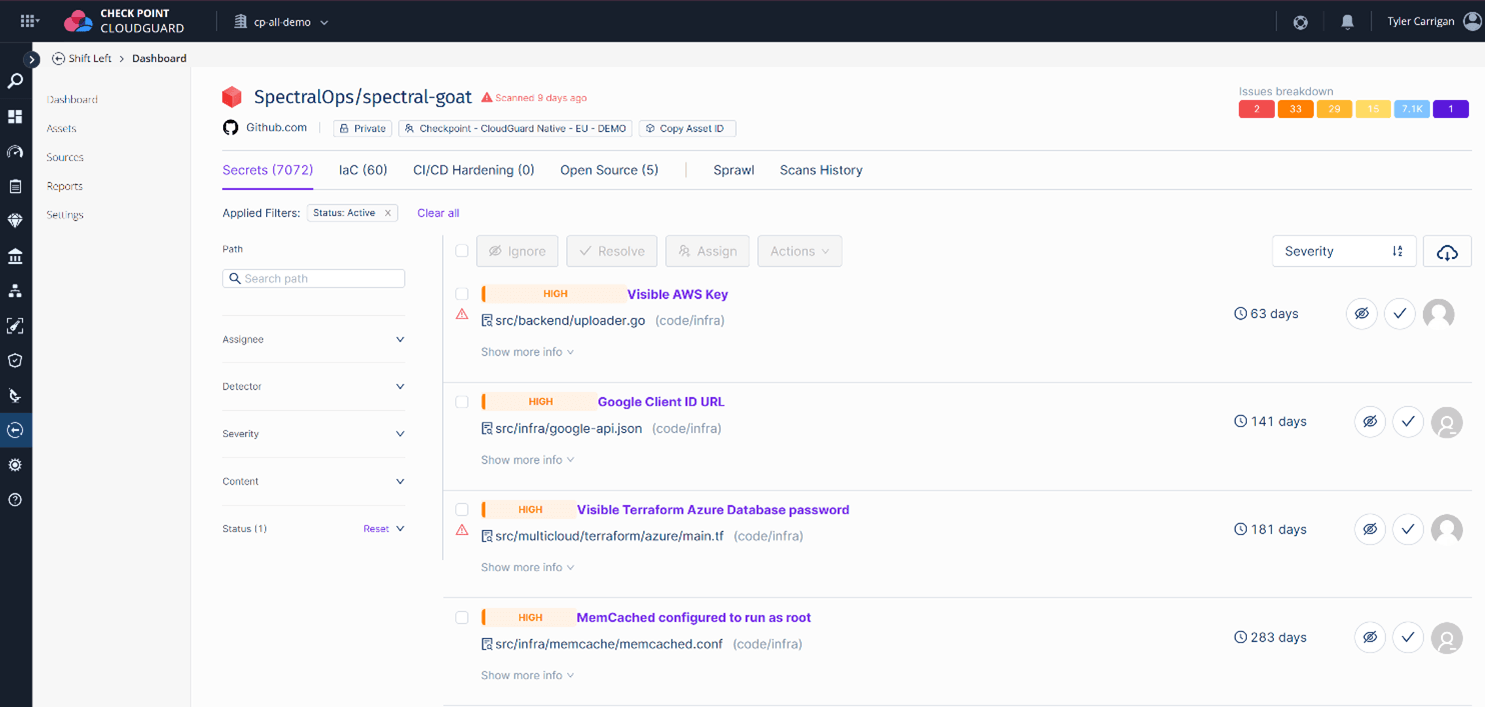
CloudGuard CNAPP is marketed as the first “in-market preventative CNAPP solution.” That’s a bold claim. Let’s examine what it actually includes.
The platform consists of eight core services that work together. Each addresses a specific aspect of cloud security. Here’s a breakdown:
| Service | What It Does | Key Benefit |
|---|---|---|
| Cloud Security Posture Management (CSPM) | Monitors cloud configurations for misconfigurations and compliance violations | Prevents data breaches caused by human error |
| Cloud Workload Protection Platform (CWPP) | Secures servers, containers, and serverless functions | Runtime protection for your actual applications |
| Cloud Infrastructure Entitlement Management (CIEM) | Manages identities and access permissions across clouds | Enforces least-privilege access |
| Kubernetes Security Posture Management (KSPM) | Secures Kubernetes clusters and container orchestration | Specialized protection for containerized workloads |
| Data Security Posture Management (DSPM) | Discovers and classifies sensitive data in the cloud | Prevents data leaks and ensures compliance |
| Cloud Detection and Response (CDR) | Detects active threats and enables rapid response | Catches what prevention misses |
| AI-Driven Security Posture Management (AI-SPM) | Uses machine learning to identify risk patterns | Smarter prioritization of security issues |
| Network Security | Protects cloud network traffic and enforces segmentation | Stops lateral movement of attackers |
How These Services Work Together
The real power of CloudGuard CNAPP comes from integration. These eight services share data and context. A misconfiguration flagged by CSPM gets correlated with network traffic patterns. Identity risks from CIEM inform workload protection policies.
This unified approach eliminates the blind spots that occur when you use separate tools from different vendors. Your security team sees everything in one console. They can trace an attack from initial access through lateral movement to data exfiltration.
Check Point describes this as “shift-left, shield-right” security. You catch problems early in development (shift left). And you maintain protection in production (shield right). Both matter equally.
CloudGuard Posture Management: Deep Dive into CSPM Capabilities
Cloud Security Posture Management might be the most important service in CloudGuard. Why? Because most cloud breaches don’t involve sophisticated hacking. They happen because someone misconfigured an S3 bucket or left a database exposed to the internet.
CloudGuard Posture Management continuously scans your cloud environments. It checks configurations against security best practices and compliance frameworks. When it finds problems, it alerts you immediately.
Automated Security Assessments
The platform runs automated assessments across your entire cloud footprint. These assessments cover hundreds of security checks:
- Network exposure: Are any resources publicly accessible that shouldn’t be?
- Encryption status: Is data encrypted at rest and in transit?
- Access controls: Are IAM policies following least-privilege principles?
- Logging and monitoring: Are you capturing the right audit trails?
- Resource configurations: Are services configured securely?
Assessments run continuously, not just on a schedule. When someone changes a configuration, CloudGuard evaluates it within minutes. This catches mistakes before they cause problems.
Compliance Mapping and Reporting
CloudGuard maps your security posture to major compliance frameworks automatically. This saves your compliance team hundreds of hours during audits.
Supported frameworks include:
- CIS Benchmarks for AWS, Azure, and GCP
- SOC 2 Type II
- HIPAA for healthcare organizations
- PCI DSS for payment card data
- GDPR for European data protection
- ISO 27001
- NIST Cybersecurity Framework
- FedRAMP for U.S. government contractors
The platform generates audit-ready reports with evidence collection. Auditors can see exactly what controls you have in place and how they’re enforced. This transparency speeds up compliance certifications.
Auto-Remediation Features
Finding problems is only half the battle. You also need to fix them. CloudGuard includes auto-remediation capabilities that can automatically correct certain misconfigurations.
For example, if someone creates an S3 bucket with public read access, CloudGuard can automatically disable public access. If an EC2 instance gets assigned an overly permissive security group, CloudGuard can tighten the rules.
Auto-remediation requires careful configuration. You don’t want to break production applications by changing settings automatically. CloudGuard lets you:
- Enable auto-remediation for specific rule types
- Require approval before changes take effect
- Limit auto-remediation to certain environments (like dev/test)
- Notify teams when remediation occurs
This flexibility lets security teams balance protection with operational stability.
CloudGuard Network Security: Protecting Cloud Traffic
Network security in the cloud works differently than in traditional data centers. You can’t just drop a firewall appliance in front of your servers. CloudGuard Network Security provides cloud-native traffic inspection and protection.
Virtual Security Gateways
CloudGuard deploys virtual security gateways in your cloud environments. These gateways inspect traffic flowing between your cloud resources. They apply the same deep packet inspection technology that Check Point uses in hardware firewalls.
The virtual gateways can be deployed in several patterns:
- Transit gateway: Inspect traffic between VPCs or virtual networks
- Inline protection: Sit directly in the data path for specific workloads
- Gateway load balancer: Scale inspection capacity automatically with traffic volume
Each deployment pattern has tradeoffs between visibility, performance, and complexity. CloudGuard documentation provides guidance for choosing the right architecture.
Threat Prevention Capabilities
CloudGuard Network Security includes multiple threat prevention engines:
Intrusion Prevention System (IPS): Blocks known attack signatures and exploit attempts. Check Point’s IPS engine has been refined over decades. It catches attacks targeting vulnerabilities in web applications, databases, and operating systems.
Anti-Bot Protection: Detects and blocks communication with command-and-control servers. If malware gets into your environment, this prevents it from phoning home to attackers.
Anti-Virus: Scans files and payloads for known malware. This catches malicious files before they reach your servers.
Threat Emulation (Sandboxing): Executes suspicious files in an isolated environment to identify zero-day threats. If a file behaves maliciously, it gets blocked even if there’s no signature for it yet.
Threat Extraction: Removes potentially malicious content from files while preserving their usability. Users get clean documents without active content that could be weaponized.
Micro-Segmentation
Micro-segmentation limits what attackers can do if they get into your environment. Instead of one big flat network, you create small security zones with strict controls between them.
CloudGuard makes micro-segmentation easier by:
- Discovering traffic patterns automatically
- Suggesting segmentation policies based on observed behavior
- Enforcing policies without manual firewall rule management
- Visualizing traffic flows between segments
When you can see exactly what’s talking to what, you can make informed decisions about what should be allowed.
CloudGuard WAF: Web Application Firewall Review
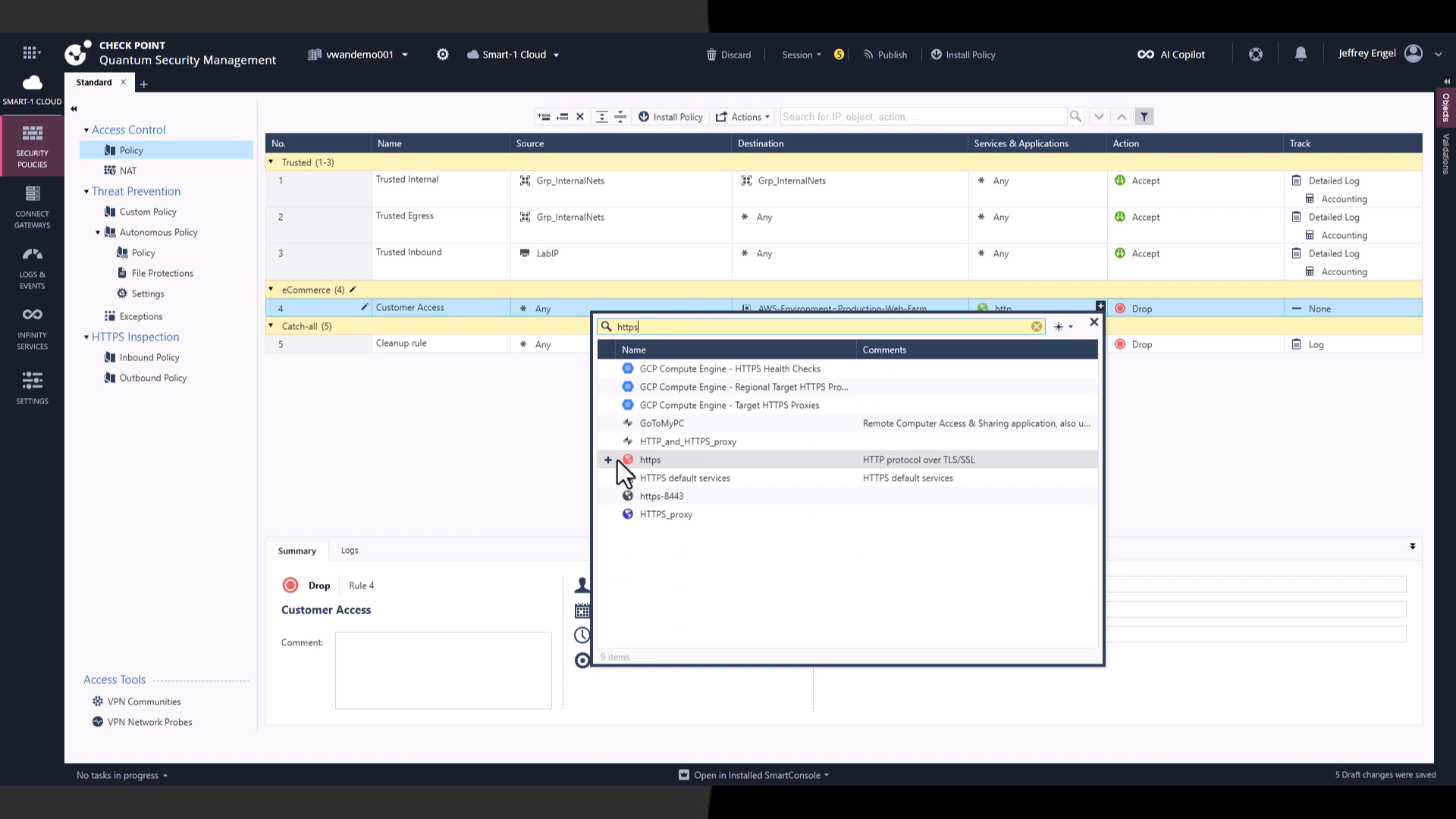
Web applications are the front door for most organizations. They’re also a favorite target for attackers. CloudGuard WAF protects web applications and APIs from common attack vectors.
Protection Against OWASP Top 10
CloudGuard WAF blocks attacks from the OWASP Top 10 list. This includes:
- SQL Injection: Attackers insert malicious database commands into user inputs
- Cross-Site Scripting (XSS): Malicious scripts get injected into web pages
- Broken Authentication: Attackers exploit weak login mechanisms
- Security Misconfigurations: Exposed admin interfaces or default credentials
- XML External Entities (XXE): Attackers exploit XML processors to access files or execute code
The WAF uses both signature-based detection and behavioral analysis. Signatures catch known attack patterns. Behavioral analysis identifies anomalies that might indicate new attack techniques.
API Security
Modern applications rely heavily on APIs. Mobile apps, single-page applications, and microservices all communicate through APIs. CloudGuard WAF provides specialized API protection:
- Schema validation: Ensures API requests match expected formats
- Rate limiting: Prevents abuse and denial-of-service attacks
- Authentication enforcement: Verifies API tokens and credentials
- Parameter tampering protection: Detects manipulation of API parameters
API security requires understanding your application’s normal behavior. CloudGuard learns this behavior automatically through a training period. It then flags deviations that might indicate attacks.
Bot Management
Not all traffic to your web applications comes from real users. Bots account for a large percentage of internet traffic. Some bots are good (search engine crawlers). Many are bad (credential stuffers, scrapers, DDoS bots).
CloudGuard WAF includes bot management features:
- Distinguishes between legitimate bots and malicious ones
- Challenges suspicious traffic with CAPTCHAs
- Blocks known bad bot signatures
- Detects and blocks credential stuffing attacks
Bot management protects your applications and your business. Scrapers steal your content. Credential stuffers compromise user accounts. DDoS bots take down your services. Blocking them keeps your applications available and your data safe.
CloudGuard CIEM: Identity and Entitlement Management
Identity is the new perimeter. In the cloud, anyone with valid credentials can access resources from anywhere. Managing those identities and their permissions is critical for security.
CloudGuard CIEM provides visibility and control over cloud identities. It helps you answer questions like:
- Who has access to what resources?
- What permissions are actually being used?
- Which identities have excessive privileges?
- Are there any orphaned accounts or roles?
Permission Analysis
Cloud IAM systems are complex. AWS alone has hundreds of services, each with dozens of permission types. Azure and GCP are similarly complicated. It’s easy for permissions to get out of control.
CloudGuard CIEM analyzes effective permissions across all your cloud accounts. It shows you:
- Granted permissions: What can each identity theoretically do?
- Used permissions: What has each identity actually done?
- Permission gaps: The difference between granted and used
- Risk scores: How dangerous are the excess permissions?
This analysis reveals opportunities to tighten permissions without breaking applications. If a service account has admin access but only reads from one S3 bucket, you can safely remove the admin permissions.
Least-Privilege Recommendations
CloudGuard doesn’t just identify problems. It suggests solutions. The platform generates least-privilege policy recommendations based on observed behavior.
Here’s how it works:
- CloudGuard monitors API calls made by each identity
- It tracks which permissions are actually used over time
- It generates a recommended policy that includes only necessary permissions
- You review and apply the recommendations
This data-driven approach removes guesswork from permission management. You’re not guessing what an application needs. You know exactly what it uses.
Cross-Cloud Identity Governance
Most organizations use multiple cloud providers. Each has its own IAM system with different concepts and terminology. CloudGuard CIEM provides a unified view across clouds.
You can see:
- All identities from AWS, Azure, and GCP in one view
- Equivalent permissions across different cloud platforms
- Identities that exist in multiple clouds
- Consistent policy enforcement regardless of cloud provider
This unified view simplifies governance for multi-cloud organizations. Security teams don’t need to become experts in three different IAM systems.
CloudGuard Workload Protection: Securing Containers and Serverless
Modern applications run on containers and serverless functions, not just virtual machines. CloudGuard Workload Protection extends security to these cloud-native compute platforms.
Container Security
Containers have changed how applications get built and deployed. But they’ve also introduced new security challenges. Images can contain vulnerabilities. Container runtimes can be exploited. Orchestration platforms can be misconfigured.
CloudGuard addresses container security across the lifecycle:
Build-time scanning: CloudGuard integrates with CI/CD pipelines to scan container images before deployment. It checks for:
- Known vulnerabilities in OS packages
- Vulnerable application dependencies
- Malware embedded in images
- Hardcoded secrets and credentials
- Configuration issues in Dockerfiles
Registry scanning: CloudGuard monitors container registries continuously. Even if an image passed initial scanning, new vulnerabilities might be discovered later. Continuous scanning catches these before you deploy vulnerable images.
Runtime protection: Once containers are running, CloudGuard monitors their behavior. It detects:
- Unexpected process execution
- File system modifications
- Network connections to suspicious destinations
- Privilege escalation attempts
- Container breakout attempts
Kubernetes Security
Kubernetes has become the standard for container orchestration. It’s powerful but complex. CloudGuard includes specialized Kubernetes Security Posture Management (KSPM).
KSPM covers:
- Cluster configuration: Are your Kubernetes clusters configured securely?
- Pod security: Are pods following security best practices?
- Network policies: Is traffic between pods properly segmented?
- RBAC settings: Are role-based access controls appropriately restrictive?
- Secrets management: Are secrets stored and accessed securely?
CloudGuard maps these findings to the CIS Kubernetes Benchmark. This gives you a clear picture of your compliance status and areas that need improvement.
Serverless Function Security
Serverless functions (AWS Lambda, Azure Functions, Google Cloud Functions) present unique security challenges. There’s no server to protect. The attack surface is the function code itself.
CloudGuard protects serverless functions by:
- Scanning function code for vulnerabilities
- Analyzing function permissions for excessive access
- Monitoring function invocations for suspicious patterns
- Detecting injection attacks in function inputs
Serverless security requires a different mindset than traditional infrastructure security. CloudGuard adapts to this model automatically.
CloudGuard DSPM: Data Security Posture Management
Data is what attackers ultimately want. Protecting the infrastructure matters because it protects the data. CloudGuard DSPM focuses on securing sensitive data wherever it lives in your cloud environments.
Sensitive Data Discovery
You can’t protect what you don’t know about. Many organizations struggle to track where sensitive data ends up. Developers copy production data to test environments. Analytics teams export data to data lakes. The result is sensitive data scattered across many locations.
CloudGuard DSPM discovers sensitive data automatically. It scans:
- Object storage (S3, Azure Blob, GCS)
- Databases (RDS, Azure SQL, Cloud SQL)
- Data warehouses (Redshift, Snowflake, BigQuery)
- File shares and storage accounts
The platform identifies different types of sensitive data:
- Personal Identifiable Information (PII)
- Payment card data
- Protected health information
- Credentials and secrets
- Intellectual property
Data Classification and Tagging
Once discovered, data needs to be classified. CloudGuard assigns classification labels based on content analysis. These classifications drive policy decisions:
- Highly sensitive data gets stricter access controls
- Data subject to regulations gets compliance monitoring
- Public data gets basic protection
Classification happens automatically using machine learning. But you can also define custom classification rules for organization-specific data types.
Data Risk Assessment
CloudGuard DSPM assesses risk based on multiple factors:
- Sensitivity: How sensitive is the data?
- Exposure: Is the data accessible to unauthorized parties?
- Volume: How much sensitive data is at risk?
- Context: Is this a development or production environment?
Risk scores help security teams prioritize their efforts. A public S3 bucket containing millions of customer records demands immediate attention. An internal database with test data can wait.
CloudGuard Detection and Response: When Prevention Isn’t Enough
Prevention stops most threats. But determined attackers with enough time and resources can sometimes get through. That’s where Cloud Detection and Response (CDR) comes in.
Threat Detection Capabilities
CloudGuard CDR monitors your cloud environments for signs of active threats. It analyzes:
- Cloud provider logs (CloudTrail, Activity Logs, Audit Logs)
- Network traffic flows
- DNS queries
- API calls
- User behavior patterns
Detection rules cover common attack patterns:
- Credential compromise: Login anomalies, impossible travel, new device access
- Privilege escalation: Users gaining permissions they shouldn’t have
- Data exfiltration: Large data transfers to unusual destinations
- Persistence mechanisms: Attackers establishing backdoors
- Lateral movement: Spreading access to other resources
Investigation Tools
When CloudGuard detects a potential threat, security teams need to investigate quickly. The platform provides investigation tools:
- Timeline view: See all related events in chronological order
- Context enrichment: Understand who, what, where, and when
- Impact analysis: Determine what resources might be affected
- Evidence collection: Gather data for forensic analysis
These tools speed up investigations from hours to minutes. Faster investigations mean faster containment and less damage.
Automated Response Actions
Some threats require immediate action. Waiting for a human to investigate and respond gives attackers more time to cause damage. CloudGuard supports automated response actions:
- Disable compromised user accounts
- Revoke temporary credentials
- Isolate affected resources
- Block malicious IP addresses
- Trigger incident response workflows
Automation needs guardrails. You don’t want false positives to disable production systems. CloudGuard lets you configure automation carefully with approval workflows and environment restrictions.
Multi-Cloud Support and Integration: CloudGuard Compatibility Analysis
One of CloudGuard’s biggest strengths is multi-cloud support. Most enterprises use two or more cloud providers. They need security tools that work across all of them.
Supported Cloud Platforms
CloudGuard supports all major public cloud platforms:
| Cloud Provider | Services Covered | Integration Depth |
|---|---|---|
| Amazon Web Services | EC2, S3, RDS, Lambda, EKS, ECS, IAM, VPC, and 100+ more | Deep native integration |
| Microsoft Azure | VMs, Storage, SQL, Functions, AKS, AD, VNet, and 80+ more | Deep native integration |
| Google Cloud Platform | Compute, Cloud Storage, Cloud SQL, GKE, IAM, VPC, and 60+ more | Deep native integration |
| Oracle Cloud | Compute, Object Storage, Database, OKE | Standard integration |
| Alibaba Cloud | ECS, OSS, RDS, ACK | Standard integration |
Integration depth matters. “Deep native integration” means CloudGuard understands the cloud provider’s specific services and security constructs. It can read native configurations and apply provider-specific security checks.
Hybrid and Private Cloud Support
Not everything runs in public cloud. Many organizations maintain private data centers or use hybrid architectures. CloudGuard supports these scenarios:
- VMware vSphere: CloudGuard virtual appliances for VMware environments
- OpenStack: Support for private cloud platforms built on OpenStack
- Kubernetes anywhere: Secure Kubernetes clusters regardless of where they run
- Private 5G networks: Support for private wireless infrastructure
Hybrid support lets organizations maintain consistent security policies across their entire infrastructure. The same rules that protect AWS workloads protect on-premises servers.
Third-Party Integrations
Security tools don’t exist in isolation. They need to integrate with other systems: SIEM platforms, ticketing systems, CI/CD pipelines, and more.
CloudGuard integrates with:
- SIEM platforms: Splunk, IBM QRadar, Microsoft Sentinel, Elastic
- SOAR tools: Palo Alto XSOAR, Splunk SOAR, Swimlane
- Ticketing systems: ServiceNow, Jira, PagerDuty
- CI/CD pipelines: Jenkins, GitLab CI, GitHub Actions, Azure DevOps
- Infrastructure as Code: Terraform, CloudFormation, Pulumi
APIs enable custom integrations for specialized workflows. If CloudGuard doesn’t have a native integration, you can build one using the REST API.
CloudGuard User Experience and Management Console
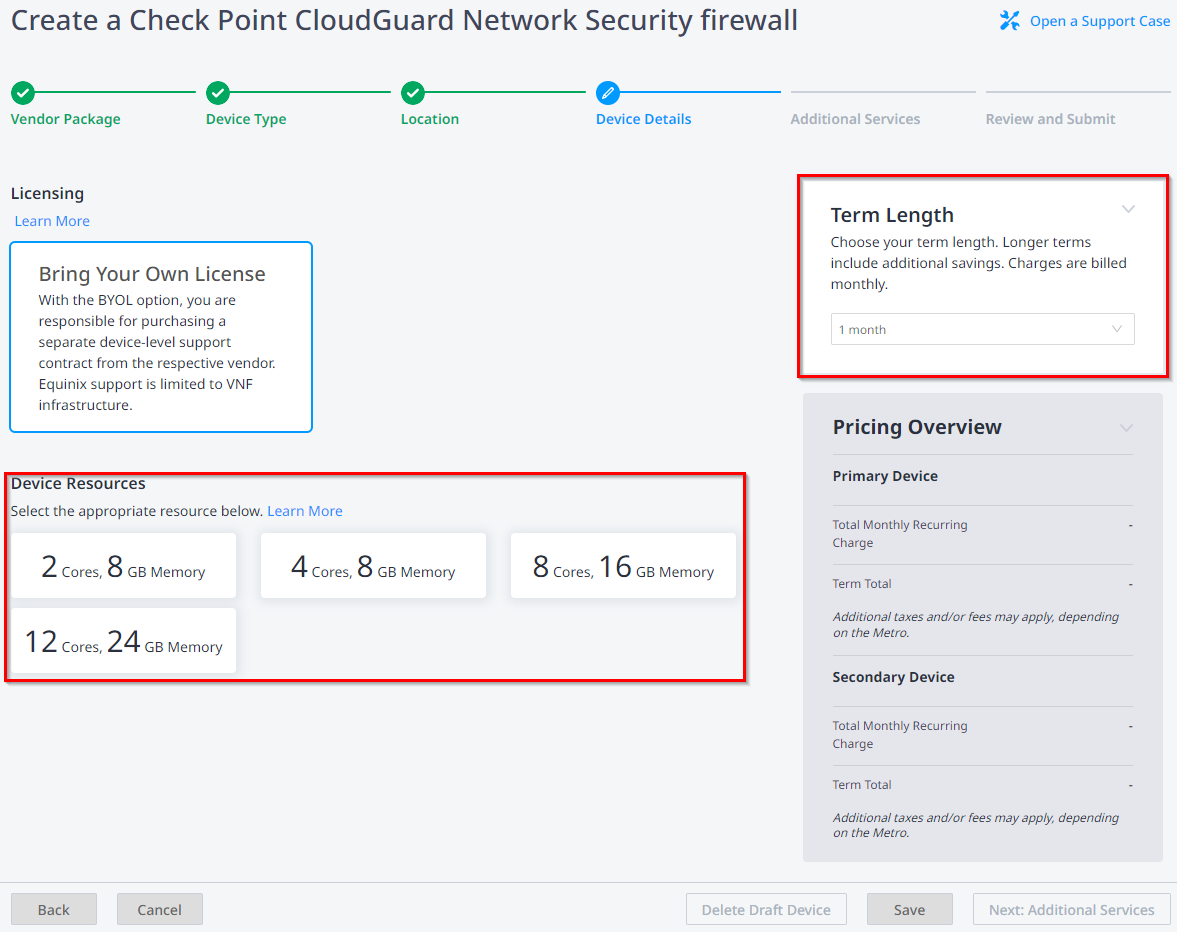
Powerful features mean nothing if the tool is too hard to use. Let’s examine CloudGuard’s user experience and management capabilities.
Unified Management Console
CloudGuard provides a single web console for all security functions. You don’t need separate interfaces for posture management, network security, and workload protection. Everything lives in one place.
The console is organized into logical sections:
- Dashboard: High-level view of security posture across all environments
- Assets: Inventory of all cloud resources and their security status
- Policies: Security rules and compliance frameworks
- Findings: Security issues that need attention
- Reports: Compliance reports and executive summaries
- Settings: Account configuration and user management
Navigation is straightforward. Most tasks require just a few clicks. The learning curve is reasonable for security professionals familiar with cloud concepts.
Role-Based Access Control
Not everyone needs access to everything. CloudGuard includes role-based access control (RBAC) for managing who can do what:
- Administrators: Full access to all features and settings
- Security analysts: View findings and investigate threats
- Compliance officers: Access compliance reports and audit data
- Developers: View findings related to their applications
- Auditors: Read-only access to compliance documentation
Custom roles let you define exactly what permissions each group needs. This supports the principle of least privilege within your security team.
Mobile Application
CloudGuard includes a mobile app for iOS and Android. The app lets security teams monitor their environments on the go. Key features include:
- Real-time alerts for critical security events
- Dashboard views of security posture
- Approval workflows for automated remediation
- Quick access to investigation tools
The mobile app isn’t meant to replace the full console. But it’s valuable for after-hours monitoring and quick response to urgent issues.
CloudGuard Pricing and Licensing: What to Expect
Pricing is always a concern when evaluating security tools. CloudGuard’s pricing model varies by component and consumption.
Pricing Model Overview
CloudGuard uses a combination of pricing approaches:
- Subscription-based: Annual or multi-year subscriptions for core platform access
- Usage-based: Charges based on the number of protected workloads
- Tiered pricing: Different feature sets at different price points
Check Point doesn’t publish public pricing. Costs depend on:
- Number of cloud accounts connected
- Volume of workloads protected
- Which services you need (CSPM, CWPP, WAF, etc.)
- Support level required
- Contract length and payment terms
Expect to engage with Check Point sales for a custom quote. Pricing discussions typically start after a discovery call to understand your requirements.
Licensing Options
CloudGuard offers several licensing tiers:
CloudGuard CNAPP Basic: Core posture management and basic workload protection. Good for organizations starting their cloud security journey.
CloudGuard CNAPP Advanced: Adds network security, WAF, and advanced threat prevention. Suitable for organizations with more mature cloud deployments.
CloudGuard CNAPP Premium: Full platform with all eight core services, including CIEM, DSPM, and CDR. Best for large enterprises with complex multi-cloud environments.
Total Cost Considerations
When budgeting for CloudGuard, consider more than just license fees:
- Implementation services: Professional services for deployment and configuration
- Training: Getting your team up to speed on the platform
- Integration work: Connecting CloudGuard to existing tools
- Ongoing management: Staff time for day-to-day operations
CloudGuard typically costs less than buying separate tools for each security function. The consolidated platform reduces both license costs and operational overhead.
CloudGuard vs Competitors: How It Stacks Up
CloudGuard competes in a crowded market. Let’s see how it compares to other CNAPP solutions.
CloudGuard vs Palo Alto Prisma Cloud
| Criteria | Check Point CloudGuard | Palo Alto Prisma Cloud |
|---|---|---|
| Prevention focus | Strong prevention-first approach | More balanced detection/prevention |
| Multi-cloud support | Excellent | Excellent |
| Network security | Deep integration with Check Point firewalls | Good but separate from firewall products |
| Container security | Strong | Strong (especially after Twistlock acquisition) |
| Learning curve | Moderate | Moderate to steep |
Prisma Cloud is a strong competitor, especially for organizations already using Palo Alto firewalls. CloudGuard has advantages in prevention and threat intelligence from ThreatCloud.
CloudGuard vs Microsoft Defender for Cloud
| Criteria | Check Point CloudGuard | Microsoft Defender for Cloud |
|---|---|---|
| Azure integration | Good | Excellent (native) |
| AWS/GCP support | Excellent | Good but not as deep |
| Pricing model | Per-workload subscription | Consumption-based, can be complex |
| Advanced threat prevention | Industry-leading | Good |
| Vendor independence | Cloud-agnostic | Microsoft-centric |
Microsoft Defender makes sense for Azure-first organizations. For multi-cloud environments, CloudGuard offers more consistent protection across providers.
CloudGuard vs Wiz
| Criteria | Check Point CloudGuard | Wiz |
|---|---|---|
| Deployment model | SaaS with optional agents | Agentless only |
| Runtime protection | Yes (with agents) | Limited (no agents) |
| Attack path analysis | Available | Core strength |
| Market position | Established leader | Fast-growing challenger |
| Ease of deployment | Moderate | Very easy |
Wiz has gained market share with its agentless approach and excellent user experience. CloudGuard offers deeper protection capabilities, especially for runtime workload security.
Real-World Use Cases: Who Uses CloudGuard?
Understanding how organizations use CloudGuard helps evaluate whether it fits your needs.
Enterprise Multi-Cloud Security
Large enterprises with workloads across multiple cloud providers use CloudGuard for unified security management. A typical scenario:
- Production workloads on AWS
- Microsoft 365 and some applications on Azure
- Analytics workloads on Google Cloud
- Legacy applications in private data centers
CloudGuard provides consistent visibility and policy enforcement across all these environments. The security team uses one console instead of four separate tools.
Regulated Industry Compliance
Healthcare, financial services, and government organizations face strict compliance requirements. CloudGuard helps by:
- Continuously monitoring compliance status
- Generating audit-ready reports
- Alerting on compliance violations
- Providing evidence for auditors
For example, a healthcare organization uses CloudGuard to maintain HIPAA compliance across their AWS environment. Automated checks catch misconfigurations before they lead to audit findings.
DevSecOps Integration
Organizations practicing DevSecOps integrate CloudGuard into their development pipelines. Security becomes part of the build process rather than an afterthought.
A common workflow:
- Developer commits code to Git repository
- CI/CD pipeline triggers CloudGuard scan of container images
- Infrastructure-as-Code templates get validated against security policies
- Violations block deployment until fixed
- Approved changes deploy with runtime protection enabled
This shift-left approach catches security issues early when they’re cheaper to fix.
Kubernetes-First Organizations
Companies running everything on Kubernetes benefit from CloudGuard’s KSPM and container security. They get:
- Cluster configuration monitoring
- Container image scanning
- Runtime workload protection
- Network policy enforcement
The platform understands Kubernetes-native concepts and provides relevant security guidance.
Implementation and Getting Started with CloudGuard
Deploying CloudGuard requires planning and preparation. Here’s what the process typically looks like.
Prerequisites and Planning
Before deployment, gather information about your environment:
- Which cloud accounts need protection?
- What workload types do you have (VMs, containers, serverless)?
- What compliance frameworks apply?
- Which teams will use CloudGuard?
- How should findings be prioritized and routed?
Also ensure you have the right access:
- Admin access to cloud accounts for connecting CloudGuard
- Ability to create IAM roles and policies
- Network access for CloudGuard to reach your environments
Initial Deployment Steps
CloudGuard deployment follows these general steps:
- Create CloudGuard account: Sign up and configure your CloudGuard tenant
- Connect cloud accounts: Onboard AWS, Azure, and GCP accounts
- Initial scan: CloudGuard discovers assets and runs first assessment
- Review findings: Understand your current security posture
- Configure policies: Enable relevant compliance frameworks
- Set up notifications: Route alerts to appropriate teams
- Enable integrations: Connect to SIEM, ticketing, and CI/CD systems
The basic setup takes a few hours for simple environments. Complex multi-cloud deployments may take several weeks to fully configure.
Best Practices for Success
Organizations that succeed with CloudGuard follow these practices:
Start with visibility: Don’t try to enforce everything immediately. First, understand what you have and where the risks are.
Prioritize ruthlessly: You’ll find hundreds or thousands of findings. Focus on the highest-risk issues first.
Involve development teams: Security isn’t just for the security team. Developers need access to findings about their applications.
Automate gradually: Start with monitoring and alerting. Add auto-remediation once you understand the impact.
Measure progress: Track metrics like mean time to remediation and number of critical findings over time.
Strengths and Limitations of Check Point CloudGuard
Every product has pros and cons. Here’s an honest assessment of CloudGuard.
Key Strengths
- Prevention-first approach: Strong threat prevention backed by ThreatCloud intelligence
- Comprehensive platform: All CNAPP services in one solution
- Multi-cloud consistency: Same protection across AWS, Azure, and GCP
- Check Point ecosystem: Tight integration with Check Point firewalls and threat prevention
- Mature technology: Decades of security expertise built into the platform
- Compliance coverage: Support for major regulatory frameworks
- Unified management: Single console for all security functions
Limitations to Consider
- Complexity: The platform has many features, which can be overwhelming
- Agent requirements: Some features require deploying agents on workloads
- Pricing transparency: No public pricing makes budgeting difficult
- Learning curve: Teams need time to become proficient
- Check Point focus: Best value for organizations already using Check Point products
Who Should Consider CloudGuard?
CloudGuard is a good fit for:
- Enterprises with complex multi-cloud environments
- Organizations with strict compliance requirements
- Teams that already use Check Point products
- Companies that prioritize threat prevention over detection
- Organizations willing to invest in a full CNAPP platform
CloudGuard may not be ideal for:
- Small businesses with simple cloud footprints
- Organizations looking for the cheapest option
- Teams that want purely agentless deployment
- Companies committed to a competitor’s security ecosystem
Conclusion: Is Check Point CloudGuard Right for You?
Check Point CloudGuard is a powerful CNAPP platform with strong multi-cloud support and prevention-first security. It offers comprehensive coverage across posture management, workload protection, network security, and identity management. Organizations with complex cloud environments and serious security requirements will find value in the platform’s depth and integration. The learning curve and pricing require commitment, but the unified approach simplifies operations compared to managing multiple point solutions.
Frequently Asked Questions About Check Point CloudGuard Review
| What is Check Point CloudGuard used for? | CloudGuard is used to secure cloud applications, workloads, and infrastructure across AWS, Azure, GCP, and hybrid environments. It provides posture management, threat prevention, workload protection, and compliance monitoring. |
| Who should use Check Point CloudGuard? | CloudGuard is best for medium to large enterprises with multi-cloud environments, especially those with compliance requirements or existing Check Point deployments. Security teams, DevOps engineers, and compliance officers are typical users. |
| How much does CloudGuard cost? | Check Point doesn’t publish public pricing. Costs depend on the number of protected workloads, cloud accounts, selected services, and contract terms. Contact Check Point sales for a custom quote based on your requirements. |
| How does CloudGuard compare to Prisma Cloud? | Both are strong CNAPP platforms. CloudGuard emphasizes prevention and integrates well with Check Point firewalls. Prisma Cloud has a strong container security background and integrates with Palo Alto’s security ecosystem. Choice often depends on existing vendor relationships. |
| Does CloudGuard require agents? | CloudGuard offers both agentless and agent-based options. Posture management and configuration scanning are agentless. Runtime workload protection and some advanced features require lightweight agents on protected resources. |
| What cloud providers does CloudGuard support? | CloudGuard supports AWS, Microsoft Azure, Google Cloud Platform, Oracle Cloud, and Alibaba Cloud. It also supports private clouds running VMware, OpenStack, or Kubernetes. |
| How long does CloudGuard deployment take? | Basic deployment takes a few hours for simple environments. Complex multi-cloud deployments with full configuration, integrations, and policy tuning may take several weeks to fully implement. |
| What compliance frameworks does CloudGuard support? | CloudGuard supports CIS Benchmarks, SOC 2, HIPAA, PCI DSS, GDPR, ISO 27001, NIST CSF, FedRAMP, and many other frameworks. Custom compliance rules can also be created. |
| Can CloudGuard integrate with CI/CD pipelines? | Yes. CloudGuard integrates with Jenkins, GitLab CI, GitHub Actions, Azure DevOps, and other CI/CD tools. It can scan container images and Infrastructure-as-Code templates during the build process. |
| Is CloudGuard suitable for small businesses? | CloudGuard is designed for enterprise use cases. Small businesses with simple cloud environments may find it more complex and expensive than necessary. Simpler cloud security tools may be more appropriate for smaller organizations. |





 Stack Insight is intended to support informed decision-making by providing independent information about business software and services. Some product details, including pricing, features, and promotional offers, may be supplied by vendors or partners and can change without notice.