
Tenable Cloud Security Review


Tenable Cloud Security Review: A Complete Analysis of This Cloud-Native Protection Platform
Cloud security has become a massive headache for organizations everywhere. The more you move to the cloud, the more complex your security challenges get. Misconfigurations, risky permissions, vulnerabilities scattered across multiple cloud providers. It’s a lot to manage.
Tenable Cloud Security positions itself as an answer to this chaos. It’s a Cloud-Native Application Protection Platform, or CNAPP, that promises to unify your cloud security efforts under one roof. But does it actually deliver?
In this review, we’re going to break down everything about Tenable Cloud Security. We’ll look at what it does, how it works, who it’s for, and whether it’s worth your investment. We’ve gathered real user feedback, analyzed its features, and compared it against the market. By the end, you’ll have a clear picture of whether this tool fits your needs.
What Is Tenable Cloud Security and Why Does It Matter?
Let’s start with the basics. Tenable Cloud Security is a CNAPP solution built to protect cloud-native applications throughout their entire lifecycle. From the moment your developers write code to when your apps run in production, this platform watches over everything.
But what makes it different from other security tools?
The Problem It Solves
Most organizations today don’t use just one cloud provider. They’ve got resources spread across AWS, Azure, Google Cloud, and maybe a few others. Each of these environments has its own:
- Security configurations
- Identity and access management systems
- Compliance requirements
- Vulnerability profiles
Managing all of this with separate tools creates blind spots. Things fall through the cracks. Security teams spend more time jumping between dashboards than actually fixing problems.
Tenable Cloud Security addresses this by pulling everything into a single platform. You get one place to see all your cloud assets, one system to identify risks, and one workflow to fix them.
The CNAPP Approach
CNAPP isn’t just a fancy acronym. It represents a shift in how we think about cloud security. Instead of buying separate tools for:
- Cloud Security Posture Management (CSPM)
- Cloud Workload Protection (CWP)
- Cloud Infrastructure Entitlement Management (CIEM)
- Infrastructure as Code scanning
You get all of these capabilities in one package. Tenable has built its CNAPP to handle each of these areas while making them work together.
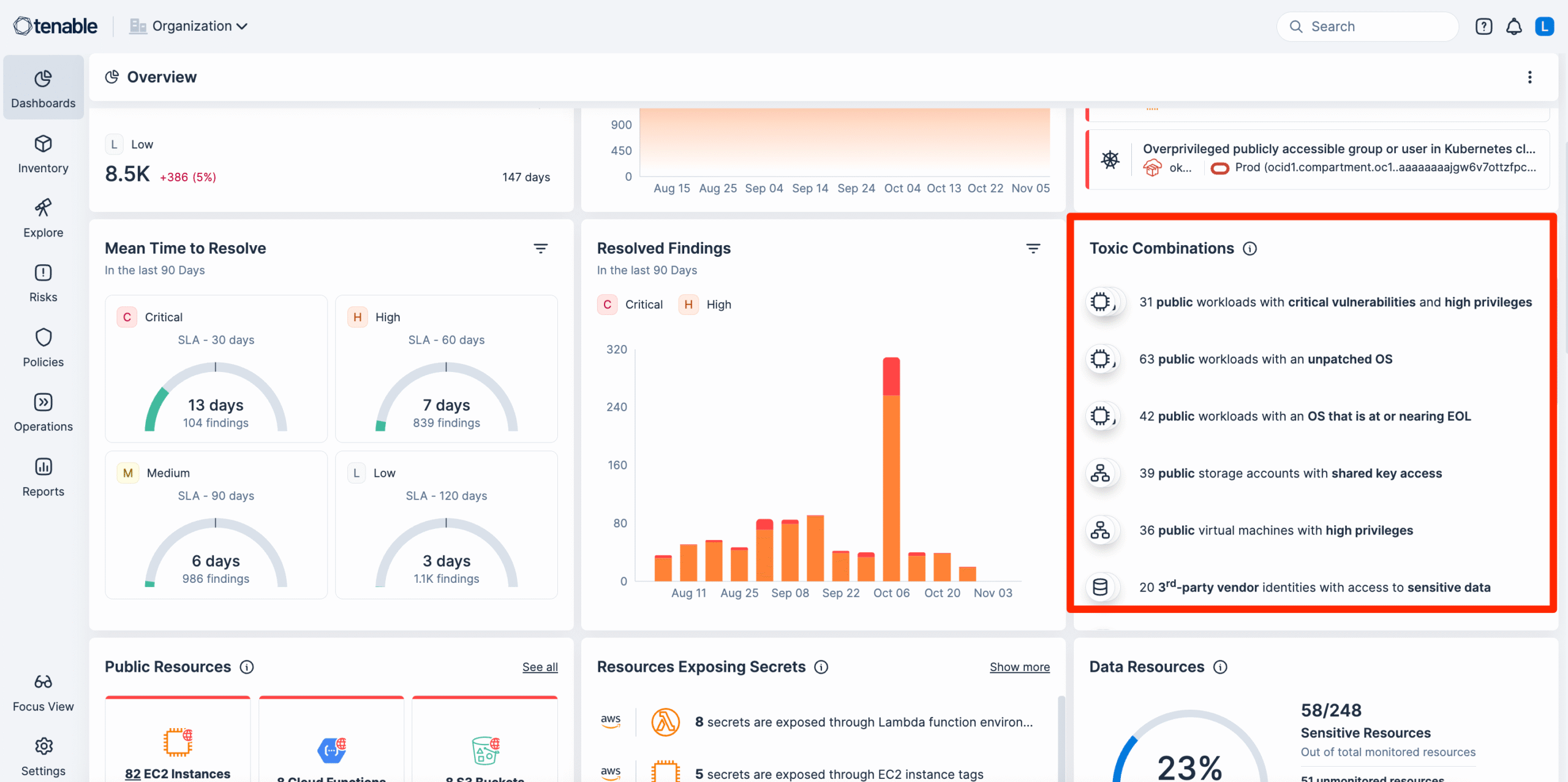
The real value? When your tools talk to each other, they can identify “toxic combinations.” That’s when multiple small risks combine to create a serious security gap. A single tool might miss this. An integrated platform won’t.
Tenable Cloud Security Features: A Detailed Breakdown
Now let’s dig into what Tenable Cloud Security actually does. We’re going to examine each major feature area so you understand exactly what you’re getting.
Multi-Cloud Visibility and Asset Discovery
The foundation of any cloud security tool is knowing what you need to protect. Tenable Cloud Security continuously scans your cloud environments to discover and inventory all assets.
What it finds:
- Virtual machines and compute instances
- Containers and Kubernetes clusters
- Serverless functions
- Storage buckets and databases
- Network configurations
- IAM roles and policies
- API gateways
The platform builds a complete map of your cloud infrastructure. This isn’t a one-time snapshot either. It updates continuously as your environment changes.
For organizations with resources across multiple cloud providers, this unified view is valuable. You don’t need to log into AWS, then Azure, then GCP to understand your security posture. Everything shows up in one interface.
Misconfiguration Detection
Misconfigurations cause a huge percentage of cloud security breaches. A publicly exposed storage bucket here. An overly permissive security group there. These mistakes happen constantly.
Tenable Cloud Security scans your cloud configurations against industry benchmarks and best practices. It checks for issues like:
- Unencrypted data at rest or in transit
- Publicly accessible resources that shouldn’t be
- Missing logging and monitoring
- Weak authentication settings
- Non-compliant network configurations
When it finds problems, it doesn’t just flag them. It explains what’s wrong, why it matters, and how to fix it. This context helps security teams prioritize their work.
Identity and Entitlement Management
Cloud permissions are tricky. IAM policies in AWS alone can get incredibly complex. Most organizations end up with users and services that have way more access than they need.
Tenable Cloud Security’s CIEM capabilities analyze your identity configurations to find:
- Overprivileged accounts
- Unused permissions that could be removed
- Risky access patterns
- Cross-account trust relationships
- Service accounts with excessive rights
The platform can recommend least-privilege policies based on actual usage. Instead of guessing what permissions someone needs, you can see what they actually use and adjust accordingly.
This is where “risky entitlements” come into play. Tenable specifically calls out permissions that could lead to privilege escalation or unauthorized access if exploited.
Vulnerability Management
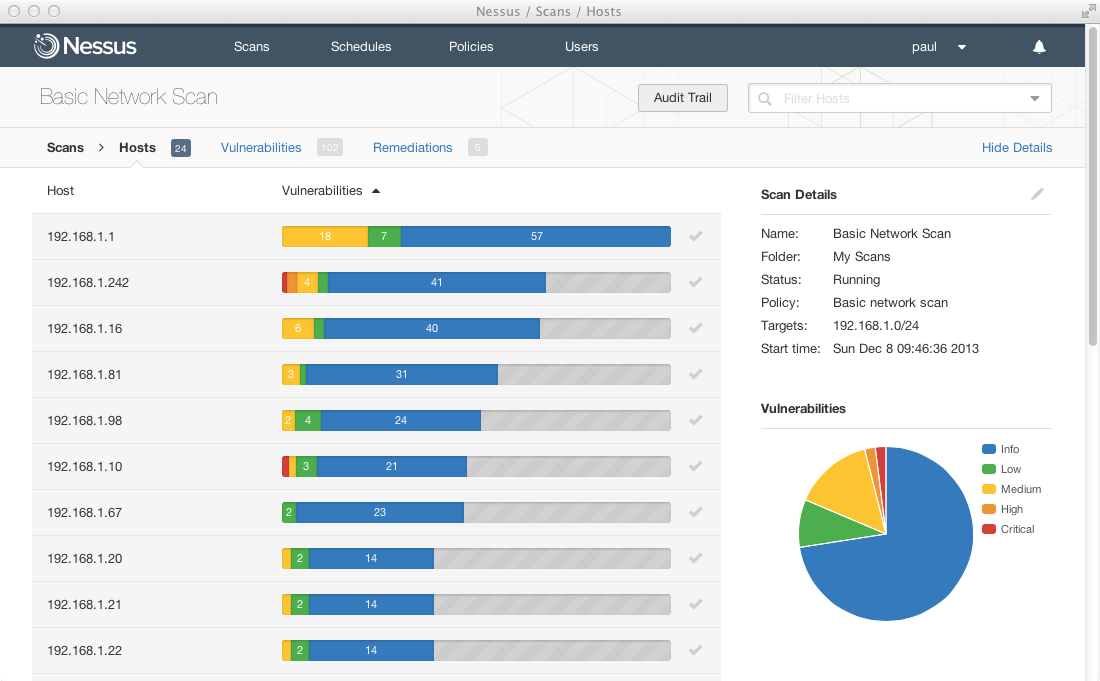
Tenable has deep roots in vulnerability management. The company built its reputation on Nessus, one of the most widely used vulnerability scanners in the world. This expertise carries over to their cloud security offering.
Tenable Cloud Security scans cloud workloads for known vulnerabilities. This includes:
- Operating system patches
- Application vulnerabilities
- Container image weaknesses
- Dependencies with known CVEs
But finding vulnerabilities isn’t enough. The platform prioritizes them based on:
- Severity of the vulnerability itself
- Exposure level (is this workload internet-facing?)
- Business criticality of the affected asset
- Availability of exploits in the wild
This risk-based approach helps teams focus on what matters most. You’re not drowning in a list of thousands of vulnerabilities with no idea where to start.
Infrastructure as Code Security
Shifting security left means catching problems before they reach production. Tenable Cloud Security can scan Infrastructure as Code templates during development.
Supported formats include:
- Terraform
- CloudFormation
- ARM templates
- Kubernetes manifests
- Helm charts
By integrating with CI/CD pipelines, the platform can block deployments that would create security issues. This prevents misconfigurations from ever reaching your live environment.
Developers get feedback early. Security teams don’t have to clean up messes after the fact. Everyone wins.
Container and Kubernetes Security
Container environments add another layer of complexity to cloud security. Tenable Cloud Security provides specific capabilities for these workloads.
Container image scanning:
- Scans images in registries before deployment
- Identifies vulnerable packages and libraries
- Checks for malware and embedded secrets
- Validates against security policies
Kubernetes security:
- Assesses cluster configurations
- Reviews RBAC policies
- Monitors runtime behavior
- Detects suspicious activity in pods
For organizations running containerized applications at scale, these features help maintain security without slowing down deployment cycles.
Compliance Monitoring and Reporting
Meeting regulatory requirements is non-negotiable for many organizations. Tenable Cloud Security includes built-in compliance frameworks to measure your posture against standards like:
- CIS Benchmarks
- SOC 2
- PCI DSS
- HIPAA
- GDPR
- NIST frameworks
- FedRAMP
The platform continuously checks your configurations against these frameworks. When you drift out of compliance, you know immediately.
Automated reports make audit preparation easier. Instead of scrambling to gather evidence before an audit, you have documentation ready to go.
How Tenable Cloud Security Works: Technical Architecture
Understanding how a security tool works under the hood helps you evaluate whether it will fit your environment. Let’s look at how Tenable Cloud Security operates.
Agentless Scanning
Tenable Cloud Security uses agentless technology for much of its scanning. This means you don’t need to install software on every workload you want to protect.
The platform connects to your cloud providers through APIs and service accounts. It reads configuration data, scans workload snapshots, and analyzes permissions without touching your running applications.
Benefits of this approach:
- No performance impact on production workloads
- Faster deployment since there’s nothing to install
- Complete coverage including ephemeral workloads
- Works across all major cloud providers
Some organizations prefer agent-based scanning for certain use cases. Tenable offers both options to cover different requirements.
Continuous Assessment
Cloud environments change constantly. Resources spin up and down. Configurations get modified. New vulnerabilities get discovered daily.
Tenable Cloud Security runs continuous assessments rather than periodic scans. It watches for changes and evaluates new resources as they appear.
This continuous approach means you’re working with current data. You’re not making decisions based on a scan from last week when your environment has changed significantly since then.
Integration Capabilities
Security tools don’t exist in isolation. Tenable Cloud Security integrates with your existing tech stack through various methods.
Cloud provider integrations:
- AWS (including GovCloud)
- Microsoft Azure
- Google Cloud Platform
DevOps tooling:
- GitHub, GitLab, Bitbucket
- Jenkins, CircleCI, Azure DevOps
- Jira for ticket creation
- Slack for notifications
SIEM and SOAR platforms:
- Splunk
- ServiceNow
- Various other platforms through APIs
These integrations let Tenable Cloud Security fit into your existing workflows instead of creating another silo.
User Experience and Interface Analysis
A powerful tool that’s hard to use doesn’t help anyone. Let’s examine what it’s actually like to work with Tenable Cloud Security day to day.
Dashboard and Navigation
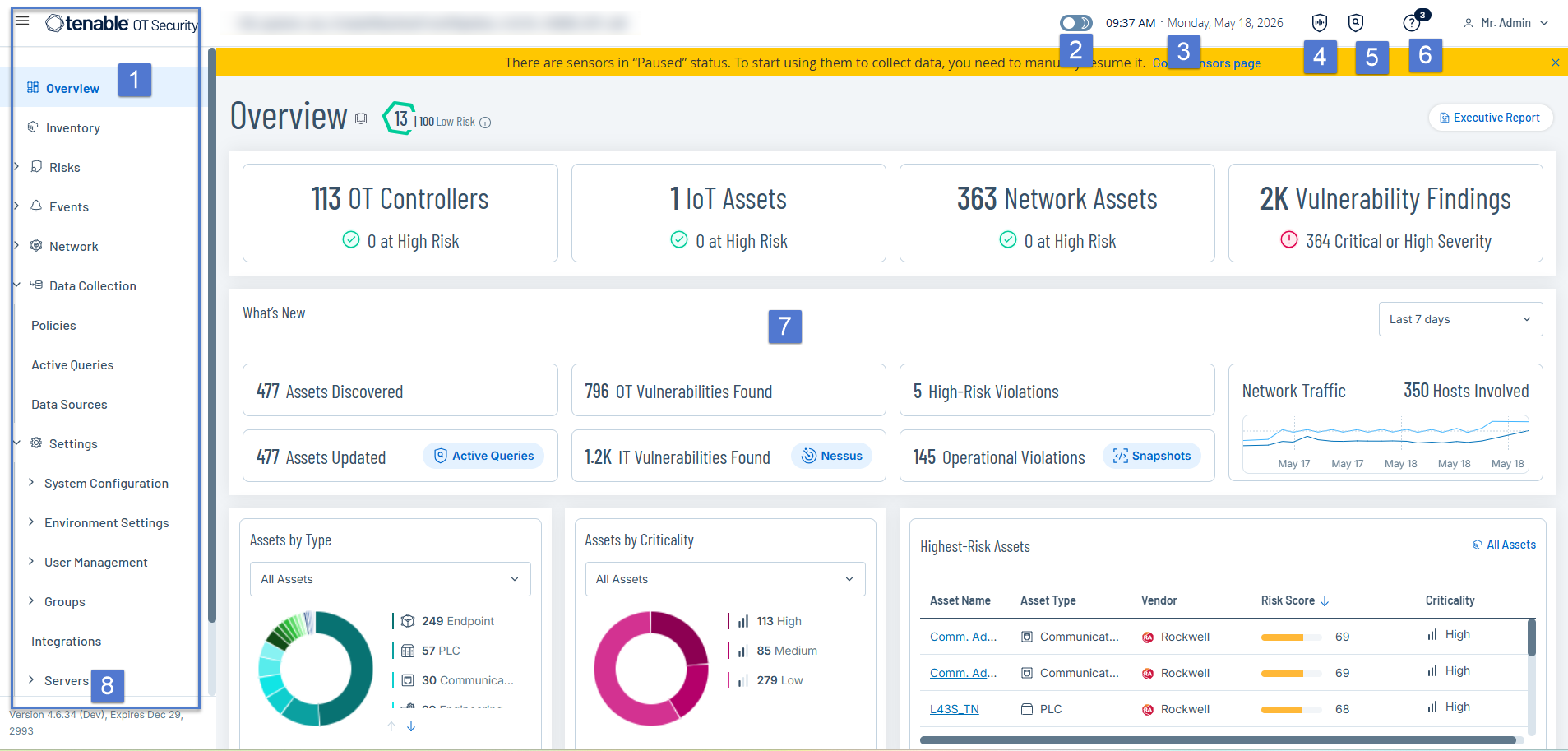
The main dashboard provides an overview of your security posture. At a glance, you can see:
- Total assets discovered
- Critical and high-severity findings
- Compliance status by framework
- Trends over time
Navigation is organized around key areas: assets, findings, compliance, and identities. You can drill down from high-level summaries to specific resources and their associated issues.
Search and filtering capabilities help you find specific resources quickly. If you manage thousands of cloud assets, this becomes essential.
Finding Management
When the platform identifies a security issue, it creates a finding with detailed information:
- What the problem is
- Which resources are affected
- Severity rating with context
- Remediation guidance
- Links to relevant documentation
Findings can be grouped, filtered, assigned to team members, and tracked through resolution. Some issues can be remediated directly from the platform through guided workflows.
The ability to suppress or accept certain findings is important for handling false positives or accepted risks. You don’t want the same known issue cluttering your view forever.
Reporting Capabilities
Tenable Cloud Security offers various reporting options for different audiences.
Executive reports summarize your security posture in business terms. These work well for leadership updates and board presentations.
Technical reports provide the detail security teams need for remediation work. They include specific resources, configurations, and step-by-step fixes.
Compliance reports map your findings to regulatory frameworks. They show which controls are satisfied and which need attention.
Reports can be scheduled for automatic generation and delivery. This keeps stakeholders informed without manual effort.
Real User Feedback: What Customers Say About Tenable Cloud Security
Marketing materials tell one story. Real users tell another. Let’s look at what actual customers say about this platform.
Gartner Peer Insights Recognition
Tenable Cloud Security has earned recognition as a Gartner Peer Insights Customers’ Choice for Cloud-Native Application Protection Platforms. This distinction comes from verified user reviews, not analyst opinions.
The platform holds a 4.8 out of 5 rating based on 581 ratings in the CNAPP category on Gartner. That’s a strong score, especially with a substantial number of reviews backing it up.
Users specifically highlight:
- Risk prioritization capabilities that help teams focus efforts
- Deep visibility across cloud environments
- Intuitive interface that doesn’t require extensive training
- All-in-one solution that replaces multiple point tools
Common Praise Points
Across various review platforms and user discussions, several themes emerge repeatedly.
Unified visibility: Users appreciate seeing all their cloud assets in one place. The multi-cloud support gets specific mention from organizations running hybrid environments.
Actionable insights: Findings include clear remediation steps. Users don’t just see problems; they understand how to fix them.
Speed to value: The agentless deployment model means organizations can start seeing results quickly. No lengthy rollout projects required.
Risk context: The platform doesn’t just list vulnerabilities by CVSS score. It considers your actual environment to prioritize what matters most.
Areas Users Want Improved
No product is perfect. User feedback also highlights areas where Tenable Cloud Security could improve.
Learning curve for advanced features: While basic usage is straightforward, some advanced capabilities require time to master.
Custom policy creation: Some users want more flexibility in creating custom security policies beyond the built-in options.
Alert tuning: Initial deployments can generate many findings. Teams need to invest time in tuning to reduce noise.
Reporting customization: While reports cover common needs, some organizations want more control over report formats and content.
Tenable Cloud Security vs. Competitors: Market Comparison
You have options in the CNAPP market. How does Tenable Cloud Security stack up against alternatives? Let’s compare.
Market Position
Tenable brings strong brand recognition from its vulnerability management heritage. The company has been in the security space for decades. This experience shows in the maturity of their platform.
Key competitors include:
- Palo Alto Prisma Cloud
- Wiz
- Orca Security
- Lacework
- Aqua Security
Each of these platforms has strengths in different areas. Your choice depends on your specific priorities.
Feature Comparison Table
| Feature Area | Tenable Cloud Security | Typical Competitor |
|---|---|---|
| Multi-cloud support | AWS, Azure, GCP | Varies by vendor |
| Agentless scanning | Yes, primary approach | Most offer this |
| CSPM capabilities | Strong | Strong across market |
| CIEM capabilities | Built-in | Varies significantly |
| Vulnerability expertise | Industry-leading heritage | Varies by vendor |
| IaC scanning | Included | Usually included |
| Container security | Included | Usually included |
| Deployment speed | Fast (agentless) | Fast for agentless vendors |
| Pricing model | Asset-based | Varies widely |
Where Tenable Stands Out
Vulnerability management integration: Tenable’s background in vulnerability assessment gives their platform an edge here. The correlation between cloud misconfigurations and traditional vulnerabilities is tighter than many competitors.
Exposure management vision: Tenable positions cloud security as part of a broader exposure management strategy. If you’re looking to unify security across cloud and on-premises environments, this matters.
Identity security depth: The CIEM capabilities in Tenable Cloud Security receive strong marks from users. Analyzing and remediating permission issues is a standout feature.
Established vendor stability: Tenable is a publicly traded company with a long track record. For organizations concerned about vendor longevity, this provides reassurance.
Where Others May Have an Edge
Pure-play cloud focus: Some newer vendors built their platforms exclusively for cloud from day one. They don’t carry any legacy architecture decisions.
Graph-based visualization: Certain competitors offer more advanced attack path visualization using graph technology.
Specific cloud depth: If you’re exclusively on one cloud provider, some vendor tools might offer deeper native integration.
Pricing and Licensing: What Tenable Cloud Security Costs
Let’s talk money. Understanding the pricing model helps you evaluate total cost of ownership.
Pricing Model Overview
Tenable Cloud Security uses asset-based pricing. You pay based on the number of cloud resources being protected rather than users or data volume.
The specific cost varies based on:
- Number of cloud accounts
- Total billable assets
- Contract length
- Additional capabilities needed
Tenable doesn’t publish exact pricing publicly. You’ll need to request a quote based on your environment size.
Available Discounts
Certain organizations qualify for special pricing. Members of the Multi-State and Elections Infrastructure Information Sharing and Analysis Centers (MS-ISAC and EI-ISAC) can receive discounted pricing through CIS CyberMarket.
If you’re a government or public sector organization, it’s worth exploring these options. The savings can be significant.
Enterprise agreements and multi-year commitments typically come with better rates as well. Negotiating based on your full Tenable portfolio, if you use other products like Nessus, can also help.
Total Cost Considerations
The license fee is just part of your total cost. Consider these factors:
Implementation effort: Agentless deployment reduces this, but you’ll still need time for configuration and integration.
Training requirements: Your team needs to learn the platform. Tenable provides documentation and training resources.
Ongoing management: Someone needs to review findings, tune policies, and drive remediation.
Tool consolidation savings: If Tenable Cloud Security replaces multiple existing tools, factor in those savings.
Implementation and Deployment Guide
Getting started with any security platform requires planning. Here’s what to expect when deploying Tenable Cloud Security.
Prerequisites
Before you begin, you’ll need:
- Administrative access to your cloud accounts
- Permission to create service accounts or roles for API access
- Understanding of your cloud architecture and assets
- Identified stakeholders for security findings
It’s helpful to document your current cloud footprint before starting. Know which accounts, regions, and resource types you need to cover.
Deployment Steps
Step 1: Account setup
Create your Tenable Cloud Security account and configure basic settings. Define your organization structure if you have multiple business units or teams.
Step 2: Cloud provider connections
Connect your AWS, Azure, and GCP accounts. This typically involves creating IAM roles or service principals with read access to your cloud resources.
Tenable provides CloudFormation templates and Terraform modules to simplify this process. The setup for each major cloud provider is well documented.
Step 3: Initial scan and discovery
Once connected, the platform begins discovering your cloud assets. This first scan can take time depending on your environment size.
Step 4: Baseline review
Review the initial findings. You’ll likely see many issues on first scan. This is normal. Work through them to understand your baseline posture.
Step 5: Policy tuning
Adjust policies based on your organization’s risk tolerance and requirements. Suppress findings that don’t apply to your environment. Add custom rules if needed.
Step 6: Integration setup
Connect Tenable Cloud Security to your other tools. Set up ticket creation in Jira, alerts in Slack, or data feeds to your SIEM.
Step 7: Workflow establishment
Define how your team will work with the platform. Who reviews findings? How are issues assigned? What’s the escalation path?
Time to Value
Most organizations can get basic visibility within hours of starting deployment. The agentless model speeds this up significantly.
However, reaching operational maturity takes longer. Plan for several weeks to:
- Tune out noise and false positives
- Establish response workflows
- Train team members
- Integrate with existing processes
Don’t expect to be fully operational on day one. But you will start seeing value quickly.
Use Cases: Who Should Consider Tenable Cloud Security?
Tenable Cloud Security isn’t right for everyone. Let’s look at where it fits best.
Ideal Organization Profiles
Mid-size to large enterprises: Organizations with substantial cloud footprints get the most value. If you’re managing dozens or hundreds of cloud accounts, unified visibility matters.
Multi-cloud environments: Running workloads across AWS, Azure, and GCP creates complexity. Tenable Cloud Security simplifies management across providers.
Regulated industries: Healthcare, financial services, and government organizations benefit from built-in compliance frameworks and audit-ready reporting.
Existing Tenable customers: If you already use Tenable.io or Nessus, adding cloud security to your portfolio makes sense. The platforms can work together.
Teams looking to consolidate: Organizations using multiple point solutions for CSPM, CWPP, and CIEM can reduce complexity by moving to one platform.
Use Case Examples
Use Case 1: Cloud migration security
A company moving from on-premises to cloud needs visibility into their new environment. Tenable Cloud Security discovers all resources as they’re created, ensuring nothing goes unprotected.
Use Case 2: DevSecOps integration
A software company wants to catch security issues before production. They integrate IaC scanning into their CI/CD pipeline, blocking risky deployments automatically.
Use Case 3: Compliance management
A healthcare organization needs to demonstrate HIPAA compliance continuously. They use Tenable Cloud Security’s compliance dashboards and automated reporting to track their posture.
Use Case 4: Least privilege enforcement
An enterprise has accumulated years of IAM policy creep. They use the CIEM capabilities to identify overprivileged accounts and right-size permissions across their organization.
When to Look Elsewhere
Tenable Cloud Security may not be the best fit if:
- You have a very small cloud footprint (under 100 resources)
- You’re exclusively on a single cloud provider and want native-only tooling
- You need deep Kubernetes-specific capabilities beyond basic scanning
- Your budget is extremely limited
In these cases, native cloud provider tools or more specialized solutions might serve you better.
Security and Privacy: How Tenable Protects Your Data
When you give a security tool access to your cloud environment, you need to trust them. Let’s examine how Tenable handles this responsibility.
Access Model
Tenable Cloud Security requires read-only access to your cloud accounts. It doesn’t need or request write permissions for basic functionality.
The platform uses:
- AWS cross-account IAM roles
- Azure service principals
- GCP service accounts
These can be scoped to specific permissions rather than full administrative access. You control exactly what the platform can see.
Data Handling
Tenable collects configuration data and metadata from your cloud resources. They don’t access the actual data stored in your workloads.
For vulnerability scanning, the platform reads disk snapshots. This is done without impacting running workloads and the data is processed securely.
Tenable maintains various security certifications for their own infrastructure. They publish transparency reports and undergo regular audits.
Compliance with Regulations
Tenable Cloud Security supports organizations subject to various regulations. The platform itself is designed to meet enterprise security requirements.
For extremely sensitive environments, Tenable offers deployment options that provide additional controls. Government customers can use FedRAMP-compliant options.
Support and Customer Success
What happens when you need help? Support quality can make or break your experience with any platform.
Support Options
Tenable provides multiple support tiers:
Standard support: Included with subscription. Provides access to documentation, knowledge base, and ticketed support during business hours.
Premium support: Adds 24/7 availability, faster response times, and dedicated support resources.
Technical Account Managers: For enterprise customers, named TAMs provide proactive guidance and relationship management.
Self-Service Resources
Tenable provides extensive documentation and learning resources:
- Product documentation and user guides
- Video tutorials and webinars
- Community forums for peer discussion
- Training courses and certifications
- Regular product update communications
Many common questions can be answered through self-service. This reduces dependency on support for routine issues.
Customer Success Programs
Beyond break-fix support, Tenable offers customer success programs focused on helping you get value from the platform.
These programs include:
- Onboarding assistance
- Best practice reviews
- Quarterly business reviews
- Advisory services
Availability varies by subscription level and contract size.
The Broader Tenable Ecosystem
Tenable Cloud Security doesn’t exist in isolation. Understanding how it fits with other Tenable products helps you see the full picture.
Tenable One Exposure Management Platform
Tenable positions itself as “the one clear leader in Exposure Management.” Their vision extends beyond cloud security to cover your entire attack surface.
Tenable One brings together:
- Cloud Security (what we’ve been discussing)
- Vulnerability Management for traditional IT
- Web Application Scanning
- Attack Surface Management
- Identity Security
- OT Security for operational technology
If you want unified visibility across all these areas, the Tenable ecosystem offers that option.
Hexa AI
Tenable is investing in AI capabilities through Hexa AI. This adds intelligent analysis and recommendations to their platform.
AI-powered features can help with:
- Prioritizing the most critical risks
- Explaining complex security issues in plain language
- Suggesting remediation approaches
- Identifying patterns across your environment
As AI capabilities mature, expect them to become more prominent in the product.
Integration with Tenable.io
Organizations already using Tenable.io for vulnerability management can integrate their cloud security data. This creates a unified view of risk across traditional and cloud workloads.
The combination is powerful for organizations with hybrid environments. You don’t need to manage cloud and on-premises security as separate worlds.
Future Direction and Product Roadmap
Where is Tenable Cloud Security heading? Understanding the roadmap helps you evaluate long-term fit.
Investment in Cloud Security
Tenable has made clear that cloud security is a major priority. The acquisition of cloud-native security companies and continued product development demonstrate this commitment.
Recent years have seen significant expansion of capabilities:
- Deeper CIEM functionality
- Expanded compliance frameworks
- Better developer workflows
- More cloud service coverage
This trajectory suggests continued investment going forward.
CNAPP Market Evolution
The CNAPP market itself is maturing quickly. Analysts expect consolidation and capability expansion across all vendors.
Trends to watch:
- Deeper AI and ML integration
- Better runtime protection capabilities
- Expanded attack path analysis
- More developer-friendly interfaces
Tenable will need to keep pace with these industry movements. Their track record suggests they will.
Final Verdict: Is Tenable Cloud Security Worth It?
After this deep analysis, what’s the bottom line?
Strengths Summary
Tenable Cloud Security brings real value in several areas:
- Unified visibility across multi-cloud environments
- Strong risk prioritization that helps teams focus
- Deep identity and entitlement analysis
- Vulnerability management expertise built on decades of experience
- Agentless deployment for fast time to value
- Compliance support for regulated industries
- Positive user feedback validated by Gartner ratings
Weaknesses Summary
Areas where improvement would help:
- Advanced features take time to learn
- Initial finding volume requires tuning effort
- Custom policy flexibility could be expanded
- Reporting customization options are limited
Who Should Buy
You should seriously consider Tenable Cloud Security if you:
- Manage substantial cloud infrastructure across multiple providers
- Need to address compliance requirements
- Want to consolidate multiple cloud security tools
- Already use other Tenable products
- Value vendor stability and maturity
Who Should Look Elsewhere
Consider alternatives if you:
- Have a very small cloud footprint
- Need only basic cloud security controls
- Have extremely tight budget constraints
- Require deep Kubernetes-native capabilities
Recommendation
Tenable Cloud Security is a strong CNAPP option for mid-size to large organizations. The 4.8 Gartner rating reflects genuine user satisfaction. The platform delivers on its promises for visibility, risk prioritization, and multi-cloud security management.
If you’re evaluating CNAPP solutions, Tenable deserves a spot on your shortlist. Request a demo, run a proof of concept, and see how it handles your specific environment. That hands-on evaluation will tell you whether it’s the right fit for your organization.
Conclusion
Tenable Cloud Security offers a complete approach to cloud-native application protection. It brings together misconfiguration detection, vulnerability management, identity security, and compliance monitoring in one platform. Real users give it high marks for visibility and risk prioritization. For organizations dealing with multi-cloud complexity and security tool sprawl, it presents a compelling option to simplify and strengthen their cloud security posture.
Frequently Asked Questions About Tenable Cloud Security Review
| Who is Tenable Cloud Security best suited for? | Mid-size to large enterprises with substantial multi-cloud environments. Organizations in regulated industries like healthcare, finance, and government benefit from built-in compliance features. It’s also a good fit for existing Tenable customers looking to extend their security coverage to cloud workloads. |
| How does Tenable Cloud Security compare to native cloud provider tools? | Native tools like AWS Security Hub or Azure Security Center work well for single-cloud environments. Tenable Cloud Security adds value when you need unified visibility across multiple cloud providers, deeper identity analysis, or integration with broader vulnerability management programs. |
| How long does it take to deploy Tenable Cloud Security? | Basic deployment can be completed in hours thanks to the agentless approach. However, reaching full operational maturity typically takes several weeks as you tune policies, integrate with existing tools, and establish response workflows. |
| Does Tenable Cloud Security require agents on workloads? | No. The platform primarily uses agentless scanning through cloud provider APIs. This means no software installation on your workloads, no performance impact, and faster deployment. Agent-based options are available for specific use cases if needed. |
| What cloud providers does Tenable Cloud Security support? | The platform supports Amazon Web Services (AWS), Microsoft Azure, and Google Cloud Platform (GCP). This covers the three major public cloud providers and supports multi-cloud environments where organizations use multiple providers. |
| How is Tenable Cloud Security priced? | Tenable uses asset-based pricing. You pay based on the number of cloud resources protected. Specific pricing requires a custom quote based on your environment size. Government and public sector organizations may qualify for discounted rates through CIS CyberMarket. |
| Can Tenable Cloud Security replace multiple existing security tools? | Yes, for many organizations. The CNAPP approach combines CSPM, CWPP, CIEM, and IaC scanning capabilities. If you’re currently using separate tools for each of these areas, consolidation onto Tenable Cloud Security can reduce complexity and potentially lower total cost. |
| What compliance frameworks does Tenable Cloud Security support? | The platform includes built-in support for CIS Benchmarks, SOC 2, PCI DSS, HIPAA, GDPR, NIST frameworks, FedRAMP, and others. It continuously monitors your configurations against these frameworks and generates audit-ready compliance reports. |
| How do real users rate Tenable Cloud Security? | The platform holds a 4.8 out of 5 rating on Gartner Peer Insights based on 581 ratings in the CNAPP category. It has been recognized as a Gartner Peer Insights Customers’ Choice. Users particularly highlight risk prioritization and multi-cloud visibility as strengths. |
| Does Tenable Cloud Security integrate with DevOps tools? | Yes. The platform integrates with popular DevOps tooling including GitHub, GitLab, Bitbucket, Jenkins, CircleCI, and Azure DevOps. This enables IaC scanning in CI/CD pipelines and helps shift security left into the development process. |





 Stack Insight is intended to support informed decision-making by providing independent information about business software and services. Some product details, including pricing, features, and promotional offers, may be supplied by vendors or partners and can change without notice.