
Orca Security Review

Orca Security Review 2026: Complete Analysis of the Agentless Cloud Security Platform
Cloud security has become a battlefield. Organizations running workloads on AWS, Azure, or Google Cloud face a constant stream of vulnerabilities, misconfigurations, and identity risks. Traditional security tools that require agents installed on every workload simply can’t keep up with the speed of cloud development. That’s where Orca Security enters the picture.
This Orca Security review breaks down everything you need to know about this cloud-native application protection platform. We’ll examine how the agentless SideScanning technology works, what security capabilities come built into the platform, and whether it delivers on its promise of complete cloud visibility. Whether you’re a security engineer evaluating vendors or a CISO building a cloud security strategy, this analysis gives you the details you need to make an informed decision.
What Is Orca Security? Understanding the Platform Basics
Orca Security is a cloud-native application protection platform, commonly called a CNAPP. The company launched with a single goal: provide full visibility into cloud environments without requiring agents. This approach was different from nearly every other security vendor at the time.
The Core Philosophy Behind Orca
Traditional cloud security tools require you to install software agents on virtual machines, containers, and other workloads. This creates headaches. Development teams resist adding agents because they can slow down applications. Security teams struggle to get complete coverage because some workloads never get agents installed.
Orca took a different path. The platform reads cloud storage directly using API access. It scans workload file systems, configurations, and network settings without touching the running systems. This means 100% coverage from day one. No gaps. No pushback from development teams about installing software.
Company Background and Market Position
Orca Security was founded in 2019 by former Check Point executives who saw the agent problem firsthand. The company grew quickly, raising significant venture funding and attracting enterprise customers. Today, Orca competes directly with vendors like Wiz, Lacework, and Prisma Cloud in the CNAPP market.
The platform is available directly from Orca and through cloud marketplaces. On AWS Marketplace, you can deploy Orca with existing AWS spending commitments. This makes procurement easier for organizations already invested in AWS.
Target Users and Use Cases
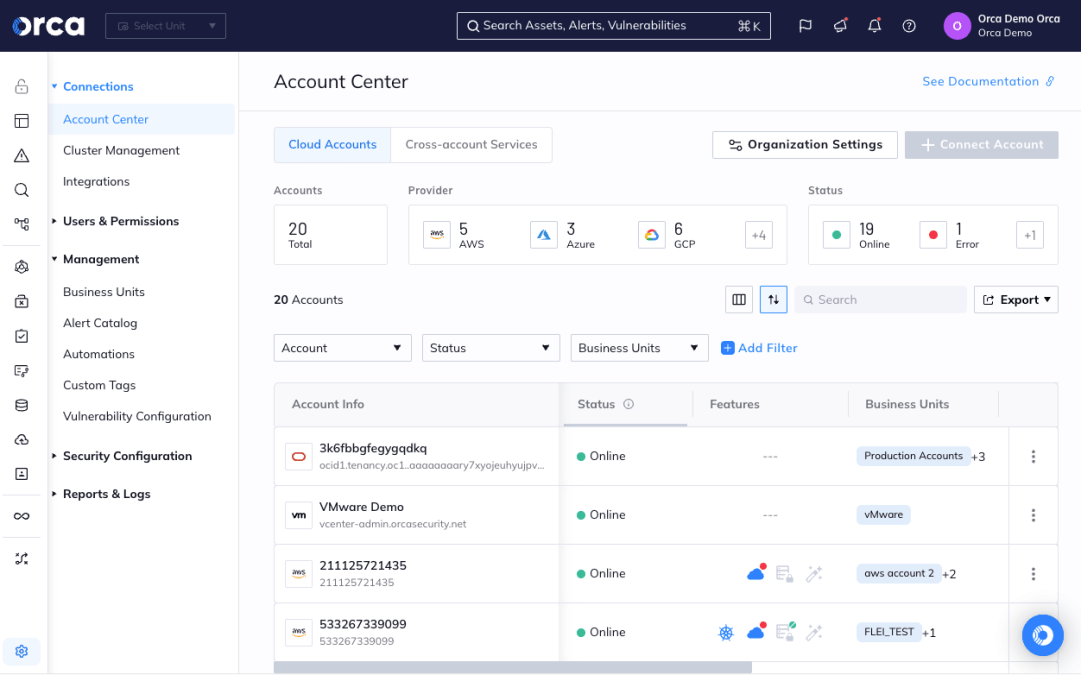
Orca Security targets organizations running production workloads in public clouds. The ideal customer typically has:
- Multiple cloud accounts spread across development, staging, and production
- Container workloads running on Kubernetes or managed services like EKS and ECS
- Compliance requirements for standards like SOC 2, PCI DSS, or HIPAA
- Lean security teams that can’t manage dozens of point tools
- Fast deployment cycles where agent installation would slow things down
The platform works for companies of various sizes, but the pricing model tends to favor mid-market and enterprise organizations with significant cloud footprints.
Orca Security Technology Deep Dive: How SideScanning Works
The technology that makes Orca Security different from competitors is called SideScanning. This patented approach changes how cloud security scanning happens. Understanding it helps explain why the platform can deliver results so quickly.
Traditional Scanning vs. SideScanning
With traditional security scanning, an agent runs inside each workload. The agent examines files, checks configurations, and monitors network traffic. It then sends findings back to a central console. This approach has worked for decades in on-premises environments.
Cloud environments work differently. Workloads can be ephemeral, spinning up and down in minutes. Installing agents on short-lived containers doesn’t make sense. And getting development teams to include agents in their deployment pipelines often creates friction.
SideScanning works outside the workload. Here’s the process:
- Orca connects to your cloud account using read-only API credentials
- The platform reads storage snapshots of your workload file systems
- Block storage data is analyzed for vulnerabilities, malware, and sensitive data
- Cloud configurations are examined through API calls to the cloud provider
- Results are correlated with network, identity, and other context
This happens without any impact on running workloads. No CPU cycles consumed. No network traffic generated. No agents to update or maintain.
What SideScanning Can Detect
Reading storage snapshots gives Orca visibility into everything installed on a system. The platform can identify:
- Operating system packages and their patch levels
- Application dependencies including npm, pip, and Maven packages
- Container images and their contents
- Configuration files that may contain hardcoded credentials
- Malware signatures and suspicious files
- Encryption keys and certificates stored on disk
- Database contents that might include sensitive data
This level of visibility matches or exceeds what agent-based tools provide. And it works across every workload, not just the ones where agents got installed.
Limitations of the Agentless Approach
No technology is perfect. SideScanning has some limitations worth understanding:
Point-in-time visibility: Scans happen periodically, not continuously. If malware appears between scans, there’s a delay before detection. Agent-based tools can catch real-time activity more quickly.
Memory analysis gaps: SideScanning reads disk storage, not memory. Fileless malware that only exists in RAM won’t be detected through this method.
Network traffic blind spots: Without agents, Orca can’t see network connections in real time. It infers network relationships from security group rules and cloud configurations instead.
Orca addresses some of these gaps by offering optional runtime protection capabilities. But the core value proposition remains the agentless approach for most use cases.
Complete Feature Analysis: Security Capabilities Built Into Orca
Orca Security bundles multiple security functions into a single platform. This consolidation is a major selling point. Instead of buying and managing separate tools, you get everything in one place. Let’s examine each capability in detail.
Cloud Security Posture Management (CSPM)
CSPM focuses on cloud configuration. Are your S3 buckets public? Are security groups too permissive? Is encryption enabled where it should be? These questions matter because misconfigurations cause most cloud breaches.
Orca’s CSPM capabilities include:
| Feature | What It Does | Why It Matters |
|---|---|---|
| Configuration Assessment | Checks cloud resources against security best practices | Catches mistakes before attackers find them |
| Compliance Mapping | Maps configurations to regulatory frameworks | Speeds up audit preparation |
| Drift Detection | Alerts when configurations change unexpectedly | Maintains security baselines over time |
| Multi-Cloud Support | Works across AWS, Azure, and GCP | Single view for hybrid environments |
The platform comes with hundreds of built-in policies covering major compliance frameworks. You can also create custom policies for organization-specific requirements.
Cloud Workload Protection Platform (CWPP)
CWPP handles security for the compute layer. This includes virtual machines, containers, and serverless functions. Orca’s CWPP capabilities scan for:
- Vulnerabilities in operating systems with CVE details and severity ratings
- Outdated software packages that need patching
- Malware and suspicious files using signature and behavioral detection
- Secrets and credentials accidentally committed to disk
- Weak configurations like disabled firewalls or permissive SSH settings
The agentless approach really shines here. Traditional CWPP tools need agents everywhere. Orca scans everything automatically, including workloads that were deployed before the security team even knew about them.
Kubernetes Security Posture Management (KSPM)
Kubernetes adds complexity to cloud security. Clusters have their own configurations, network policies, and access controls. Getting these wrong can expose applications or enable lateral movement.
Orca provides specialized Kubernetes scanning that examines:
- Cluster configurations against CIS benchmarks and best practices
- Pod security policies that control container privileges
- Network policies that segment traffic between workloads
- RBAC configurations that define who can do what in the cluster
- Secrets management for credentials stored in Kubernetes
Container images get scanned too. Orca examines images for vulnerabilities before and after deployment. This catches problems in the build pipeline and monitors for newly discovered vulnerabilities in running containers.
Cloud Infrastructure Entitlement Management (CIEM)
Identity and access management in the cloud is notoriously complicated. AWS alone has over 10,000 unique permissions. Understanding who can access what requires analyzing policies, roles, and trust relationships.
Orca’s CIEM capabilities help by:
- Mapping effective permissions for users, roles, and service accounts
- Identifying over-privileged identities that have more access than needed
- Detecting unused permissions that should be removed
- Finding lateral movement paths where compromised identities could escalate access
- Tracking cross-account trust relationships that expand the blast radius of breaches
This visibility helps security teams follow the principle of least privilege. When you can see that a development role has production database access it doesn’t need, you can fix it.
Shift Left Security and CI/CD Integration
Finding security problems in production is expensive. Finding them during development costs less. Orca supports shift left security by integrating into development pipelines.
The platform can scan:
- Infrastructure as code templates like Terraform and CloudFormation
- Container images during the build process
- Source code repositories for secrets and vulnerabilities
- CI/CD pipeline configurations for security weaknesses
Developers get feedback before changes reach production. Security teams get visibility into what’s being built. This collaboration model works better than security gates that block releases and create friction.
Attack Path Analysis: How Orca Prioritizes Real Risks
Finding vulnerabilities is easy. Every scanner finds thousands. The hard part is knowing which ones actually matter. Orca addresses this through attack path analysis that considers context.
The Problem with Severity-Based Prioritization
Most security tools assign severity ratings based on CVSS scores. A vulnerability rated 9.8 gets flagged as critical. But CVSS doesn’t consider your specific environment.
A critical vulnerability on a system that:
- Has no network connectivity
- Contains no sensitive data
- Requires authentication to access
- Sits behind multiple security controls
That vulnerability isn’t really critical in practice. An attacker would need to chain multiple exploits together to actually reach it.
How Orca Builds Attack Paths
Orca correlates findings across multiple domains to build attack paths. The platform considers:
Network exposure: Is this workload reachable from the internet? Are there security groups allowing inbound traffic?
Data sensitivity: Does this system contain PII, financial data, or credentials? What would an attacker gain from compromising it?
Identity relationships: What permissions does this workload have? Could an attacker pivot to other systems from here?
Existing vulnerabilities: What’s the full chain of weaknesses an attacker would exploit?
By combining these factors, Orca can show that a medium-severity vulnerability on an internet-facing system with database credentials actually represents high risk. Conversely, a critical vulnerability on an isolated development system might be lower priority.
Visualization and Communication
Attack paths get visualized as graphs in the Orca interface. Security teams can see exactly how an attacker might move from initial access to valuable targets. This visualization helps when communicating with non-security stakeholders.
Showing a development manager a path from “public S3 bucket” to “production database credentials” tells a clearer story than showing a list of CVE numbers. People understand attack stories better than severity ratings.
User Experience: Dashboard, Interface, and Daily Workflow
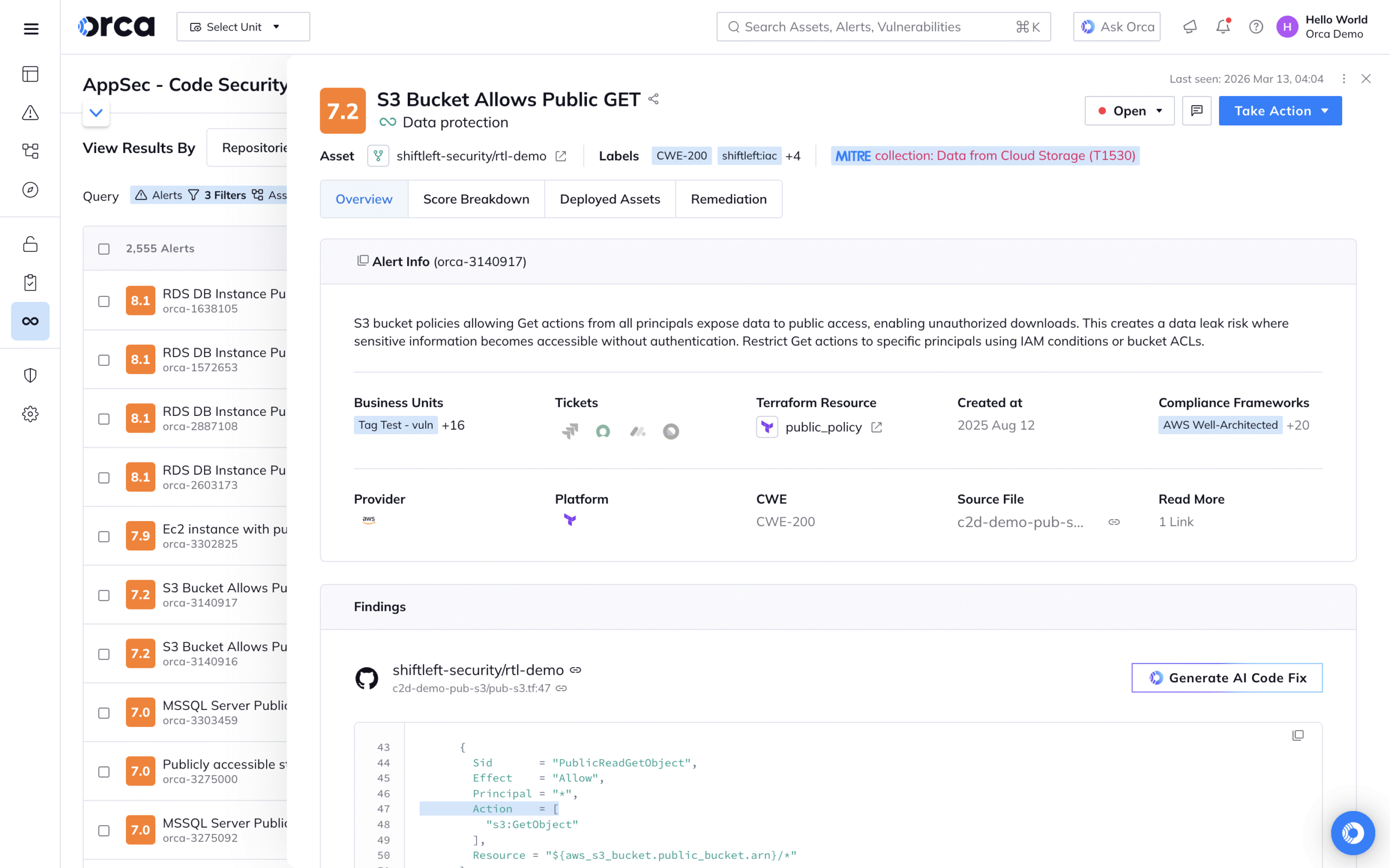
Security tools that are hard to use don’t get used. The interface matters. Based on user reviews and Gartner ratings, Orca scores well on usability. Let’s examine what the daily experience looks like.
Initial Setup and Onboarding
Getting started with Orca is straightforward compared to agent-based tools. The process typically involves:
- Connect cloud accounts by creating cross-account IAM roles with read permissions
- Configure scan settings to determine frequency and scope
- Wait for initial scan which usually completes within hours
- Review findings and start prioritizing remediation
Users consistently mention fast time to value. One reviewer on the Orca website stated: “When we started using Orca, our cloud estate was in disarray. After an incredibly easy setup, Orca immediately brought into focus how seriously exposed some of our assets were.”
No agent deployment. No maintenance windows. No pushback from operations teams. You connect the accounts and start getting visibility.
Main Dashboard and Navigation
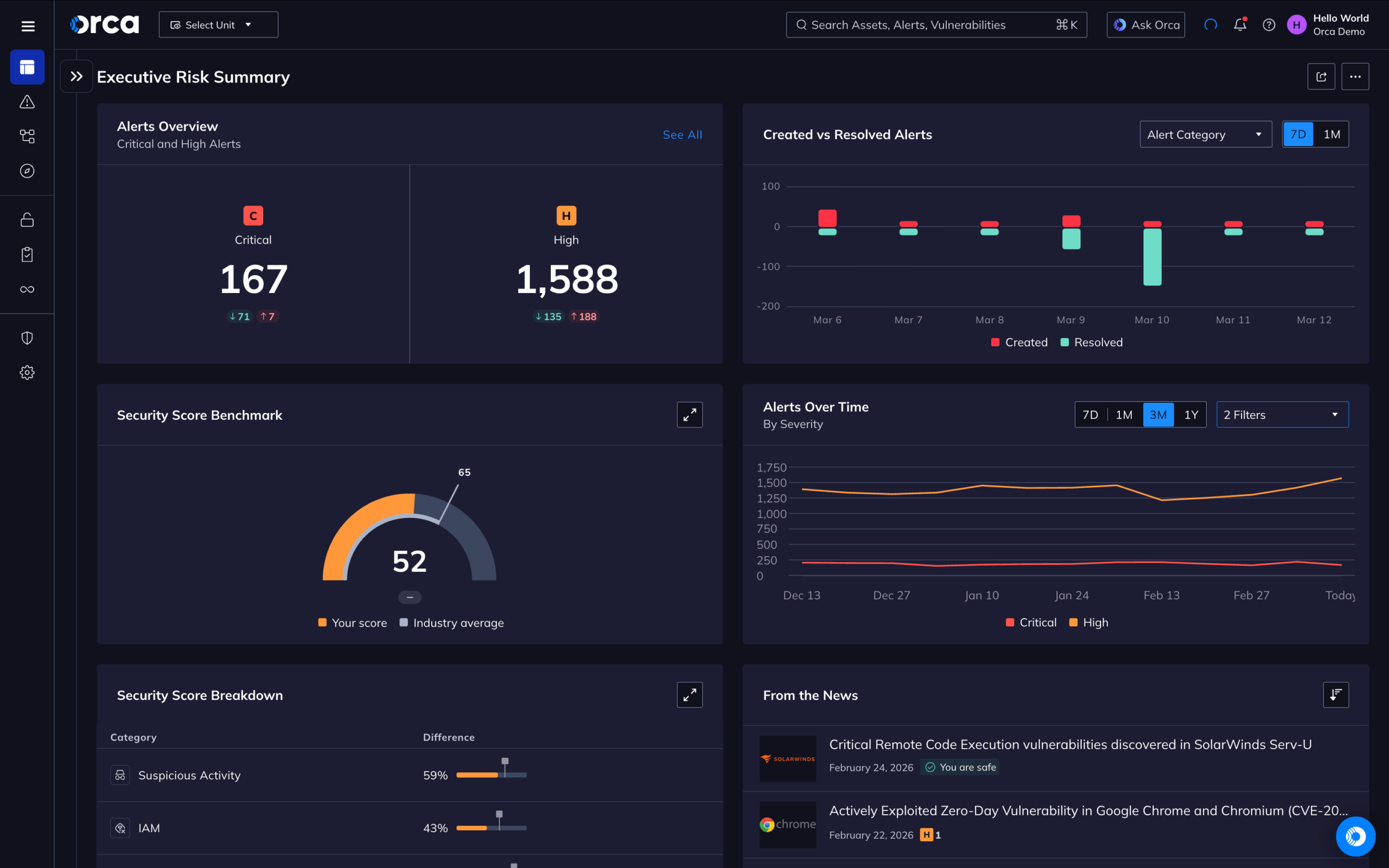
The Orca dashboard provides an overview of cloud security posture. Key elements include:
- Risk score trending showing improvement or regression over time
- Top risks requiring attention prioritized by actual exploitability
- Asset inventory with complete visibility into cloud resources
- Compliance status mapped to relevant frameworks
- Alert queues organized by severity and category
Users can drill down from high-level views to specific findings. The interface follows logical patterns that security professionals expect. Navigation doesn’t require extensive training.
Alert Management and Workflow
Managing alerts efficiently prevents security teams from drowning in noise. Orca provides several workflow features:
Auto-grouping: Related alerts get grouped together. Instead of seeing 50 alerts for the same vulnerability across 50 servers, you see one alert with 50 affected assets.
Filtering and search: Find specific issues quickly using filters for cloud account, asset type, severity, and other criteria.
Assignment and tracking: Route alerts to appropriate team members and track remediation status.
Integration hooks: Send alerts to ticketing systems, SIEM platforms, and notification channels like Slack.
One Gartner reviewer noted: “The automatic awareness of assets, configuration visibility, and even a few instances of malware showed up, one a server that was spun up for testing over a weekend with zero defenses, but Orca saw it.”
Reporting and Compliance Documentation
Security teams spend significant time preparing reports and compliance documentation. Orca includes built-in reporting for common frameworks:
| Framework | Coverage |
|---|---|
| SOC 2 | Full mapping of cloud controls |
| PCI DSS | Payment card security requirements |
| HIPAA | Healthcare data protection controls |
| CIS Benchmarks | AWS, Azure, GCP hardening guides |
| ISO 27001 | Information security management |
| NIST CSF | Cybersecurity framework controls |
| GDPR | EU data protection requirements |
Reports can be generated on demand or scheduled for regular delivery. Auditors appreciate having documentation automatically mapped to control requirements.
Orca Security vs. Wiz: Head-to-Head Comparison
The most common question when evaluating Orca is how it compares to Wiz. Both companies pioneered agentless cloud security. Both offer similar capabilities. The competition between them is fierce. Here’s how they stack up.
Technology Approach
Both Orca and Wiz use agentless scanning. Both read cloud storage snapshots to analyze workloads. The fundamental technology is similar, though each company has proprietary innovations.
Orca SideScanning was first to market with the agentless approach. The company has refined the technology over years of production use.
Wiz built a similar capability and has grown rapidly. The company reached unicorn status faster than almost any other security vendor.
For most practical purposes, the scanning approaches deliver comparable results. Both achieve full coverage without agents. Both find similar categories of issues.
Feature Comparison
| Capability | Orca Security | Wiz |
|---|---|---|
| Agentless Scanning | Yes (patented SideScanning) | Yes |
| CSPM | Full coverage | Full coverage |
| CWPP | Full coverage | Full coverage |
| CIEM | Full coverage | Full coverage |
| KSPM | Full coverage | Full coverage |
| Code Scanning | Available | Available |
| Attack Path Analysis | Strong | Strong |
| Multi-Cloud Support | AWS, Azure, GCP, Alibaba | AWS, Azure, GCP, Alibaba, OCI |
Feature parity is high. Both platforms can handle the same core use cases. The differences show up more in user experience, specific implementation details, and pricing.
Market Perception and Reviews
Looking at Gartner Peer Insights and other review platforms, both vendors receive strong ratings. Wiz tends to have slightly higher scores in some categories, with 4.8 out of 5 stars based on 580 ratings mentioned in one source.
Orca users consistently praise ease of use and fast deployment. Reviews on Gartner note the platform’s ability to quickly surface risks that had been invisible before.
One Orca reviewer described their experience: “It was an awesome experience using the Orca security system. It came with lots of security coverage, from compliance to cloud security, vulnerability management, dashboard and widgets customization and lots more.”
Pricing Considerations
Neither company publishes pricing publicly. Both use consumption-based models tied to cloud asset counts. Enterprise agreements involve negotiation based on specific requirements.
Generally, expect to pay based on:
- Number of cloud accounts connected
- Volume of workloads scanned
- Features and modules selected
- Contract length and commitment
Organizations should request quotes from both vendors and compare based on their specific environment. The pricing can vary significantly based on deal timing, competitive pressure, and relationship factors.
Which Should You Choose?
There’s no universal answer. Both are capable platforms from strong companies. Consider these factors:
Choose Orca if:
- You value the proven track record of the original agentless pioneer
- Your evaluation shows better alignment with your specific workflow
- The sales and support experience meets your expectations
- Pricing works out favorably for your environment
Choose Wiz if:
- You need specific features only Wiz offers
- Your evaluation shows better user experience for your team
- Existing relationships or integrations favor the platform
- Pricing works out favorably for your environment
Run a proper proof of concept with both. Let them scan the same environment. Compare findings, interface, and team feedback. The best choice depends on your specific situation.
Multi-Cloud Security: How Orca Handles AWS, Azure, and GCP
Most enterprises don’t use just one cloud. Acquisitions, team preferences, and strategic decisions lead to multi-cloud environments. Orca provides unified visibility across major providers.
AWS Coverage and Integration
AWS is Orca’s strongest integration. The platform connects through cross-account IAM roles with read-only permissions. Scanning covers:
- EC2 instances including EBS volumes and AMI analysis
- EKS clusters with full Kubernetes security coverage
- Lambda functions for serverless workload security
- RDS databases including configuration and access analysis
- S3 buckets for data exposure and access control
- IAM policies for identity risk analysis
The AWS Marketplace listing makes procurement easier. Organizations can apply existing AWS spending commitments toward Orca licensing. This simplifies budget approvals for teams already invested in AWS infrastructure.
Azure Coverage
Azure support mirrors AWS capabilities. Orca connects through Azure Active Directory app registration and can scan:
- Virtual machines and managed disk analysis
- AKS clusters for Kubernetes workloads
- Azure Functions for serverless security
- Storage accounts and blob containers
- Azure AD for identity and access analysis
Organizations with Microsoft-heavy environments get full coverage. The unified dashboard shows Azure risks alongside other clouds.
Google Cloud Coverage
GCP scanning works through service account credentials. Supported services include:
- Compute Engine instances and persistent disk analysis
- GKE clusters for Kubernetes security
- Cloud Functions for serverless workloads
- Cloud Storage buckets and access controls
- IAM policies for identity risk analysis
Unified Multi-Cloud Experience
The real value comes from the unified view. Security teams don’t need to context-switch between different tools for different clouds. One dashboard shows risks across all environments.
This matters for attack path analysis especially. An attacker might compromise an AWS workload, steal credentials, and pivot to Azure resources. Single-cloud tools miss these cross-cloud attack paths. Orca’s unified data model can surface them.
Compliance reporting also benefits. Generate one report showing posture across all clouds instead of stitching together separate reports from multiple tools.
Real User Experiences: What Orca Customers Actually Say
Marketing materials only tell part of the story. Let’s look at what actual users report about their Orca Security experience.
Positive Feedback Themes
Reviewing feedback from Gartner, the Orca website, and other sources reveals consistent positive themes:
Fast deployment: Users repeatedly mention how quickly they got value. Connecting accounts takes minutes. First results appear within hours. Compare that to weeks or months for agent-based deployments.
One user stated: “We even caught a live breach in our sandbox environment during our evaluation period!” Finding active threats during a trial demonstrates immediate value.
Complete coverage: The 100% visibility promise holds up in practice. Users discover workloads they didn’t know existed. Shadow IT becomes visible. Security gaps get exposed.
Alert quality: The context-aware prioritization helps teams focus. Users appreciate seeing attack paths rather than overwhelming CVE lists.
As one reviewer put it: “Orca has been a crucial tool for our enterprise to enhance our visibility into our cloud resources.”
Constructive Criticism and Challenges
No product is perfect. Users mention areas for improvement:
Learning curve for advanced features: While basic functionality is intuitive, some advanced capabilities require time to master. Custom policy creation and complex queries have steeper learning curves.
Alert volume at first: Initial scans often find hundreds or thousands of issues. Organizations with significant security debt can feel overwhelmed at first. Teams need to develop processes for systematic remediation.
Pricing complexity: Some users find the consumption-based pricing model difficult to predict. Costs can grow as cloud environments expand.
Integration gaps: While Orca integrates with major platforms, some users want deeper integration with specific tools in their stack.
Support and Customer Success
Reviews generally praise Orca’s support team. Users mention responsive communication and helpful guidance during implementation. The company invests in customer success to help organizations get value from the platform.
Training resources include documentation, videos, and direct support. New users can get up to speed without extensive external consulting.
Integration Ecosystem: Connecting Orca to Your Security Stack
Orca doesn’t operate in isolation. The platform needs to connect with existing security tools, ticketing systems, and communication platforms. Here’s how the integration ecosystem works.
SIEM and SOAR Integration
Security teams typically centralize alerts in SIEM platforms. Orca supports integration with major SIEM solutions:
- Splunk through native app and syslog forwarding
- Microsoft Sentinel through API integration
- IBM QRadar through log forwarding
- Sumo Logic through native integration
- Other SIEM platforms through webhook and syslog options
SOAR platforms can also pull Orca alerts for automated response workflows. When Orca finds a critical vulnerability, automation can create tickets, notify owners, or even trigger remediation scripts.
Ticketing and Workflow Systems
Most organizations track remediation work in ticketing systems. Orca integrates with:
- Jira for development team workflows
- ServiceNow for IT service management
- PagerDuty for on-call alerting
- OpsGenie for incident management
These integrations allow automatic ticket creation when Orca finds issues. Developers get notified through their normal workflow instead of checking a separate security console.
Communication Platforms
Real-time notifications help teams respond quickly. Orca sends alerts to:
- Slack channels for team visibility
- Microsoft Teams for Microsoft-centric organizations
- Email for traditional notification workflows
- Webhooks for custom integration scenarios
CI/CD Pipeline Integration
Shift left security requires integration into development tooling. Orca provides:
- CLI scanner for pipeline integration
- GitHub integration for repository scanning
- GitLab integration for code and container scanning
- Jenkins plugins for build pipeline checks
- API access for custom integration scenarios
Development teams can fail builds when critical vulnerabilities are found. This prevents vulnerable code from reaching production. The feedback loop is faster than finding issues after deployment.
Compliance and Regulatory Use Cases
Meeting compliance requirements is a major driver for cloud security investments. Orca provides specific capabilities for compliance-heavy industries.
Financial Services Requirements
Banks, investment firms, and fintech companies face strict regulatory requirements. Orca helps address:
PCI DSS: For organizations processing payment cards, Orca maps controls to PCI requirements. Evidence collection becomes easier when auditors request documentation.
SOC 2: Service organizations need SOC 2 reports to demonstrate security. Orca tracks the controls that auditors examine.
FFIEC guidelines: US financial regulators have specific expectations for cloud security. Orca’s configuration monitoring helps demonstrate compliance.
Healthcare Compliance
Healthcare organizations protecting patient data need HIPAA compliance. Orca assists by:
- Identifying PHI stored in cloud resources
- Monitoring access controls on sensitive data
- Tracking encryption requirements
- Documenting security controls for audit
The data classification features help identify where protected health information lives in cloud environments.
General Data Protection (GDPR)
Organizations handling EU resident data need GDPR compliance. Orca helps by:
- Finding personal data in cloud storage
- Monitoring data access and processing
- Tracking data transfer configurations
- Supporting data subject access requests
Industry Framework Support
Beyond specific regulations, Orca supports general security frameworks:
CIS Benchmarks: The Center for Internet Security publishes hardening guides for AWS, Azure, and GCP. Orca automatically checks configurations against these benchmarks.
NIST Cybersecurity Framework: Many organizations align to NIST CSF. Orca maps controls to the five framework functions: Identify, Protect, Detect, Respond, and Recover.
ISO 27001: For organizations pursuing ISO certification, Orca tracks controls relevant to the information security management system.
Implementation Guide: Getting Started with Orca Security
Deploying Orca Security is simpler than traditional security tools, but planning still matters. Here’s a practical guide for successful implementation.
Pre-Deployment Planning
Before connecting cloud accounts, establish:
Scope definition: Which cloud accounts will be scanned? Start with production and critical environments before expanding to development accounts.
Stakeholder alignment: Who needs access to Orca? Define roles for security engineers, developers, and management viewers.
Alert routing: Where will alerts go? Plan integrations with existing ticketing and notification systems.
Remediation ownership: Who fixes issues? Cloud misconfigurations might go to infrastructure teams. Application vulnerabilities might go to development teams.
Cloud Account Connection
The technical connection process varies by cloud:
AWS connection:
- Create a cross-account IAM role in your AWS accounts
- Grant read-only permissions for EC2, S3, IAM, and other services
- Provide the role ARN to Orca
- Orca assumes the role to perform scans
Azure connection:
- Create an app registration in Azure AD
- Grant reader permissions on subscriptions
- Provide credentials to Orca
- Orca authenticates to perform scans
GCP connection:
- Create a service account in your GCP project
- Grant viewer permissions on resources
- Provide service account credentials to Orca
- Orca authenticates to perform scans
Initial scans typically complete within hours. Larger environments take longer but don’t require any action from your team.
First Week Activities
Once scans complete, focus on:
Day 1-2: Review the dashboard. Understand the overall risk posture. Don’t panic at the volume of findings, as most organizations discover more issues than expected.
Day 3-4: Examine high-priority attack paths. Focus on internet-exposed vulnerabilities and crown jewel assets. These require immediate attention.
Day 5-7: Configure alert rules and integrations. Route findings to appropriate teams. Establish a rhythm for reviewing new issues.
Ongoing Operations
After initial deployment, establish operational patterns:
Daily: Review new high-severity alerts. Assign critical findings for immediate remediation.
Weekly: Review trend reports. Track remediation progress. Identify patterns requiring systematic fixes.
Monthly: Generate compliance reports. Review with stakeholders. Plan remediation projects for persistent issues.
Quarterly: Assess overall program maturity. Expand scanning scope. Review Orca feature updates and enable new capabilities.
Orca Security Pricing and Licensing Analysis
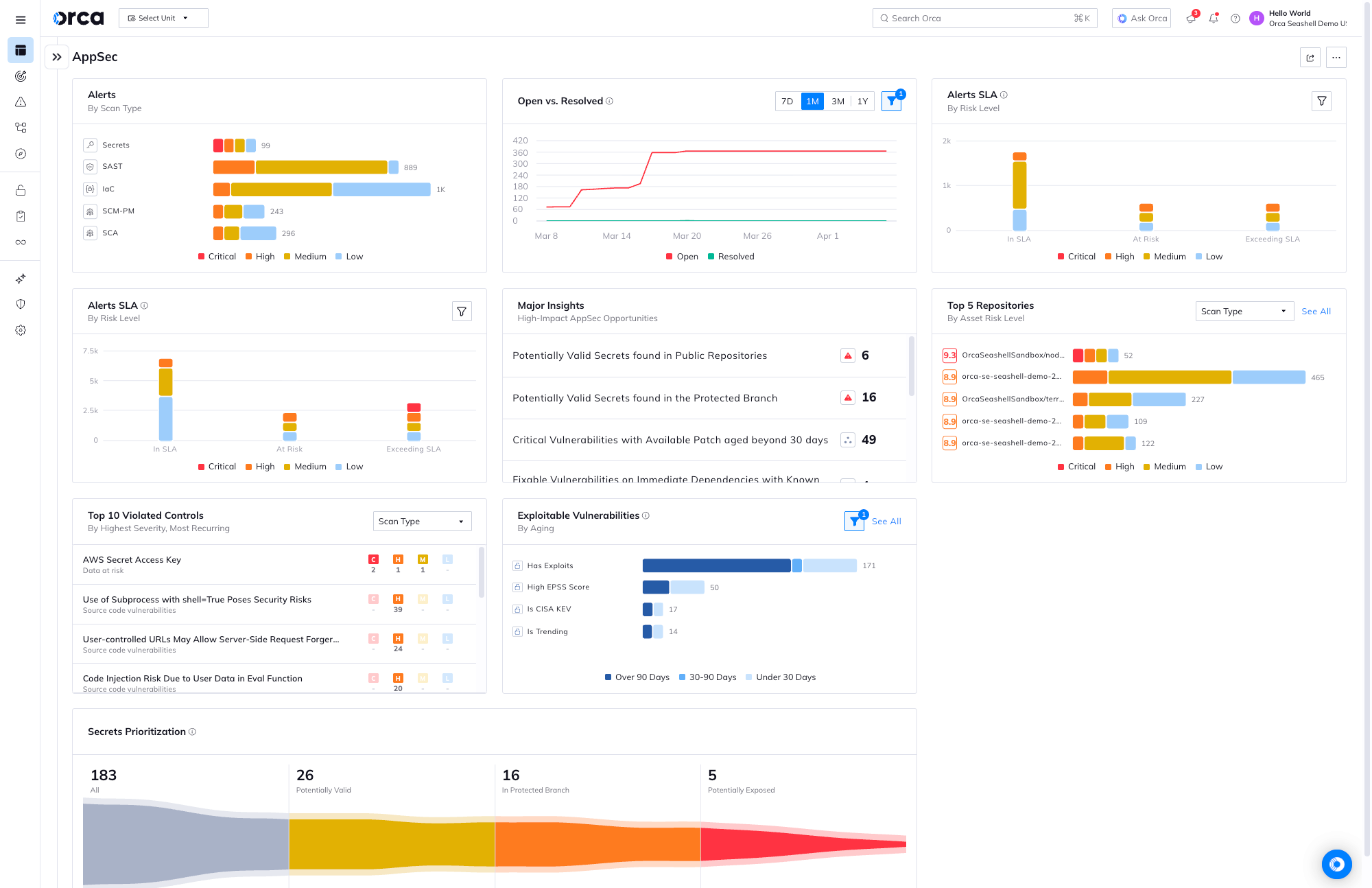
Pricing is always a key consideration. Orca doesn’t publish specific numbers, but understanding the pricing model helps with budget planning.
Consumption-Based Model
Orca uses a consumption-based pricing model. You pay based on what you protect:
- Cloud workload count including VMs, containers, and serverless functions
- Storage scanned in some pricing tiers
- Features selected from the platform modules
This model aligns cost with value. You pay more as your cloud environment grows. But it also means costs can increase unpredictably if cloud usage spikes.
Enterprise Agreement Options
Large organizations typically negotiate enterprise agreements that include:
- Volume discounts for large deployments
- Committed use pricing for predictable costs
- Support tiers from standard to premium
- Professional services for implementation assistance
Multi-year commitments usually receive better pricing than month-to-month arrangements.
Marketplace Procurement
Buying through AWS Marketplace offers advantages:
- Use existing AWS spending commitments
- Simplified procurement through existing vendor relationship
- Consolidated billing with other AWS services
- Potential for committed use discounts
Organizations with AWS Enterprise Agreements should consider this path.
ROI Considerations
When evaluating Orca’s price, consider the value delivered:
Tool consolidation: Replacing multiple point tools with one platform reduces overall security spend. Compare Orca’s price against the combined cost of separate CSPM, CWPP, CIEM, and KSPM tools.
Staff efficiency: Faster visibility and better prioritization mean security teams accomplish more. Calculate the time savings from not deploying agents and not managing multiple tools.
Risk reduction: Finding and fixing vulnerabilities before breaches prevents costly incidents. One prevented breach can justify years of platform cost.
Final Verdict: Should You Choose Orca Security?
After examining the platform in detail, here’s the overall assessment.
Strengths Summary
Agentless approach: SideScanning delivers complete visibility without the operational burden of agent management. This is the platform’s defining strength.
Unified platform: Consolidating CSPM, CWPP, CIEM, and KSPM into one tool reduces complexity. Security teams operate more efficiently.
Attack path analysis: Context-aware prioritization helps teams focus on real risks instead of drowning in alerts.
Fast deployment: Getting value in hours instead of months matters for organizations that need immediate visibility.
Multi-cloud coverage: Unified visibility across AWS, Azure, and GCP serves organizations with diverse cloud strategies.
Considerations
Agentless limitations: Real-time monitoring and fileless malware detection aren’t as strong as agent-based tools. Organizations with those specific needs may want complementary solutions.
Competitive market: Wiz and other vendors offer similar capabilities. Thorough evaluation against alternatives is important.
Pricing opacity: Without public pricing, budget planning requires vendor engagement. Get specific quotes for your environment.
Ideal Use Cases
Orca Security is particularly well-suited for:
- Organizations with cloud-native workloads and limited security staff
- Companies seeking to consolidate multiple security tools
- Environments where agent deployment is impractical
- Teams that need fast visibility into cloud security posture
- Organizations with compliance requirements across cloud infrastructure
Organizations That Might Look Elsewhere
Orca might not be the best fit for:
- Organizations requiring deep real-time monitoring capabilities
- Environments with primarily on-premises workloads
- Very small cloud footprints where simpler tools suffice
- Organizations locked into competing vendor relationships
Conclusion: Orca Security Review Summary
Orca Security has earned its position as a leading CNAPP through innovation and execution. The agentless SideScanning approach solves real problems that security teams face in cloud environments. Complete visibility without agent deployment isn’t just convenient. It fundamentally changes how organizations can approach cloud security.
The platform combines capabilities that historically required multiple tools. This consolidation reduces complexity and improves efficiency. For organizations struggling with cloud security visibility, Orca deserves serious consideration alongside competitors like Wiz. Run a proof of concept in your environment and let the results guide your decision.
Frequently Asked Questions About Orca Security
| What type of organization should use Orca Security? | Orca Security works best for organizations with significant public cloud workloads on AWS, Azure, or GCP. Companies with lean security teams, compliance requirements, and fast-moving development cycles benefit most. The agentless approach suits environments where deploying agents would create friction or gaps in coverage. |
| How does Orca Security scanning work without agents? | Orca uses patented SideScanning technology that reads cloud storage snapshots through API access. The platform analyzes workload file systems, configurations, and metadata without installing software on running systems. This provides deep visibility while avoiding the operational overhead of agent management. |
| How long does it take to deploy Orca Security? | Initial deployment typically takes hours rather than weeks. Connecting cloud accounts involves creating read-only IAM roles or service accounts. Once connected, scans run automatically. Most organizations see initial findings within the first day of deployment. |
| How does Orca Security compare to Wiz? | Both platforms offer agentless cloud security with similar CNAPP capabilities. Orca pioneered the agentless approach with SideScanning. Wiz grew rapidly and has strong market traction. Feature parity is high. Organizations should run proof of concept evaluations with both to determine which fits better for their specific environment and team. |
| What compliance frameworks does Orca Security support? | Orca includes built-in support for SOC 2, PCI DSS, HIPAA, GDPR, ISO 27001, NIST Cybersecurity Framework, and CIS Benchmarks for major cloud providers. The platform maps findings to control requirements and generates documentation for audit purposes. |
| What are the limitations of Orca Security’s agentless approach? | Agentless scanning provides point-in-time visibility rather than continuous monitoring. Fileless malware that exists only in memory may not be detected. Real-time network traffic monitoring isn’t available without agents. Orca offers optional runtime protection features for organizations that need these capabilities. |
| How does Orca Security handle multi-cloud environments? | Orca provides unified visibility across AWS, Azure, GCP, and Alibaba Cloud. One dashboard shows risks across all connected clouds. Attack path analysis can identify cross-cloud risks where compromised credentials in one environment could impact another. |
| What integrations does Orca Security support? | Orca integrates with major SIEM platforms like Splunk and Microsoft Sentinel, ticketing systems like Jira and ServiceNow, communication tools like Slack and Microsoft Teams, and CI/CD platforms including GitHub and GitLab. Webhooks and API access support custom integrations. |
| Is Orca Security available on cloud marketplaces? | Yes, Orca Security is available on AWS Marketplace. Organizations can apply existing AWS spending commitments toward Orca licensing, simplifying procurement for teams already invested in AWS infrastructure. |
| What does Orca Security cost? | Orca uses consumption-based pricing tied to cloud workload counts. Specific pricing isn’t published publicly. Organizations should request quotes based on their environment size and feature requirements. Enterprise agreements with volume discounts are available for larger deployments. |





 Stack Insight is intended to support informed decision-making by providing independent information about business software and services. Some product details, including pricing, features, and promotional offers, may be supplied by vendors or partners and can change without notice.