
Aqua Security Review


Aqua Security Review: A Complete Guide to the Leading Cloud Native Security Platform
Securing cloud native applications has become one of the biggest challenges for modern enterprises. Containers, Kubernetes clusters, and serverless functions create new attack surfaces that traditional security tools simply can’t handle. Aqua Security has positioned itself as a pioneer in this space, offering what they call a Cloud Native Application Protection Platform, or CNAPP.
This review covers everything you need to know about Aqua Security’s platform. We’ll dig into its features, pricing model, strengths, weaknesses, and how it compares to competitors. Whether you’re a security engineer evaluating tools or a CISO making budget decisions, this guide will help you understand if Aqua Security fits your organization’s needs. We’ll look at real user feedback, technical capabilities, and practical use cases to give you a complete picture of what to expect.
What Is Aqua Security? Company Background and History
Aqua Security started in 2015 with a simple mission. The founders recognized that containers and cloud native technologies were changing how companies build software. But security tools hadn’t caught up. Traditional perimeter-based security couldn’t protect dynamic, ephemeral workloads.
The Founding Story
The company was founded in Israel by cybersecurity veterans. They saw containers moving from development environments into production. And they knew this shift would create massive security gaps. Their timing was perfect. Docker was gaining mainstream adoption. Kubernetes was becoming the standard for container orchestration.
Aqua quickly established itself as the first dedicated container security vendor. While others were still figuring out what containers meant for security, Aqua was already building protection tools specifically for this new world.
Open Source Contributions
One thing that sets Aqua apart is their commitment to open source. They’ve created some of the most popular cloud native security tools available:
- Trivy: A vulnerability scanner with 36,500+ GitHub stars. It’s become the go-to tool for scanning container images, filesystems, and git repositories.
- Tracee: A runtime security tool with 4,400+ stars. It uses eBPF technology for deep system visibility.
- kube-bench: A Kubernetes security checker with 7,900+ stars. It tests clusters against CIS benchmarks.
- kube-hunter: A penetration testing tool with 5,000+ stars. It actively hunts for security weaknesses in Kubernetes deployments.
These aren’t small side projects. They’re among the most starred cloud native security tools on GitHub. This open source presence builds trust with developers and security teams. It also demonstrates technical expertise.
Enterprise Customer Base
Aqua reports serving 500+ enterprise customers through their commercial platform. This is a self-published figure, not independently audited. But it includes major organizations across finance, healthcare, technology, and government sectors. The company has raised over $265 million in funding from investors including Insight Partners, Lightspeed Venture Partners, and TLV Partners.
Understanding CNAPP: Why It Matters for Your Security Strategy
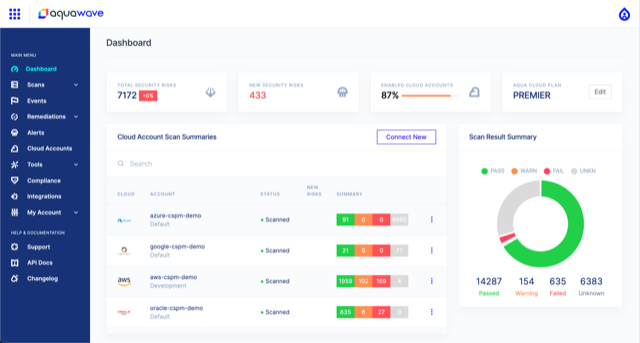
Before diving deeper into Aqua’s platform, let’s understand what CNAPP actually means. This context is important for evaluating any cloud native security tool.
The Problem CNAPP Solves
Cloud environments are complicated. Really complicated. A typical enterprise might run thousands of containers across multiple Kubernetes clusters. They might use serverless functions, virtual machines, and various cloud services. All of these create potential security risks:
- Software vulnerabilities in container images
- Misconfigured cloud infrastructure
- Insecure runtime settings
- Exposed secrets and credentials
- Overly permissive identity and access policies
- Compliance violations
Traditionally, organizations needed separate tools to address each of these areas. A vulnerability scanner here. A configuration checker there. A runtime protection agent somewhere else. This led to tool sprawl, alert fatigue, and gaps in coverage.
What CNAPP Brings Together
A Cloud Native Application Protection Platform combines multiple security capabilities into one solution. According to Aqua’s definition, CNAPP tools protect applications “from code to cloud.” The goal is to secure workloads across all layers and all stages of development.
The five main pillars of CNAPP that Aqua covers include:
| CNAPP Pillar | What It Does | When It Applies |
|---|---|---|
| Container Image Scanning | Finds vulnerabilities and malware in container images | Build time and registry scanning |
| Cloud Workload Protection (CWPP) | Protects running workloads from attacks | Runtime protection |
| Kubernetes Security Posture Management (KSPM) | Checks Kubernetes configurations against best practices | Deployment and ongoing monitoring |
| Cloud Security Posture Management (CSPM) | Identifies cloud infrastructure misconfigurations | Continuous monitoring |
| Infrastructure-as-Code Scanning | Catches security issues before deployment | Development and CI/CD |
Why Organizations Choose CNAPP Over Point Solutions
The appeal of CNAPP is consolidation. Instead of managing five or ten different security tools, you get one platform. One console. One set of policies. One vendor relationship.
But there’s a deeper benefit too. When security capabilities are integrated, they can share context. A vulnerability finding becomes more meaningful when you know the affected container is actually running in production. And when you know it’s exposed to the internet. And when you know it’s processing sensitive data.
This context is exactly what Aqua emphasizes. As they put it: “Correlate vulnerabilities, runtime behavior and cloud context to reduce noise, accelerate remediation and shorten mean time to protect.”
Aqua Security Platform Overview: Full Breakdown of Capabilities
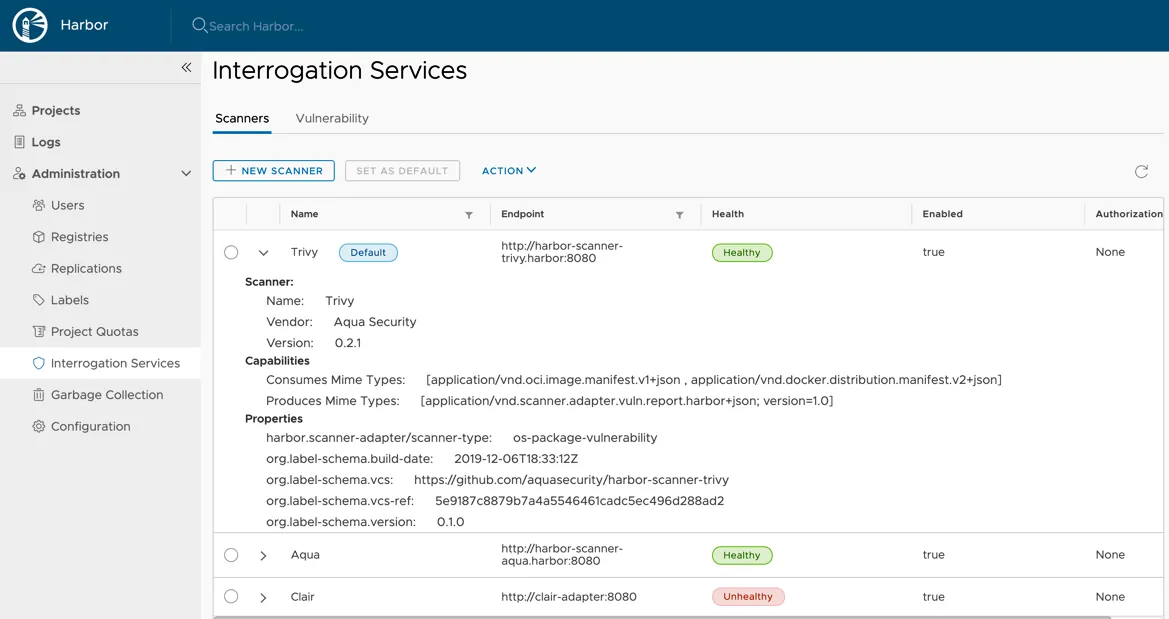
Now let’s look at what Aqua’s platform actually does. This section covers the core features and how they work together.
Code Security and Shift-Left Capabilities
Aqua’s security story starts in the development phase. The platform scans code repositories and infrastructure-as-code templates before anything reaches production.
Infrastructure-as-Code Scanning:
- Scans Terraform, CloudFormation, Kubernetes manifests, and Helm charts
- Identifies misconfigurations that could lead to security problems
- Integrates with CI/CD pipelines to catch issues early
- Provides remediation guidance for developers
Software Composition Analysis:
- Identifies open source packages and their licenses
- Maps dependencies and transitive dependencies
- Tracks known vulnerabilities in third-party code
- Generates software bills of materials (SBOMs)
The shift-left approach matters because fixing issues early is cheaper. A vulnerability caught during development costs almost nothing to fix. The same vulnerability in production could mean emergency patches, downtime, or worse.
Container Image Scanning
This is where Aqua’s Trivy heritage really shows. The platform provides comprehensive scanning of container images.
What gets scanned:
- Operating system packages
- Programming language dependencies (npm, pip, gems, etc.)
- Known vulnerabilities (CVEs)
- Malware signatures
- Embedded secrets and credentials
- Compliance with hardening benchmarks
Where scanning happens:
- Developer workstations (IDE plugins)
- CI/CD pipelines
- Container registries
- Running containers in production
Aqua supports all major container registries including Docker Hub, Amazon ECR, Google Container Registry, Azure Container Registry, and private registries. The platform can block non-compliant images from being deployed.
Kubernetes Security Posture Management
Kubernetes is powerful but easy to misconfigure. Aqua’s KSPM capabilities help organizations secure their clusters.
Configuration Assessment:
- Checks clusters against CIS Kubernetes Benchmark
- Identifies overly permissive RBAC policies
- Detects risky pod security settings
- Monitors network policies
- Tracks admission controller configurations
Continuous Monitoring:
- Watches for configuration drift
- Alerts on new security findings
- Tracks changes over time
- Provides remediation steps
Aqua supports managed Kubernetes services like Amazon EKS, Google GKE, and Azure AKS. It also works with self-managed Kubernetes clusters and distributions like OpenShift and Rancher.
Cloud Security Posture Management
Beyond Kubernetes, Aqua monitors the broader cloud environment. This includes compute resources, storage, networking, and identity management.
Multi-Cloud Support:
- Amazon Web Services (AWS)
- Microsoft Azure
- Google Cloud Platform (GCP)
What gets monitored:
- IAM policies and permissions
- Network security groups and firewalls
- Storage bucket configurations
- Encryption settings
- Logging and monitoring configurations
- Resource tags and organization
The CSPM capabilities map findings to compliance frameworks. This helps organizations demonstrate adherence to standards like PCI DSS, HIPAA, SOC 2, and others.
Runtime Protection and Workload Security
This is where Aqua differentiates itself most strongly. Many competitors focus primarily on scanning and posture management. Aqua offers actual runtime protection.
Agent-Based Enforcement:
Aqua deploys as a Kubernetes DaemonSet, meaning an agent runs on each node in your cluster. This agent provides:
- Real-time enforcement: Blocks attacks as they happen
- Drift prevention: Stops unauthorized changes to running containers
- Behavioral monitoring: Detects anomalous activity
- Network segmentation: Controls container-to-container communication
Agentless Scanning:
For organizations that can’t or won’t deploy agents, Aqua offers agentless scanning. This uses cloud provider APIs to assess workloads without installing software. It’s less intrusive but provides less protection than agent-based approaches.
Aqua claims to be “the first CNAPP to combine active protection with agentless” capabilities. This hybrid approach lets customers choose the right balance for their environment.
Supply Chain Security
Software supply chain attacks have increased dramatically. Aqua addresses this with features for securing the build process.
Key Capabilities:
- Image signing and verification
- SBOM generation and management
- Pipeline integrity checking
- Artifact attestation
These features help organizations prove the provenance of their software and detect tampering.
Deployment Options: Agent-Based vs. Agentless Approaches
One of the most important decisions when deploying Aqua is choosing between agent-based and agentless approaches. Each has tradeoffs.
Agent-Based Deployment
The agent-based approach provides the deepest visibility and strongest protection. Here’s how it works:
Installation:
- Deployed as a Kubernetes DaemonSet
- Runs on every node in the cluster
- Requires privileged access to monitor system calls
- Typically uses less than 1% CPU overhead
Capabilities Enabled:
- Runtime threat detection
- Real-time blocking of attacks
- Drift prevention
- Network policy enforcement
- Behavioral analysis
Considerations:
- Requires change management approval
- Must be maintained and updated
- Adds some (minimal) overhead
- Needs careful testing before production deployment
Agentless Deployment
The agentless approach is simpler to deploy but provides less protection.
How It Works:
- Connects via cloud provider APIs
- Scans resources using read-only access
- No software installed on workloads
- Typically requires IAM role configuration
Capabilities Enabled:
- Vulnerability scanning
- Configuration assessment
- Compliance checking
- Posture management
Limitations:
- No real-time protection
- Cannot block attacks
- Less visibility into runtime behavior
- Periodic scanning rather than continuous monitoring
Hybrid Approach
Many organizations use both approaches. They deploy agents to their most critical workloads for full protection. And they use agentless scanning for development environments or less sensitive systems.
Aqua’s platform supports this hybrid model. You can manage both agent-based and agentless deployments from a single console.
User Interface and Management Console: Hands-On Analysis
A security platform is only useful if people can actually use it. Let’s look at Aqua’s management experience.
Console Overview
Aqua provides a web-based management console. This is where security teams spend most of their time. The interface organizes information into several main areas:
- Dashboard: High-level view of security posture
- Workloads: Details on protected containers and applications
- Images: Vulnerability findings for container images
- Cloud: CSPM and infrastructure findings
- Kubernetes: Cluster security and configuration
- Policies: Rules and enforcement settings
- Reports: Compliance and audit documentation
Vulnerability Management
The vulnerability view is central to daily operations. Aqua presents findings with context that helps prioritize remediation.
Key Information Displayed:
- CVE identifier and description
- Severity rating (CVSS score)
- Affected packages and versions
- Fix availability
- Exploit availability
- Runtime context (is this actually running?)
- Exposure (is this reachable from the internet?)
This context is valuable. Not all vulnerabilities are equal. A high-severity CVE in a container that isn’t running doesn’t need emergency attention. Aqua helps you focus on what matters.
As one user quoted in Gartner reviews noted: “Aqua has been in our security tool kit for a while and we heavily rely on it to find vulnerabilities in our environment.”
Policy Configuration
Policies define what’s allowed and what’s blocked. Aqua offers flexible policy configuration with options like:
- Image assurance policies (what can be deployed)
- Runtime policies (what containers can do)
- Network policies (what can communicate with what)
- Host policies (what’s allowed on nodes)
Policies can be applied at different scopes: global, namespace, or workload-specific. This granularity helps avoid one-size-fits-all approaches that don’t work in complex environments.
Reporting and Compliance
Aqua generates reports for compliance and audit purposes. Pre-built report templates cover common frameworks:
- CIS Benchmarks
- PCI DSS
- HIPAA
- SOC 2
- NIST
- GDPR
Reports can be scheduled or generated on-demand. They’re exportable in various formats for sharing with auditors.
Integration Capabilities: How Aqua Fits Your Toolchain
No security tool exists in isolation. Aqua integrates with the broader DevSecOps ecosystem.
CI/CD Pipeline Integrations
Aqua plugs into popular build and deployment tools:
| Category | Supported Tools |
|---|---|
| CI/CD Platforms | Jenkins, GitLab CI, GitHub Actions, CircleCI, Azure DevOps, TeamCity |
| Container Registries | Docker Hub, Amazon ECR, Google Container Registry, Azure ACR, Harbor, JFrog Artifactory |
| Orchestration | Kubernetes, OpenShift, Amazon ECS, Docker Swarm |
| Cloud Providers | AWS, Azure, GCP, IBM Cloud |
SIEM and SOAR Integrations
Security teams need Aqua alerts in their existing workflows. Integrations include:
- Splunk
- IBM QRadar
- Elastic Security
- Microsoft Sentinel
- Palo Alto Cortex XSOAR
- ServiceNow
Ticketing and Notification
When issues need human attention, Aqua can create tickets or send alerts:
- Jira
- Slack
- Microsoft Teams
- PagerDuty
- Webhooks (for custom integrations)
API Access
For custom integrations, Aqua provides a REST API. This allows programmatic access to:
- Scan results
- Policy configuration
- Enforcement decisions
- Compliance data
- Asset inventory
The API enables automation and integration with home-grown tools.
Real-World Performance: User Feedback and Gartner Reviews
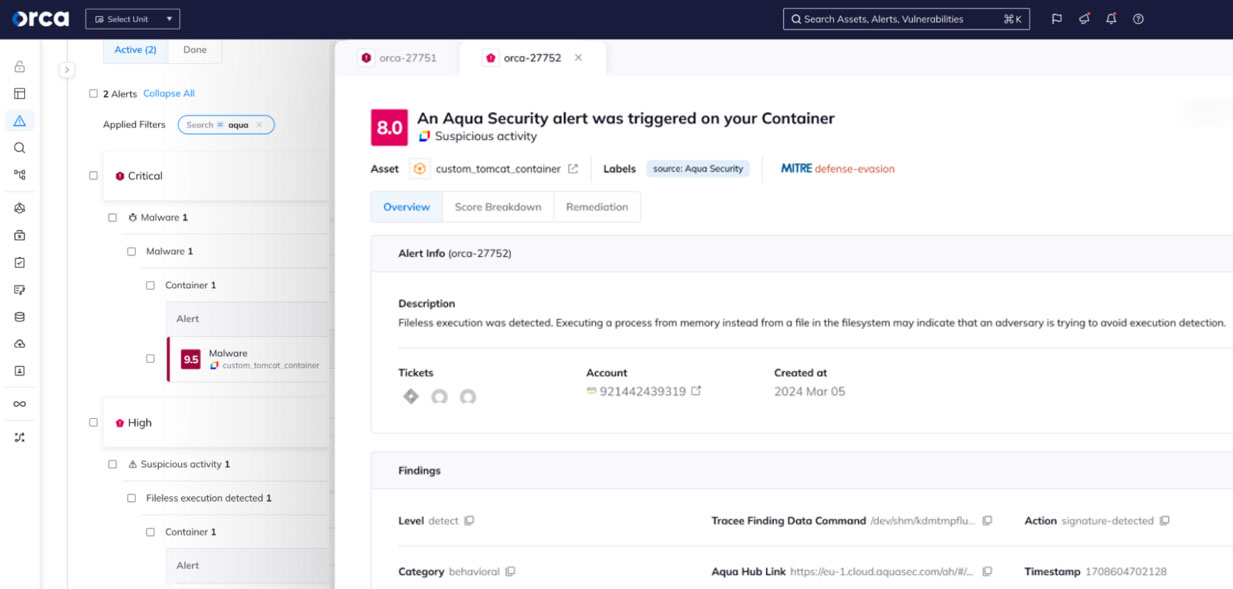
What do actual users think of Aqua Security? Let’s look at feedback from Gartner Peer Insights and other sources.
Overall Sentiment
Gartner reviews describe Aqua CNAPP with mixed but generally positive feedback. One reviewer summarized it as: “Strong Kubernetes & Container security with powerful runtime protection, but complexity.”
This captures a common theme. Aqua is technically capable but has a learning curve.
What Users Like
Runtime Protection: Users consistently praise Aqua’s runtime capabilities. The ability to actually block attacks, not just detect them, is valuable.
Kubernetes Expertise: Organizations running Kubernetes appreciate Aqua’s deep understanding of the platform. The security controls feel purpose-built, not bolted on.
Vulnerability Intelligence: Aqua claims a “90% reduction in vulnerability research and detection time.” While this specific number should be taken with appropriate skepticism, users do report faster triage.
Open Source Foundation: The connection to Trivy and other open source projects builds confidence. Users feel they can evaluate the technology before buying.
What Users Criticize
Complexity: This comes up repeatedly. Aqua is feature-rich, which means there’s a lot to learn. Smaller teams may struggle to use the platform effectively.
Pricing: Some users find Aqua expensive compared to alternatives. Enterprise pricing isn’t publicly disclosed, making comparison difficult.
Documentation: A few reviewers mention that documentation could be more comprehensive. Complex configurations sometimes require support engagement.
Alert Volume: Without proper tuning, Aqua can generate many alerts. Organizations need to invest time in policy configuration.
Gartner Recognition
Aqua Security has been recognized in Gartner’s Market Guide for CNAPP. This recognition validates their position in the market. Gartner’s research helps enterprises identify viable vendors, and inclusion in the Market Guide signals that Aqua meets basic requirements for enterprise consideration.
Pricing and Licensing: What to Expect
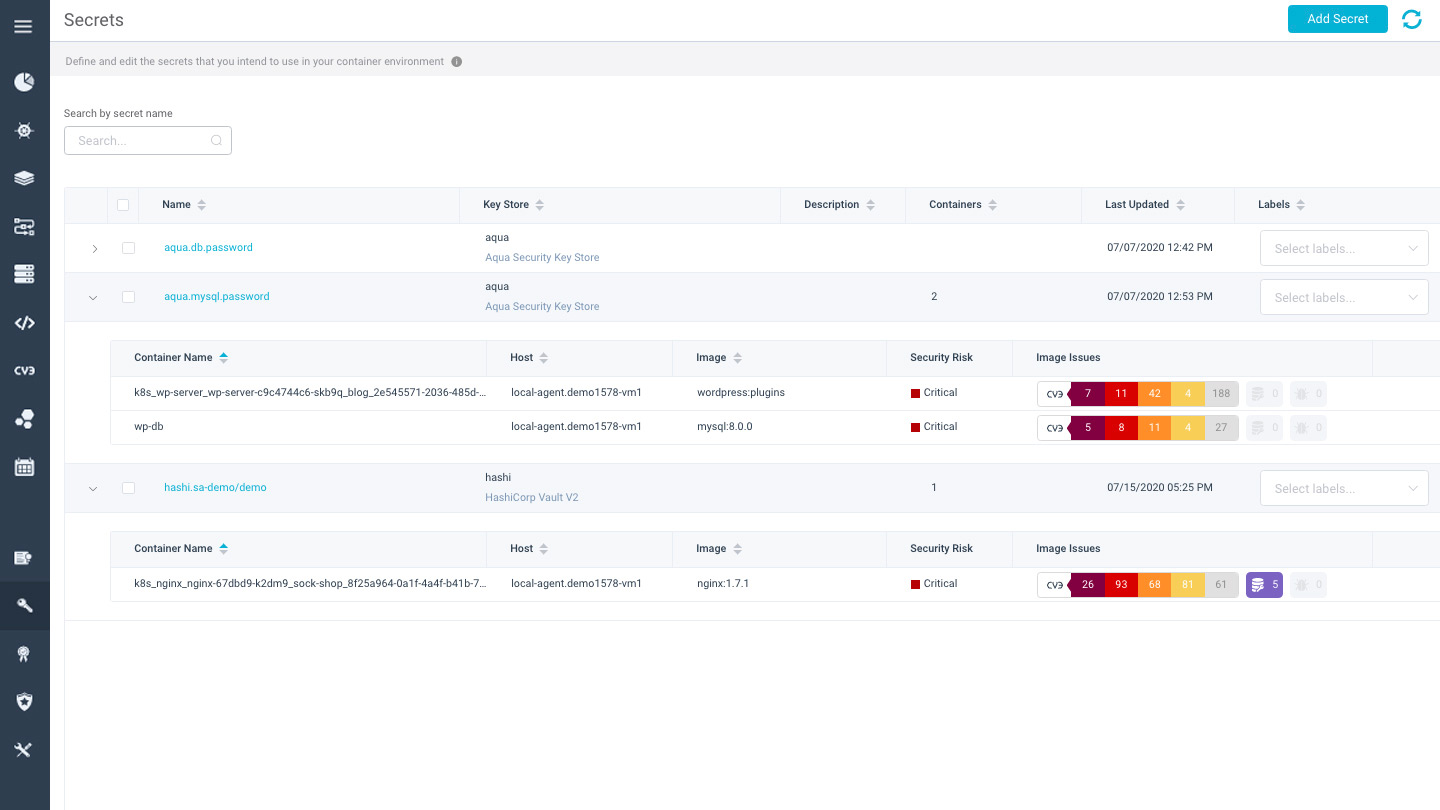
Aqua Security doesn’t publish pricing on their website. This is common for enterprise security software. Pricing is typically customized based on several factors.
Pricing Variables
Likely factors that affect cost:
- Number of protected workloads (containers, VMs, serverless functions)
- Features included (basic scanning vs. full runtime protection)
- Deployment model (SaaS vs. self-hosted)
- Support level
- Contract length
Free Options
Organizations wanting to evaluate Aqua have free options:
- Trivy: The open source scanner is completely free. It’s a great way to experience Aqua’s technology without commitment.
- Free Trial: Aqua offers trials of the commercial platform. Contact their sales team to request access.
- Open Source Tools: Tracee, kube-bench, and kube-hunter are all free to use.
Enterprise Considerations
When evaluating pricing, consider total cost of ownership:
- Implementation and professional services
- Training for security and development teams
- Ongoing administration time
- Integration effort
- Potential consolidation of existing tools
Aqua may replace multiple point solutions. Factor in the cost savings from tool consolidation when comparing options.
Comparing Aqua Security to Competitors
The CNAPP market has many players. How does Aqua compare?
Aqua vs. Palo Alto Prisma Cloud
| Criteria | Aqua Security | Prisma Cloud |
|---|---|---|
| Runtime Protection | Strong agent-based enforcement | Good but Aqua often considered deeper |
| Container Focus | Purpose-built for containers | Broader scope (also covers VMs, cloud) |
| Open Source | Major contributor (Trivy, etc.) | Less open source presence |
| Enterprise Features | Comprehensive | Very comprehensive |
| Company Size | Smaller, more focused | Part of Palo Alto Networks (large) |
Organizations already using Palo Alto products may prefer Prisma Cloud for consolidation. Those prioritizing container and Kubernetes security often choose Aqua.
Aqua vs. Snyk
| Criteria | Aqua Security | Snyk |
|---|---|---|
| Primary Strength | Runtime protection | Developer-focused scanning |
| Runtime Enforcement | Yes, strong | Limited |
| Developer Experience | Good | Excellent |
| Open Source Scanning | Yes | Yes, strong |
| Target Buyer | Security teams | Development teams |
Snyk excels at developer workflows and fixing vulnerabilities early. Aqua provides more complete runtime protection. Many organizations use both.
Aqua vs. Sysdig
| Criteria | Aqua Security | Sysdig |
|---|---|---|
| Runtime Visibility | Strong | Very strong (Falco heritage) |
| eBPF Technology | Yes (Tracee) | Yes (core to platform) |
| Monitoring Overlap | Some | Strong (also does observability) |
| CNAPP Breadth | Full coverage | Full coverage |
| Open Source | Multiple projects | Falco (CNCF graduated) |
Sysdig and Aqua are close competitors. Sysdig has stronger ties to the monitoring world. Aqua has slightly broader CNAPP coverage. Both are solid choices for Kubernetes security.
Aqua vs. Wiz
| Criteria | Aqua Security | Wiz |
|---|---|---|
| Deployment Model | Agent + Agentless | Agentless only |
| Runtime Blocking | Yes | No (detection only) |
| Cloud Coverage | Strong | Very strong |
| Ease of Deployment | Moderate | Easy (no agents) |
| Graph-Based Analysis | Yes | Core differentiator |
Wiz has grown quickly with its agentless approach. It’s easier to deploy. But it can’t block attacks in real-time. Organizations wanting active protection need Aqua or similar agent-based tools.
Best Practices for Deploying Aqua Security
Based on user experiences and Aqua’s documentation, here are recommendations for successful deployment.
Start with Assessment
Before deploying protection, understand your environment:
- Inventory all container workloads and Kubernetes clusters
- Identify which workloads are most critical
- Map data flows and network dependencies
- Document existing security controls
- Define success metrics
Phase Your Rollout
Don’t try to deploy everything at once. A phased approach works better:
Phase 1: Visibility (1-2 months)
- Deploy image scanning in CI/CD pipelines
- Enable registry scanning
- Connect cloud accounts for CSPM
- Run Kubernetes assessments
- Focus on learning, not blocking
Phase 2: Soft Enforcement (1-2 months)
- Create policies based on observed behavior
- Enable alerts for policy violations
- Deploy agents in audit mode
- Tune policies to reduce false positives
Phase 3: Active Protection (ongoing)
- Enable blocking for high-confidence policies
- Expand coverage to more workloads
- Integrate with incident response workflows
- Continuously refine policies
Invest in Training
Aqua is a complex platform. Invest in training for:
- Security engineers who will operate the platform
- DevOps teams who will receive findings
- Developers who need to understand requirements
- Incident responders who will handle alerts
Establish Ownership
Define who’s responsible for what:
- Who manages Aqua policies?
- Who triages vulnerability findings?
- Who responds to runtime alerts?
- Who approves exceptions?
Clear ownership prevents findings from falling through the cracks.
Common Use Cases and Industry Applications
Aqua Security fits various scenarios. Here are common use cases.
Financial Services
Banks and financial institutions face strict regulations. Aqua helps with:
- PCI DSS compliance for payment processing systems
- Audit trail for all container deployments
- Runtime protection for sensitive transaction systems
- Vulnerability management with SLA tracking
Healthcare
Healthcare organizations need to protect patient data. Aqua supports:
- HIPAA compliance documentation
- Data access monitoring
- Network segmentation between applications
- Secure handling of protected health information
Software Companies
SaaS providers and software vendors use Aqua to:
- Secure their development pipelines
- Protect production environments
- Demonstrate security to customers
- Enable SOC 2 compliance
Government and Defense
Government agencies have unique requirements:
- FedRAMP compliance
- Air-gapped deployments
- Strong runtime isolation
- Detailed audit logging
Aqua supports these requirements with dedicated deployment options.
Technical Deep Dive: How Aqua’s Runtime Protection Works
Runtime protection is Aqua’s key differentiator. Let’s look at how it actually works.
The Agent Architecture
Aqua’s runtime agent (called Enforcer) runs as a privileged DaemonSet. It needs elevated access to monitor system activity. The agent intercepts system calls and evaluates them against policies.
Technologies Used:
- eBPF: Extended Berkeley Packet Filter allows deep visibility without modifying the kernel
- Seccomp: Secure computing mode restricts available system calls
- AppArmor/SELinux: Mandatory access control for additional restrictions
Drift Prevention
Containers should be immutable. Once deployed, they shouldn’t change. Drift prevention enforces this:
- Blocks execution of new binaries
- Prevents modification of existing files
- Stops new processes from spawning
- Detects changes to container filesystem
If an attacker compromises a container and tries to download tools or modify files, drift prevention stops them.
Network Controls
Aqua provides container-aware network segmentation:
- Discovers actual communication patterns
- Generates recommended network policies
- Enforces policies at the container level
- Blocks unauthorized network connections
This is more granular than Kubernetes NetworkPolicies alone. Aqua can control traffic between containers in the same namespace.
Behavioral Analysis
Beyond static policies, Aqua learns normal container behavior:
- What processes typically run
- What files are accessed
- What network connections are made
- What system calls are used
Deviations from normal behavior trigger alerts. This catches novel attacks that don’t match known signatures.
Limitations and Considerations
No security tool is perfect. Here are Aqua’s limitations to consider.
Complexity
Aqua is a sophisticated platform with many features. This creates challenges:
- Steep learning curve for new users
- Risk of misconfiguration
- Requires dedicated resources to operate
- May be overkill for small environments
Organizations with fewer than 100 containers might find simpler solutions more appropriate.
Agent Overhead
While Aqua claims minimal overhead, agents do consume resources:
- Memory footprint on each node
- CPU cycles for monitoring
- Network traffic for communication
- Potential impact on performance-sensitive workloads
Testing in staging environments is essential before production deployment.
False Positives
Like any security tool, Aqua can generate false positives:
- Vulnerabilities that aren’t actually exploitable
- Behavioral alerts for legitimate activity
- Configuration findings that don’t apply to your context
Tuning is required to achieve a useful signal-to-noise ratio.
Vendor Lock-In
Adopting Aqua means depending on their platform:
- Policies are defined in Aqua’s format
- Historical data lives in Aqua
- Workflows become integrated with Aqua
While Aqua uses open standards where possible, switching to a competitor would require effort.
Future Direction and Roadmap
Where is Aqua Security headed? Based on market trends and company communications, here’s what to expect in 2026 and beyond.
AI and Machine Learning
Security vendors are adding AI capabilities. Expect Aqua to:
- Improve behavioral analysis with ML models
- Provide smarter prioritization of findings
- Automate policy recommendations
- Speed up threat investigation
Serverless and Edge
Containers aren’t the only cloud native workload type. Aqua is expanding to:
- AWS Lambda and other serverless functions
- Edge computing environments
- WebAssembly workloads
Supply Chain Focus
Software supply chain security is a hot topic. Aqua will likely deepen:
- SBOM management capabilities
- Build pipeline attestation
- Third-party risk assessment
- Artifact signing and verification
Platform Consolidation
The CNAPP market is consolidating. Aqua may:
- Acquire complementary technologies
- Expand into adjacent security areas
- Deepen integrations with major platforms
Final Verdict: Is Aqua Security Right for You?
After this deep analysis, let’s summarize when Aqua Security makes sense.
Aqua Is a Good Fit If You:
- Run containers and Kubernetes at scale
- Need actual runtime protection, not just scanning
- Have security resources to operate a sophisticated platform
- Face compliance requirements for cloud workloads
- Want to consolidate multiple security tools
- Value open source involvement and transparency
Consider Alternatives If You:
- Have a small container footprint (under 100 containers)
- Lack dedicated security engineering resources
- Only need vulnerability scanning (not runtime protection)
- Primarily run traditional VMs rather than containers
- Have very tight budget constraints
Recommendation
Aqua Security is a mature, capable CNAPP platform with particular strength in runtime protection. Organizations serious about container and Kubernetes security should evaluate it. Start with the open source tools (Trivy, kube-bench) to experience Aqua’s technology. Then request a trial of the commercial platform to assess fit.
The platform isn’t simple. But security in cloud native environments isn’t simple either. Aqua provides the depth needed to address real threats. If you’re willing to invest in proper deployment and operation, it delivers strong protection.
Conclusion
Aqua Security has established itself as a leader in cloud native security. Their combination of open source tools and enterprise platform addresses the full lifecycle from code to runtime. Runtime protection with real-time enforcement sets them apart from scan-only competitors. The platform is complex but capable. Organizations running Kubernetes at scale should seriously consider Aqua for their security stack. Start with a trial to see if the platform fits your specific environment and needs.
FAQs About Aqua Security Review
| Who is Aqua Security designed for? | Aqua Security is designed for enterprises running containerized applications and Kubernetes clusters at scale. It’s best suited for organizations with dedicated security engineering resources who need comprehensive protection beyond basic vulnerability scanning. Financial services, healthcare, technology companies, and government agencies are common customers. |
| What makes Aqua different from other CNAPP vendors? | Aqua’s main differentiator is runtime protection with real-time enforcement. Many competitors focus primarily on scanning and posture management. Aqua can actually block attacks as they happen, prevent container drift, and enforce network segmentation. Their strong open source presence (Trivy, Tracee, kube-bench) also builds trust and demonstrates technical expertise. |
| Is Aqua Security expensive? | Aqua doesn’t publish pricing publicly. Cost depends on the number of workloads protected, features needed, and deployment model. Some users describe Aqua as expensive compared to alternatives. However, the platform may replace multiple point solutions, which should be factored into total cost calculations. Request a quote for accurate pricing. |
| Can I try Aqua Security before buying? | Yes. You can start with Aqua’s free open source tools like Trivy for vulnerability scanning. For the commercial platform, Aqua offers trials through their sales team. This lets you test capabilities in your actual environment before committing to purchase. |
| How long does it take to deploy Aqua Security? | Initial deployment can happen in days, but proper rollout takes months. A phased approach is recommended: start with scanning and visibility (1-2 months), then add soft enforcement (1-2 months), then enable active blocking. Rushing deployment often leads to false positives and operational problems. |
| Does Aqua Security require agents on every container? | Aqua offers both agent-based and agentless deployment options. Agent-based deployment runs as a Kubernetes DaemonSet (one agent per node, not per container). Agentless scanning works via cloud provider APIs. Organizations often use a hybrid approach, with agents on critical workloads and agentless scanning elsewhere. |
| What compliance frameworks does Aqua support? | Aqua maps findings to major compliance frameworks including CIS Benchmarks, PCI DSS, HIPAA, SOC 2, NIST, and GDPR. The platform generates compliance reports for audit purposes. Pre-built policies help organizations meet regulatory requirements for cloud and container environments. |
| How does Aqua compare to free tools like Trivy? | Trivy is Aqua’s open source vulnerability scanner. It’s excellent for basic image scanning. The commercial Aqua platform adds runtime protection, policy enforcement, centralized management, compliance reporting, cloud posture management, and enterprise support. Organizations needing only vulnerability scanning can use Trivy alone. |
| What is the performance impact of Aqua’s runtime agent? | Aqua claims less than 1% CPU overhead for their agent. Actual impact varies by workload. Performance-sensitive applications should be tested thoroughly in staging environments before production deployment. The agent does consume memory on each node and generates network traffic for communication. |
| Does Aqua Security work with multi-cloud environments? | Yes. Aqua supports AWS, Azure, and GCP. The platform can manage security across multiple clouds from a single console. This includes both container workloads (EKS, GKE, AKS) and cloud infrastructure configuration. Multi-cloud visibility helps organizations maintain consistent security policies across environments. |






 Stack Insight is intended to support informed decision-making by providing independent information about business software and services. Some product details, including pricing, features, and promotional offers, may be supplied by vendors or partners and can change without notice.