
Lacework FortiCNAPP Review


Lacework FortiCNAPP Review: A Complete Analysis of Fortinet’s Cloud Security Platform
Cloud security has become a top priority for organizations running workloads across multiple providers. When Fortinet acquired Lacework in August 2024, it created one of the most talked-about cloud-native application protection platforms on the market. The resulting product, FortiCNAPP, brings together Lacework’s behavioral analytics with Fortinet’s broader security ecosystem.
This review breaks down everything you need to know about FortiCNAPP. We’ll cover how it works, what makes it different from competitors, and where it falls short. You’ll find detailed analysis of its features, pricing considerations, real user feedback, and practical guidance on whether it fits your organization. By the end, you’ll have a clear picture of what this platform can and can’t do for your cloud security needs.
What Is Lacework FortiCNAPP? Understanding the Platform
FortiCNAPP is a cloud-native application protection platform that combines multiple security functions into one tool. It started as Lacework, a company founded in 2015 that raised $1.8 billion in funding before being acquired by Fortinet.
The platform handles several security jobs:
- Cloud Security Posture Management (CSPM) for finding misconfigurations
- Cloud Workload Protection Platform (CWPP) for runtime security
- Cloud Infrastructure Entitlement Management (CIEM) for identity and access
- Cloud Detection and Response (CDR) for threat hunting
- Code Security for catching issues before deployment
- Data Security Posture Management (DSPM) added in January 2026
The platform works across AWS, Azure, Google Cloud Platform, Oracle Cloud Infrastructure, and Kubernetes environments. This multi-cloud support matters because most enterprises use more than one provider.
The Acquisition Story and What Changed
Lacework built its reputation on the Polygraph platform. This technology creates baselines of normal behavior in cloud environments. When something unusual happens, it flags the activity. This approach cut down on alert fatigue that plagued earlier security tools.
Fortinet saw value in this approach. The acquisition brought 225 cloud security and AI patents into Fortinet’s portfolio. More importantly, it filled a gap in Fortinet’s product lineup. Fortinet had strong network security products like FortiGate firewalls and FortiWeb application security. But cloud-native protection was missing.
After the acquisition, lacework.com started redirecting to fortinet.com. The branding shifted to FortiCNAPP. But the core technology remains the same Polygraph engine that made Lacework popular.
How FortiCNAPP Fits Into Fortinet Security Fabric
Fortinet’s Security Fabric is the company’s ecosystem of connected security products. FortiCNAPP now plugs into this ecosystem. This means it can share data with:
- FortiGate next-generation firewalls
- FortiWeb web application firewalls
- FortiSOAR security orchestration and response
- FortiGuard threat intelligence services
For organizations already using Fortinet products, this connection makes sense. Alerts from FortiCNAPP can trigger responses in other Fortinet tools. Security teams see everything in one place instead of jumping between consoles.
Core Features of FortiCNAPP: A Detailed Breakdown
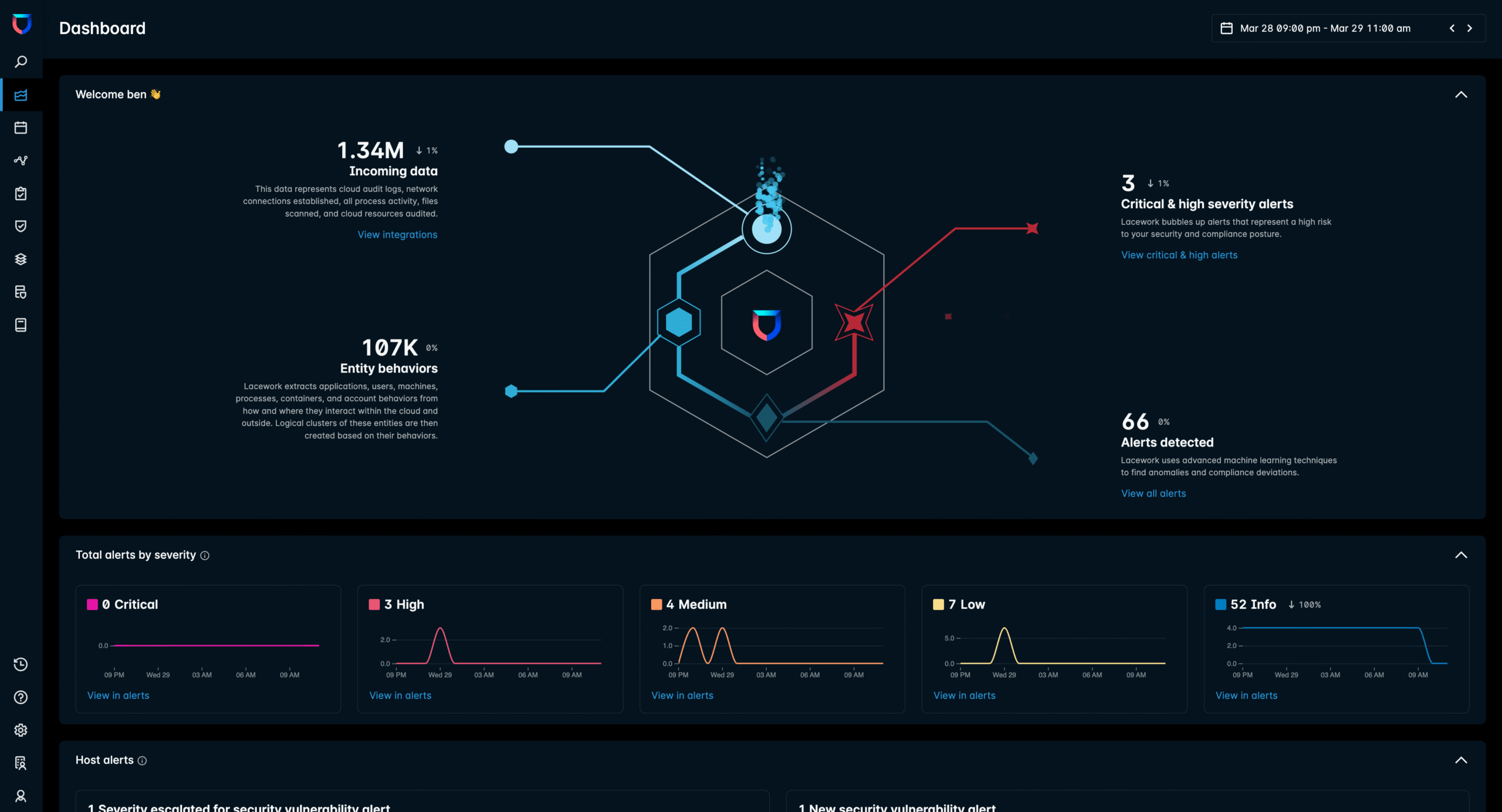
Understanding what FortiCNAPP actually does requires looking at each component. The platform bundles several tools that organizations might otherwise buy separately.
Cloud Security Posture Management (CSPM) Capabilities
CSPM in FortiCNAPP scans cloud environments for misconfigurations. These misconfigurations cause most cloud security breaches. A storage bucket left public. An overly permissive security group. A database without encryption.
The platform checks configurations against multiple benchmarks:
| Compliance Framework | Coverage Level | Auto-Remediation |
|---|---|---|
| CIS Benchmarks | Full coverage for major clouds | Yes, with approval workflow |
| SOC 2 | Type I and Type II controls | Partial |
| PCI DSS | Version 4.0 requirements | Yes |
| HIPAA | Technical safeguards | Partial |
| GDPR | Technical requirements | Limited |
| NIST 800-53 | Cloud-relevant controls | Yes |
What sets FortiCNAPP apart is how it prioritizes findings. Not every misconfiguration carries equal risk. The platform considers context. Is this resource internet-facing? Does it contain sensitive data? Is it connected to other critical systems?
This context-aware approach helps security teams focus on what matters. Without it, teams drown in thousands of alerts that all look equally urgent.
Kubernetes Security Posture Management (KSPM)
Container environments need different security approaches. FortiCNAPP includes dedicated Kubernetes security features. These scan cluster configurations, pod security policies, and network policies.
The platform checks for common Kubernetes mistakes:
- Containers running as root
- Missing resource limits that enable denial of service
- Privileged containers that can escape to the host
- Missing network policies that allow lateral movement
- Secrets stored in environment variables instead of secret stores
KSPM also tracks changes over time. If a developer introduces a risky configuration, security teams see it immediately. They can trace back to which deployment caused the issue.
Cloud Workload Protection Platform (CWPP) Features
CWPP handles runtime security. This means protecting workloads while they’re actually running, not just scanning configurations.
FortiCNAPP’s CWPP includes:
- Vulnerability scanning for container images and virtual machines
- Runtime protection that detects suspicious processes
- File integrity monitoring for critical system files
- Network traffic analysis between workloads
The vulnerability scanner checks images against known CVE databases. It prioritizes findings based on exploitability and whether the vulnerable component is actually loaded at runtime. A vulnerability in an unused library matters less than one in active code.
Runtime protection uses the behavioral analytics engine. It learns what normal looks like for each workload. A web server suddenly running cryptomining software triggers an alert. An API service making unusual database queries gets flagged.
Cloud Infrastructure Entitlement Management (CIEM)
CIEM tackles the identity problem in cloud environments. Organizations struggle with overprivileged accounts. A developer gets admin access for a one-time task. They never lose that access. Over time, thousands of unused permissions accumulate.
FortiCNAPP’s CIEM features:
- Permission analysis showing what each identity can do
- Usage tracking revealing which permissions actually get used
- Right-sizing recommendations to remove unused permissions
- Cross-account access mapping for complex organizations
- Service account monitoring for machine identities
The platform visualizes identity relationships. Security teams see which users can access which resources through which paths. This matters in cloud environments where permissions can be granted directly, through groups, through roles, or through resource policies.
CIEM also detects identity-based attacks. Unusual login patterns, impossible travel scenarios, and access to resources a user has never touched before all raise flags.
Cloud Detection and Response (CDR) Analysis
CDR is where FortiCNAPP’s behavioral analytics shine brightest. The platform ingests logs from cloud providers, applications, and workloads. It analyzes this data to find threats.
The Composite Alerts feature deserves special attention. Traditional security tools generate alerts for individual events. Suspicious login. File modified. New process started. Each gets its own alert.
Composite Alerts correlate related events into single incidents. That suspicious login, file modification, and new process might all be part of one attack. FortiCNAPP connects them. Security teams see one meaningful alert instead of three confusing ones.
This correlation dramatically reduces false positives. Users consistently praise this feature in reviews. Alert fatigue is a real problem in security operations. Fewer, more accurate alerts mean faster response times.
Code Security and Infrastructure as Code Scanning
Shifting security left means finding issues before deployment. FortiCNAPP scans code and infrastructure templates for security problems.
Infrastructure as Code (IaC) scanning covers:
- Terraform configurations
- CloudFormation templates
- Kubernetes manifests
- Helm charts
- Dockerfiles
The scanner checks for misconfigurations that would fail CSPM checks after deployment. Finding these issues in code review is cheaper than fixing them in production.
Policy as Code enforcement lets teams define custom rules. Security requirements get codified and checked automatically. No more relying on developers to remember every security requirement.
Data Security Posture Management (DSPM)
Added in January 2026, DSPM helps organizations find and protect sensitive data. Cloud environments make data sprawl easy. Data gets copied, moved, and forgotten. DSPM tracks it down.
The DSPM module:
- Discovers data stores across cloud providers
- Classifies data based on sensitivity
- Maps data flows between services
- Identifies data exposure risks
- Monitors access to sensitive data stores
This helps with compliance requirements around data protection. Organizations can prove they know where sensitive data lives and who can access it.
Behavioral Analytics: The Technology Behind FortiCNAPP
The Polygraph technology is what made Lacework famous. Understanding how it works explains why FortiCNAPP behaves differently than competitors.
How Polygraph Creates Behavioral Baselines
Traditional security tools work from signatures and rules. They know what attacks look like and watch for matches. This works for known attacks. It fails for novel threats.
Polygraph takes a different approach. It watches everything in your cloud environment. Network connections. Process execution. API calls. File access. User behavior.
From this observation, it builds baselines. What does normal look like for this workload? This user? This application? The baselines are specific to your environment, not generic rules.
When behavior deviates from baseline, Polygraph raises alerts. A web server that normally talks to a database suddenly connecting to an external IP address stands out. That pattern might be innocent. Or it might be data exfiltration.
Machine Learning Models in FortiCNAPP
The behavioral analysis relies on machine learning models. These models process massive amounts of telemetry data. They find patterns humans couldn’t spot manually.
The models handle several tasks:
- Anomaly detection for spotting unusual behavior
- Entity resolution for linking related activities
- Risk scoring for prioritizing findings
- False positive reduction for improving alert quality
Fortinet brought 225 patents related to cloud security and AI through the acquisition. Many of these patents cover the machine learning approaches in Polygraph.
Reducing False Positives Through Correlation
False positives kill security programs. When every alert is urgent, none of them are. Security teams learn to ignore alerts. Real attacks slip through.
FortiCNAPP addresses this through multiple layers:
First layer: Behavioral context. An action that looks suspicious without context might be normal for a specific user or workload. The baseline comparison filters out routine behavior.
Second layer: Composite Alerts. Related events get grouped together. Instead of five alerts about different aspects of one attack, teams see one alert with full context.
Third layer: Risk scoring. Not every anomaly deserves immediate attention. The platform scores findings based on potential impact and likelihood of being a real threat.
Fourth layer: Attack path analysis. Some misconfigurations matter more because of what they’re connected to. A misconfigured server with no sensitive data and no network path to critical systems is low priority.
User reviews consistently mention reduced false positives as a major benefit. One G2 reviewer specifically noted that the correlation features helped their team focus on actual threats.
FortiCNAPP Integration With Fortinet Security Fabric
The acquisition wasn’t just about technology. It was about integration. FortiCNAPP becomes more valuable when connected to other Fortinet products.
FortiSOAR Integration for Automated Response
FortiSOAR is Fortinet’s security orchestration platform. When FortiCNAPP detects a threat, FortiSOAR can automate the response.
Example workflow:
- FortiCNAPP detects cryptomining malware on an EC2 instance
- Alert triggers FortiSOAR playbook
- Playbook isolates the instance from the network
- Playbook creates forensic snapshot of the instance
- Playbook notifies security team with full context
- Playbook creates ticket in ITSM system
This automation reduces response time from hours to seconds. The malware gets contained before spreading. Evidence gets preserved for investigation.
Organizations without FortiSOAR can still use FortiCNAPP. But the integration adds significant value for Fortinet shops.
FortiGuard Threat Intelligence Integration
FortiGuard is Fortinet’s threat intelligence service. It tracks malware, attack patterns, and malicious infrastructure worldwide. FortiCNAPP now benefits from this intelligence.
When FortiCNAPP sees a workload connecting to an IP address, it can check FortiGuard’s reputation database. Known command and control servers get flagged immediately. This adds a layer of detection beyond behavioral analysis.
The integration also works for vulnerability prioritization. FortiGuard tracks which vulnerabilities are being actively exploited. FortiCNAPP can prioritize those over theoretical risks.
Network Security Integration Benefits
FortiGate firewalls and FortiWeb WAFs handle network security at the perimeter. FortiCNAPP handles cloud-native workloads. Together, they provide complete visibility.
Security teams see both sides of an attack. Network logs show external reconnaissance. FortiCNAPP shows the internal compromise. Correlation between these data sources reveals attack chains.
This matters for hybrid environments. Many organizations run some workloads in the cloud and some on-premises. Having one vendor cover both simplifies operations.
FortiCNAPP Pricing and Licensing Model
Pricing for enterprise security software is rarely straightforward. FortiCNAPP follows the industry pattern of custom quotes based on environment size.
Pricing Factors That Affect Cost
Several variables determine FortiCNAPP pricing:
| Factor | Impact on Price |
|---|---|
| Number of cloud accounts | More accounts mean higher cost |
| Number of workloads | VMs, containers, and serverless functions count |
| Data volume | More logs and telemetry increase cost |
| Features enabled | Full platform costs more than CSPM alone |
| Contract length | Multi-year deals offer discounts |
| Existing Fortinet relationship | Bundle discounts available |
The workload-based pricing model makes sense for cloud environments. Organizations pay for what they actually use, not for licenses they might need someday.
Comparing FortiCNAPP Cost to Alternatives
FortiCNAPP sits in the middle of the CNAPP market on pricing. It’s not the cheapest option. Tools like Wiz and Orca have aggressive pricing for specific use cases. But FortiCNAPP isn’t the most expensive either. Traditional enterprise security vendors often charge more.
The value calculation depends on your situation. Organizations already using Fortinet products often get bundle pricing that makes FortiCNAPP attractive. Those without existing Fortinet relationships should compare total cost of ownership carefully.
Hidden Costs to Consider
Beyond license fees, consider these costs:
- Setup and deployment time for your team
- Training to learn the platform
- Integration work with existing tools
- Tuning period to reduce false positives
- Professional services if needed for complex deployments
G2 reviewers note that setup is generally smooth. The platform doesn’t require heavy professional services for basic deployments. This reduces hidden costs compared to some enterprise tools.
User Experience and Interface Design
A powerful tool that’s hard to use doesn’t help anyone. FortiCNAPP’s interface received mixed feedback in reviews.
Dashboard and Visualization Quality
The main dashboard provides an overview of security posture. Widgets show alert counts, compliance status, and risk scores. Users can customize which metrics appear.
Visualization features include:
- Attack path diagrams showing how an attacker could move through your environment
- Identity graphs mapping permissions and access relationships
- Network topology maps showing connections between resources
- Compliance scorecards tracking progress against frameworks
The attack path visualization stands out. It shows not just individual vulnerabilities but how they chain together. A misconfigured server plus an overprivileged account plus a missing network control equals a serious risk.
Ease of Navigation and Daily Use
Daily operations require moving between different platform sections. Security teams need to review alerts, investigate incidents, check compliance, and track remediation.
User reviews highlight some navigation pain points. Finding specific features sometimes requires multiple clicks. The interface assumes familiarity with cloud security concepts.
But the same reviews praise the platform once users learn their way around. One Gartner reviewer mentioned that initial learning curve paid off with efficient daily workflows.
Reporting and Documentation Features
Reporting matters for communicating with stakeholders outside the security team. Executives want summaries. Auditors want evidence. Development teams want remediation guidance.
FortiCNAPP’s reporting includes:
- Executive dashboards with high-level metrics
- Compliance reports for specific frameworks
- Detailed technical reports for remediation
- Custom report builder for specific needs
- Scheduled report delivery via email
The compliance reporting is particularly useful. Audits require evidence that controls are in place. Being able to generate that evidence on demand saves significant time.
FortiCNAPP Setup and Deployment Process
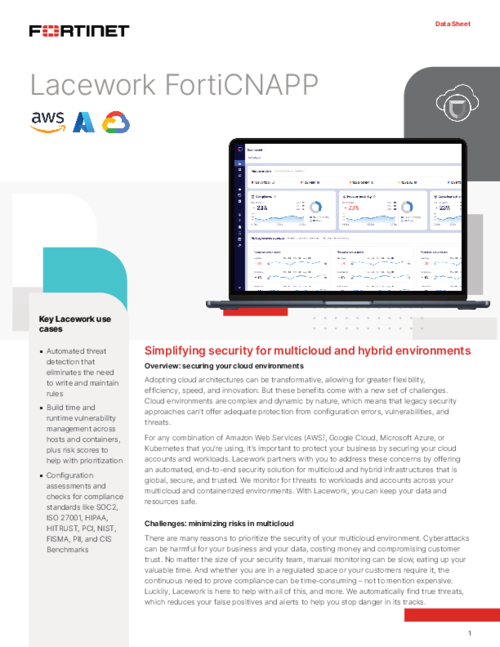
Getting a CNAPP running involves connecting to cloud providers, deploying agents, and configuring policies. FortiCNAPP aims to make this straightforward.
Initial Cloud Account Connection
Connecting cloud accounts is the first step. FortiCNAPP needs permissions to read your cloud configuration and collect telemetry.
For AWS, this involves:
- Creating an IAM role with read permissions
- Configuring cross-account access for FortiCNAPP
- Enabling CloudTrail for API logging
- Setting up SNS topics for real-time notifications
Azure and GCP have similar processes with their own IAM models. The documentation walks through each step with screenshots.
One G2 reviewer specifically praised the setup experience: “I found Lacework FortiCNAPP incredibly smooth to set up, which was neither tricky nor difficult at all.”
Agent Deployment for Workload Protection
CSPM works agentlessly by reading cloud provider APIs. But CWPP features require agents on workloads for runtime visibility.
FortiCNAPP offers multiple agent deployment methods:
- Automatic deployment through cloud provider systems managers
- Container sidecar injection for Kubernetes
- Golden image integration for VM templates
- Manual installation for specific use cases
The agents are lightweight. They don’t noticeably impact workload performance in most cases. This matters for production systems where performance is critical.
Policy Configuration and Tuning
Out of the box, FortiCNAPP comes with default policies based on industry standards. Most organizations need to customize these.
Common customizations include:
- Adjusting risk thresholds for your organization’s tolerance
- Excluding known-safe configurations from alerts
- Adding custom compliance requirements specific to your industry
- Configuring alert routing to appropriate teams
The behavioral baseline needs time to learn your environment. Expect more noise in the first few weeks. The platform gets more accurate as it gathers data about normal behavior.
FortiCNAPP Compared to Leading Competitors
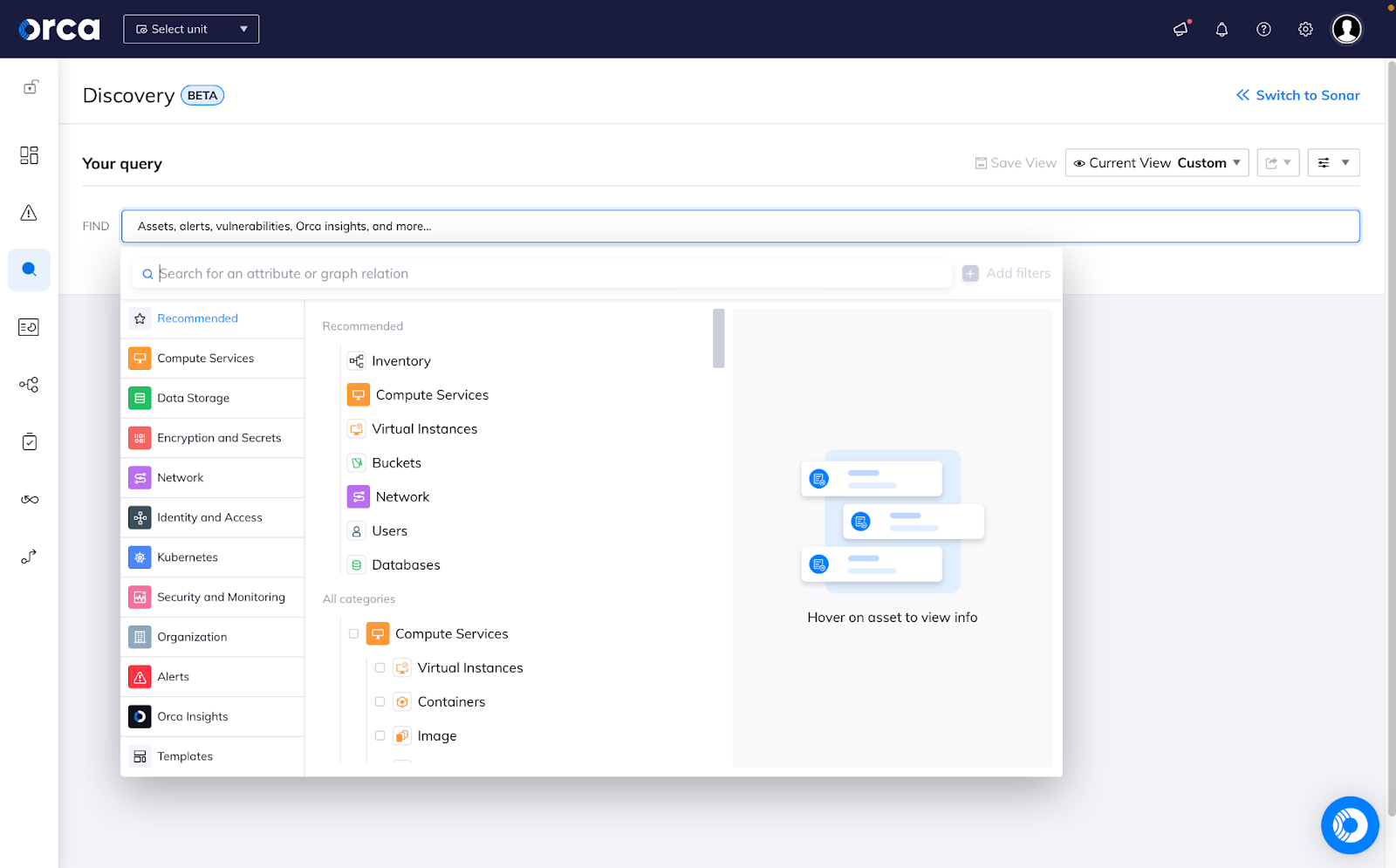
The CNAPP market has many players. Understanding how FortiCNAPP compares helps with vendor selection.
FortiCNAPP vs Wiz Comparison
Wiz is often FortiCNAPP’s main competitor. Both platforms offer comprehensive cloud security. Key differences:
| Capability | FortiCNAPP | Wiz |
|---|---|---|
| Deployment Model | Agentless + agent for CWPP | Primarily agentless |
| Behavioral Analytics | Strong, core differentiator | More limited |
| Network Security Integration | Deep Fortinet integration | Third-party integrations |
| Runtime Protection | Yes, with agents | Limited without agents |
| Market Position | Enterprise focused | Broad market appeal |
FortiCNAPP’s behavioral analytics provide better runtime threat detection. Wiz’s agentless approach means faster deployment with less infrastructure. The right choice depends on your priorities.
FortiCNAPP vs Prisma Cloud Comparison
Palo Alto’s Prisma Cloud is another major competitor. Like FortiCNAPP, it comes from a company with strong network security roots.
Key differences:
- Integration ecosystem: Prisma Cloud integrates with Palo Alto products. FortiCNAPP integrates with Fortinet products. Choose based on your existing investments.
- Code security depth: Prisma Cloud has deeper code security features from its Bridgecrew acquisition.
- Market maturity: Prisma Cloud has been in market longer. FortiCNAPP is newer as a branded product but built on mature Lacework technology.
FortiCNAPP vs Orca Security Comparison
Orca Security focuses heavily on the agentless approach. It pioneered SideScanning technology that reads workload data without deployed agents.
Comparison points:
- Agentless depth: Orca’s agentless scanning goes deeper than most competitors. FortiCNAPP’s agentless features are solid but agents add more capability.
- Behavioral detection: FortiCNAPP’s Polygraph technology provides stronger behavioral analysis than Orca’s approach.
- Enterprise features: FortiCNAPP’s Fortinet integration provides more enterprise security orchestration options.
Feature Comparison Table Across Major CNAPPs
| Feature | FortiCNAPP | Wiz | Prisma Cloud | Orca |
|---|---|---|---|---|
| CSPM | Yes | Yes | Yes | Yes |
| CWPP | Yes | Limited | Yes | Yes |
| CIEM | Yes | Yes | Yes | Yes |
| CDR | Strong | Good | Good | Good |
| Code Security | Yes | Yes | Strong | Yes |
| DSPM | Yes (2026) | Yes | Yes | Yes |
| Behavioral Analytics | Strong | Limited | Moderate | Moderate |
| Multi-cloud Support | AWS, Azure, GCP, OCI | AWS, Azure, GCP | AWS, Azure, GCP, Alibaba | AWS, Azure, GCP |
| Kubernetes Security | Yes | Yes | Yes | Yes |
Real User Feedback and FortiCNAPP Reviews Analysis
Marketing materials tell one story. Actual users tell another. Here’s what people say about FortiCNAPP on review platforms.
Positive Feedback Themes
Across G2 and Gartner reviews, several themes appear consistently:
Setup simplicity: Users regularly mention smooth deployment. The cloud account connection process works well. Agent deployment doesn’t cause major issues.
Visibility improvement: Many reviewers note that FortiCNAPP revealed security issues they didn’t know existed. The platform finds blind spots.
Alert quality: The Composite Alerts feature gets specific praise. Users appreciate getting meaningful alerts instead of noise. “Strong visibility and reliable setup, with growing automation options” according to one Gartner reviewer.
Fortinet integration: Organizations already using Fortinet products value the integration. Being able to orchestrate responses across cloud and network security tools simplifies operations.
Critical Feedback and Limitations
Not all reviews are positive. Common criticisms include:
Learning curve: The platform has many features. New users take time to learn their way around. Some reviewers wanted better onboarding.
Documentation gaps: A few users mentioned that documentation could be more comprehensive. Edge cases and advanced configurations sometimes lack clear guidance.
Expectation mismatches: One Gartner review headline reads “Inefficiencies in Lacework Emerge with Expectations Falling Short.” Some users expected more automation or different feature depth than delivered.
Pricing transparency: Enterprise pricing isn’t publicly available. Some users wished for clearer pricing before engaging with sales.
Industry Analyst Recognition
FortiCNAPP has received analyst recognition. KuppingerCole named it a Leader in their 2025 CNAPP Leadership Compass. This recognition validates the platform’s capabilities against competitors.
The analyst reports highlight behavioral analytics as a key differentiator. They also note the Fortinet Security Fabric integration as valuable for enterprises.
Ideal Use Cases for FortiCNAPP
No security tool fits every organization perfectly. FortiCNAPP makes the most sense in specific situations.
Organizations Already Using Fortinet Products
If you have FortiGate firewalls, FortiWeb WAFs, or FortiSOAR, adding FortiCNAPP makes obvious sense. The integration provides more than the sum of parts.
Security data flows between products. Response automation becomes possible. Management happens through familiar Fortinet interfaces. Pricing bundles often make the economics attractive.
Enterprises With Hybrid Cloud and On-Premises Environments
Many large organizations run workloads both in public clouds and their own data centers. They need security tools that cover both.
FortiCNAPP handles the cloud side. Fortinet’s network products handle on-premises. Together, they provide unified visibility. Security teams don’t need separate tools and separate teams for each environment.
This hybrid coverage matters as organizations migrate workloads gradually. They need security that works during the transition, not just at the destination.
Companies Focused on Runtime Threat Detection
Some organizations care most about catching active attacks. They’ve accepted that prevention isn’t 100% effective. Detection and response capabilities matter more.
FortiCNAPP’s behavioral analytics excel at detection. The Polygraph engine finds threats that signature-based tools miss. Composite Alerts ensure detection leads to action, not alert fatigue.
Security operations teams benefit from this detection focus. They get actionable alerts with context for investigation.
Regulated Industries Needing Compliance Reporting
Financial services, healthcare, and government organizations face strict compliance requirements. They need evidence that security controls are in place.
FortiCNAPP’s compliance reporting maps findings to specific frameworks. Audits become easier when evidence is automatically collected and organized. Continuous compliance monitoring catches drift before auditors do.
Limitations and When to Consider Alternatives
FortiCNAPP isn’t the right choice for everyone. Understanding its limitations helps avoid buyer’s remorse.
Smaller Organizations Without Fortinet Investments
If you’re a startup or small company without existing Fortinet products, the integration benefits don’t apply. You’re paying for enterprise capabilities you might not need.
Alternatives like Wiz or Orca might provide faster time to value. They’re often easier to evaluate and purchase without complex enterprise sales cycles.
Organizations Wanting Purely Agentless Approaches
FortiCNAPP’s full capabilities require agents for runtime protection. If you absolutely cannot deploy agents on workloads, you’ll miss features.
The agentless CSPM and CIEM features still work. But CWPP runtime protection requires agents. Organizations with strict no-agent policies should evaluate what they’re giving up.
Teams Needing Extremely Deep Code Security
FortiCNAPP includes code security features. But they’re not as deep as purpose-built code security tools. Organizations with mature DevSecOps programs might want more.
The IaC scanning and basic code security work well. Advanced features like software composition analysis with deep dependency tracking exist but aren’t as fully developed as competitors focused solely on code security.
FortiCNAPP Implementation Best Practices
Getting value from FortiCNAPP requires thoughtful implementation. These practices help ensure success.
Start With Visibility Before Enforcement
Resist the temptation to turn on blocking immediately. Start in monitoring mode. Learn what your environment looks like through FortiCNAPP’s eyes.
The behavioral baseline needs time to develop. Blocking based on incomplete baselines causes legitimate activities to fail. Give the platform at least two weeks to learn before adding enforcement.
Prioritize Cloud Accounts Strategically
Most organizations have more cloud accounts than they can reasonably secure at once. Prioritize connection order based on risk.
Start with accounts containing:
- Production workloads
- Sensitive data
- Customer-facing applications
- Regulated systems
Development and test environments can come later. Get visibility into critical systems first.
Integrate With Existing Workflows
FortiCNAPP alerts mean nothing if they don’t reach the right people. Connect the platform to your existing workflows from day one.
Essential integrations include:
- Ticketing systems for tracking remediation
- Chat tools for real-time notifications
- SIEM for correlation with other security data
- CI/CD pipelines for code security feedback
Establish Clear Ownership for Remediation
CNAPP tools find problems. People fix problems. Without clear ownership, findings pile up without action.
Define who owns remediation for different finding types:
- Infrastructure misconfigurations go to cloud platform teams
- Code vulnerabilities go to development teams
- Identity issues go to IAM administrators
- Active threats go to security operations
Future Direction and Platform Roadmap
Understanding where FortiCNAPP is heading helps with long-term planning. Fortinet has shared some direction publicly.
Deeper Security Fabric Integration
Expect continued integration with Fortinet’s broader product portfolio. The acquisition’s value comes from combining cloud and network security. More integration points will appear.
Likely areas include:
- Tighter FortiEDR integration for endpoint correlation
- FortiAnalyzer integration for centralized logging
- FortiManager integration for policy management
AI and Machine Learning Expansion
The 225 patents Fortinet acquired include AI capabilities. Expect the behavioral analytics to become more sophisticated. Machine learning models will improve detection accuracy over time.
Generative AI features may appear for things like:
- Natural language queries against security data
- Automated investigation assistance
- Remediation guidance generation
Expanded Cloud Provider Coverage
FortiCNAPP already covers AWS, Azure, GCP, and OCI. Additional providers and services will likely follow. As organizations use more cloud services, the platform needs to keep up.
Conclusion: Is FortiCNAPP Right for Your Organization?
FortiCNAPP brings together Lacework’s proven behavioral analytics with Fortinet’s security ecosystem. It’s a capable platform that covers the full CNAPP spectrum from code to cloud. Organizations already invested in Fortinet products will find the integration valuable. The behavioral analytics provide better threat detection than many competitors. But it’s not the right fit for everyone. Smaller organizations or those without Fortinet investments should carefully evaluate alternatives.
Frequently Asked Questions About FortiCNAPP
| Who is FortiCNAPP designed for? | FortiCNAPP targets mid-size to large enterprises running workloads across multiple cloud providers. Organizations already using Fortinet products benefit most from the integration capabilities. Companies in regulated industries appreciate the compliance reporting features. |
| What happened to Lacework after the Fortinet acquisition? | Fortinet acquired Lacework in August 2024 and rebranded the platform as FortiCNAPP. The lacework.com domain now redirects to Fortinet’s product page. The core Polygraph technology and development team continued under the Fortinet umbrella. |
| Does FortiCNAPP require agents on workloads? | CSPM and CIEM features work agentlessly by reading cloud provider APIs. Full CWPP runtime protection requires lightweight agents on workloads. Organizations can use FortiCNAPP without agents but will miss some detection capabilities. |
| How does FortiCNAPP compare to Wiz? | Both are comprehensive CNAPP platforms. FortiCNAPP offers stronger behavioral analytics and runtime detection. Wiz provides a more purely agentless approach. FortiCNAPP integrates deeply with Fortinet products. The right choice depends on your existing tools and priorities. |
| What cloud providers does FortiCNAPP support? | FortiCNAPP supports AWS, Microsoft Azure, Google Cloud Platform, Oracle Cloud Infrastructure, and Kubernetes environments. This covers the major public cloud providers that most enterprises use. |
| Is FortiCNAPP difficult to set up? | User reviews consistently praise the setup experience. Connecting cloud accounts follows documented processes. Agent deployment offers multiple options. Most organizations get basic functionality running within days, though full tuning takes longer. |
| What compliance frameworks does FortiCNAPP support? | The platform includes built-in support for CIS Benchmarks, SOC 2, PCI DSS, HIPAA, GDPR, and NIST 800-53 among others. Custom frameworks can be configured for organization-specific requirements. |
| How does FortiCNAPP reduce false positives? | The Composite Alerts feature correlates related events into single incidents instead of generating separate alerts. Behavioral baselines filter out normal activity specific to your environment. Risk scoring prioritizes findings by actual threat level. |
| What is DSPM in FortiCNAPP? | Data Security Posture Management was added in January 2026. It discovers and classifies sensitive data across cloud environments, maps data flows, and identifies exposure risks. This helps organizations track where sensitive data lives and who can access it. |
| Can FortiCNAPP work without other Fortinet products? | Yes. FortiCNAPP functions as a standalone CNAPP without other Fortinet products. But the integration with FortiSOAR, FortiGate, FortiWeb, and FortiGuard adds significant value. Organizations get more from the platform when it’s part of the broader Fortinet Security Fabric. |






 Stack Insight is intended to support informed decision-making by providing independent information about business software and services. Some product details, including pricing, features, and promotional offers, may be supplied by vendors or partners and can change without notice.