
Trend Micro Cloud One Review


Trend Micro Cloud One Review: A Complete Analysis of This Cloud Security Platform for 2026
Cloud security has become a top priority for businesses running workloads across AWS, Azure, Google Cloud, and hybrid environments. With threats growing more complex every day, security teams need tools that can keep up. Trend Micro Cloud One positions itself as an all-in-one cloud-native application protection platform (CNAPP) designed to protect everything from development to runtime.
This review breaks down every aspect of Trend Micro Cloud One. We’ll look at its features, pricing structure, how it compares to competitors, and whether it’s the right fit for your organization. You’ll learn about its strengths, limitations, and real-world applications. By the end, you’ll have a clear picture of what this platform can and can’t do for your cloud security needs.
What Is Trend Micro Cloud One? Understanding the Platform
Trend Micro Cloud One is a security platform built specifically for cloud environments. It’s part of the larger Trend Vision One ecosystem. The platform brings together multiple security capabilities under one roof.
At its core, Cloud One functions as a CNAPP. That stands for cloud-native application protection platform. CNAPPs combine several security tools that used to be sold separately. Think of it as a Swiss Army knife for cloud security.
The Problem Cloud One Solves
Before platforms like Cloud One existed, security teams had to piece together different tools. They’d buy one product for container security. Another for workload protection. A third for compliance scanning. And yet another for application security.
This patchwork approach created problems:
- Visibility gaps between tools meant threats could slip through
- Alert fatigue from managing multiple dashboards
- Integration headaches when tools didn’t talk to each other
- Higher costs from paying for overlapping features
- Slower response times when incidents required switching between platforms
Cloud One addresses these pain points by consolidating everything into a single platform. Security teams get one place to monitor, detect, and respond to threats across their entire cloud environment.
How Trend Micro Describes the Platform
According to Trend Micro’s own materials, the platform “delivers deep visibility and security” for cloud-native applications. They emphasize the integrated approach. Rather than bolting together separate products, Cloud One was designed from the ground up as a unified solution.
The company has earned recognition for this approach. Trend Micro was named a Leader in the IDC MarketScape: Worldwide Cloud-Native Application Protection Platform 2025 Vendor Assessment. This independent analysis validates the platform’s capabilities against competitors.
As the IDC report noted, “Trend Micro blends proactive and reactive cloud security across the entire attack surface, offering a strategic advantage against cyberthreats.”
Trend Micro Cloud One Features: A Detailed Breakdown
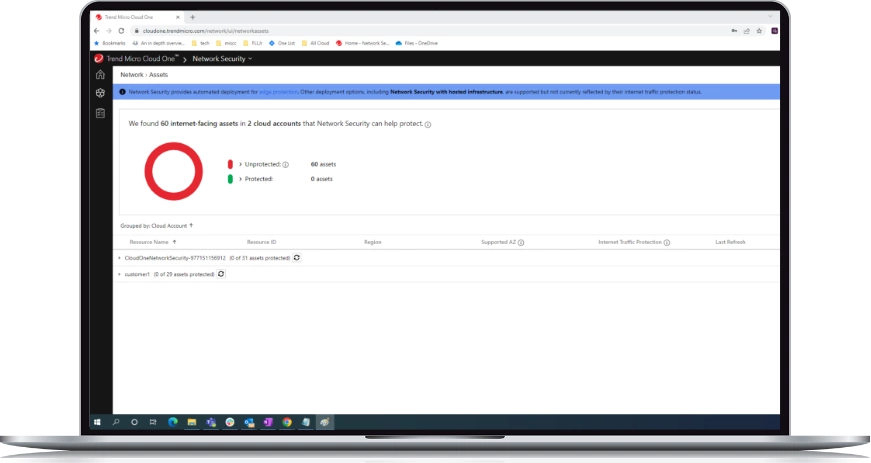
Let’s dig into what Cloud One actually does. The platform includes several distinct modules. Each handles a specific aspect of cloud security. Together, they create comprehensive protection.
Workload Security
This module protects your servers, whether they’re physical, virtual, or cloud-based. It covers Windows and Linux systems running in any environment.
Key capabilities include:
- Anti-malware scanning with real-time protection
- Host-based firewall for controlling network traffic
- Intrusion prevention to block exploits
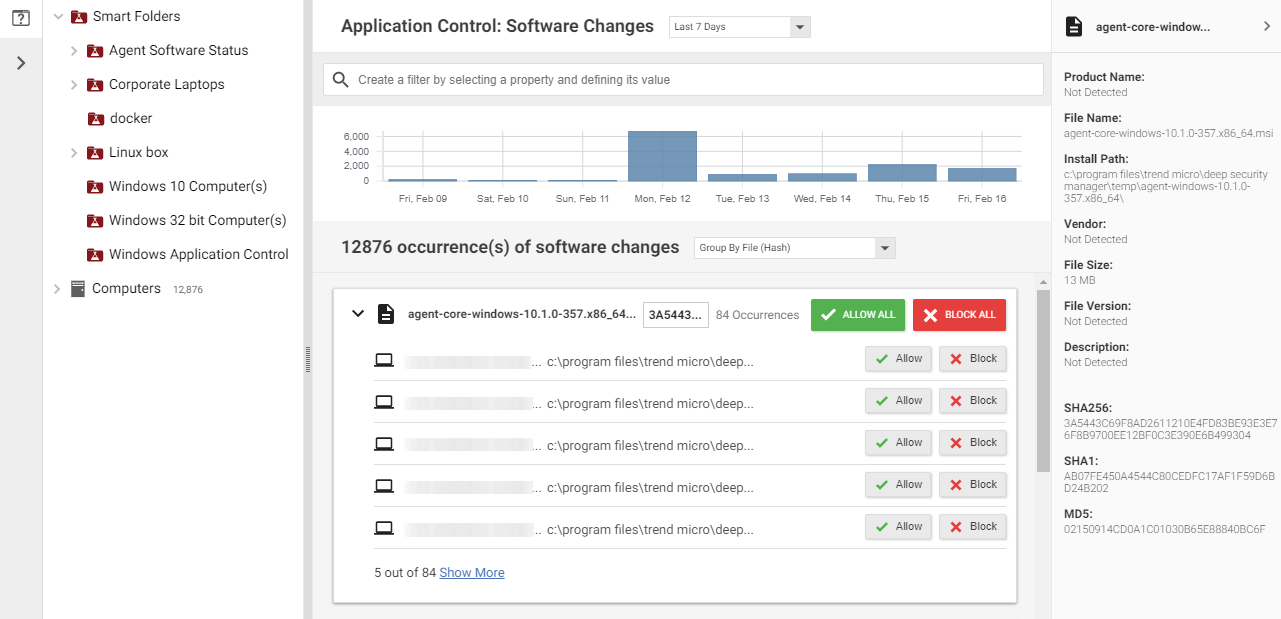
- Integrity monitoring to detect unauthorized changes
- Log inspection for identifying suspicious activity
- Application control to prevent unauthorized software from running
Workload Security integrates with major cloud providers. It automatically discovers new instances as you spin them up. This means protection scales with your infrastructure without manual intervention.
Container Security
Containers have become the standard for deploying modern applications. But they introduce unique security challenges. Cloud One’s container security addresses these head-on.
The platform scans container images for vulnerabilities before deployment. It checks for known CVEs, malware, and misconfigurations. If an image fails your security policies, it won’t make it to production.
Runtime protection monitors containers after deployment. It detects suspicious behavior like:
- Unexpected network connections
- Unauthorized file system changes
- Privilege escalation attempts
- Cryptocurrency mining malware
The platform supports Kubernetes, Docker, and other container orchestration tools. It plugs into your existing CI/CD pipeline. Security becomes part of the development process, not an afterthought.
File Storage Security
Cloud storage buckets often contain sensitive data. They’re also a common attack vector. Misconfigured S3 buckets have caused countless data breaches.
Cloud One scans files uploaded to cloud storage services. It looks for malware, ransomware, and other malicious content. Infected files get quarantined before they can cause damage.
Supported storage services include:
- Amazon S3
- Azure Blob Storage
- Google Cloud Storage
The scanning happens automatically. When someone uploads a file, Cloud One checks it. Clean files pass through. Suspicious ones get flagged for review or blocked entirely.
Network Security
This module provides network-layer protection for cloud environments. It includes intrusion prevention capabilities that inspect traffic for threats.
The network security features work differently than traditional perimeter firewalls. They’re designed for cloud architectures where workloads move dynamically. Protection follows the workload, not the IP address.
Traffic inspection happens without creating bottlenecks. The platform uses distributed architecture to maintain performance while scanning for threats.
Application Security
Modern applications face constant attack. SQL injection, cross-site scripting, and API abuse are daily threats. Cloud One’s application security module helps defend against these attacks.
The platform provides runtime application self-protection (RASP). This technology instruments your applications to detect attacks from the inside. It sees what traditional perimeter tools miss.
Developers get visibility into vulnerabilities during testing. Security findings show up in their existing tools. This makes it easier to fix issues before they reach production.
Conformity (Cloud Security Posture Management)
Misconfigurations cause most cloud security breaches. Conformity scans your cloud infrastructure for these mistakes. It checks against hundreds of best-practice rules.
The module covers multiple compliance frameworks:
| Framework | Coverage |
|---|---|
| CIS Benchmarks | Full coverage for AWS, Azure, GCP |
| SOC 2 | Mapped controls and automated checks |
| PCI DSS | Payment card industry requirements |
| HIPAA | Healthcare data protection rules |
| GDPR | European privacy regulations |
| NIST | Federal cybersecurity standards |
When Conformity finds a misconfiguration, it doesn’t just alert you. It provides step-by-step remediation guidance. Some fixes can be applied automatically with your approval.
Open Source Security
Most modern applications rely on open source libraries. These dependencies can introduce vulnerabilities. Cloud One scans your code for risky open source components.
The platform integrates with code repositories. It checks dependencies against vulnerability databases. When a new CVE affects a library you’re using, you get notified quickly.
This shifts security left in the development process. Developers catch vulnerable dependencies before committing code. That’s cheaper and faster than finding them in production.
Trend Micro Cloud One Evaluation: How It Stacks Up Against the Competition
Cloud One doesn’t exist in a vacuum. Several vendors compete in the CNAPP space. Understanding how they compare helps you make an informed decision.
Cloud One vs. Palo Alto Prisma Cloud
Prisma Cloud is one of Cloud One’s biggest competitors. Both platforms offer comprehensive CNAPP capabilities. But they differ in important ways.
Strengths of Prisma Cloud:
- Strong network security heritage from Palo Alto’s firewall business
- Extensive API security features
- Large partner ecosystem
Strengths of Cloud One:
- Tighter integration with endpoint security through Trend Micro’s broader portfolio
- More flexible consumption-based pricing
- Longer track record in server protection
Prisma Cloud tends to appeal to organizations already invested in Palo Alto’s network security products. Cloud One attracts customers who want a standalone cloud security platform or already use Trend Micro products.
Cloud One vs. CrowdStrike Falcon Cloud Security
CrowdStrike entered the cloud security market more recently. Their strength lies in endpoint detection and response. They’ve extended those capabilities to cloud workloads.
Strengths of CrowdStrike:
- Industry-leading EDR capabilities
- Strong threat intelligence from their incident response work
- Fast-growing platform with aggressive innovation
Strengths of Cloud One:
- More mature cloud security posture management
- Deeper container security features
- Broader compliance coverage out of the box
Organizations prioritizing threat detection often lean toward CrowdStrike. Those focused on compliance and cloud configuration management may prefer Cloud One.
Cloud One vs. Wiz
Wiz has gained massive traction since launching. They pioneered agentless cloud security scanning. Their approach differs from Cloud One’s agent-based model.
Strengths of Wiz:
- Agentless architecture simplifies deployment
- Excellent risk prioritization with attack path analysis
- Modern user interface praised by customers
Strengths of Cloud One:
- Deeper runtime protection through agents
- More comprehensive workload security features
- Better suited for organizations needing active blocking, not just detection
Wiz excels at finding risks and prioritizing them. Cloud One goes further by actively protecting workloads. The right choice depends on whether you need visibility or active defense.
Competitive Comparison Table
| Feature | Trend Micro Cloud One | Prisma Cloud | CrowdStrike | Wiz |
|---|---|---|---|---|
| Agent-based protection | Yes | Yes | Yes | No |
| Agentless scanning | Yes | Yes | Limited | Yes |
| Container security | Strong | Strong | Good | Good |
| CSPM | Strong | Strong | Good | Excellent |
| Runtime protection | Excellent | Good | Excellent | Limited |
| Multi-cloud support | AWS, Azure, GCP | AWS, Azure, GCP | AWS, Azure, GCP | AWS, Azure, GCP |
| Pricing model | Consumption-based | Credits | Per workload | Per cloud account |
Trend Micro Cloud One Assessment: Pricing and Licensing
Understanding Cloud One’s pricing helps you budget appropriately. The platform uses a consumption-based model. You pay for what you use.
How Pricing Works
Cloud One pricing varies by module. Each capability has its own pricing structure. This lets you pick and choose what you need.
Workload Security pricing is based on the number of protected instances. You pay per server, whether physical, virtual, or cloud-based. Pricing tiers offer discounts at higher volumes.
Container Security charges by the number of protected containers or nodes. Kubernetes clusters with hundreds of pods will cost more than smaller deployments.
Conformity pricing depends on the number of cloud accounts monitored. More accounts mean higher costs. But the per-account price drops as you add more.
Free Trial and Evaluation Options
Trend Micro offers a 30-day free trial of Cloud One. This gives you time to test the platform in your environment. No credit card is required to start.
The trial includes access to all modules. You can evaluate workload protection, container security, and compliance scanning. This helps you understand which capabilities you actually need.
For larger organizations, Trend Micro provides proof-of-concept support. Their team helps you set up the platform and configure it for your specific use cases.
Pricing Considerations
Several factors affect your total cost:
- Environment size: More workloads mean higher costs
- Module selection: Using all modules costs more than selecting a few
- Commitment term: Annual commitments often come with discounts
- Support level: Premium support adds to the base price
Getting an accurate quote requires talking to Trend Micro’s sales team. They’ll assess your environment and provide customized pricing. List prices aren’t publicly available.
ROI Considerations
Cloud One’s value goes beyond the sticker price. Consider the costs you avoid:
Tool consolidation savings: Replacing three or four point products with one platform reduces licensing costs. You also save on training and management overhead.
Breach prevention: A single security incident can cost millions. Cloud One’s protection capabilities help prevent these costly events.
Compliance efficiency: Manual compliance assessments take weeks. Automated scanning with Conformity cuts this to hours. Staff time saved has real value.
Developer productivity: Shifting security left means fewer production issues. Developers spend less time fixing vulnerabilities found late in the cycle.
Integration Capabilities: How Cloud One Fits Your Toolchain
No security tool exists in isolation. Cloud One needs to work with your existing technology stack. The platform offers extensive integration options.
Cloud Provider Integrations
Cloud One integrates natively with major public clouds:
Amazon Web Services:
- AWS CloudFormation for infrastructure as code deployment
- Amazon CloudWatch for log ingestion
- AWS Security Hub for consolidated findings
- Amazon SNS for notifications
- AWS Lambda for automated response
Microsoft Azure:
- Azure Resource Manager templates
- Azure Sentinel integration
- Azure Security Center data sharing
- Azure Event Hubs for streaming data
Google Cloud Platform:
- Google Cloud Security Command Center
- Pub/Sub for event notifications
- Cloud Functions for automation
DevOps Tool Integrations
Modern development workflows require security tools that fit naturally into CI/CD pipelines. Cloud One supports common DevOps tools.
CI/CD Platforms:
- Jenkins with official plugins
- GitLab CI/CD integration
- GitHub Actions support
- Azure DevOps pipelines
- CircleCI and Travis CI
Container Platforms:
- Docker Hub and private registries
- Amazon ECR
- Azure Container Registry
- Google Container Registry
- Harbor and other registry solutions
Infrastructure as Code:
- Terraform providers
- Ansible playbooks
- Chef and Puppet recipes
SIEM and SOAR Integrations
Security operations teams need Cloud One data in their existing tools. The platform exports findings to popular SIEM solutions.
Supported SIEM platforms include:
- Splunk with dedicated app
- Microsoft Sentinel
- IBM QRadar
- Elastic Security
- Sumo Logic
For automation, Cloud One’s APIs enable SOAR integration. You can build playbooks that automatically respond to security events. This reduces manual work for your security team.
API Access
Everything in Cloud One is accessible via REST APIs. This enables custom integrations when pre-built connectors don’t exist.
The API documentation is comprehensive. Code samples in Python, Go, and other languages help developers get started quickly. Trend Micro maintains SDKs for common programming languages.
Common API use cases include:
- Custom dashboards pulling Cloud One data
- Automated compliance reporting
- Integration with ticketing systems like ServiceNow
- Custom notification workflows
Deployment and Setup: Getting Started with Cloud One
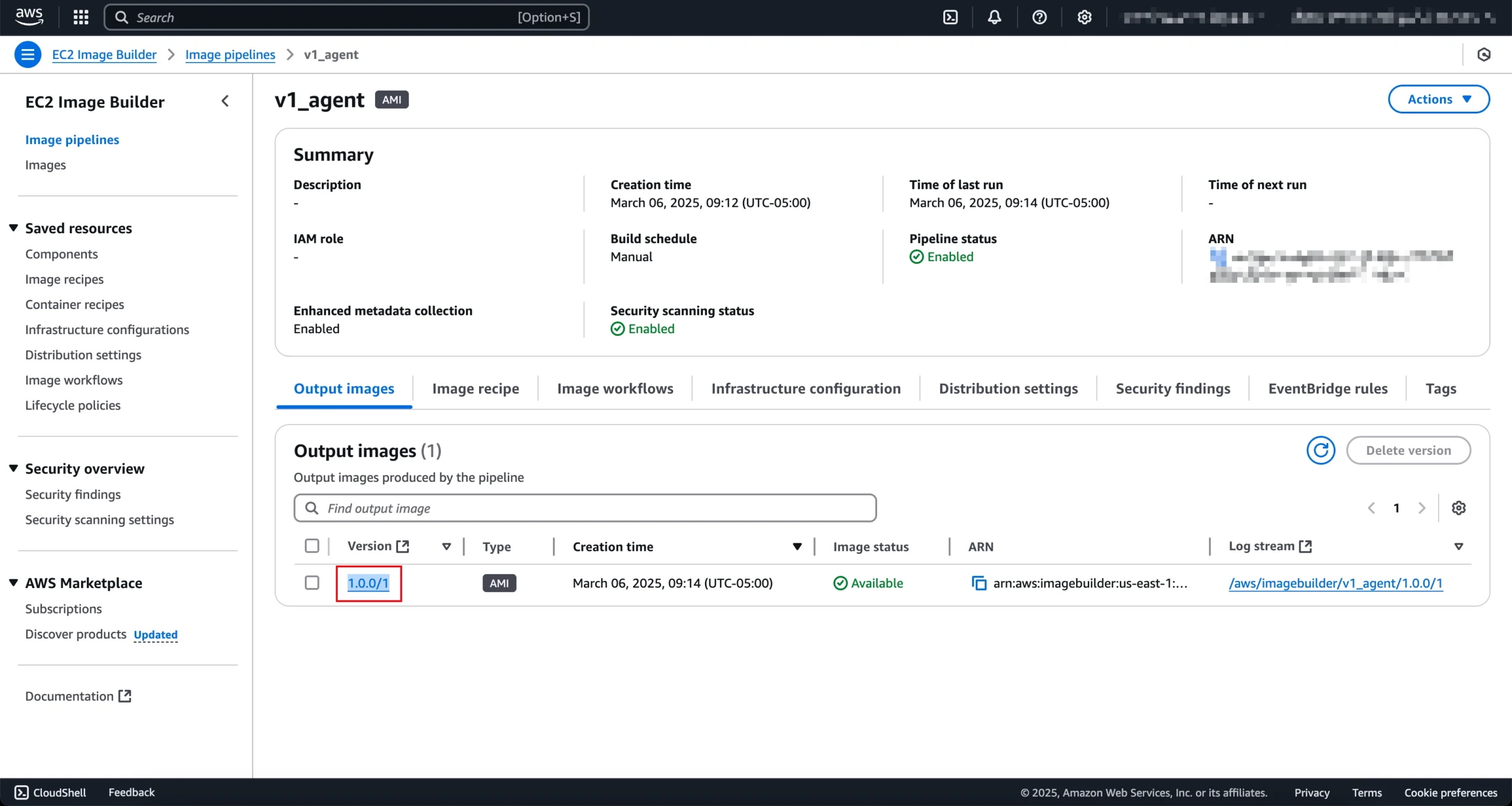
How easy is Cloud One to deploy? This matters because complex security tools often go unused. Let’s walk through the setup process.
Initial Account Setup
Getting started with Cloud One takes minutes. You create an account on Trend Micro’s cloud portal. No hardware to install. No software to download initially.
The portal walks you through connecting your cloud accounts. For AWS, this means setting up an IAM role with appropriate permissions. Azure and GCP have similar processes.
Once connected, Cloud One begins scanning your environment. Within hours, you’ll see your cloud posture. Conformity identifies misconfigurations automatically.
Agent Deployment for Workload Security
Protecting workloads requires installing agents. Cloud One provides multiple deployment methods.
Manual installation: Download the agent and install it on each server. Good for small deployments or testing.
Automated installation: Use configuration management tools like Ansible or Chef. Better for larger environments.
Cloud-native deployment: Launch instances from pre-built AMIs with agents included. Or use launch scripts that install agents automatically.
Agent deployment scripts are available for:
- Windows Server (2012 R2 and newer)
- Red Hat Enterprise Linux
- Ubuntu
- Amazon Linux
- CentOS
- SUSE Linux Enterprise
- Debian
Container Security Setup
Protecting containers involves two components: image scanning and runtime protection.
Image scanning integrates with your container registry. You configure a webhook that triggers scans when new images are pushed. Results appear in the Cloud One console within minutes.
Runtime protection requires deploying a DaemonSet to your Kubernetes cluster. This installs security agents on each node. The agents monitor container behavior in real time.
Helm charts simplify Kubernetes deployment. A few commands get protection running:
helm repo add trendmicro https://trendmicro.github.io/cloudone-container-security-helm
helm install container-security trendmicro/container-security
Time to Value
How quickly can you get value from Cloud One? It depends on your starting point.
Cloud posture visibility: Hours. Connect your cloud accounts and Conformity starts scanning immediately.
Workload protection: Days. Agent deployment across a large environment takes time, but protection is active as soon as agents install.
Container security: Days. Registry integration and Kubernetes deployment require coordination with development teams.
Full integration: Weeks. Connecting to SIEM, building automation playbooks, and tuning policies takes longer.
Most organizations see meaningful value within the first week. Full deployment typically takes one to three months depending on environment complexity.
Real-World Use Cases: How Organizations Use Cloud One
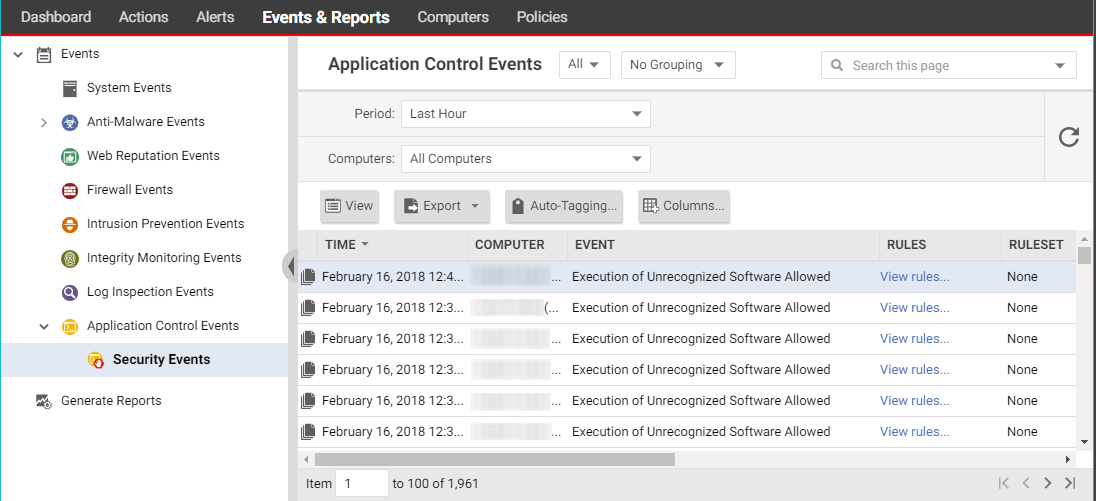
Theory is nice, but how does Cloud One work in practice? Let’s look at common deployment scenarios.
Use Case 1: Protecting a Multi-Cloud Environment
A financial services company runs workloads across AWS and Azure. They chose Cloud One because it works consistently across both clouds.
Their challenge: Security teams struggled to maintain visibility across two cloud providers. Each had different native security tools. Policies weren’t consistent.
How Cloud One helped:
- Conformity provides a single view of compliance across both clouds
- Workload Security uses the same agents regardless of cloud provider
- Security policies apply uniformly whether workloads run in AWS or Azure
- One console instead of two reduced training and management overhead
Results: The security team reduced tool sprawl from six products to one. Compliance assessments that took weeks now happen continuously.
Use Case 2: Securing a Kubernetes-Based Application Platform
A software company runs their entire product on Kubernetes. Hundreds of microservices deploy multiple times daily.
Their challenge: Traditional security tools couldn’t keep up with container velocity. Manual vulnerability scanning created bottlenecks. Developers pushed back against security requirements.
How Cloud One helped:
- Container Security integrated with their GitLab CI/CD pipeline
- Every container image gets scanned automatically before deployment
- Vulnerable images are blocked from reaching production
- Runtime protection catches threats that slip through
- Developers see security findings in their existing tools
Results: Deployment velocity actually increased because security became automated. Critical vulnerabilities in production dropped by 80%.
Use Case 3: Meeting Compliance Requirements
A healthcare organization needed to prove HIPAA compliance for their cloud environment. Auditors required evidence of security controls.
Their challenge: Manual compliance documentation took months to prepare. By the time reports were finished, the environment had changed. Evidence gathering required pulling data from multiple tools.
How Cloud One helped:
- Conformity maps controls to HIPAA requirements automatically
- Real-time compliance dashboards show current status
- Historical data proves controls were in place over time
- Automated reports satisfy auditor requirements
Results: Audit preparation time dropped from weeks to days. Continuous monitoring means no surprises when auditors arrive.
Use Case 4: Securing Cloud File Storage
A media company uses S3 buckets to receive files from external partners. They needed to scan uploads for malware before processing them.
Their challenge: Partners sometimes uploaded infected files. Malware would spread when employees downloaded content for review. Existing antivirus couldn’t scan cloud storage directly.
How Cloud One helped:
- File Storage Security scans every upload automatically
- Infected files get quarantined immediately
- Clean files are tagged and released for processing
- The security team gets alerts when malware is detected
Results: Malware incidents from partner uploads dropped to zero. Partners don’t notice any delay because scanning happens within seconds.
Strengths of Trend Micro Cloud One: What It Does Well
After examining Cloud One in depth, several strengths stand out. These make the platform a strong choice for many organizations.
Comprehensive Coverage
Cloud One isn’t missing major capabilities. It covers workloads, containers, serverless, file storage, network, and application security. Few competitors match this breadth.
The comprehensive approach means you don’t need to buy additional tools to fill gaps. One vendor, one contract, one support relationship. This simplifies procurement and management.
Mature Technology
Trend Micro has decades of security experience. They’ve protected endpoints and servers since the 1990s. Cloud One builds on this foundation.
The workload protection capabilities reflect years of refinement. Malware detection, intrusion prevention, and integrity monitoring have been battle-tested across millions of deployments.
Newer competitors may have flashier interfaces, but Trend Micro’s technology works. It catches threats that others miss because of this deep experience.
Strong Multi-Cloud Support
Many organizations run workloads across multiple cloud providers. Cloud One handles this well. The same platform protects AWS, Azure, and GCP workloads.
Policies apply consistently regardless of where workloads run. Security teams don’t need to learn different tools for each cloud. This multi-cloud capability is a real differentiator.
Integration with Trend Vision One
Cloud One integrates with Trend Micro’s broader security platform, Trend Vision One. This provides additional capabilities.
XDR (extended detection and response) correlates data across endpoints, email, and cloud. Threats that touch multiple environments get detected faster. Response is coordinated across the attack surface.
Organizations already using Trend Micro products benefit from this integration. Adding Cloud One extends existing investments rather than requiring a rip-and-replace.
Developer-Friendly Approach
Cloud One fits modern development practices. It integrates with CI/CD pipelines rather than fighting against them. Security becomes part of the workflow.
APIs and automation capabilities let teams customize the platform. Developers can build security into their processes without waiting for the security team.
As Trend Micro notes, the platform delivers “thoughtful application security from commit to runtime across all major cloud providers, integrating with the DevOps tools your organization already uses.”
Industry Recognition
Third-party validation matters. Trend Micro’s Leader position in the IDC MarketScape provides independent confirmation of their capabilities.
Analyst recognition helps during procurement. It’s easier to justify choosing a vendor that industry experts recommend. This social proof reduces buying risk.
Limitations of Cloud One: Areas for Improvement
No product is perfect. Cloud One has limitations worth considering before you buy.
Learning Curve
The platform’s comprehensive nature creates complexity. New users face a learning curve before they’re productive. There’s a lot to understand.
Different modules have different interfaces. Moving between Workload Security, Conformity, and Container Security requires adjustment. Unifying the experience would help.
Training resources exist, but expect to invest time in getting up to speed. Plan for adequate onboarding when budgeting for the platform.
Agent Requirements
Full workload protection requires installing agents. This adds overhead to your environment. Agents consume CPU and memory resources.
Some organizations prefer agentless approaches. Competitors like Wiz have gained traction with agentless scanning. Cloud One now offers agentless options too, but agent-based protection remains core to the platform.
In containerized environments, running security DaemonSets on every node isn’t always welcome. Teams with strict resource constraints may push back.
Pricing Complexity
The modular pricing structure makes budgeting challenging. Different modules have different pricing units. Predicting costs requires careful analysis.
Consumption-based pricing means costs vary month to month. Organizations that spin up lots of temporary workloads may face unpredictable bills.
Getting accurate quotes requires sales engagement. You can’t self-serve pricing on the website. This slows down evaluation for some buyers.
User Interface
The Cloud One console is functional but not beautiful. Newer competitors have invested heavily in user experience. Cloud One’s interface feels dated by comparison.
Navigation between modules could be smoother. Finding specific settings sometimes takes multiple clicks. Small frustrations add up during daily use.
Trend Micro continues improving the interface, but it’s not yet at the level of more modern platforms.
Documentation Gaps
While documentation exists for most features, some advanced scenarios lack coverage. You may need to contact support for complex configurations.
Community resources are limited compared to larger competitors. Fewer blog posts, fewer Stack Overflow answers, fewer tutorial videos from third parties.
Trend Micro’s own documentation is accurate but sometimes assumes knowledge that new users don’t have. More beginner-friendly content would help.
Who Should Use Trend Micro Cloud One?
Cloud One fits some organizations better than others. Here’s who should seriously consider it.
Good Fit: Enterprises with Complex Cloud Environments
Large organizations running workloads across multiple clouds benefit from Cloud One’s comprehensive coverage. The platform scales to handle thousands of workloads.
If you’re managing AWS, Azure, and on-premises infrastructure, Cloud One provides consistent protection everywhere. The unified approach reduces complexity.
Good Fit: Regulated Industries
Healthcare, financial services, and government organizations face strict compliance requirements. Cloud One’s built-in compliance frameworks simplify meeting these obligations.
Continuous compliance monitoring catches issues before auditors arrive. Automated reporting provides evidence when needed. This makes Cloud One attractive for regulated environments.
Good Fit: Existing Trend Micro Customers
Organizations already using Trend Micro products see additional value. Integration with Trend Vision One extends existing capabilities. Vendor consolidation reduces management overhead.
Training investments carry over. Staff familiar with Trend Micro products adapt to Cloud One more quickly. Existing support relationships continue.
Good Fit: Organizations Needing Active Protection
Some security tools only detect threats. Cloud One actively blocks them. If you need protection that stops attacks in real time, Cloud One delivers.
Workload Security’s intrusion prevention, file integrity monitoring, and application control provide defense in depth. Threats get stopped, not just reported.
Less Ideal: Startups and Small Teams
Cloud One’s complexity may overwhelm small teams. The platform assumes dedicated security staff. Organizations with a single security person might struggle.
Pricing may be challenging for small environments. Some modules have minimum commitments that don’t make sense for a handful of workloads.
Smaller organizations might prefer simpler tools that grow with them.
Less Ideal: Agentless-Only Requirements
If your organization has decided against agents, Cloud One isn’t the best fit. While agentless scanning exists, agent-based protection is core to the platform.
Organizations that can’t deploy agents due to performance concerns or policy restrictions should look at agentless alternatives.
How to Evaluate Cloud One for Your Organization
Interested in Cloud One? Here’s a structured approach to evaluation.
Step 1: Define Your Requirements
Before talking to vendors, know what you need. Consider:
- Which clouds do you use today? Which might you add?
- What workload types need protection (VMs, containers, serverless)?
- What compliance frameworks apply to your organization?
- What tools does Cloud One need to integrate with?
- How much can you invest in a new platform?
Document your requirements before starting vendor conversations. This keeps evaluations focused and comparable.
Step 2: Request a Demo
Trend Micro offers product demonstrations. Schedule one to see Cloud One in action. Come prepared with questions specific to your environment.
Good demo questions include:
- Show me how container image scanning works with our CI/CD tools
- Walk through the compliance reporting for our framework
- How would we deploy agents across our existing infrastructure?
- What does incident response look like in this platform?
Step 3: Run a Proof of Concept
Demos show the best-case scenario. A proof of concept reveals reality. Deploy Cloud One in your actual environment.
Focus your POC on high-value scenarios:
- Protect a subset of production workloads
- Scan your container images for vulnerabilities
- Run compliance checks against your cloud accounts
- Integrate with one key tool (SIEM, ticketing, CI/CD)
Document what works and what doesn’t. Note any issues with deployment, performance, or usability.
Step 4: Compare Against Alternatives
Don’t evaluate Cloud One in isolation. Test at least two competitors using the same criteria. This gives you comparison data.
Create a scoring matrix covering:
- Feature coverage for your specific needs
- Ease of deployment and management
- Integration quality with your tools
- Total cost of ownership
- Vendor stability and support quality
Step 5: Negotiate and Purchase
Once you’ve selected Cloud One, negotiate terms. Common negotiation points include:
- Multi-year discounts
- Support level upgrades
- Professional services for implementation
- Training credits
- Favorable payment terms
End of quarter and fiscal year timing often yields better deals. Vendors are more flexible when trying to hit numbers.
Implementation Best Practices
Buying Cloud One is just the beginning. Successful implementation requires careful planning.
Start with Visibility, Then Add Protection
Don’t try to deploy everything at once. Start with Conformity to understand your cloud posture. This provides immediate value without changing your environment.
Once you understand your risks, prioritize protection. Deploy Workload Security to your most critical systems first. Expand from there based on risk.
Container Security can run in detect-only mode initially. This shows what would be blocked without disrupting development. Switch to enforcement after tuning policies.
Involve Development Teams Early
Security tools that slow down developers get disabled. Involve your development teams from the start. Explain what Cloud One does and why it matters.
Work with developers to integrate scanning into existing workflows. Make security findings visible in tools they already use. Avoid creating new dashboards they need to check.
Set expectations about blocking policies. Developers should know that vulnerable images won’t deploy. Give them time to clean up existing issues before enforcement.
Tune Policies Over Time
Default policies won’t be perfect for your environment. Expect to tune them as you learn what’s normal.
Start with monitoring mode. Review alerts to understand false positives. Adjust rules to reduce noise before enabling blocking.
Document your policy decisions. Explain why certain rules are configured the way they are. This helps when onboarding new team members or answering audit questions.
Build Automation
Manual security doesn’t scale. Build automation around Cloud One from the start.
Examples of useful automation:
- Auto-remediate common misconfigurations found by Conformity
- Create tickets automatically for findings that need investigation
- Notify teams through Slack or Teams when issues arise
- Generate weekly compliance reports for leadership
Cloud One’s APIs make automation straightforward. Invest the time upfront to reduce ongoing manual work.
Monitor and Measure
Track metrics that show Cloud One’s value:
- Misconfigurations found and remediated
- Vulnerabilities blocked before production
- Threats detected and stopped
- Time to detect and respond to incidents
- Compliance posture over time
Regular reporting keeps stakeholders informed. It also justifies continued investment in the platform.
The Future of Cloud One and CNAPP
Cloud security continues evolving rapidly. Understanding where things are headed helps you plan.
AI and Automation
AI is transforming security operations. Trend Micro is investing in AI capabilities across their platform. Expect more automated threat detection and response.
AI can help prioritize risks, reducing alert fatigue. It can suggest remediation steps and even apply fixes automatically. These capabilities are coming to Cloud One.
Deeper DevOps Integration
Security is shifting left, embedding earlier in development. Future Cloud One versions will likely offer even tighter CI/CD integration.
Expect more native integrations with popular development tools. Security findings will surface directly in IDEs and pull requests. Developers won’t need to leave their workflow.
Expanded Cloud Coverage
New cloud services launch constantly. Cloud One will need to keep pace. Support for emerging services, especially serverless and edge computing, will expand.
Multi-cloud and hybrid scenarios will get more attention. Organizations increasingly mix clouds and on-premises infrastructure. Security tools must handle this reality.
Consolidation Trends
The security market is consolidating. CNAPPs are absorbing capabilities that used to be separate products. This trend benefits comprehensive platforms like Cloud One.
Organizations want fewer vendors, not more. Platforms that provide broad coverage will win over point products. Cloud One is well-positioned for this shift.
Final Verdict: Is Trend Micro Cloud One Worth It?
After this thorough review, here’s the bottom line on Trend Micro Cloud One.
Cloud One delivers comprehensive cloud security through a single platform. It protects workloads, containers, file storage, and applications across AWS, Azure, and GCP. Conformity provides strong cloud security posture management with built-in compliance frameworks.
The platform shines for enterprise organizations with complex multi-cloud environments. Regulated industries benefit from its compliance capabilities. Organizations already using Trend Micro products gain additional value from integration.
Limitations include a learning curve, agent requirements, and an interface that could be more modern. Smaller organizations may find it overwhelming.
For organizations needing active protection across diverse cloud environments, Cloud One deserves serious consideration. The IDC MarketScape Leader recognition confirms its position among the top CNAPP solutions.
Start with a free trial. Test it against your specific requirements. Compare it to alternatives. Then make an informed decision based on your findings.
FAQ Section: Common Questions About Trend Micro Cloud One Review
| Who should use Trend Micro Cloud One? | Cloud One works best for medium to large enterprises running workloads across multiple cloud providers. Organizations in regulated industries like healthcare, finance, and government benefit from its compliance features. Companies already using Trend Micro products gain additional value through integration with Trend Vision One. |
| How much does Trend Micro Cloud One cost? | Pricing varies based on which modules you use and how many workloads you protect. The platform uses consumption-based pricing. Contact Trend Micro’s sales team for a quote specific to your environment. A 30-day free trial is available to evaluate the platform before purchasing. |
| Does Cloud One require installing agents? | Full workload protection requires agents. However, some capabilities like cloud security posture management work without agents. Trend Micro has added agentless scanning options, but agent-based protection provides the deepest security coverage. |
| Which cloud providers does Cloud One support? | Cloud One supports Amazon Web Services, Microsoft Azure, and Google Cloud Platform. It works consistently across all three, allowing organizations to apply unified security policies regardless of where workloads run. |
| How does Cloud One compare to Prisma Cloud or CrowdStrike? | Each platform has strengths. Cloud One offers broader coverage and mature workload protection. Prisma Cloud brings strong network security heritage. CrowdStrike excels at threat detection. The best choice depends on your specific priorities and existing technology investments. |
| Can Cloud One help with compliance requirements? | Yes. The Conformity module includes built-in rules for major compliance frameworks including CIS Benchmarks, SOC 2, PCI DSS, HIPAA, GDPR, and NIST. It provides continuous compliance monitoring and generates reports suitable for auditors. |
| How long does it take to deploy Cloud One? | Initial visibility through Conformity takes hours. Workload protection deployment across a large environment takes days to weeks. Full integration with existing tools and tuned policies typically takes one to three months depending on environment complexity. |
| Does Cloud One integrate with CI/CD pipelines? | Yes. Cloud One integrates with Jenkins, GitLab CI/CD, GitHub Actions, Azure DevOps, and other popular CI/CD platforms. Container image scanning can be automated as part of build pipelines, blocking vulnerable images before deployment. |
| What support options are available for Cloud One? | Trend Micro offers multiple support tiers. Standard support includes access to documentation and technical support during business hours. Premium support adds 24/7 availability and faster response times. Professional services are available for implementation assistance. |
| Is there a free trial of Trend Micro Cloud One available? | Yes. Trend Micro offers a 30-day free trial with access to all modules. No credit card is required to start. This allows organizations to test the platform in their own environment before making a purchasing decision. |






 Stack Insight is intended to support informed decision-making by providing independent information about business software and services. Some product details, including pricing, features, and promotional offers, may be supplied by vendors or partners and can change without notice.