
Upwind Review


Upwind Review: A Complete Guide to Cloud-Native Application Protection in 2026
Cloud security has changed. The old way of scanning static configurations and hoping for the best doesn’t cut it anymore. Modern cloud environments shift constantly. Containers spin up and down. APIs connect everything. AI workloads add new attack surfaces nobody anticipated five years ago.
That’s where Upwind comes in. This platform takes a different approach to cloud security by focusing on what’s actually happening at runtime. Instead of just telling you what could go wrong, it shows you what’s actually running, what’s exposed, and what needs your attention right now.
In this review, we’ll break down everything about Upwind’s CNAPP solution. You’ll learn how it works, what makes it different from competitors, and whether it’s the right fit for your organization. We’ll look at real features, honest limitations, and practical use cases.
What Is Upwind and Why Does It Matter?
Upwind is a Cloud-Native Application Protection Platform, commonly called CNAPP. But calling it “just another CNAPP” misses the point.
The company built its platform from the ground up around runtime insights. This isn’t a collection of acquired tools stitched together. It’s a unified system designed to show you what’s happening inside your cloud environment as it happens.
The Core Problem Upwind Solves
Traditional cloud security tools scan your infrastructure periodically. They take snapshots. They compare configurations against best practices. Then they dump thousands of alerts on your security team.
Here’s the issue: most of those alerts don’t matter.
- A vulnerability in a container that never runs? Low priority.
- An exposed API that nobody calls? Still needs fixing, but not urgent.
- A misconfiguration on a development resource with no sensitive data? Can wait.
Without runtime context, every finding looks equally important. Security teams drown in noise. Real threats hide in the flood of false positives.
Upwind flips this model. By watching what actually runs, connects, and executes, it tells you which vulnerabilities are actively exploitable. Which misconfigurations affect production workloads. Which APIs handle sensitive data.
Who Built Upwind and Why It Matters
The founding team came from security and infrastructure backgrounds. They understood that cloud environments behave differently than traditional data centers. Static tools designed for on-premises environments fail in dynamic cloud settings.
In 2026, Upwind was validated as a leader in modern cloud security across independent market signals, according to Business Wire reporting. The platform earned a 4.9 out of 5 rating on Gartner Peer Insights in the CNAPP category based on verified customer reviews.
These ratings matter because they come from actual users, not marketing claims.
Understanding CNAPP: The Foundation of Upwind’s Approach
Before diving deeper into this Upwind analysis, you need to understand what CNAPP actually means and why it became necessary.
The Tool Sprawl Problem
Five years ago, securing a cloud environment meant buying separate tools for different problems:
| Security Need | Traditional Tool Category | What It Does |
|---|---|---|
| Configuration errors | CSPM (Cloud Security Posture Management) | Scans for misconfigurations |
| Workload protection | CWPP (Cloud Workload Protection Platform) | Secures containers and VMs |
| Identity risks | CIEM (Cloud Infrastructure Entitlement Management) | Manages permissions and access |
| Threat detection | CDR (Cloud Detection and Response) | Finds and responds to attacks |
| Code vulnerabilities | SAST/DAST scanners | Analyzes application code |
| API security | Dedicated API tools | Protects API endpoints |
Each tool had its own console, its own alerts, its own way of presenting data. Security teams spent more time switching between dashboards than actually fixing problems.
Worse, these tools didn’t talk to each other. A vulnerability scanner might flag a container issue, but it couldn’t tell you if that container was actually running or if it had network access to sensitive systems.
How CNAPP Consolidates Security
CNAPP brings all these capabilities under one roof. Upwind’s implementation includes:
- Security posture management for cloud configurations
- Workload protection for containers, Kubernetes, and serverless
- Identity security for permissions and access control
- Vulnerability management across the entire stack
- API security with application-layer visibility
- Detection and response capabilities for active threats
But consolidation alone isn’t special anymore. Most major security vendors offer CNAPP products now. What sets Upwind apart is how these capabilities connect through runtime data.
The Security Runtime Fabric: Upwind’s Core Technology
This section of our Upwind platform review covers the technical foundation that makes everything else work.
What Is the Security Runtime Fabric?
Upwind uses what it calls the Security Runtime Fabric to collect and analyze data from your environment. Think of it as a nervous system that runs through your cloud infrastructure.
The platform deploys a lightweight, network-focused endpoint agent. This agent doesn’t just sit and wait for scheduled scans. It watches traffic patterns, process execution, and resource behavior in real time.
Key data points collected include:
- Network connections between workloads
- API calls and their payloads
- Process execution within containers
- File system access patterns
- Memory usage and anomalies
- Authentication and authorization events
Agentless vs Agent-Based: Upwind’s Hybrid Approach
The cloud security market often debates agent vs agentless approaches. Each has trade-offs:
| Approach | Pros | Cons |
|---|---|---|
| Agentless | Easy deployment, no performance impact | Limited visibility, snapshot-based |
| Agent-based | Deep visibility, real-time data | Deployment complexity, resource usage |
Upwind uses both. The platform collects agentless data through cloud provider APIs and also deploys its lightweight agent for runtime insights. This gives you immediate value from agentless scanning while the agent provides the deep context that makes alerts actionable.
According to Latio’s vendor analysis, Upwind has “built CNAPP from the ground-up around runtime insights provided from a network-focused endpoint agent. They provide unique features like API security that others can’t match without similar agent deployment.”
How Runtime Context Changes Everything
Let’s look at a concrete example.
Traditional scanner finds: “CVE-2026-12345, Critical severity, affects container image xyz:latest”
Without runtime context, this looks urgent. But is it?
Upwind adds: “This container ran 3 times in the past 30 days. It has no network access to production databases. The vulnerable library is never loaded at runtime.”
Suddenly, that “critical” finding moves down the priority list. Meanwhile, a “medium” severity issue in a container that processes customer payments and runs continuously jumps to the top.
This context-first approach helps teams focus on what actually matters instead of chasing every alert.
Security Posture Management: Upwind’s Configuration Capabilities
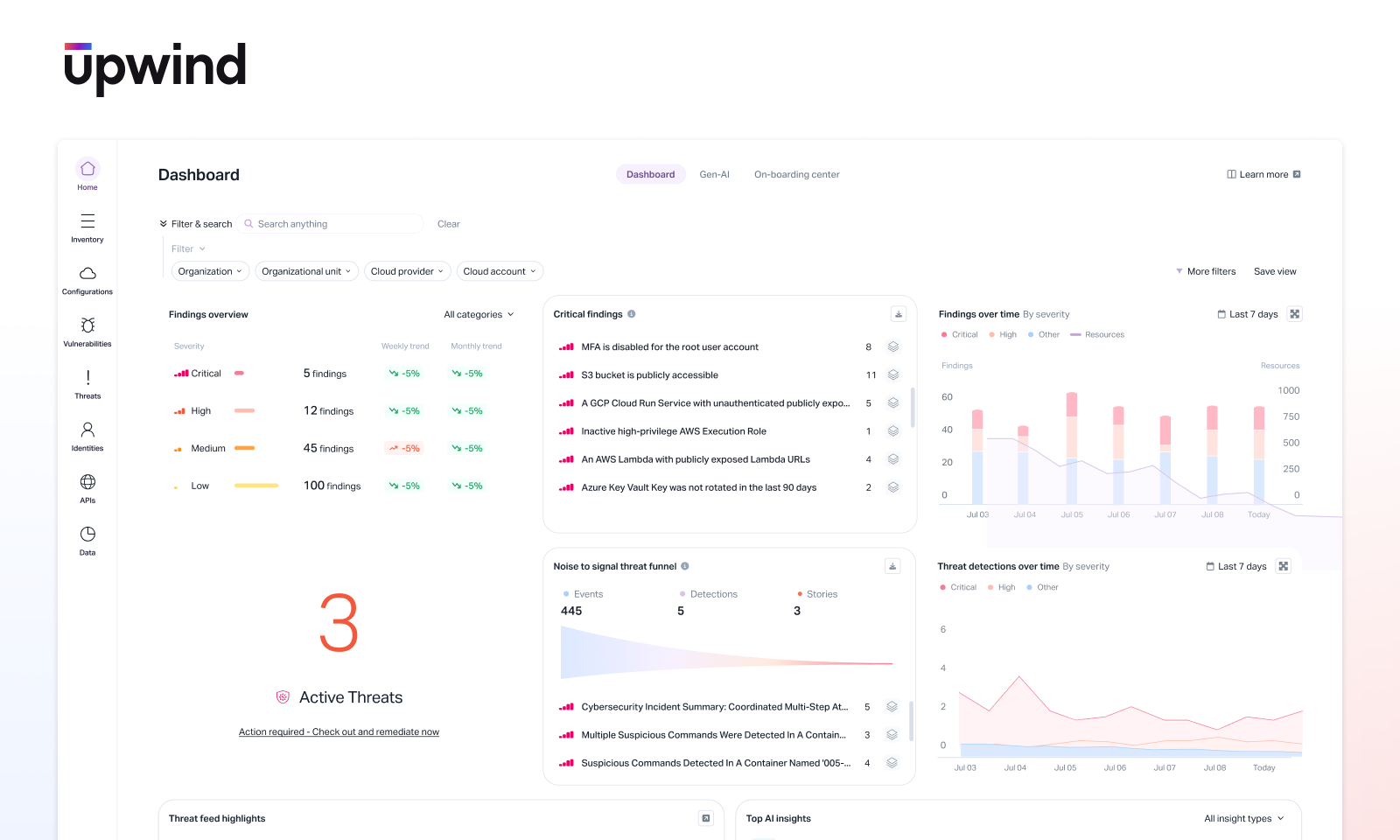
This part of our Upwind CNAPP review examines how the platform handles cloud configurations and compliance.
What Security Posture Management Covers
Cloud providers give you hundreds of configuration options. Each one can become a security risk if set incorrectly. Upwind continuously monitors:
- Storage buckets for public access, encryption settings, and logging
- Network configurations for overly permissive rules and exposure
- Identity settings for weak authentication and excessive permissions
- Database configurations for encryption, backups, and access controls
- Kubernetes settings for pod security, RBAC, and network policies
- Serverless functions for permissions and environment variables
Going Beyond Simple Misconfiguration Detection
Most CSPM tools can tell you that a storage bucket is publicly accessible. That’s table stakes. Upwind adds layers of context:
- What data is actually in that bucket? Customer PII matters more than marketing images.
- Is anything accessing it? A bucket that hasn’t been touched in months is lower risk than one with active traffic.
- What’s the network path? Can attackers actually reach it from the internet?
- What compliance frameworks apply? PCI-DSS requirements differ from HIPAA requirements.
Compliance Frameworks and Mapping
Organizations don’t just need to find problems. They need to prove compliance to auditors. Upwind maps findings against common frameworks:
| Framework | Coverage | Use Case |
|---|---|---|
| CIS Benchmarks | Full | Technical baseline configuration |
| SOC 2 | Full | Service organization audits |
| PCI-DSS | Full | Payment card processing |
| HIPAA | Full | Healthcare data protection |
| GDPR | Full | European data privacy |
| NIST 800-53 | Full | Government and federal requirements |
| ISO 27001 | Full | Information security management |
The platform generates compliance reports that auditors can understand. No more translating technical findings into control language manually.
Custom Policy Creation
Every organization has unique requirements. Upwind lets you create custom policies using a policy-as-code approach. You can:
- Define specific configuration requirements for your environment
- Set different severity levels based on resource criticality
- Create exceptions for approved deviations
- Version control policies alongside infrastructure code
Application Security: Protecting What Runs in Your Cloud
This section of our Upwind security solution review focuses on application-layer protection.
L7 Visibility: Seeing Inside Application Traffic
Traditional network security operates at Layer 3 and Layer 4. It sees IP addresses and ports. Upwind goes to Layer 7, the application layer.
This means seeing:
- HTTP methods and paths for every API call
- Request and response patterns across services
- Authentication tokens and their usage patterns
- Data types flowing between components
- Service dependencies based on actual traffic, not documentation
API Discovery and Security
Most organizations don’t know all their APIs. Development teams create endpoints, documentation gets outdated, and shadow APIs proliferate.
Upwind discovers APIs automatically by watching traffic. It finds:
- Undocumented endpoints that developers forgot about
- APIs exposing sensitive data without proper authentication
- Endpoints receiving suspicious request patterns
- Version mismatches between API specs and reality
Once discovered, Upwind assesses each API for security risks:
| Risk Category | What Upwind Checks |
|---|---|
| Authentication | Missing auth, weak tokens, exposed credentials |
| Authorization | Broken access control, privilege escalation paths |
| Data exposure | Sensitive data in responses, excessive information |
| Injection risks | SQL injection, command injection patterns |
| Rate limiting | Missing or insufficient request throttling |
Container and Kubernetes Security
Containers brought new deployment flexibility. They also brought new attack surfaces. Upwind secures container environments at multiple levels:
Image Security:
- Scans container images for known vulnerabilities
- Checks for secrets accidentally baked into images
- Verifies base image sources and integrity
- Tracks which images are actually running vs sitting in registries
Runtime Protection:
- Monitors process execution within containers
- Detects anomalous behavior indicating compromise
- Watches for container escape attempts
- Tracks network connections containers make
Kubernetes-Specific Controls:
- Evaluates RBAC configurations for overprivilege
- Checks pod security standards compliance
- Monitors admission controllers and webhooks
- Assesses network policies between namespaces
Identity and Access Management: CIEM Capabilities in Upwind
Identity has become the new perimeter. This Upwind evaluation section covers how the platform handles cloud permissions.
The Identity Problem in Cloud Environments
Cloud providers make it easy to grant permissions. Too easy. Over time, environments accumulate:
- Service accounts with admin rights that only need read access
- Users with permissions to resources they never touch
- Roles with excessive wildcards in their policies
- Cross-account access that nobody remembers approving
These excessive permissions create attack paths. If an attacker compromises one identity, they inherit all its permissions.
How Upwind Analyzes Identity Risks
Upwind’s CIEM capabilities focus on effective permissions, not just granted permissions. There’s a difference.
Granted permissions: What the IAM policy says the identity can do.
Effective permissions: What the identity can actually do after considering all policy interactions, service control policies, permission boundaries, and resource policies.
The platform maps these effective permissions and correlates them with runtime usage:
- What permissions does this identity have?
- What permissions does it actually use?
- What’s the gap between granted and used?
- What resources can it access if compromised?
Attack Path Analysis for Identity
Upwind doesn’t just list overprivileged accounts. It shows how identity misconfigurations create paths to sensitive resources.
Example attack path:
Developer laptop compromised > Uses developer’s AWS credentials > Developer can assume role in production > Role has S3 full access > Accesses bucket with customer data
Without this path visualization, you might not connect a developer’s excessive permissions to a data breach risk. Upwind makes these connections visible.
Recommendations and Remediation
Finding problems is only half the job. Upwind provides specific remediation guidance:
- Least privilege policies: Generated policies based on actual usage
- Permission removal suggestions: Specific permissions to remove
- Role consolidation: Opportunities to simplify role structures
- MFA enforcement gaps: Identities missing multi-factor requirements
Vulnerability Management: Beyond Traditional Scanning
This part of our Upwind tool analysis examines how the platform handles vulnerabilities differently than legacy scanners.
The Vulnerability Overload Problem
Modern applications have hundreds of dependencies. Each dependency can have vulnerabilities. Traditional scanners find them all and report them all.
A typical enterprise environment might have:
- 50,000+ total vulnerabilities across all assets
- 5,000+ “critical” and “high” severity findings
- New vulnerabilities added daily
- Limited remediation resources
Security teams can’t fix everything. They need to know what to fix first.
Runtime-Aware Vulnerability Prioritization
Upwind changes vulnerability management by adding runtime context to every finding:
| Traditional Scanner Says | Upwind Adds |
|---|---|
| Log4j vulnerability exists in image | Library loaded at runtime, actively processing external input |
| Critical CVE in dependency | Package installed but never imported or executed |
| High severity kernel vulnerability | Container has no capabilities to exploit it |
| SQL injection possible | API endpoint exposed to internet, handles payment data |
This context transforms a list of 5,000 critical findings into maybe 200 that actually matter right now.
Software Bill of Materials (SBOM) Integration
Upwind tracks the complete software inventory across your environment. When a new vulnerability is disclosed, you can instantly answer:
- Do we have this package anywhere?
- Where is it running?
- Is it exposed to the internet?
- Does it process sensitive data?
This beats the old approach of asking developers “do you use library X?” and waiting days for responses.
Vulnerability Workflow Integration
Finding vulnerabilities matters less than fixing them. Upwind integrates with development workflows:
- Ticketing systems: Creates issues in Jira, ServiceNow, and others
- CI/CD pipelines: Blocks deployments of newly vulnerable code
- Slack/Teams: Notifies teams about their specific findings
- Remediation tracking: Monitors whether fixes are actually deployed
Detection and Response: Real-Time Threat Capabilities
This Upwind features breakdown covers how the platform handles active threats.
Cloud Detection and Response (CDR)
Prevention only goes so far. Attackers will eventually get in. When they do, you need to detect them quickly and respond before they cause damage.
Upwind’s detection capabilities leverage its runtime visibility:
Behavioral Analysis:
- Establishes baselines of normal workload behavior
- Detects deviations indicating compromise
- Correlates suspicious activities across resources
- Tracks lateral movement between workloads
Threat Detection Rules:
- Pre-built rules for known attack patterns
- Custom rule creation for your environment
- MITRE ATT&CK framework mapping
- Cloud-specific attack detection
What Upwind Detects
The platform watches for indicators of compromise across cloud environments:
| Attack Type | Detection Method |
|---|---|
| Cryptocurrency mining | Process behavior, CPU patterns, network connections to mining pools |
| Data exfiltration | Unusual outbound traffic patterns, large data transfers |
| Container escape | Privilege escalation attempts, host filesystem access |
| Credential theft | Metadata service access, credential file reads |
| Reverse shells | Unexpected outbound connections, shell process spawning |
| Reconnaissance | Port scanning, API enumeration, service discovery |
Response Actions
Detection without response is just expensive logging. Upwind enables response actions:
Automated Responses:
- Isolate compromised workloads from network
- Block malicious IP addresses
- Revoke compromised credentials
- Trigger incident response workflows
Investigation Support:
- Timeline reconstruction of attack sequences
- Evidence collection for forensics
- Scope assessment for breach containment
- Integration with SIEM platforms
AI and Machine Learning Workload Protection
Cloud environments in 2026 increasingly run AI workloads. This Upwind capabilities review examines protections for these new technologies.
Why AI Workloads Need Special Attention
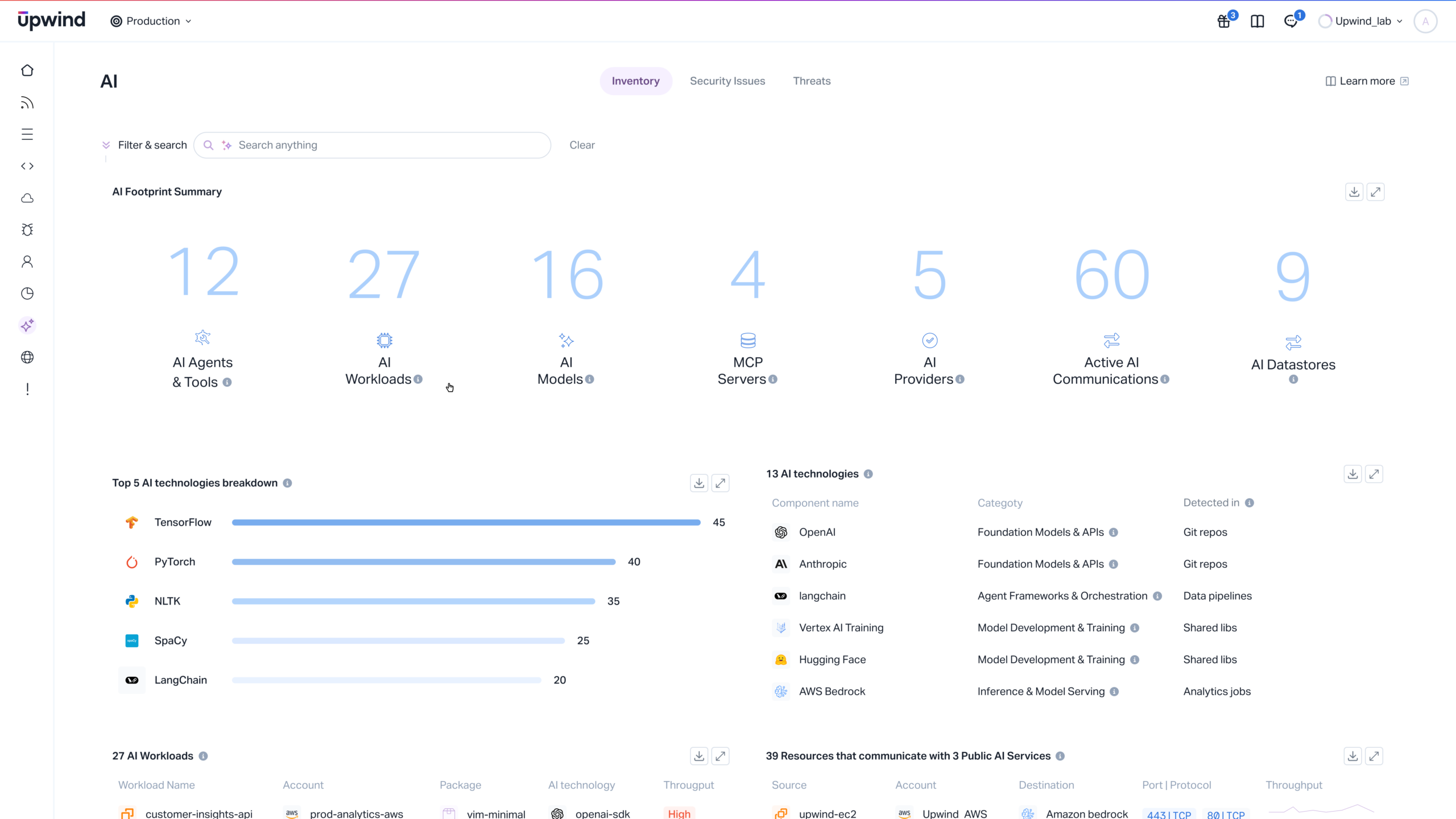
AI workloads introduce unique security challenges:
- Large compute requirements create expensive attack targets for cryptomining
- Training data often contains sensitive information
- Model files represent valuable intellectual property
- Inference APIs can leak training data through careful querying
- GPU resources have different security considerations than CPUs
Upwind’s AI Security Approach
The platform extends its runtime visibility to AI workloads:
Data Flow Tracking:
- Where training data originates
- How data moves between storage and compute
- What data the model accesses during inference
- Who queries the model and with what inputs
Model Protection:
- Access controls on model artifacts
- Integrity verification of deployed models
- Anomaly detection for model extraction attempts
- Prompt injection detection for LLM workloads
The AI Agentic Pack
Upwind offers an AI Agentic Pack that helps teams prioritize findings. According to customer feedback highlighted in their marketing:
“The AI Agentic Pack helps our team focus on what is actually exposed, what matters most to the business, and prioritize action with far greater confidence and efficiency. Add to that the Agent Pack’s ability to show runtime vulnerabilities and we can target and remediate across our enterprise where it matters most.”
This capability uses machine learning to:
- Correlate findings across security domains
- Predict which issues will become exploitable
- Suggest remediation priorities based on business context
- Reduce alert fatigue through intelligent grouping
Multi-Cloud Support and Integrations
Real enterprise environments span multiple clouds. This section of our Upwind software review covers platform support.
Cloud Provider Coverage
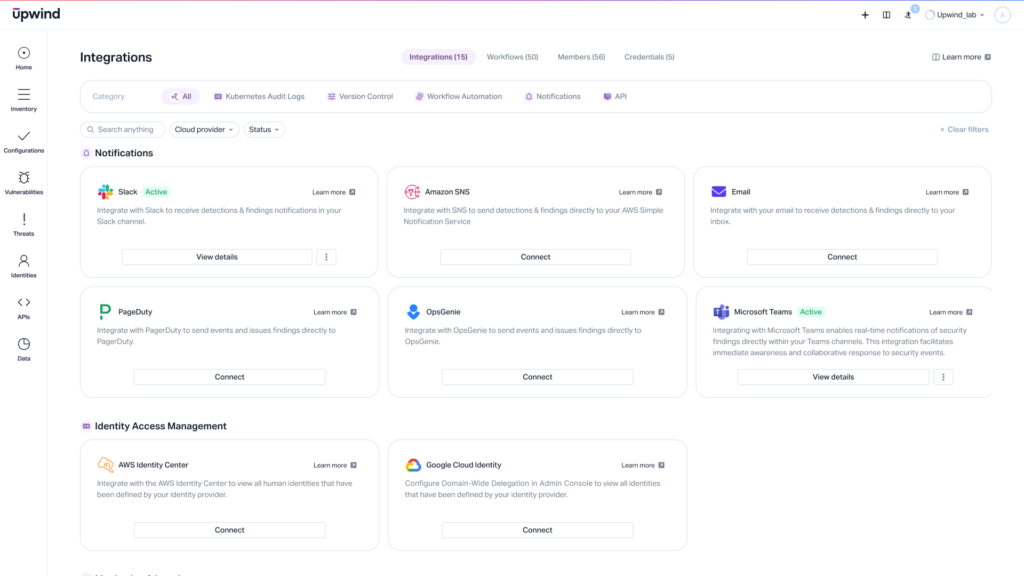
Upwind supports the major cloud providers:
| Provider | Coverage Level | Specific Services |
|---|---|---|
| AWS | Full | EC2, EKS, Lambda, S3, RDS, IAM, and 100+ services |
| Microsoft Azure | Full | VMs, AKS, Functions, Storage, SQL, and core services |
| Google Cloud | Full | Compute, GKE, Cloud Functions, Storage, and key services |
Multi-cloud visibility means seeing your entire environment in one place, not switching between provider-specific tools.
Third-Party Integrations
Security tools don’t exist in isolation. Upwind integrates with:
SIEM Platforms:
- Splunk
- Microsoft Sentinel
- IBM QRadar
- Sumo Logic
SOAR Solutions:
- Palo Alto XSOAR
- Splunk SOAR
- Swimlane
Ticketing and Collaboration:
- Jira
- ServiceNow
- Slack
- Microsoft Teams
- PagerDuty
DevOps Tools:
- GitHub
- GitLab
- Jenkins
- Terraform
- ArgoCD
API-First Architecture
Upwind provides comprehensive APIs for automation and custom integration. You can:
- Pull vulnerability data into custom dashboards
- Trigger scans based on deployment events
- Extract compliance reports programmatically
- Build custom alerting workflows
- Integrate with internal tools
User Experience and Interface Design
Security tools are only useful if people can actually use them. This Upwind user experience review covers the interface.
Dashboard and Visualization
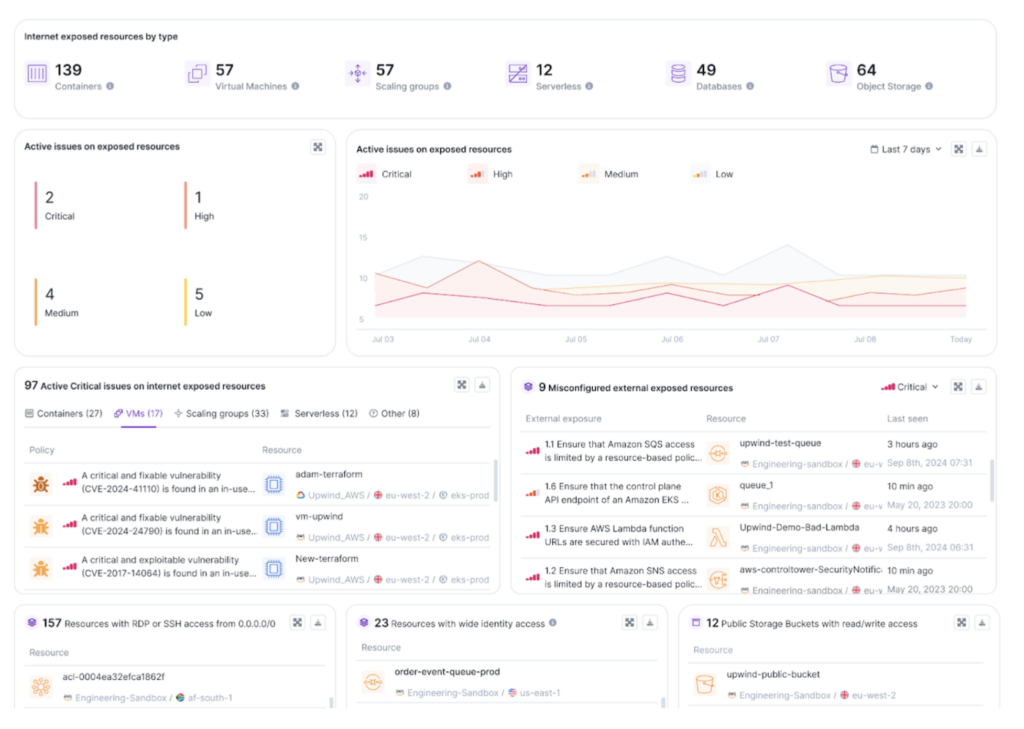
The main dashboard provides a high-level view of your security posture. It shows:
- Overall risk score across your environment
- Trend lines showing improvement or degradation
- Top risks requiring immediate attention
- Recent detections and their status
- Compliance status across frameworks
Colors and visual indicators follow intuitive patterns. Red means bad. Green means good. You don’t need training to understand the basics.
Resource and Topology Views
Upwind creates visual maps showing how your resources connect. This topology view answers questions like:
- What can access this database?
- What path does data take from user to storage?
- Where are the internet-exposed entry points?
- How do services depend on each other?
These maps update based on actual runtime traffic, not static documentation that’s probably wrong anyway.
Alert Management
Nobody wants to wade through thousands of alerts. Upwind groups and prioritizes alerts to reduce noise:
Grouping:
- Same vulnerability across multiple resources
- Related misconfigurations in one area
- Correlated events suggesting one attack
Prioritization:
- Runtime exposure level
- Sensitivity of affected data
- Business criticality of the resource
- Ease of exploitation
Team Workflows
Security teams aren’t monolithic. Different people have different responsibilities. Upwind supports:
- Role-based access: Show each team member only what they need
- Team assignment: Route findings to the right owners
- Saved views: Custom dashboards for different purposes
- Notification preferences: Control what triggers alerts and how
Deployment and Implementation
Getting a CNAPP running involves more than clicking install. This section covers what to expect.
Initial Setup Process
Upwind deployment typically follows these phases:
- Cloud account connection: Grant Upwind read access to cloud APIs
- Agentless scanning: Immediate visibility without agent deployment
- Agent rollout: Deploy agents for runtime visibility
- Integration setup: Connect ticketing, alerting, and SIEM systems
- Policy tuning: Adjust alerts based on your environment
Agent Deployment Options
For runtime visibility, you need to deploy the Upwind agent. Options include:
Kubernetes:
- DaemonSet deployment covers all nodes
- Helm chart for easy installation
- Typically running in minutes
Virtual Machines:
- Installable packages for major OS distributions
- Configuration management integration (Ansible, Puppet)
- Auto-scaling group support
Serverless:
- Layer-based deployment for Lambda
- Extension support for other platforms
- Minimal latency impact
Time to Value
One advantage of modern cloud security platforms: you don’t wait months for value.
| Capability | Typical Time to Value |
|---|---|
| Asset inventory | Hours |
| Posture findings | 1-2 days |
| Vulnerability scanning | 1-2 days |
| Runtime visibility | Days to 1 week (after agent deployment) |
| Full context | 2-4 weeks (for behavioral baselines) |
Resource Requirements
The Upwind agent is designed to be lightweight:
- CPU: Typically <1% overhead
- Memory: 100-200MB depending on workload
- Network: Minimal bandwidth for data transmission
- Storage: Small footprint for local buffering
For most environments, the performance impact is negligible compared to the security value gained.
Pricing and Value Comparison
This Upwind cost analysis helps you understand the investment required.
Pricing Model
Upwind, like most enterprise security platforms, uses custom pricing based on:
- Number of cloud accounts
- Volume of workloads protected
- Feature modules selected
- Support level required
Specific pricing isn’t publicly available. You’ll need to contact Upwind for a quote based on your environment size.
Value Calculation Factors
When evaluating Upwind’s cost, consider:
Tool Consolidation Savings:
- Replacing separate CSPM, CWPP, CIEM tools
- Eliminating duplicate scanning solutions
- Reducing integration and maintenance costs
Efficiency Gains:
- Time saved triaging false positives
- Faster remediation from better prioritization
- Reduced context switching between tools
Risk Reduction:
- Faster detection of real threats
- Fewer missed vulnerabilities
- Better compliance posture
Competitive Pricing Context
CNAPP pricing across the market varies widely. Factors affecting cost include:
| Vendor Type | Typical Positioning | Pricing Approach |
|---|---|---|
| Large security vendors | Part of broader security suite | Often bundled, can be expensive standalone |
| Cloud provider native | Basic functionality included | Lower cost, limited features |
| Specialized CNAPP vendors | Purpose-built focus | Mid-range, feature-complete |
| Upwind | Runtime-first specialist | Competitive for differentiated value |
Comparison with Competing Solutions
This Upwind alternatives comparison helps position the platform against other options.
Upwind vs Wiz
Wiz pioneered agentless cloud security and achieved rapid market adoption.
| Aspect | Upwind | Wiz |
|---|---|---|
| Primary approach | Runtime-first with hybrid visibility | Agentless-first with snapshot scanning |
| API security | Deep L7 visibility with runtime context | Limited without agent deployment |
| Deployment speed | Agentless fast, agent adds depth | Very fast agentless deployment |
| Market position | Rising challenger | Established leader |
| Ideal for | Teams wanting runtime context | Teams prioritizing fast deployment |
Upwind vs Palo Alto Prisma Cloud
Prisma Cloud offers broad security capabilities as part of Palo Alto’s portfolio.
| Aspect | Upwind | Prisma Cloud |
|---|---|---|
| Product origin | Built ground-up | Multiple acquisitions integrated |
| Interface consistency | Unified experience | Variable across modules |
| Runtime depth | Core differentiator | Available but not primary focus |
| Ecosystem | Focused on cloud security | Part of broader security platform |
| Ideal for | Teams wanting focused CNAPP | Existing Palo Alto customers |
Upwind vs CrowdStrike Falcon Cloud Security
CrowdStrike brings its endpoint expertise to cloud workloads.
| Aspect | Upwind | CrowdStrike |
|---|---|---|
| Heritage | Cloud-native born | Endpoint-first, expanded to cloud |
| Agent technology | Network-focused, lightweight | Comprehensive, heavier footprint |
| Threat intelligence | Growing capability | Industry-leading |
| Posture management | Full CSPM capability | Added capability, not original focus |
| Ideal for | Cloud-first organizations | Existing CrowdStrike customers |
Upwind vs Aqua Security
Aqua focuses heavily on container and Kubernetes security.
| Aspect | Upwind | Aqua |
|---|---|---|
| Container security | Strong, part of broader platform | Industry-leading depth |
| VM coverage | Full coverage | Secondary focus |
| CSPM | Integrated capability | Available but not primary |
| Open source | Commercial only | Trivy and other OSS projects |
| Ideal for | Mixed cloud environments | Heavy Kubernetes users |
Strengths and Limitations: Honest Assessment
Every product has trade-offs. This balanced Upwind assessment covers both sides.
Where Upwind Excels
Runtime Context Quality:
The platform’s core strength is connecting findings to actual runtime behavior. This isn’t a marketing claim. The 4.9 Gartner rating reflects real customer experience with this capability.
API Security Depth:
Layer 7 visibility from the network-focused agent provides API security that most competitors can’t match without similar agent deployment. If API security matters to you, this is a differentiator.
Unified Architecture:
Built from scratch as one platform means consistent experience, no awkward integration points between acquired products.
Alert Quality:
Teams consistently report lower alert fatigue compared to traditional scanners. When every alert matters, you actually look at them.
Modern Tech Stack Support:
Strong support for containers, Kubernetes, serverless, and AI workloads reflects current cloud usage patterns.
Where Upwind Could Improve
Market Maturity:
Compared to established players like Wiz or Palo Alto, Upwind is newer. Some organizations prefer vendors with longer track records.
Agent Requirement for Full Value:
While agentless provides immediate value, the best features require agent deployment. Some organizations resist any agent deployment.
Ecosystem Size:
Larger vendors have bigger partner ecosystems, more integrations out of the box, and larger communities.
Enterprise Scale Validation:
Very large enterprises with thousands of cloud accounts should validate performance at their scale during evaluation.
Who Should Choose Upwind
Best fit organizations:
- Cloud-native companies with Kubernetes-heavy environments
- Teams frustrated with alert fatigue from existing tools
- Organizations needing strong API security
- Companies running AI workloads that need protection
- Teams that value runtime context over static scanning
Who Might Look Elsewhere
Consider alternatives if:
- You need a larger vendor for procurement reasons
- Agent deployment is absolutely not possible
- You’re deeply invested in a competitor’s ecosystem
- Your environment is primarily traditional VMs with limited containers
Customer Success Stories and Use Cases
This section of our Upwind performance review examines real-world applications.
Enterprise Retail: H&M
H&M appears in Upwind’s customer list, representing large-scale retail deployment. Retail organizations face:
- PCI-DSS compliance requirements for payment processing
- High-volume seasonal traffic requiring scalable infrastructure
- Customer data protection across global operations
- Complex supply chain integrations
Financial Services: American Express Global Business Travel
Amex GBT represents financial services requirements:
- Stringent regulatory compliance
- High-value transaction protection
- Global data residency considerations
- Zero tolerance for security incidents
Sustainability-Focused: Patagonia
Patagonia’s presence shows Upwind’s fit for companies prioritizing:
- E-commerce protection
- Supply chain visibility
- Efficient security operations for focused teams
Publishing and Information: Wolters Kluwer
Wolters Kluwer represents information services:
- Intellectual property protection
- SaaS application security
- Customer data across multiple products
- Compliance with various industry standards
Getting Started with Upwind
If you’re considering Upwind, here’s how to proceed.
Evaluation Process
- Request a demo: See the platform in action with your use cases
- Define evaluation criteria: What problems must the tool solve?
- Pilot deployment: Test in a representative environment
- Measure outcomes: Track alert quality, time savings, coverage
- Compare alternatives: Evaluate at least one other option
- Negotiate terms: Discuss pricing, support, and contract terms
Questions to Ask During Evaluation
Bring these questions to your Upwind discussions:
- What percentage of current alerts have runtime context?
- How long until behavioral baselines are established?
- What’s the false positive rate compared to our current tools?
- How does pricing scale as our environment grows?
- What support is included vs additional cost?
- Can you share references from similar organizations?
Success Metrics to Track
Measure these during and after deployment:
| Metric | Why It Matters |
|---|---|
| Alert-to-incident ratio | Are alerts leading to real actions? |
| Mean time to remediate | Are you fixing things faster? |
| Coverage percentage | What portion of your environment is protected? |
| Team hours saved | Reduced time on false positives? |
| Compliance status | Meeting audit requirements? |
Conclusion
Upwind offers a different approach to cloud security. By building around runtime context from the start, it solves the alert fatigue problem that plagues traditional tools. The platform’s 4.9 Gartner rating reflects genuine customer satisfaction.
For organizations running modern cloud environments with containers, APIs, and AI workloads, Upwind deserves serious evaluation. The runtime-first approach provides actionable security insights that static scanners simply can’t match.
Whether Upwind fits your organization depends on your specific needs, existing investments, and willingness to deploy agents for maximum value. But if context-aware cloud security matters to you, it belongs on your shortlist.
Frequently Asked Questions About Upwind Review
| What is Upwind used for? | Upwind is a Cloud-Native Application Protection Platform (CNAPP) used to secure cloud infrastructure, applications, APIs, and workloads. It combines posture management, vulnerability scanning, identity security, and runtime protection in one platform. Organizations use it to find and fix security issues across AWS, Azure, and Google Cloud environments. |
| Who should use Upwind? | Upwind fits best for organizations with cloud-native environments running containers, Kubernetes, and modern application architectures. Security teams tired of alert overload, DevOps teams needing integrated security, and compliance teams managing multiple frameworks all benefit from the platform’s consolidated approach. |
| How is Upwind different from other CNAPP vendors? | Upwind built its platform ground-up around runtime insights from a network-focused agent. This approach provides deeper context than agentless-only tools and stronger API security than competitors without similar agent deployment. The runtime context helps prioritize which findings actually matter versus theoretical risks. |
| Does Upwind require an agent? | Upwind works with both agentless and agent-based approaches. Agentless scanning provides immediate visibility into configurations and vulnerabilities. The optional agent adds runtime context, API visibility, and behavioral detection. Most customers deploy both for maximum value. |
| What cloud providers does Upwind support? | Upwind supports AWS, Microsoft Azure, and Google Cloud Platform. The platform provides consistent visibility across multi-cloud environments, letting you see your entire cloud footprint in one place rather than using separate tools for each provider. |
| How does Upwind pricing work? | Upwind uses custom pricing based on cloud accounts, workload volume, and selected features. Specific pricing requires contacting Upwind directly. The platform aims to consolidate multiple point solutions, so total cost should be compared against the combined cost of separate CSPM, CWPP, CIEM, and API security tools. |
| What compliance frameworks does Upwind support? | Upwind maps security findings against CIS Benchmarks, SOC 2, PCI-DSS, HIPAA, GDPR, NIST 800-53, ISO 27001, and other frameworks. The platform generates compliance reports suitable for auditors and tracks compliance status over time. |
| How long does Upwind take to deploy? | Agentless capabilities provide value within hours to days. Agent deployment for Kubernetes environments typically takes minutes using Helm charts. Full behavioral baselines develop over 2-4 weeks as the platform learns normal patterns in your environment. |
| What is Upwind’s Gartner rating? | Upwind is rated 4.9 out of 5 on Gartner Peer Insights in the CNAPP category based on verified customer reviews. This rating reflects strong customer satisfaction with the platform’s capabilities and approach to cloud security. |
| Can Upwind protect AI workloads? | Yes. Upwind extends its runtime visibility to AI and machine learning workloads. This includes tracking data flows to and from models, protecting model artifacts, detecting anomalous access patterns, and securing inference APIs. The AI Agentic Pack adds intelligent prioritization capabilities using machine learning. |






 Stack Insight is intended to support informed decision-making by providing independent information about business software and services. Some product details, including pricing, features, and promotional offers, may be supplied by vendors or partners and can change without notice.