
OX Security vs GitHub Advanced Security: Complete Comparison Guide for 2026
Picking the right application security platform matters more than ever. Development teams face growing pressure to ship code fast while keeping vulnerabilities in check. Two platforms stand out in this space: OX Security and GitHub Advanced Security.
Both tools promise to help you find and fix security issues. But they approach the problem from different angles. OX Security takes a broad view across your entire software supply chain. GitHub Advanced Security focuses deeply on code within the GitHub ecosystem.
This comparison breaks down everything you need to know. We’ll look at features, pricing, ease of use, and real-world fit for different teams. By the end, you’ll have a clear picture of which tool makes sense for your situation. Let’s dig in.
Understanding Application Security Posture Management in 2026
Application security has changed a lot. It’s no longer just about scanning code for bugs. Modern teams need visibility across their entire development process. That means tracking code, dependencies, pipelines, cloud infrastructure, and more.
What ASPM Actually Means
ASPM stands for Application Security Posture Management. Think of it as a dashboard for your security program. It pulls data from multiple sources. It shows you where problems exist. And it helps you prioritize what to fix first.
Traditional security tools work in silos. Your SAST scanner finds code issues. Your SCA tool finds dependency problems. Your cloud scanner finds misconfigurations. ASPM connects all these dots.
The goal is simple: give security teams one place to see everything. No more jumping between ten different tools. No more spreadsheets to track findings.
Why Supply Chain Security Matters Now
Software supply chain attacks have exploded in recent years. Attackers target the tools and processes that build software. They compromise open source packages. They infiltrate CI/CD pipelines. They exploit developer credentials.
A traditional code scanner misses these threats. It only looks at your code. It doesn’t see the package you pulled from npm. It doesn’t see the GitHub Action you borrowed from a stranger.
- Dependency attacks: Malicious code hidden in packages you trust
- Pipeline attacks: Compromised build steps that inject backdoors
- Credential theft: Exposed secrets that grant access to production
- Infrastructure drift: Cloud configs that change without approval
Both OX Security and GitHub Advanced Security address some of these concerns. But they do it differently. Understanding their approach helps you pick the right fit.
OX Security: Platform Overview and Core Philosophy
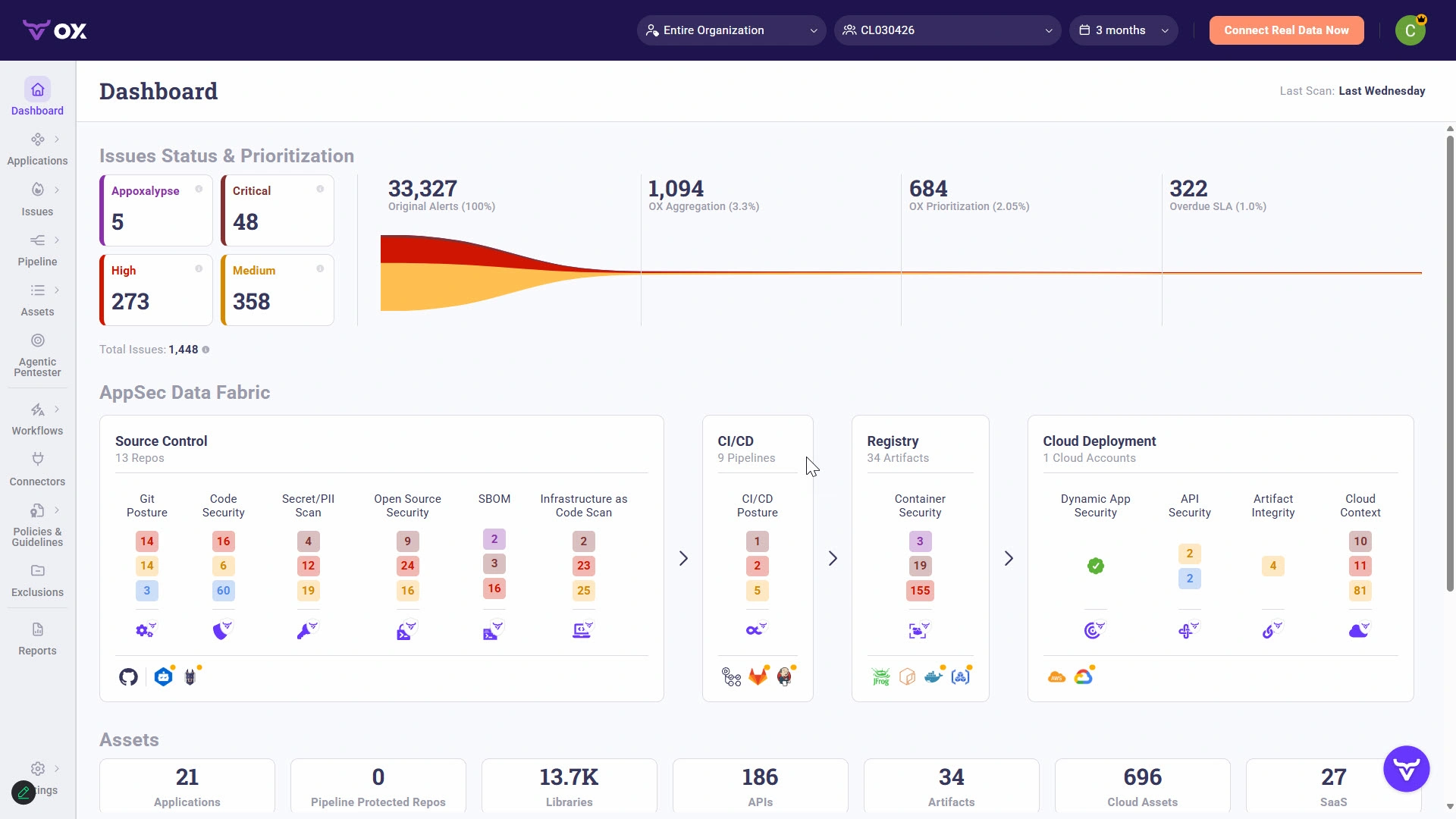
OX Security positions itself as a complete software supply chain security platform. The company calls it “prompt to runtime” coverage. That’s a fancy way of saying they watch your code from the moment a developer writes it until it runs in production.
The OX Security Approach to AppSec
OX takes what they call a “holistic” view. They don’t just scan code. They map your entire development environment. Every tool, every pipeline, every connection gets tracked.
The platform builds a graph of your software factory. It shows how code flows from developer laptops to production servers. This visibility helps security teams spot gaps they’d otherwise miss.
Key elements of the OX approach:
- Automatic discovery of all dev tools and connections
- Pipeline security monitoring and analysis
- Open source dependency tracking
- Cloud security posture monitoring
- Developer-friendly remediation guidance
OX Security has earned a 4.9 star rating based on reviews. Users praise its broad coverage and integration capabilities. The platform connects with GitHub, GitLab, Jenkins, and dozens of other tools.
How OX Handles Finding Prioritization
One of OX’s biggest selling points is intelligent prioritization. Most security scanners drown teams in alerts. OX tries to surface what actually matters.
The platform considers multiple factors when ranking issues:
- Reachability: Can attackers actually reach this vulnerable code?
- Exploitability: How easy is it to exploit this weakness?
- Business impact: What happens if this gets compromised?
- Fix difficulty: How hard is it to remediate this issue?
This context helps teams focus on real risks. A critical vulnerability in unreachable code matters less than a medium issue in your payment flow.
OX Security’s Integration Strategy
OX built its platform to play nice with existing tools. The company recognizes that most organizations already have security scanners. They don’t want to rip and replace everything.
Instead, OX aggregates findings from multiple sources. You can connect your existing SAST, DAST, SCA, and container scanning tools. OX normalizes the data and presents it in one view.
The GitHub integration deserves special mention. OX connects directly to GitHub repositories. It analyzes your GitHub Actions workflows. It monitors for exposed secrets and misconfigurations. And it pushes findings back to developers through pull request comments.
According to OX’s documentation: “The integration of OX Security with GitHub takes DevOps to the next level by combining the developer-friendly security of GitHub with OX’s holistic software supply chain security.”
GitHub Advanced Security: Platform Overview and Core Philosophy

GitHub Advanced Security takes a different approach. It’s built directly into the GitHub platform. If your team already lives in GitHub, this tight integration feels natural.
The GitHub Approach to Developer Security
GitHub’s philosophy centers on meeting developers where they work. Security shouldn’t be a separate tool. It should be part of the normal development flow.
GitHub Advanced Security (GHAS) adds security capabilities to GitHub’s existing platform. You get code scanning, secret detection, and dependency analysis without leaving GitHub.
Core components of GHAS:
- Code scanning: Static analysis powered by CodeQL
- Secret scanning: Detection of exposed credentials and API keys
- Dependency review: Analysis of vulnerable packages
- Security advisories: Alerts about known vulnerabilities
GitHub has earned impressive reviews from its massive user base. With over 15,000 reviews and a strong rating, it’s clearly doing something right. But those reviews cover all of GitHub, not just the security features.
CodeQL: GitHub’s Secret Weapon
CodeQL is GitHub’s static analysis engine. It treats code like a database. You can write queries to find specific patterns or vulnerabilities.
This approach is powerful but comes with tradeoffs. CodeQL requires compilation for some languages. That adds friction to the scanning process. Teams using interpreted languages have an easier time.
CodeQL ships with thousands of pre-built queries. These cover common vulnerabilities like SQL injection, XSS, and path traversal. You can also write custom queries for your specific needs.
The query-based approach has fans among security researchers. It’s flexible and precise. But it can produce false positives that frustrate developers.
GitHub’s Native Ecosystem Advantage
GitHub’s biggest strength is integration depth. Security findings appear directly in pull requests. Developers see alerts without context switching. Fixes can be applied with a single click in many cases.
The dependency graph tracks every package in your projects. When a vulnerability hits a popular library, GitHub alerts affected repositories automatically. This saved countless teams during high-profile supply chain incidents.
Dependabot, while technically separate from GHAS, works alongside it. Automated pull requests keep dependencies updated. Security patches land faster with less manual effort.
Feature-by-Feature: OX Security vs GitHub Advanced Security Comparison
Now let’s get specific. This section breaks down key features side by side. We’ll look at what each platform offers and where they differ.
Static Application Security Testing (SAST)
Both platforms offer static code analysis. But they approach it differently.
| Feature | OX Security | GitHub Advanced Security |
|---|---|---|
| Scanning engine | Multiple integrated engines | CodeQL |
| Language support | Broad, through integrations | Good, but compilation needed for some |
| Custom rules | Supported | CodeQL queries |
| IDE support | Multiple IDEs | VS Code primarily |
| False positive handling | Context-aware filtering | Manual triage |
OX Security’s SAST approach: OX can aggregate findings from multiple SAST tools. If you already have a commercial scanner, OX pulls those results. It adds context from other sources to reduce noise.
GitHub’s SAST approach: CodeQL is powerful but singular. You’re using one engine. Some teams appreciate the consistency. Others want options.
The IDE experience matters here too. GitHub’s integration works best in VS Code. OX supports more development environments. If your team uses JetBrains products or other editors, this difference matters.
Software Composition Analysis (SCA)
Both platforms help you track vulnerable dependencies. This is table stakes for modern application security.
| Feature | OX Security | GitHub Advanced Security |
|---|---|---|
| Vulnerability database | Multiple sources aggregated | GitHub Advisory Database |
| Auto-fix capabilities | Guided remediation | Dependabot PRs |
| License compliance | Yes | Limited |
| Reachability analysis | Yes | Limited |
| SBOM generation | Yes | Dependency graph export |
Reachability matters: A vulnerable function in a package you never call isn’t really a risk. OX’s reachability analysis helps surface this context. GitHub is improving here but started behind.
Dependabot’s convenience: GitHub’s automated PRs for dependency updates are genuinely useful. Developers can merge security patches quickly. This workflow friction reduction speeds up response time.
Secret Detection and Management
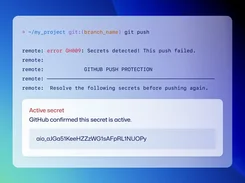
Exposed secrets remain a top security concern. Both platforms tackle this problem.
| Feature | OX Security | GitHub Advanced Security |
|---|---|---|
| Pre-commit scanning | Yes | Push protection |
| Historical scanning | Yes | Yes |
| Partner integrations | Yes | 100+ partners notified |
| Custom patterns | Yes | Yes |
| Remediation automation | Guided workflows | Manual rotation needed |
GitHub’s partner program stands out: When GHAS finds an AWS key, GitHub can notify AWS directly. The key gets revoked faster than if you handled it manually. This partnership network is extensive.
OX’s broader scope: OX scans for secrets beyond just code repositories. It checks CI/CD configs, cloud deployments, and other locations where secrets hide.
CI/CD Pipeline Security
This is where OX Security pulls ahead. Pipeline security is core to their platform.
| Feature | OX Security | GitHub Advanced Security |
|---|---|---|
| Pipeline discovery | Automatic mapping | GitHub Actions only |
| Workflow analysis | Deep inspection | Basic |
| Third-party action vetting | Yes | Limited |
| Multi-platform support | Jenkins, CircleCI, GitLab, etc. | GitHub Actions |
| Drift detection | Yes | No |
OX’s pipeline advantage is clear: If you use multiple CI/CD systems, OX gives you unified visibility. GitHub only sees what happens in GitHub Actions.
Why this matters: Supply chain attacks often target build processes. A compromised GitHub Action or Jenkins plugin can inject malicious code. OX tracks these risks. GitHub focuses only on its own ecosystem.
Cloud Security Posture
Modern applications run in the cloud. Security can’t stop at the code level.
| Feature | OX Security | GitHub Advanced Security |
|---|---|---|
| Cloud configuration scanning | Yes | No |
| IaC scanning | Yes | Through CodeQL |
| Runtime visibility | Yes | No |
| Container security | Yes | Limited |
| Kubernetes integration | Yes | No |
OX’s “prompt to runtime” promise: The platform tracks security from development through production deployment. This end-to-end view helps correlate issues across stages.
GitHub’s code focus: GHAS concentrates on code and dependencies. Once code leaves GitHub, visibility drops. You’ll need additional tools for cloud security.
Integration Capabilities: Connecting Your Security Ecosystem
Both platforms connect with other tools. But their integration philosophies differ in meaningful ways.
OX Security Integration Depth
OX positions itself as an aggregation layer. It connects to your existing security tools and unifies their findings. This approach works well for organizations that have already invested in multiple scanners.
OX integrates with:
- Source control: GitHub, GitLab, Bitbucket, Azure DevOps
- CI/CD: Jenkins, CircleCI, GitHub Actions, GitLab CI
- Security scanners: Checkmarx, Veracode, Snyk, Semgrep
- Cloud providers: AWS, Azure, GCP
- Issue trackers: Jira, ServiceNow, Linear
- Communication: Slack, Teams, PagerDuty
The integration with GitHub specifically enables some powerful workflows. OX can analyze GitHub repositories, monitor GitHub Actions, and push findings back through pull request comments. Developers stay in their familiar environment while getting broader security context.
GitHub Advanced Security Integration Approach
GitHub’s integrations focus on depth within its ecosystem rather than breadth across tools.
Native GitHub integrations:
- Pull requests: Findings appear inline with code changes
- Actions: Security checks run in CI workflows
- Projects: Security issues can become project items
- Discussions: Security topics can be discussed in context
- Copilot: AI assistance for security fixes (emerging feature)
Third-party SARIF support: GitHub accepts security findings in SARIF format. This lets you pipe results from other scanners into GitHub’s security dashboard. It’s not as seamless as native scanning, but it provides flexibility.
The tradeoff is clear. GitHub offers deeper integration within GitHub. OX offers broader integration across tools. Your existing toolchain determines which approach fits better.
API and Automation Capabilities
Both platforms provide APIs for custom automation. Security teams often need to build workflows that tools don’t support out of the box.
| Capability | OX Security | GitHub Advanced Security |
|---|---|---|
| REST API | Yes | Yes |
| GraphQL API | Limited | Yes |
| Webhooks | Yes | Yes |
| CLI tools | Yes | Yes (gh CLI) |
| Terraform provider | Yes | Yes |
GitHub’s API is more mature and better documented. Years of community use have polished it. OX’s API is newer but covers the security-specific use cases well.
User Experience and Developer Workflow
Security tools fail when developers hate them. Both platforms recognize this. But they address developer experience differently.
The Developer Experience with OX Security
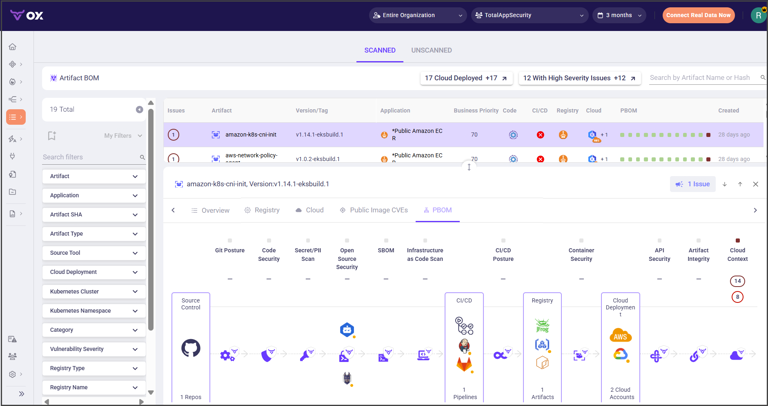
OX focuses on reducing noise for developers. Too many alerts create “alert fatigue.” Developers start ignoring security findings. OX’s prioritization aims to surface only what truly needs attention.
Developer-facing features in OX:
- Prioritized finding lists based on actual risk
- Clear remediation guidance with code examples
- Pull request comments that explain issues
- IDE plugins for early detection
- Self-service security dashboards
OX tries to be the single pane of glass for developers too. Rather than checking multiple security tools, developers see consolidated findings in one place.
The learning curve exists but isn’t steep. Developers familiar with other security tools adapt quickly. The interface emphasizes actionability over completeness.
The Developer Experience with GitHub Advanced Security
GitHub’s advantage is familiarity. Developers already know GitHub. Security features feel like natural extensions rather than separate tools.
Developer-facing features in GHAS:
- Security alerts appear in the normal PR workflow
- Fix suggestions appear inline with code
- Dependabot PRs automate dependency updates
- Security tab provides project-level overview
- VS Code integration for local scanning
The PR experience stands out: When a developer opens a pull request, GHAS findings appear as check failures. The developer can click through to see details. For many issues, a suggested fix appears. One click applies it.
This friction reduction drives adoption. Developers fix issues because it’s easy, not because security told them to.
Security Team Experience Compared
Security teams have different needs than developers. They want visibility across all projects. They need reporting for compliance. They want to track trends over time.
| Security Team Need | OX Security | GitHub Advanced Security |
|---|---|---|
| Enterprise dashboard | Yes, comprehensive | Security overview |
| Cross-repo visibility | Yes | Yes (org level) |
| Custom reporting | Yes | Limited |
| Compliance mapping | Multiple frameworks | Basic |
| Trend analysis | Yes | Basic |
| Policy enforcement | Yes | Branch protection rules |
OX’s security team focus: The platform builds for security professionals. Dashboards show risk across the organization. Reports map to compliance frameworks. Policies enforce security standards consistently.
GitHub’s developer-first reality: GHAS was built for developers with security teams as secondary users. The security overview helps, but deep analytics require exporting data to other tools.
Pricing and Cost Considerations
Budget matters. Security tools can get expensive quickly, especially at scale. Understanding pricing models helps you estimate real costs.
OX Security Pricing Model
OX Security uses a typical enterprise SaaS pricing model. Pricing typically depends on:
- Number of developers or users
- Number of applications monitored
- Feature tiers (basic vs. advanced)
- Support level required
OX doesn’t publish fixed pricing on their website. You’ll need to contact sales for a quote. This is common for enterprise security tools. It allows for negotiation but makes comparison harder.
Cost factors to consider with OX:
- Implementation and onboarding services
- Training for security and development teams
- Ongoing support and success management
- Annual vs. multi-year commitments
GitHub Advanced Security Pricing Model
GitHub’s pricing is more transparent. GHAS is an add-on to GitHub Enterprise.
Current pricing structure:
- Requires GitHub Enterprise Cloud or Server
- Priced per active committer per month
- Published rates available on GitHub’s pricing page
- Volume discounts for larger organizations
The per-committer model has pros and cons. You only pay for active developers. But costs can surprise you if committer counts spike during busy periods.
Hidden costs with GitHub:
- GitHub Enterprise is a prerequisite (not cheap)
- Actions minutes for security scanning
- Storage for security artifacts
- Additional tools needed for gaps GHAS doesn’t cover
Total Cost of Ownership Comparison
Comparing raw pricing misses the full picture. TCO includes implementation, training, maintenance, and gap-filling tools.
| Cost Factor | OX Security | GitHub Advanced Security |
|---|---|---|
| Base platform | OX subscription | GitHub Enterprise + GHAS |
| Implementation | Moderate (multiple integrations) | Lower (if already on GitHub) |
| Training | New tool, more training | Familiar platform, less training |
| Gap-filling tools | Fewer needed | Cloud, pipeline, runtime tools |
| Maintenance overhead | One platform to manage | Multiple tools to coordinate |
For GitHub-native teams: If you’re already on GitHub Enterprise, GHAS adds cost but minimal complexity. The economics favor staying in the ecosystem.
For multi-tool environments: OX’s consolidation can reduce costs by replacing multiple point solutions. The math depends on what you’re currently spending.
Deployment and Implementation Considerations
Getting security tools running is one thing. Getting them adopted is another. Implementation complexity affects time-to-value for both platforms.
Deploying OX Security
OX Security is a cloud-native SaaS platform. There’s no software to install on your infrastructure. But integration takes effort.
Typical OX implementation steps:
- Connect source control systems (GitHub, GitLab, etc.)
- Connect CI/CD pipelines (Jenkins, Actions, etc.)
- Connect existing security scanners
- Configure policy rules and thresholds
- Set up notifications and workflows
- Train security and development teams
- Roll out gradually by team or project
Implementation timelines vary. Simple environments might take weeks. Complex enterprises with many tools take months. OX provides professional services to help.
Challenges to expect:
- Mapping all applications and repositories
- Configuring integrations correctly
- Tuning prioritization to reduce noise
- Getting developer buy-in
- Establishing governance processes
Deploying GitHub Advanced Security
If you’re already on GitHub, enabling GHAS is straightforward. It’s a feature toggle more than an implementation project.
Typical GHAS implementation steps:
- Enable GHAS at the organization level
- Enable code scanning on repositories
- Configure secret scanning policies
- Set up Dependabot alerts and updates
- Define branch protection rules
- Train developers on new security features
You can enable GHAS progressively. Start with a pilot team. Expand as you learn. This gradual approach reduces risk.
Challenges to expect:
- Handling the initial flood of findings
- Tuning CodeQL to reduce false positives
- Getting developers to address findings
- Managing exceptions and suppressions
- Scaling to large repository counts
Migration Scenarios
Many organizations have existing security tools. Migration adds complexity to any implementation.
Moving to OX Security: OX’s aggregation approach makes migration gentler. You can keep existing scanners running while adding OX as an overlay. Over time, you might consolidate onto fewer tools.
Moving to GitHub Advanced Security: If you’re switching from another SAST/SCA tool, expect finding differences. CodeQL catches different things than other scanners. Plan for a period of dual-running to understand gaps.
Compliance and Regulatory Considerations
Regulated industries need more than vulnerability scanning. They need audit trails, documentation, and framework alignment. Both platforms address compliance, but with different depth.
OX Security Compliance Capabilities
OX positions strongly for compliance use cases. The platform includes built-in mapping to common frameworks.
Frameworks OX supports:
- SOC 2 Type II
- ISO 27001
- NIST Cybersecurity Framework
- PCI DSS
- HIPAA
- FedRAMP (for applicable customers)
- SLSA (Supply chain Levels for Software Artifacts)
The platform generates compliance reports automatically. Auditors can see what controls exist and how they’re enforced. This documentation speeds up audit cycles.
Supply chain compliance is a strength: Regulations increasingly require software bill of materials (SBOM) and supply chain transparency. OX’s focus on this area aligns with emerging requirements.
GitHub Advanced Security Compliance Capabilities
GitHub provides basic compliance features. But it’s not built as a compliance platform.
GitHub compliance features:
- Audit logs for security events
- Export capabilities for reporting
- Branch protection for change control
- CODEOWNERS for review requirements
- Dependency review for supply chain
What’s missing: GitHub doesn’t map findings to compliance frameworks. You won’t get a report showing your SOC 2 control coverage. You’ll need to build that mapping yourself or use additional tools.
For teams in heavily regulated industries, this gap matters. Financial services, healthcare, and government organizations often need more than GitHub provides natively.
Audit and Reporting Comparison
| Audit Need | OX Security | GitHub Advanced Security |
|---|---|---|
| Audit trail | Complete history | Audit log (90 days default) |
| Framework mapping | Built-in | Manual |
| Executive reporting | Yes | Basic |
| Custom reports | Yes | Via API exports |
| Attestations | Yes | Limited |
Scalability and Enterprise Readiness
Small teams have simple needs. Enterprise organizations face complexity at every turn. Both platforms scale, but with different characteristics.
OX Security at Scale
OX markets to enterprises with complex environments. The platform handles:
- Thousands of applications and repositories
- Multiple development platforms (GitHub, GitLab, Bitbucket)
- Diverse tech stacks and languages
- Distributed development teams
- Acquisitions bringing new tools and code
Enterprise features:
- Multi-tenant architecture
- Role-based access control
- SSO and identity integration
- Custom policy enforcement
- API for automation and integration
According to Gartner reviews, OX Security competes well in the software supply chain security market. Enterprise buyers appreciate the broad coverage and consolidation benefits.
GitHub Advanced Security at Scale
GitHub scales well within its ecosystem. Organizations with thousands of repositories run GHAS successfully.
Scaling strengths:
- Native to GitHub, minimal infrastructure
- Automatic scanning on push and PR
- Organization-wide policies
- Enterprise account management
- GitHub Connect for hybrid deployments
Scaling challenges:
- Actions minutes can get expensive at scale
- CodeQL compilation adds build time
- Large repositories slow scanning
- Cross-organization visibility is limited
GitHub’s per-committer pricing becomes attractive at scale. You only pay for active developers, not repositories. But you need GitHub Enterprise as the foundation.
Multi-Cloud and Hybrid Considerations
Many enterprises run hybrid environments. Some code lives on-premises. Some runs in multiple clouds. Support for these scenarios varies.
| Deployment Model | OX Security | GitHub Advanced Security |
|---|---|---|
| SaaS only | Yes | Cloud version |
| Self-hosted option | Limited | GitHub Enterprise Server |
| Hybrid support | Through integrations | GitHub Connect |
| Air-gapped environments | Contact for options | Server with manual updates |
Use Case Analysis: Which Tool Fits Which Situation
Context determines the right choice. Let’s look at specific scenarios and how each platform fits.
Startup or Small Team
Scenario: A 20-person engineering team using GitHub for everything. Limited security budget. Need basic coverage.
Recommendation: GitHub Advanced Security
Why it fits:
- Already using GitHub, no new tool to learn
- Simple pricing aligned with team size
- Good coverage for common vulnerability types
- Dependabot keeps dependencies updated
- Developer experience is smooth
OX might be overkill here. The team doesn’t have complex tooling. They don’t need cross-platform aggregation. Keep it simple.
Mid-Size Company with Mixed Tooling
Scenario: A 200-person engineering org. Some teams on GitHub, others on GitLab. Jenkins and GitHub Actions for CI. Multiple security scanners already in place.
Recommendation: OX Security
Why it fits:
- Unifies visibility across multiple platforms
- Aggregates findings from existing scanners
- Pipeline security across different CI systems
- Prioritization helps with alert overload
- Single dashboard for security team
GitHub Advanced Security would only cover part of this environment. The GitLab teams would need separate tooling. OX bridges the gap.
Enterprise with Compliance Requirements
Scenario: A Fortune 500 financial services company. Strict regulatory requirements. Multiple business units with different tech stacks. Annual audits require detailed documentation.
Recommendation: OX Security
Why it fits:
- Compliance framework mapping built-in
- Audit reporting capabilities
- Policy enforcement across the organization
- Supply chain security for regulatory requirements
- Executive dashboards for leadership visibility
GitHub Advanced Security could be part of the solution. But it won’t satisfy compliance needs alone. You’d need additional tools and manual work to map findings to frameworks.
Open Source Project
Scenario: A popular open source project hosted on GitHub. Community contributors from around the world. No budget for commercial security tools.
Recommendation: GitHub Advanced Security (free for public repos)
Why it fits:
- Free for public repositories
- Secret scanning protects contributor credentials
- Dependabot keeps dependencies updated
- Security advisories reach downstream users
- Community familiar with GitHub workflow
OX Security doesn’t have a free tier for open source projects. GitHub’s commitment to open source security makes GHAS the clear choice here.
DevSecOps Transformation Initiative
Scenario: A traditional enterprise embarking on DevSecOps transformation. Moving from waterfall to agile. Building security into the development process. Multiple teams at different maturity levels.
Recommendation: Consider both strategically
This scenario might benefit from layering:
- GitHub Advanced Security for developer-facing scanning
- OX Security for security team visibility and supply chain coverage
The integration between OX and GitHub means they can work together. Developers get findings in their familiar workflow. Security teams get the broader view they need.
Strengths and Weaknesses Summary
Let’s consolidate the key strengths and weaknesses of each platform.
OX Security Strengths
- Broad coverage: From code to cloud to runtime
- Multi-platform: Works with GitHub, GitLab, Bitbucket, and more
- Aggregation: Unifies findings from multiple tools
- Prioritization: Context-aware filtering reduces noise
- Pipeline security: Deep visibility into CI/CD systems
- Compliance: Built-in framework mapping and reporting
- Supply chain focus: Purpose-built for modern threats
OX Security Weaknesses
- Learning curve: New tool to learn and adopt
- Cost: Enterprise pricing may exceed startup budgets
- Smaller user base: Less community knowledge to draw from
- Integration effort: Connecting all tools takes time
- Dependency on integrations: Quality depends on connected tools
GitHub Advanced Security Strengths
- Native experience: Seamless for GitHub users
- Developer adoption: Easy to use, high compliance
- CodeQL power: Flexible query-based analysis
- Secret protection: Strong partner notification network
- Dependabot: Automated dependency updates
- Free for open source: Public repos get full features
- Massive user base: Extensive community knowledge
GitHub Advanced Security Weaknesses
- GitHub-centric: Limited value outside GitHub
- Narrow scope: Code focus misses pipeline and cloud
- CodeQL compilation: Adds friction for some languages
- False positives: Tuning requires ongoing effort
- Compliance gaps: Manual work needed for framework mapping
- Enterprise pricing: Requires GitHub Enterprise as prerequisite
Making the Decision: Key Questions to Ask
Before choosing between OX Security and GitHub Advanced Security, answer these questions about your situation.
Questions About Your Environment
- Where does your code live? All in GitHub? Split across platforms?
- What CI/CD systems do you use? GitHub Actions only? Multiple systems?
- Do you have existing security scanners? Want to keep them or replace?
- How complex is your cloud infrastructure? Simple or multi-cloud?
- Are you planning acquisitions? Will you need to onboard new tooling?
Questions About Your Requirements
- What compliance frameworks apply? SOC 2? PCI? HIPAA?
- Do you need supply chain security? Pipeline, dependency, runtime?
- What’s your developer experience priority? Frictionless flow or comprehensive coverage?
- Do you need executive reporting? Dashboards for leadership visibility?
- What’s your risk tolerance? Accept gaps or need complete coverage?
Questions About Your Team
- How mature is your security team? Dedicated AppSec or shared responsibility?
- What’s your developer security culture? Engaged or resistant?
- Do you have tool fatigue? Too many dashboards already?
- What’s your implementation capacity? Bandwidth for a big rollout?
- What’s your budget situation? Tight or flexible?
Decision Framework
Choose GitHub Advanced Security if:
- Your code lives entirely in GitHub
- You’re already on GitHub Enterprise
- Developer experience is the top priority
- You don’t have complex compliance requirements
- Budget is limited and you need quick wins
Choose OX Security if:
- You use multiple source control or CI/CD platforms
- Supply chain security is a priority
- You need compliance framework mapping
- You want to consolidate multiple security tools
- Security team visibility is important
Consider both if:
- You want developer-friendly scanning plus security team oversight
- You’re on a DevSecOps transformation journey
- Budget allows for layered coverage
- You need the best of both worlds
Future Outlook and Market Trends
The application security market keeps evolving. Understanding where things are headed helps inform your decision.
Industry Trends Affecting Both Platforms
AI-powered security is expanding: Both platforms are adding AI capabilities. GitHub Copilot is moving into security remediation. OX is building AI into prioritization and fix suggestions. Expect more automation in 2026 and beyond.
Regulation is increasing: Governments worldwide are mandating supply chain transparency. SBOM requirements are becoming standard. Platforms that support these requirements have advantages.
Consolidation pressure continues: Organizations want fewer tools, not more. Platforms that cover more ground win budget battles. This favors OX’s aggregation approach and GitHub’s ecosystem play.
Developer experience keeps winning: Security tools that developers hate don’t get used. Both platforms recognize this. Expect continued investment in developer UX from both.
Where OX Security Is Heading
OX is investing in several areas:
- Deeper AI-powered analysis and remediation
- Expanded cloud security capabilities
- More integrations with emerging tools
- Enhanced compliance automation
- Runtime security improvements
OX’s position in the ASPM market looks strong. As organizations mature their security programs, platforms like OX become more attractive.
Where GitHub Advanced Security Is Heading
GitHub is investing in several areas:
- Copilot integration for security remediation
- Improved CodeQL analysis and speed
- Expanded secret scanning capabilities
- Better enterprise management features
- Tighter Actions integration for security workflows
Microsoft’s backing gives GitHub resources to expand. Expect GHAS to keep growing. But GitHub’s focus will remain within its ecosystem.
Conclusion
OX Security and GitHub Advanced Security both solve real problems. They just do it differently. GitHub Advanced Security excels for teams committed to the GitHub ecosystem who want frictionless developer experience. OX Security excels for organizations with complex environments who need broad visibility and compliance support. The best choice depends on your specific situation, tooling, requirements, and budget. Many organizations ultimately use both platforms together for layered security coverage.
Frequently Asked Questions: OX Security vs GitHub Advanced Security
| What’s the main difference between OX Security and GitHub Advanced Security? |
| OX Security provides broad coverage across your entire software supply chain, including multiple source control systems, CI/CD platforms, and cloud environments. GitHub Advanced Security focuses on deep integration within the GitHub ecosystem. OX aggregates findings from multiple tools while GitHub provides native scanning through CodeQL. |
| Can I use OX Security and GitHub Advanced Security together? |
| Yes. Many organizations layer both platforms. GitHub Advanced Security provides developer-facing scanning within GitHub. OX Security provides security team visibility, supply chain coverage, and aggregation across other tools. The platforms integrate with each other. |
| Which platform is better for startups or small teams? |
| GitHub Advanced Security is typically better for small teams already using GitHub. It’s simpler to implement, developers already know the interface, and pricing aligns with small team sizes. OX Security’s strength in multi-platform environments and compliance isn’t as relevant for simple setups. |
| Which platform is better for enterprises with compliance requirements? |
| OX Security is typically better for compliance-heavy environments. It includes built-in framework mapping for SOC 2, ISO 27001, PCI DSS, and others. GitHub Advanced Security provides basic audit capabilities but requires manual work to map findings to compliance frameworks. |
| Does OX Security work with GitHub? |
| Yes. OX Security integrates directly with GitHub. It can analyze repositories, monitor GitHub Actions workflows, and push findings back through pull request comments. The integration combines GitHub’s developer experience with OX’s broader security coverage. |
| Is GitHub Advanced Security free? |
| GitHub Advanced Security is free for public repositories. For private repositories, it requires a GitHub Enterprise subscription plus additional per-committer fees. This makes it effectively an enterprise product for commercial use. |
| What does OX Security cover that GitHub Advanced Security doesn’t? |
| OX Security covers CI/CD pipeline security across multiple platforms (not just GitHub Actions), cloud security posture, runtime visibility, and aggregation from other security tools. GitHub Advanced Security focuses on code scanning, secret detection, and dependency analysis within GitHub. |
| How do the developer experiences compare between OX Security and GitHub Advanced Security? |
| GitHub Advanced Security offers a more native experience for GitHub users. Findings appear in pull requests without context switching. OX Security requires interacting with a separate platform, though it does push findings to GitHub. For pure GitHub shops, GHAS feels more natural. |
| Which platform has better prioritization of security findings? |
| OX Security’s prioritization is more advanced. It considers reachability, exploitability, business context, and fix difficulty across your entire environment. GitHub Advanced Security provides severity ratings but less contextual prioritization. |
| How long does implementation take for each platform? |
| GitHub Advanced Security can be enabled quickly if you’re already on GitHub Enterprise. It’s essentially a feature toggle with some configuration. OX Security typically takes longer because you’re connecting multiple systems, configuring policies, and potentially migrating from other tools. Expect weeks to months for a full OX rollout. |




 Stack Insight is intended to support informed decision-making by providing independent information about business software and services. Some product details, including pricing, features, and promotional offers, may be supplied by vendors or partners and can change without notice.