
OX Security vs Semgrep: A Complete Comparison for 2026
Picking the right application security tool can feel overwhelming. There are dozens of options out there. Each one promises to find bugs, fix vulnerabilities, and keep your code safe. But not all tools work the same way. Some focus on static analysis. Others cover the entire software supply chain.
OX Security and Semgrep are two popular names in this space. Both help development teams catch security issues early. But they take different approaches. OX Security positions itself as a full Application Security Posture Management (ASPM) platform. Semgrep started as a lightweight static analysis tool and has grown from there.
In this comparison, we’ll break down how these two tools stack up. We’ll look at features, pricing, ease of use, and real user feedback. By the end, you’ll have a clear picture of which tool fits your team’s needs. Let’s dig in.
Understanding the Core Differences Between OX Security and Semgrep
Before we compare specific features, let’s understand what each tool actually does. Their core approaches are quite different.
What is OX Security?
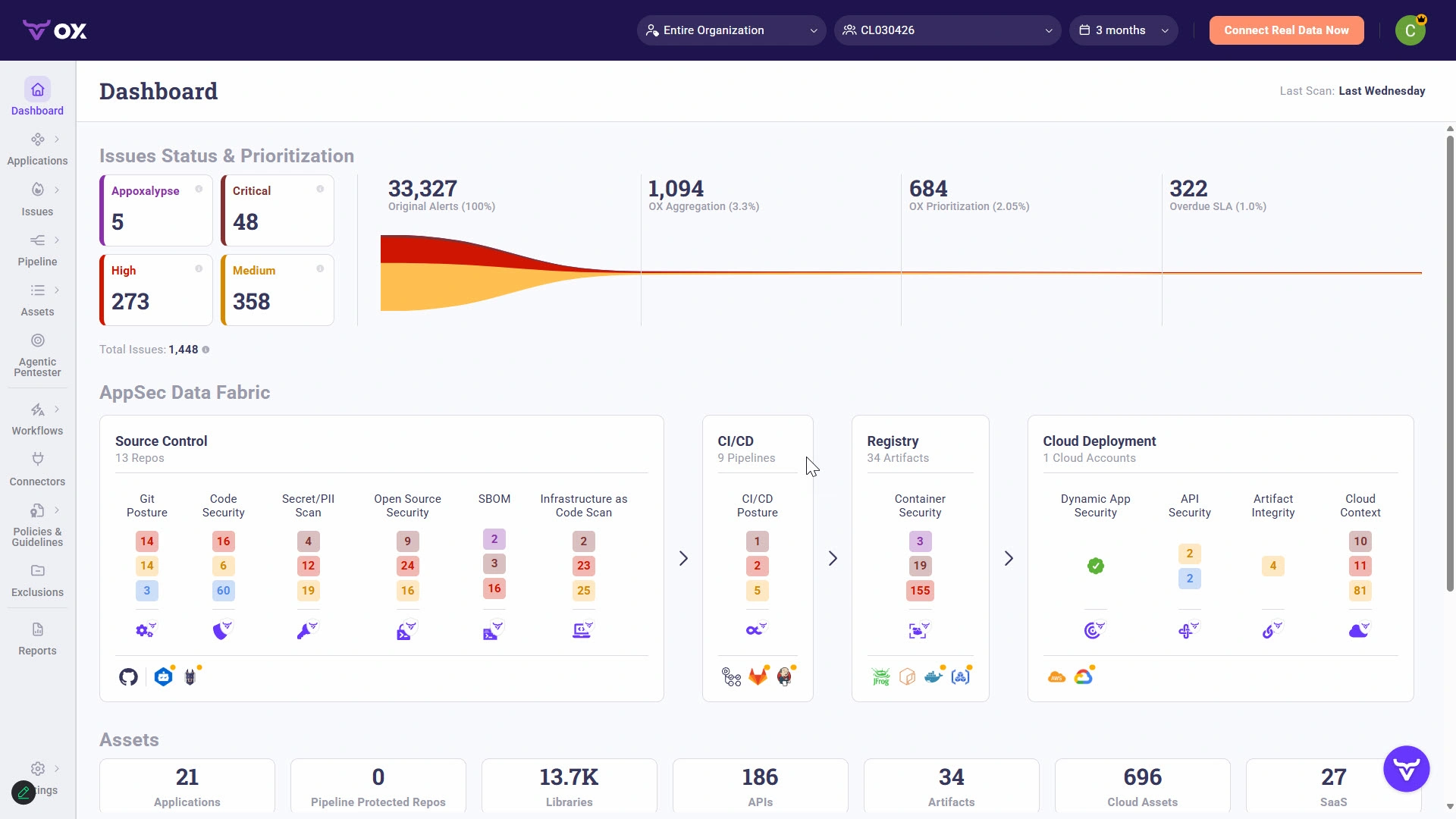
OX Security is an Application Security Posture Management platform. It aims to give security teams a complete view of their application security programs. The tool connects to your development pipeline. It then collects data from multiple sources.
OX Security doesn’t just scan code. It aggregates findings from various security tools you might already use. Think of it as a central command center for application security. The platform helps teams prioritize which issues to fix first. It uses risk calculation methods to rank vulnerabilities by actual business impact.
Key focus areas for OX Security include:
- Software supply chain security
- Pipeline security monitoring
- Vulnerability prioritization
- Risk scoring and calculation
- Developer-friendly remediation guidance
The platform targets security teams who need to manage complex environments. It’s built for organizations with multiple code repositories, CI/CD pipelines, and security tools already in place.
What is Semgrep?
Semgrep started as an open-source static analysis engine. It lets developers write custom rules to find patterns in code. The tool has grown into a more complete offering called Semgrep Code, Semgrep Supply Chain, and Semgrep Secrets.
The core strength of Semgrep is its speed and simplicity. Developers can run scans quickly without complex setup. The rule-writing syntax is intuitive. Many teams use Semgrep to enforce coding standards alongside security checks.
Semgrep’s main capabilities include:
- Static Application Security Testing (SAST)
- Software Composition Analysis (SCA)
- Secrets detection
- Custom rule creation
- Open-source community rules
Semgrep appeals to development teams who want something lightweight. It integrates smoothly into existing workflows. The open-source foundation means there’s a large community contributing rules and improvements.
The Fundamental Difference
Here’s the bottom line difference between these two tools. Semgrep focuses on finding specific code issues through pattern matching. OX Security takes a broader view of your entire security posture. One is a scanner. The other is a management platform.
This doesn’t make one better than the other. It depends on what problem you’re trying to solve. Some teams need both approaches working together.
Market Position: Semgrep vs OX Security Rankings and Mindshare
Let’s look at how the market views these two products. Numbers tell an interesting story about adoption and perception.
Industry Rankings and Ratings
According to recent peer review data, OX Security ranks #36 in the SAST category. Semgrep holds position #18 with an average rating of 8.0 out of 10. This higher ranking reflects Semgrep’s longer presence in the market. It also shows broader adoption among development teams.
Mindshare numbers reveal even more. OX Security holds a 0.9% mindshare in the SAST space. Semgrep captures 2.6%. That’s nearly three times the market awareness. Semgrep’s open-source roots contributed to this wider recognition.
| Metric | OX Security | Semgrep |
|---|---|---|
| Market Ranking (SAST) | #36 | #18 |
| Mindshare | 0.9% | 2.6% |
| Average Rating | Not publicly listed | 8.0/10 |
| Primary Category | ASPM | SAST |
Why These Numbers Matter
Higher mindshare usually means more community resources. You’ll find more tutorials, more forum discussions, and more third-party integrations for Semgrep. This can speed up your team’s learning curve.
But rankings don’t tell the whole story. OX Security competes in a newer category. ASPM platforms are gaining traction fast. The market is still figuring out how to categorize these tools properly.
Teams evaluating these options should look beyond rankings. Consider your specific use case. A lower-ranked tool might actually fit your needs better than a more popular alternative.
Feature Comparison: OX Security Against Semgrep Capabilities
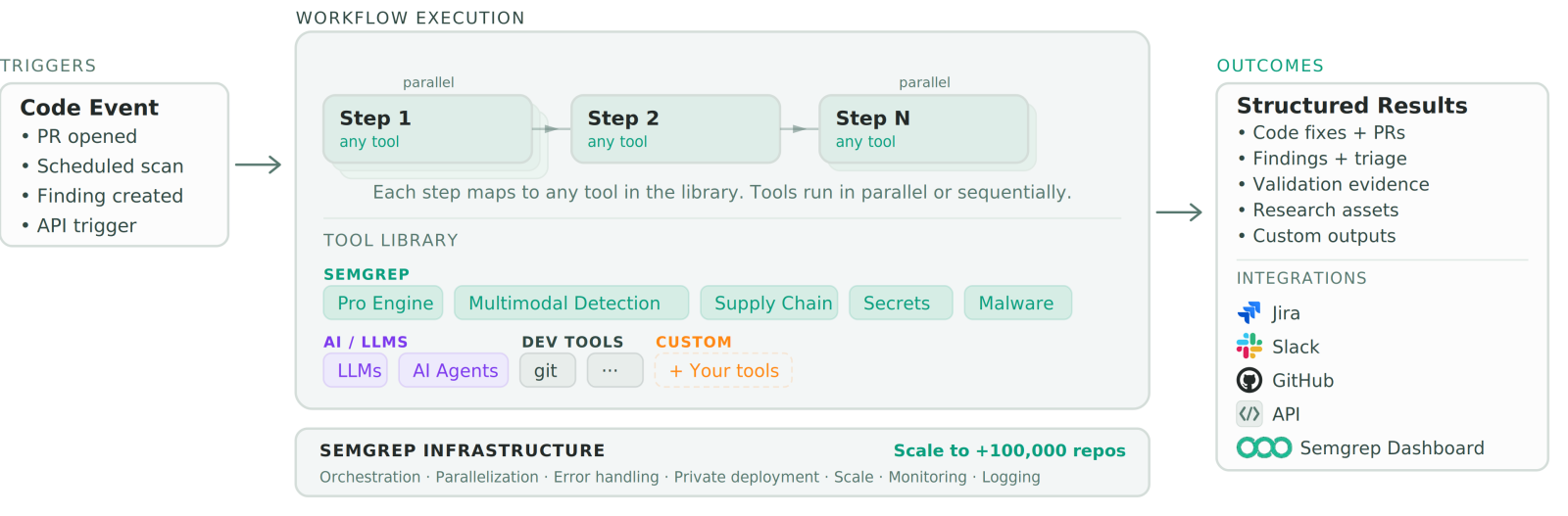
Now let’s compare what each tool actually offers. We’ll break this down by feature category to make the comparison clear.
Static Application Security Testing (SAST)
Semgrep’s Approach:
Semgrep excels at SAST. It’s the company’s core product. The tool uses pattern-based analysis to find vulnerabilities. Developers write rules that describe problematic code patterns. Semgrep then hunts for matches across your codebase.
The speed is impressive. Semgrep can scan millions of lines of code in minutes. It supports over 30 programming languages. The open-source rule library covers common vulnerability types out of the box.
OX Security’s Approach:
OX Security takes a different path. Instead of running its own SAST engine, it often aggregates results from other tools. This includes Semgrep itself. OX Security then adds context and prioritization to those findings.
Some users appreciate this approach. They don’t need to replace existing tools. Others prefer a single solution that does everything. OX Security does offer its own scanning capabilities. But the emphasis is on orchestration and management.
Software Composition Analysis (SCA)
Semgrep Supply Chain:
Semgrep offers SCA through its Supply Chain product. It checks your dependencies for known vulnerabilities. The tool maps your dependency tree and flags risky packages. Reachability analysis helps filter out vulnerabilities that don’t actually affect your code.
This reachability feature is valuable. Many SCA tools generate noise. They report every vulnerability in every dependency. Semgrep tries to show only the issues that matter.
OX Security’s SCA Coverage:
OX Security provides software supply chain security as a core feature. The platform monitors dependencies across your entire organization. It tracks where vulnerable packages appear across multiple projects.
The centralized view helps security teams see patterns. Maybe the same risky dependency shows up in 50 repositories. OX Security makes this visible. Teams can then address the issue systematically.
Secrets Detection
Both tools offer secrets detection capabilities. Semgrep Secrets scans code for accidentally committed credentials. OX Security includes similar functionality as part of its broader platform.
Key considerations for secrets detection:
- False positive rate matters a lot here
- Both tools claim high accuracy
- Integration with secrets management tools varies
- Historical scanning depth differs between products
Semgrep’s pattern-matching engine gives it flexibility in secrets detection. Users can write custom rules for organization-specific credential formats. OX Security provides pre-built detection but may offer less customization.
Coverage Comparison Table
| Capability | OX Security | Semgrep |
|---|---|---|
| SAST | Yes (aggregated + native) | Yes (core product) |
| SCA | Yes | Yes (Supply Chain) |
| Secrets Detection | Yes | Yes (Secrets) |
| DAST | Limited | No |
| API Security | Yes | Limited |
| Container Security | Yes | Limited |
| IaC Scanning | Yes | Community rules available |
| ASPM Features | Core focus | Basic |
Risk Prioritization: How OX Security and Semgrep Handle Vulnerability Ranking
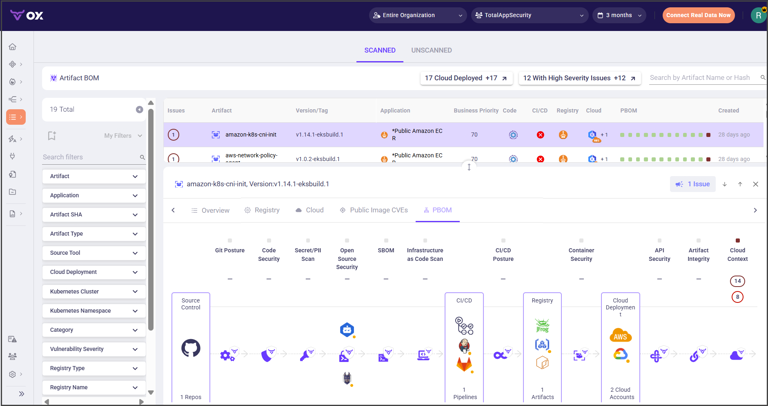
Finding vulnerabilities is just the first step. The harder problem is figuring out which ones to fix first. Both tools approach this challenge differently.
OX Security’s Risk Calculation Engine
OX Security offers a more comprehensive approach to risk calculation and prioritization. This is one of its standout features. The platform doesn’t just report CVSS scores. It considers multiple factors to calculate real-world risk.
Factors OX Security considers:
- Exploitability of the vulnerability
- Whether the vulnerable code is reachable
- Business criticality of the affected application
- Exposure to the internet
- Existing security controls in place
- Data sensitivity involved
This contextual scoring helps teams focus on what actually matters. A critical vulnerability in an internal tool might rank lower than a medium vulnerability in a customer-facing payment system. The math makes sense when you think about actual risk.
Semgrep’s Prioritization Approach
Semgrep focuses more on technical accuracy than business context. The tool is good at determining whether a vulnerability is actually exploitable in your specific code. Reachability analysis is the key feature here.
If you have a vulnerable function in a library but never call it, Semgrep can flag that as lower priority. This reduces noise significantly. Many security teams waste time on vulnerabilities that could never actually be triggered.
Semgrep’s prioritization factors:
- Severity of the vulnerability type
- Confidence level of the detection
- Reachability from user input
- Whether there’s a known exploit
Which Approach Works Better?
The answer depends on your organization’s maturity. Teams just starting their security program might prefer Semgrep’s simpler approach. It’s easier to understand and act on. The focus on technical accuracy means fewer false positives.
Larger organizations with mature security programs often need more context. OX Security’s business-aware prioritization becomes valuable at scale. When you have thousands of findings, that extra context helps dramatically.
Consider this scenario: Your team discovers 500 vulnerabilities in a single sprint. Without smart prioritization, developers won’t know where to start. They might fix easy issues that don’t matter while ignoring dangerous ones. Good prioritization changes this entirely.
Ease of Use and Setup: Semgrep vs OX Security User Experience
Security tools are only useful if teams actually use them. Setup friction and daily usability matter a lot.
Getting Started with Semgrep
Semgrep has a slight edge in ease of use and setup. The open-source version can be installed in minutes. A simple command downloads the tool. Another command runs your first scan. Many developers get results within their first hour.
Typical Semgrep setup steps:
- Install the CLI tool
- Run a scan with default rules
- Review results in terminal or CI output
- Customize rules as needed
- Add to CI/CD pipeline
The commercial Semgrep products require more configuration. You’ll set up team access, configure scanning schedules, and customize policies. But the learning curve stays manageable. The interface is clean and intuitive.
Documentation quality is excellent. The community provides tutorials, example rules, and troubleshooting guides. New users rarely feel stuck.
Getting Started with OX Security
OX Security requires more initial investment. As an ASPM platform, it needs to connect to multiple systems. You’ll integrate with source control, CI/CD pipelines, cloud providers, and existing security tools.
Typical OX Security setup involves:
- Connecting to source code repositories
- Integrating CI/CD pipelines
- Connecting existing security tools
- Configuring risk scoring weights
- Setting up dashboards and reports
- Defining policies and workflows
This takes longer. Expect days or weeks rather than hours. But the payoff is a complete view of your security posture. Teams can’t get this from simpler tools.
OX Security provides implementation support. Their team helps with initial setup and configuration. This reduces the burden on your staff. Still, the complexity is higher than standalone scanners.
Day-to-Day Usability
Developer Experience with Semgrep:
Developers generally find Semgrep pleasant to use. Scan results appear directly in pull requests. The findings include clear explanations. Suggested fixes help developers resolve issues quickly.
IDE integrations let developers catch issues before committing. Real-time feedback during coding prevents vulnerabilities from ever reaching the repository. This shift-left approach saves time for everyone.
Developer Experience with OX Security:
OX Security also integrates into developer workflows. But developers might interact with it less directly. Security teams often use the platform to triage issues first. Developers then receive prioritized tickets to fix.
This workflow suits organizations where security teams handle initial analysis. It might frustrate developers who prefer direct feedback. The extra layer adds process but also adds expertise.
Usability Comparison Table
| Factor | OX Security | Semgrep |
|---|---|---|
| Initial Setup Time | Days to weeks | Hours to days |
| Learning Curve | Steeper | Gentler |
| Documentation | Good | Excellent |
| Community Resources | Limited | Extensive |
| IDE Integration | Yes | Yes |
| PR/MR Comments | Yes | Yes |
| Implementation Support | Included | Paid tier |
Integration Capabilities: OX Security Versus Semgrep Connectivity
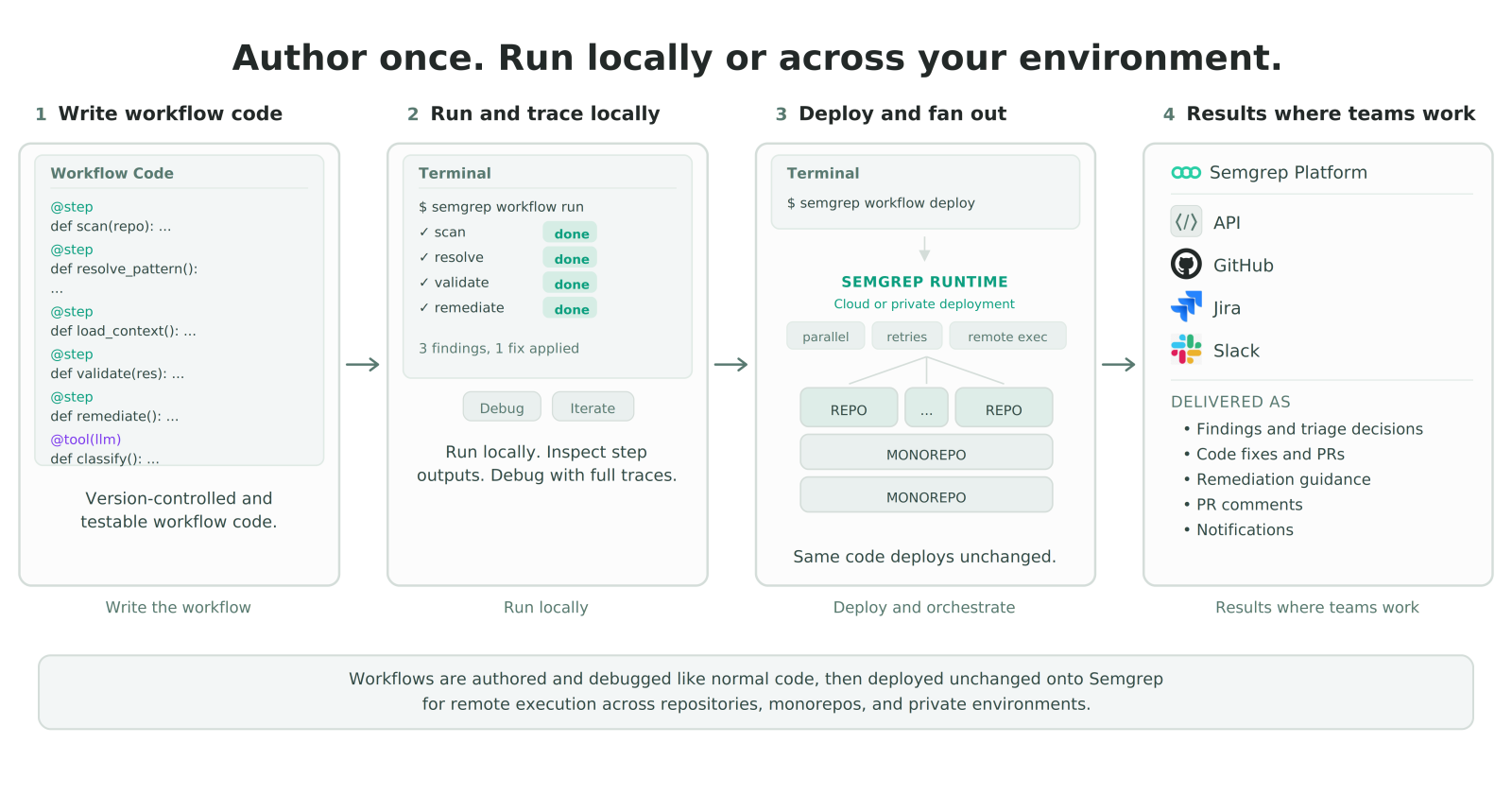
Modern development environments involve dozens of tools. Security solutions need to play nicely with all of them.
Source Control Integration
Both tools integrate with major source control platforms. GitHub, GitLab, Bitbucket, and Azure DevOps are all supported. The depth of integration varies though.
Semgrep’s source control features:
- Automatic PR scanning
- Comments on pull requests with findings
- Branch protection rule support
- GitHub Advanced Security compatibility
- GitLab Security Dashboard integration
OX Security’s source control features:
- Full repository inventory
- Branch protection policy enforcement
- Code change tracking
- Developer activity monitoring
- PR scanning and blocking
OX Security goes deeper into repository management. It tracks who has access to what. It monitors for configuration drift in branch protection rules. This appeals to security teams wanting full visibility.
CI/CD Pipeline Integration
Stopping vulnerable code before deployment is the goal. Both tools integrate into CI/CD pipelines to achieve this.
Semgrep provides lightweight integration. The scan runs as a pipeline step. Results fail the build based on configurable thresholds. Teams can block deployments when critical issues appear.
OX Security monitors the entire pipeline. Beyond scanning results, it watches for supply chain attacks. If someone introduces a malicious package, OX Security can catch it. Pipeline security is a core focus of the platform.
Supported CI/CD platforms:
| Platform | OX Security | Semgrep |
|---|---|---|
| GitHub Actions | Yes | Yes |
| GitLab CI | Yes | Yes |
| Jenkins | Yes | Yes |
| CircleCI | Yes | Yes |
| Azure Pipelines | Yes | Yes |
| Bitbucket Pipelines | Yes | Yes |
Security Tool Aggregation
This is where OX Security really shines. The platform can aggregate findings from other security tools. Already using Snyk for SCA? OX Security can pull in those results. Have Checkmarx for SAST? Those findings appear in OX Security too.
This aggregation creates a single pane of glass for security. Teams don’t need to check multiple dashboards. All findings appear in one place with consistent prioritization.
Semgrep focuses on its own findings. It doesn’t aggregate results from other tools. Teams using Semgrep alongside other scanners need separate processes for each.
Issue Tracking Integration
Both tools integrate with popular issue trackers. Jira is the most common integration. Teams can create tickets directly from security findings. This connects security work to normal development workflows.
Available integrations include:
- Jira
- Linear
- Azure Boards
- Asana
- GitHub Issues
- GitLab Issues
OX Security provides more automation around ticket creation. Rules can auto-assign issues based on code ownership. Priorities can be set automatically based on risk scores. This reduces manual work for security teams.
Cloud Provider Integration
Modern applications run in the cloud. Security tools need visibility into cloud configurations too.
OX Security connects to AWS, Azure, and Google Cloud. It monitors for misconfigurations that could expose applications. This extends security beyond just code.
Semgrep’s cloud integration is more limited. The tool focuses primarily on code analysis. Teams needing cloud security often pair Semgrep with dedicated cloud security posture management tools.
Customization and Extensibility: Tailoring OX Security and Semgrep to Your Needs
Every organization has unique security requirements. Off-the-shelf rules don’t cover everything. Customization capabilities matter.
Writing Custom Rules in Semgrep
Custom rule creation is one of Semgrep’s strongest features. The rule syntax is designed to be readable. Developers without deep security expertise can write effective rules.
Example use cases for custom Semgrep rules:
- Enforce internal coding standards
- Detect use of deprecated internal APIs
- Find organization-specific vulnerability patterns
- Require specific security patterns in certain contexts
- Prevent use of banned libraries
The community has shared thousands of rules publicly. Teams rarely start from scratch. Finding a similar rule and modifying it is the common approach.
Semgrep also supports rule testing. Teams can write test cases to verify rules work correctly. This prevents rules from breaking as they evolve. The workflow feels familiar to developers already doing test-driven development.
Customization in OX Security
OX Security offers customization at a different level. Instead of writing scan rules, teams configure policies and workflows. Risk scoring weights can be adjusted. Prioritization logic can be tuned to match business needs.
Common OX Security customizations:
- Adjust risk scoring weights for different factors
- Define application criticality levels
- Create custom security policies
- Configure exception workflows
- Build custom dashboards and reports
The platform focuses on orchestration rather than detection. If you need a new type of scan, you might add another tool and connect it to OX Security. The platform then includes those findings in its unified view.
API Access
Both tools provide API access for programmatic integration. Teams can build custom workflows, extract data for analysis, or integrate with internal systems.
Semgrep’s API allows rule management, scan triggering, and result retrieval. The API documentation is comprehensive. Many teams use it to build custom dashboards or integrate with internal reporting systems.
OX Security’s API covers similar ground plus more. The broader platform means more data is available. Teams can pull security posture information, risk scores, and aggregated findings programmatically.
Enterprise Features: Comparing OX Security and Semgrep for Large Organizations
Enterprise requirements differ from small team needs. Scale, compliance, and governance become critical factors.
Scalability Considerations
Large organizations have massive codebases. Thousands of repositories. Millions of lines of code. Security tools need to handle this volume without slowing development.
Semgrep’s scalability approach:
Semgrep is designed for speed. The scanning engine runs fast even on large codebases. Incremental scanning analyzes only changed code. This keeps CI pipelines moving quickly.
The architecture handles scale well. Many large companies run Semgrep across thousands of repositories. Performance rarely becomes a blocker.
OX Security’s scalability approach:
OX Security handles scale differently. As a management platform, it deals with aggregated data from multiple sources. The challenge is displaying and prioritizing thousands of findings effectively.
The platform is built for enterprise use. Large organizations use it to manage security across hundreds of applications. The centralized view actually becomes more valuable at scale.
Compliance and Reporting
Regulated industries need evidence of security practices. Compliance reporting is a common requirement.
OX Security provides strong compliance features. The platform maps findings to compliance frameworks. Reports show how you’re doing against SOC 2, ISO 27001, PCI DSS, and other standards. Auditors appreciate this structured evidence.
Semgrep’s compliance features are more basic. The tool shows what vulnerabilities exist. Mapping those to compliance requirements requires additional work. Teams often build custom reports or use other tools for compliance documentation.
Role-Based Access Control
Enterprise security tools need granular permissions. Different people should see different things.
Both tools offer role-based access control. OX Security’s implementation is more sophisticated. Roles can be defined at the organization, team, or application level. Complex permission hierarchies are supported.
Semgrep’s permissions are simpler but adequate for most teams. Organization admins, contributors, and viewers cover common needs. Custom roles aren’t available in most plans.
Single Sign-On and Identity Management
Enterprise tools should integrate with existing identity providers. Both OX Security and Semgrep support SSO.
Supported identity providers:
- Okta
- Azure AD
- Google Workspace
- SAML 2.0 compliant providers
SCIM support for automatic user provisioning is available in both platforms’ enterprise tiers. This simplifies user management for large organizations.
Enterprise Feature Comparison
| Feature | OX Security | Semgrep |
|---|---|---|
| Compliance Frameworks | Multiple (SOC 2, ISO, PCI, etc.) | Limited |
| Audit Logging | Comprehensive | Available |
| Custom Roles | Yes | Limited |
| SSO | Yes | Yes |
| SCIM | Yes | Enterprise tier |
| Data Residency Options | Multiple regions | Limited |
| SLA Guarantees | Enterprise tier | Enterprise tier |
Pricing Models: OX Security vs Semgrep Cost Comparison
Budget is always a factor. Let’s explore how these tools price their offerings.
Semgrep Pricing Structure
Semgrep offers a free tier. This makes it accessible for small teams and individual developers. The open-source CLI is completely free. Basic commercial features have free tiers too.
Semgrep pricing tiers:
- Community: Free, open-source scanning engine
- Team: Per-developer pricing with additional features
- Enterprise: Custom pricing with full feature access
The free tier covers basic needs. Teams can scan code, use community rules, and integrate with CI/CD. Paid tiers add features like custom policies, historical analysis, and support.
Pricing is typically per developer seat. The Team tier runs around $40 per developer per month. Enterprise pricing requires a sales conversation.
OX Security Pricing Structure
OX Security doesn’t offer a free tier. The platform is designed for organizations willing to invest in comprehensive security posture management.
OX Security pricing factors:
- Number of applications monitored
- Number of users
- Integrations required
- Support level needed
Pricing is custom quoted. You’ll need to talk to their sales team for specific numbers. Generally, ASPM platforms cost more than standalone scanners. The broader capabilities justify higher prices for organizations that need them.
Total Cost of Ownership
Sticker price isn’t everything. Consider the total cost of ownership.
Hidden costs to consider:
- Implementation time and effort
- Training and onboarding
- Ongoing maintenance and tuning
- Integration development
- Need for complementary tools
Semgrep requires less upfront investment. The simpler setup means faster time to value. But you might need additional tools for complete coverage. DAST, container security, and API security might require separate purchases.
OX Security has higher initial costs. The setup takes longer. But the platform might replace multiple point solutions. The consolidation can actually reduce total spending in some cases.
Which Offers Better Value?
Value depends on your situation. Small teams or those just starting with application security often get more value from Semgrep. The free tier provides real capability. Paid tiers are reasonably priced.
Larger organizations with complex environments might find OX Security delivers better value. The centralized management reduces operational overhead. Better prioritization means developers fix what matters most. These efficiency gains can justify higher tool costs.
Performance and Speed: OX Security Compared to Semgrep Scan Times
Slow security tools get disabled. Speed matters for developer adoption.
Semgrep Performance
Semgrep is known for speed. The engine can scan hundreds of thousands of lines per second. This makes it one of the fastest SAST tools available.
Factors contributing to Semgrep’s speed:
- Pattern-based matching (not full program analysis)
- Efficient parsing
- Parallel processing
- Incremental scanning capability
Incremental scanning is particularly valuable for CI. When a developer pushes a small change, Semgrep analyzes only the affected code. This keeps PR checks fast.
Full repository scans complete in minutes even for large codebases. Developers rarely complain about Semgrep slowing them down.
OX Security Performance
OX Security’s performance profile is different. The platform aggregates data rather than performing all scans itself. Performance depends on how quickly data flows from source systems.
The dashboard and reporting interface needs to be responsive. Searching through thousands of findings should be fast. OX Security has invested in making this experience smooth.
For organizations using OX Security’s native scanning capabilities, performance is competitive. The platform is designed for continuous monitoring rather than blocking CI pipelines.
Impact on Developer Workflows
Both tools offer IDE integration for real-time feedback. This is the fastest possible turnaround. Developers see issues as they type.
For CI/CD integration, both tools can gate deployments. The key is configuring thresholds appropriately. Blocking on every finding creates friction. Blocking on critical issues balances security and speed.
Teams should measure actual impact on their pipelines. Run benchmarks with your codebase. Abstract performance numbers matter less than real-world experience.
User Reviews and Community Feedback: What Users Say About Semgrep and OX Security
Real user experiences provide valuable perspective. Let’s examine what actual users report about these tools.
Semgrep User Feedback
Users consistently praise Semgrep’s ease of use. The quick setup wins fans immediately. Developers appreciate being able to run scans locally without complex configuration.
Common Semgrep praise:
- “Easy to get started”
- “Fast scanning speeds”
- “Custom rules are actually usable”
- “Good documentation”
- “Active community support”
Common Semgrep criticism:
- “Limited to pattern matching”
- “Some language support is better than others”
- “Enterprise features cost extra”
- “Need other tools for complete coverage”
The 8.0 average rating reflects strong overall satisfaction. Users who understand Semgrep’s scope are generally happy with it.
OX Security User Feedback
OX Security users often mention the comprehensive visibility the platform provides. Security teams appreciate seeing everything in one place.
Common OX Security praise:
- “Great for managing multiple security tools”
- “Risk prioritization is excellent”
- “Helps us focus on what matters”
- “Good supply chain security features”
- “Responsive customer support”
Common OX Security criticism:
- “Takes time to set up properly”
- “Can be overwhelming at first”
- “Pricing isn’t transparent”
- “Some integrations need improvement”
Users who need ASPM capabilities rate OX Security highly. Those expecting a simple scanner might feel it’s overkill.
Head-to-Head User Preferences
When users compare these tools directly, preferences split along predictable lines. Developer-focused teams lean toward Semgrep. Its simplicity and speed appeal to engineers who want security tools that don’t slow them down.
Security-focused teams often prefer OX Security. The centralized view and risk prioritization help security professionals manage programs at scale. The extra complexity is worth it for them.
Supply Chain Security: Semgrep vs OX Security Protection
Software supply chain attacks are increasing. Both tools address this threat, but in different ways.
OX Security’s Supply Chain Approach
Supply chain security is a core focus for OX Security. The platform monitors your entire software factory. It watches for threats at multiple levels.
OX Security supply chain capabilities:
- Dependency vulnerability tracking
- Pipeline security monitoring
- Build integrity verification
- Code signing verification
- Third-party tool risk assessment
- Developer access monitoring
The breadth of coverage helps organizations detect sophisticated attacks. Supply chain compromises often combine multiple techniques. Seeing the big picture helps identify suspicious patterns.
Semgrep’s Supply Chain Approach
Semgrep Supply Chain focuses on dependency analysis. It identifies vulnerable packages in your dependency tree. Reachability analysis helps filter findings to those that actually matter.
Semgrep Supply Chain capabilities:
- Known vulnerability detection
- Reachability analysis
- License compliance checking
- Dependency tree visualization
- Malicious package detection
The approach is narrower but deeper in its focus area. Semgrep doesn’t monitor pipeline security or developer access. It concentrates on making dependency analysis excellent.
Which Approach Is More Complete?
OX Security provides broader supply chain coverage. Teams worried about sophisticated supply chain attacks will appreciate this. The platform watches for threats that Semgrep doesn’t address.
Semgrep’s focused approach works well for teams primarily concerned about vulnerable dependencies. This is the most common supply chain risk. Covering it well handles most real-world threats.
The choice depends on your threat model. High-value targets might need OX Security’s comprehensive approach. Most organizations find Semgrep’s coverage sufficient.
AI and Remediation: How OX Security and Semgrep Help Fix Issues
Finding vulnerabilities is just half the battle. Developers need help fixing them too.
Semgrep’s Remediation Guidance
Semgrep provides fix suggestions alongside findings. The tool shows what’s wrong and how to make it right. For many common issues, suggested fixes are copy-paste ready.
Semgrep remediation features:
- Inline fix suggestions
- Code examples showing secure alternatives
- Links to relevant documentation
- Autofix for some rule types
The autofix capability is particularly powerful. For some issues, Semgrep can apply fixes automatically. This speeds up remediation dramatically. Developers review the change rather than writing it from scratch.
OX Security’s Remediation Approach
OX Security emphasizes root cause remediation. Instead of fixing symptoms, the platform helps teams address underlying issues. If the same vulnerability appears in 50 places, maybe there’s a common root cause.
OX Security remediation features:
- Root cause identification
- Remediation workflow management
- Developer assignment based on code ownership
- Progress tracking and reporting
- Remediation SLA monitoring
The workflow management helps coordinate remediation at scale. Security teams can track which issues are being addressed. Developers get clear assignments. Nobody wonders who’s responsible for what.
AI-Assisted Remediation
Both tools are adding AI capabilities for remediation. The technology is still evolving. Current capabilities vary.
Semgrep uses AI to improve autofix suggestions. The fixes are context-aware and consider surrounding code. This makes automated fixes more reliable.
OX Security incorporates AI into prioritization and analysis. The platform helps identify which issues require human attention versus which can be handled automatically.
Expect rapid improvements in this area. AI-assisted code fixing is a hot area of development. Both companies are investing heavily.
Choosing Between OX Security and Semgrep: Recommendations for Different Teams
With all this information, let’s provide concrete recommendations based on team types.
For Small Development Teams
Recommended: Semgrep
Small teams benefit most from Semgrep’s simplicity. The free tier provides real value. Setup takes hours, not weeks. Developers can start catching vulnerabilities quickly.
The learning curve is manageable. One person can become the expert and help others. Custom rules let you address team-specific concerns without enterprise features.
OX Security’s complexity would be overkill. The setup effort doesn’t make sense for small codebases. The cost is harder to justify when you don’t have thousands of findings to manage.
For Mid-Size Organizations
Recommended: Evaluate both
Mid-size organizations have more diverse needs. Some will find Semgrep’s commercial tiers perfect. Others will benefit from OX Security’s broader capabilities.
Choose Semgrep if:
- Developer experience is top priority
- You want to start simple and grow
- Custom rules are important
- Budget is constrained
Choose OX Security if:
- You already have multiple security tools
- Prioritization is a major pain point
- Supply chain security is a priority
- You need compliance reporting
For Enterprise Organizations
Recommended: Likely both, with OX Security as the management layer
Enterprise organizations often need capabilities from both tools. Running Semgrep for fast, accurate code scanning makes sense. Using OX Security to aggregate and prioritize findings also makes sense.
The combination provides comprehensive coverage. Semgrep handles detection. OX Security handles management. Each tool does what it does best.
Enterprises with complex, diverse development environments benefit most from OX Security’s centralized approach. The platform scales with organizational complexity. The investment is justified by efficiency gains.
For Startups and Funded Companies
Recommended: Semgrep to start, evaluate OX Security as you scale
Startups need to move fast. Semgrep enables this. Quick setup means security doesn’t slow down rapid development. Free tiers help preserve runway.
As the company grows, security needs become more complex. More repositories, more developers, more tools. At some point, a management layer becomes valuable. That’s when OX Security enters the picture.
Plan for this evolution. Start with Semgrep. Build good security habits. Add OX Security when complexity demands it.
For Regulated Industries
Recommended: OX Security, possibly with Semgrep
Financial services, healthcare, and government organizations face strict compliance requirements. OX Security’s compliance mapping and reporting address these needs directly.
Auditors want evidence. They want frameworks. They want traceability. OX Security provides this out of the box. Building equivalent capability from scratch takes significant effort.
Semgrep can still play a role. Its fast, accurate scanning feeds into OX Security’s management layer. The combination satisfies both technical and compliance requirements.
Conclusion
OX Security and Semgrep serve different needs despite some overlapping capabilities. Semgrep excels at fast, accurate code scanning with excellent developer experience. OX Security provides comprehensive security posture management with strong prioritization and compliance features.
Your choice depends on your team size, security maturity, and specific requirements. Small teams should start with Semgrep. Large organizations managing complex environments will benefit from OX Security’s broader capabilities. Many enterprises will find value in using both tools together.
Frequently Asked Questions About OX Security vs Semgrep
| Which tool is better for a team just starting with application security? | Semgrep is typically better for teams new to application security. Its free tier provides immediate value without budget approval. The setup takes hours rather than days. The learning curve is gentler. Teams can start catching vulnerabilities quickly and expand capabilities as they mature. |
| Can OX Security and Semgrep be used together? | Yes, many organizations use both tools together. Semgrep handles code scanning with its fast, accurate engine. OX Security aggregates those findings along with results from other tools. This combination provides excellent detection through Semgrep and comprehensive management through OX Security. |
| Why would I choose OX Security over Semgrep? | Choose OX Security when you need centralized security management across multiple tools, applications, and teams. The platform excels at prioritizing findings based on business risk, providing compliance reporting, and managing remediation workflows at scale. Supply chain security coverage is also broader. |
| Why would I choose Semgrep over OX Security? | Choose Semgrep when developer experience and scanning speed are top priorities. The tool’s custom rule creation is unmatched. The open-source community provides valuable resources. Lower cost and simpler setup make it accessible to teams of all sizes. |
| Which tool provides better vulnerability prioritization? | OX Security offers more comprehensive risk prioritization. It considers business context, exploitability, and existing security controls. Semgrep focuses on technical accuracy through reachability analysis. OX Security’s approach works better for large organizations. Semgrep’s approach is simpler and still effective. |
| Does Semgrep have a free version? | Yes, Semgrep offers a free open-source scanning engine. The community tier provides basic features at no cost. Paid tiers add enterprise features like custom policies, advanced reporting, and priority support. Many teams get substantial value from free capabilities. |
| Does OX Security offer a free trial? | OX Security typically offers demonstrations and trials through their sales process. There isn’t a self-serve free tier. Interested organizations should contact OX Security directly to discuss evaluation options and pricing. |
| Which tool is faster for code scanning? | Semgrep is generally faster for pure code scanning. Its pattern-based engine can analyze millions of lines per second. Incremental scanning only checks changed code, keeping CI pipelines fast. OX Security’s performance depends more on data aggregation than scanning speed. |
| Which tool has better language support? | Semgrep supports over 30 programming languages with its core scanning engine. Language support quality varies. Popular languages like Python, JavaScript, and Go have excellent coverage. OX Security’s language support depends on which scanning engines it integrates with. |
| How do these tools compare to alternatives like Checkmarx? | Checkmarx offers broader AppSec coverage than Semgrep, including DAST, API security, and containers. OX Security competes more directly with Checkmarx as an enterprise platform. Checkmarx positions itself as providing end-to-end coverage that Semgrep lacks in areas like API security and dynamic testing. |




 Stack Insight is intended to support informed decision-making by providing independent information about business software and services. Some product details, including pricing, features, and promotional offers, may be supplied by vendors or partners and can change without notice.