
Aikido Security Review


Aikido Security Review 2026: The Complete Guide to This All-in-One AppSec Platform
Security tools have a reputation for being noisy, complicated, and frustrating for developers. Aikido Security takes a different approach. This Belgian company built a platform that combines code scanning, cloud security, and runtime protection in one place. Over 50,000 organizations now use it. The big selling point? It cuts false positives by 95% through smart triaging and context-aware analysis.
In this review, we’ll break down everything about Aikido Security. You’ll learn what it does, how it works, who it’s for, and whether it’s worth your time. We’ll cover the technical features, pricing, real user feedback, and how it stacks up against alternatives. By the end, you’ll know if Aikido fits your team’s needs.
What Is Aikido Security? A Full Platform Breakdown
Aikido Security is an Application Security Posture Management (ASPM) platform. But that label doesn’t tell the whole story. Think of it as a Swiss Army knife for application security. It bundles multiple security tools into one unified system.
The Core Security Tools Inside Aikido
Here’s what you get under one roof:
- SAST (Static Application Security Testing) – Scans your source code for vulnerabilities like SQL injection and XSS
- DAST (Dynamic Application Security Testing) – Tests running applications for security holes
- SCA (Software Composition Analysis) – Checks open-source dependencies for known vulnerabilities
- Container Security – Scans container images for CVEs and security issues
- Secrets Detection – Finds exposed API keys, passwords, and credentials in your code
- CSPM (Cloud Security Posture Management) – Monitors cloud configuration for security risks
- IaC Scanning (Infrastructure as Code) – Catches misconfigurations in Terraform, CloudFormation, and similar tools
- Runtime Protection – Blocks attacks in production with the Zen in-app firewall
Most companies buy these tools separately. They end up with five, six, or even ten different security products. Each one has its own dashboard, its own alerts, and its own learning curve. Aikido combines them all.
The Problem Aikido Solves
Traditional security stacks create chaos. A typical setup might include Snyk for dependencies, SonarQube for code analysis, Trivy for containers, and GitLeaks for secrets. Managing all of these becomes a full-time job.
Worse, these tools don’t talk to each other. The same vulnerability might show up in three different dashboards. Your team wastes hours investigating duplicate alerts. And without context, every finding looks equally urgent.
Aikido’s approach is different. It runs all scans from one platform. It correlates findings across tools. And it filters out noise before it reaches your developers.
Who Built This Platform?
Aikido Security is a Belgian company that launched with a clear mission: make security developer-friendly. They designed the platform for teams that want protection without the complexity. The name “Aikido” comes from the Japanese martial art that redirects an attacker’s energy. It’s a fitting metaphor for a tool that turns security chaos into clarity.
Deep Dive Into Aikido Security Features
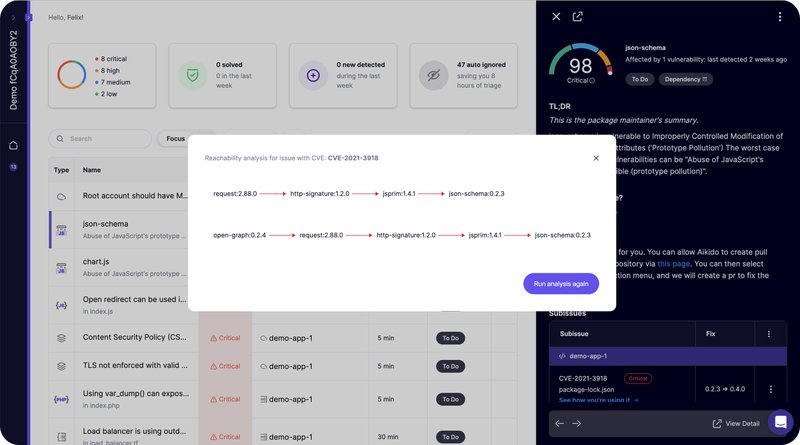
Let’s look at each major feature in detail. Understanding what each tool does will help you see if Aikido matches your security needs.
Static Application Security Testing (SAST)
SAST scans your source code without running it. Aikido’s SAST engine looks for common vulnerabilities in your codebase. It catches issues like:
- SQL injection flaws
- Cross-site scripting (XSS) vulnerabilities
- Buffer overflow risks
- Hardcoded credentials
- Insecure cryptographic practices
The scanner works out of the box. It supports all major programming languages including Python, JavaScript, Java, Go, Ruby, and more. You don’t need to configure complex rules to get started.
What makes Aikido’s SAST different? Context. The scanner doesn’t just find potential issues. It checks if those issues are actually reachable in your application. A vulnerability in code that never runs isn’t a real threat. Aikido knows the difference.
Dynamic Application Security Testing (DAST)
DAST takes a different approach. It tests your running application from the outside, like an attacker would. Aikido’s DAST module probes your app and APIs for:
- SQL injection points
- Cross-site scripting opportunities
- CSRF vulnerabilities
- Authentication weaknesses
- API security flaws
The platform supports both surface-level scanning and authenticated testing. Authenticated DAST logs into your application and tests protected areas. This finds vulnerabilities that anonymous scanning would miss.
You can run DAST scans on demand or schedule them as part of your release process. The results feed into the same dashboard as all other findings.
Software Composition Analysis (SCA)
Modern applications rely heavily on open-source packages. A typical Node.js project might have hundreds of dependencies. Each one could contain security vulnerabilities.
Aikido’s SCA scanner checks your dependency tree against known vulnerability databases. It identifies packages with CVEs and alerts you to upgrade. But here’s where it gets smart.
Not every vulnerable dependency matters. If your code never calls the vulnerable function, the risk is theoretical. Aikido performs reachability analysis to determine if your application actually uses the vulnerable code path. This alone cuts alert volume dramatically.
The SCA module also handles:
- License compliance – Flags packages with licenses that conflict with your project requirements
- Malware detection – Identifies packages that have been compromised or contain malicious code
- Dependency updates – Shows which packages have newer, safer versions available
Container Security Scanning
Containers add another layer of complexity to security. Your container images contain operating system packages, runtime components, and application code. Any of these could have vulnerabilities.
Aikido scans your container images for:
- Known CVEs in OS packages
- Outdated base images
- Insecure configurations
- Exposed secrets in image layers
The scanner integrates with your CI/CD pipeline. It can block deployments that contain high-severity vulnerabilities. And with AI-powered auto-fix, it suggests updated base images that resolve security issues.
Secrets Detection
Developers accidentally commit secrets to repositories all the time. API keys, database passwords, private certificates. Once these hit version control, they’re at risk.
Aikido’s secrets scanner finds exposed credentials in your codebase. It detects patterns for:
- AWS access keys
- Google Cloud credentials
- Azure connection strings
- Database passwords
- JWT signing keys
- Private encryption keys
- OAuth tokens
The scanner runs on every commit and can block merges that contain secrets. It also scans your git history to find credentials that were committed in the past.
Infrastructure as Code (IaC) Scanning
IaC tools like Terraform and CloudFormation define your cloud infrastructure. Misconfigurations here can expose your entire environment.
Aikido’s IaC scanner catches problems like:
- Publicly accessible S3 buckets
- Security groups with overly permissive rules
- Unencrypted storage volumes
- Missing logging and monitoring
- Overprivileged IAM roles
The scanner integrates into your CI/CD pipeline. It checks infrastructure definitions before they’re applied. This prevents misconfigurations from ever reaching production.
Cloud Security Posture Management (CSPM)
CSPM monitors your live cloud environment. Even if your IaC templates are secure, manual changes or drift can introduce vulnerabilities.
Aikido’s CSPM continuously scans your cloud accounts. It checks configurations against security best practices and compliance frameworks. When it finds issues, it alerts your team and provides remediation guidance.
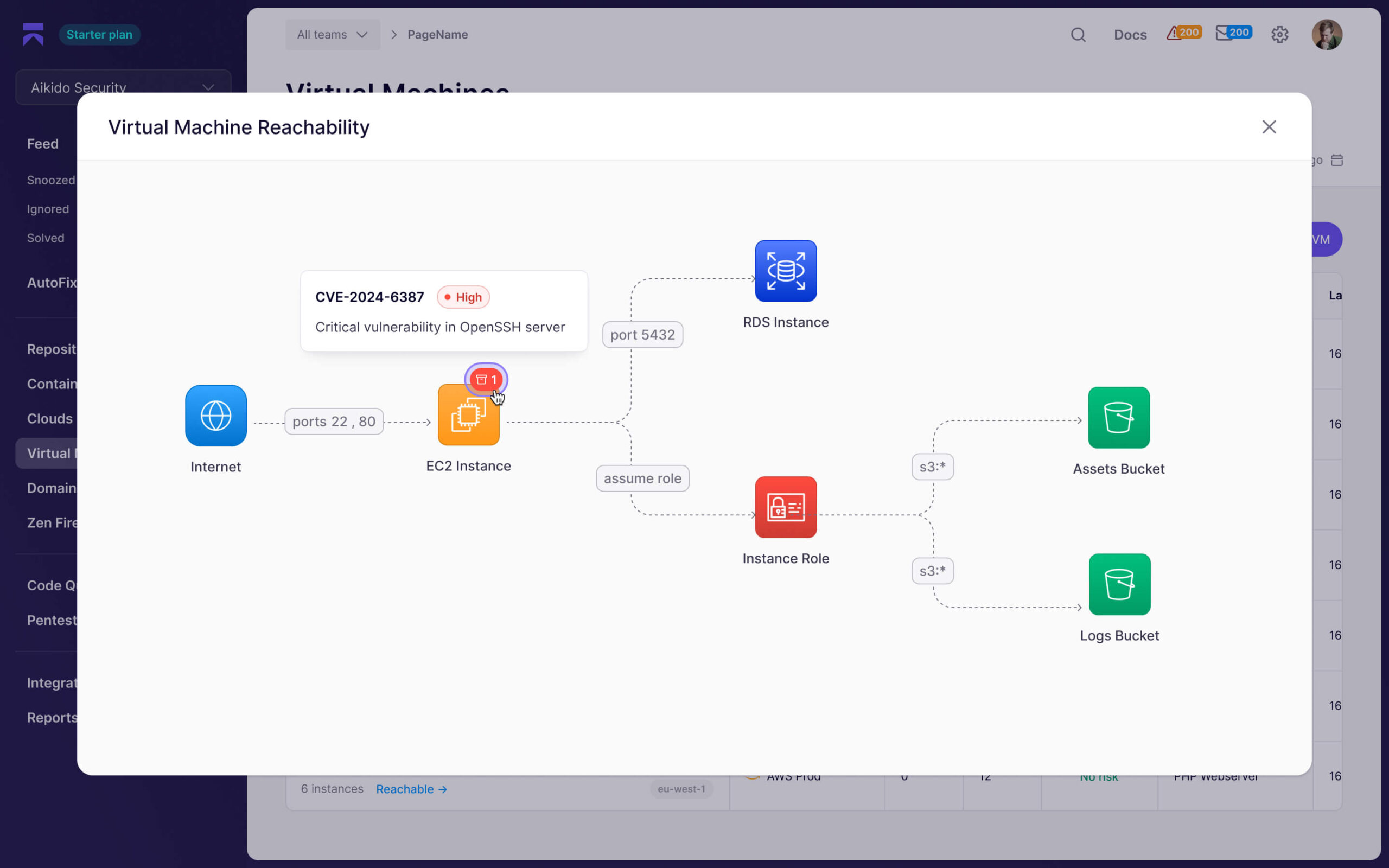
Runtime Protection with Zen
Prevention is great, but attacks still happen. Aikido’s Zen module provides runtime protection for applications in production.
Zen is an in-app firewall that runs inside your application. It blocks attacks in real-time without requiring code changes. The protection covers:
- SQL injection attempts
- Command injection attacks
- Path traversal exploits
- Server-side request forgery (SSRF)
Zen also monitors LLM (Large Language Model) usage in your application. As AI becomes more common in apps, securing LLM integrations matters. Zen tracks prompts and responses to detect abuse.
AutoTriage: How Aikido Cuts Noise by 95%
The biggest complaint about security tools? Too many alerts. Teams get buried in findings. They can’t tell what matters. Eventually, they start ignoring everything.
Aikido’s AutoTriage system addresses this head-on. It’s not just marketing speak. Real users report a 95% reduction in alert noise.
How AutoTriage Works
AutoTriage uses multiple techniques to filter findings:
Deduplication Across Scanners
When you run SAST, SCA, and container scans, they sometimes find the same issue. A vulnerable library might show up in your dependency scan, your container scan, and your code analysis. Without deduplication, that’s three alerts for one problem.
Aikido correlates findings across all scanners. It groups related issues into a single item. You see one alert, not three.
Reachability Analysis
Most vulnerable dependencies don’t actually affect your application. The vulnerable code path might never get called. Traditional scanners don’t know this. They flag everything.
Aikido traces your code to determine which vulnerabilities are actually reachable. If your application doesn’t use the vulnerable function, the finding gets deprioritized. It’s still visible, but it won’t wake you up at 3 AM.
Context Correlation
Security context matters. A SQL injection vulnerability in a public API is worse than one in an internal admin tool. Aikido considers:
- Is the vulnerable code exposed to the internet?
- Does the application handle sensitive data?
- What authentication protects this endpoint?
- Is there already compensating security control?
This context determines how urgently you need to fix each issue.
False Positive Detection
Security scanners are cautious by design. They’d rather flag something incorrectly than miss a real vulnerability. But this creates tons of false positives.
Aikido uses pattern recognition to identify likely false positives. It learns from user feedback and community data. When a finding looks like a false positive, it’s marked accordingly.
The Impact on Developer Productivity
Consider the numbers. A typical enterprise application might generate 1,000 security findings from various scanners. Without filtering, developers spend hours triaging. They investigate each alert, determine if it’s real, and decide on priority.
With 95% noise reduction, those 1,000 findings become 50 actionable items. That’s the difference between a full-time security job and a manageable task. Developers can actually fix vulnerabilities instead of sorting through alerts.
What Users Say About AutoTriage
Gartner reviews highlight this feature specifically. One reviewer noted: “The signal-to-noise ratio is one of the best I’ve seen.” Another mentioned that onboarding was fast precisely because they weren’t overwhelmed with initial findings.
This aligns with Aikido’s design philosophy. They built the platform for developers who don’t want to become full-time security analysts.
AutoFix: One-Click Vulnerability Remediation
Finding vulnerabilities is only half the battle. Fixing them takes time and expertise. Aikido’s AutoFix feature speeds up remediation dramatically.
How AutoFix Works
When Aikido identifies a vulnerability, it often knows the fix. A vulnerable dependency needs an update. A container base image needs a patch. A code pattern needs adjustment.
AutoFix generates the remediation automatically. You review the proposed change and apply it with one click. The platform creates a pull request with the fix ready to merge.
AutoFix handles:
- Dependency updates – Upgrades vulnerable packages to safe versions
- Container image updates – Replaces vulnerable base images with patched alternatives
- Configuration fixes – Corrects IaC misconfigurations
- Code changes – In some cases, suggests code modifications to address security issues
AI-Powered Remediation
Aikido uses AI to generate fixes for complex cases. The AI analyzes your code context and suggests appropriate remediation. It doesn’t just update version numbers. It understands how changes might affect your application.
For container security, AI can suggest alternative base images that are smaller, more secure, and compatible with your application. This goes beyond simple vulnerability scanning into proactive improvement.
Limits of AutoFix
AutoFix isn’t magic. Some vulnerabilities require manual intervention. Business logic flaws, complex architectural issues, and novel attack vectors still need human expertise.
But for the common cases, routine updates, and known patterns, AutoFix saves hours of developer time. It turns “we found a vulnerability” into “here’s the fix, approve when ready.”
The Developer Experience: Using Aikido Daily
A security tool that developers hate won’t get used. Aikido clearly prioritized developer experience in their design.
Onboarding and Setup
Getting started with Aikido takes minutes, not days. You connect your repositories, and scanning begins automatically. There’s no complex configuration required for basic functionality.
The platform supports:
- GitHub
- GitLab
- Bitbucket
- Azure DevOps
You authorize access, select repositories, and Aikido does the rest. Initial scans run within minutes. Results appear in a clean dashboard.
Gartner reviewers specifically called out the fast onboarding. One noted that they were seeing meaningful results within hours of starting.
The Dashboard Experience
Aikido uses a dark-mode interface that developers appreciate. The main dashboard shows:
- Overall security score
- Critical vulnerabilities requiring attention
- Recent scan results
- Trending issues over time
You can drill down into specific findings. Each vulnerability includes:
- Clear description of the issue
- Affected code location
- Risk rating with context
- Remediation guidance
- AutoFix option when available
The interface avoids security jargon when possible. It explains issues in terms developers understand. This reduces the learning curve for teams without security specialists.
CI/CD Integration
Aikido integrates into your existing development workflow. It plugs into CI/CD pipelines and runs scans on every commit or pull request.
You can configure policies that:
- Block merges when critical vulnerabilities are found
- Require security review before deployment
- Allow exceptions for known issues with expiration dates
- Notify specific team members about particular vulnerability types
The goal is catching issues early without blocking development. Aikido provides gates where you need them and flexibility where you don’t.
IDE Integration
Some developers prefer to see security issues directly in their editor. Aikido offers IDE plugins that surface vulnerabilities as you code.
The IDE integration shows:
- Inline warnings for vulnerable code patterns
- Quick access to remediation suggestions
- Dependency vulnerability alerts
This shifts security even further left. Developers fix issues before they commit, rather than after scanning.
Notification and Alerting
Aikido sends alerts through channels developers already use:
- Slack notifications
- Email summaries
- Webhook integrations
- Issue tracker integration (Jira, GitHub Issues)
You control what triggers alerts and who receives them. Critical vulnerabilities might page your security team. Minor issues might go to a weekly digest. The flexibility prevents alert fatigue.
Aikido Security Pricing Analysis
Pricing matters, especially for growing teams. Aikido’s pricing model stands out from competitors.
Free Tier Availability
Aikido offers a free tier with no credit card required. This lets you evaluate the platform on your own codebase before committing. The free tier includes basic scanning capabilities with some limitations on volume and features.
For small projects or individual developers, the free tier might be sufficient ongoing. This isn’t a trial that expires. It’s a permanent option for limited use cases.
Flat-Rate Pricing Model
Paid plans use flat-rate pricing with unlimited users. This is different from most security tools that charge per seat or per repository.
Why does this matter? Consider a team growing from 10 to 50 developers. With per-seat pricing, your security costs multiply by five. With Aikido’s flat rate, your costs stay predictable.
This pricing model encourages adoption across your organization. You don’t have to limit who gets access to save money. Everyone can use the platform.
Pricing Tiers Overview
| Tier | Best For | Key Features |
|---|---|---|
| Free | Individual developers, small projects | Basic scanning, limited repositories |
| Pro | Small teams, startups | Full scanning suite, AutoFix, unlimited users |
| Enterprise | Large organizations | Advanced features, custom integrations, dedicated support |
Specific pricing numbers require contacting Aikido directly. They customize quotes based on organization size and needs.
Cost Comparison with Alternatives
Buying separate tools for each security function adds up fast. Consider the alternative stack:
- Snyk for SCA: $98/month per developer
- SonarCloud for SAST: $45/month per seat
- Container scanning tool: varies
- Secrets detection tool: varies
- CSPM platform: often $20,000+ annually
A 20-person team could easily spend $50,000+ annually on separate tools. Aikido consolidates this into one platform at a fraction of the cost.
The value proposition is clear: one bill, one platform, lower total cost.
Aikido vs. Competitors: Detailed Comparison
How does Aikido stack up against alternative security platforms? Let’s compare against the major players.
Aikido vs. Snyk
Snyk is the dominant player in developer security. It offers excellent SCA and container scanning. But there are key differences.
| Feature | Aikido | Snyk |
|---|---|---|
| SAST | Included | Included (Code) |
| SCA | Included | Included (Open Source) |
| DAST | Included | Not included |
| Container Scanning | Included | Included |
| CSPM | Included | Separate product (Snyk Cloud) |
| Runtime Protection | Included (Zen) | Not included |
| Pricing Model | Flat-rate, unlimited users | Per-developer pricing |
| False Positive Reduction | 95% with AutoTriage | Good, varies by tool |
Aikido wins on breadth and pricing. Snyk wins on brand recognition and ecosystem maturity. For teams wanting everything in one platform, Aikido is compelling.
Aikido vs. SonarQube
SonarQube dominates the SAST market. It’s powerful for code quality and security analysis. But it’s focused on code only.
| Feature | Aikido | SonarQube |
|---|---|---|
| SAST | Included | Core strength |
| SCA | Included | Limited |
| DAST | Included | Not included |
| Container Scanning | Included | Not included |
| Cloud Security | CSPM included | Not included |
| Self-hosted Option | No | Yes |
| Code Quality Rules | Focused on security | Extensive quality + security |
SonarQube is better for teams that prioritize code quality alongside security. Aikido is better for teams focused specifically on security coverage.
Aikido vs. Checkmarx
Checkmarx is an enterprise-focused application security platform. It offers comprehensive coverage but at enterprise prices.
| Feature | Aikido | Checkmarx |
|---|---|---|
| Target Market | SMB to Enterprise | Enterprise |
| Pricing | Accessible | Premium |
| Deployment Complexity | Simple SaaS | Can be complex |
| Developer Focus | High priority | Security-team focused |
| Feature Breadth | Very broad | Very broad |
Checkmarx targets large enterprises with security teams. Aikido targets development teams who want to own security themselves.
Aikido vs. GitHub Advanced Security
GitHub Advanced Security (GHAS) is convenient for GitHub users. It integrates directly into your repository.
| Feature | Aikido | GitHub Advanced Security |
|---|---|---|
| SAST | Included | Included (CodeQL) |
| SCA | Included | Included (Dependabot) |
| Secrets Detection | Included | Included |
| DAST | Included | Not included |
| Container Scanning | Included | Limited |
| CSPM | Included | Not included |
| Multi-platform Support | GitHub, GitLab, Bitbucket, Azure DevOps | GitHub only |
GHAS is perfect if you’re all-in on GitHub and want simple security. Aikido is better if you need broader coverage or use multiple code platforms.
Real User Reviews and Feedback
What do actual users say about Aikido? Let’s look at reviews from Gartner and other sources.
Positive Feedback Themes
Developer-Centered Approach
Multiple reviewers highlight that Aikido was built with developers in mind. The interface is clean. The alerts are actionable. The fixes are clear. One Gartner reviewer stated: “Aikido delivers strong AppSec coverage with an excellent developer-centred approach.”
Fast Onboarding
Users consistently praise how quickly they got value from the platform. Unlike enterprise security tools that take weeks to deploy, Aikido provides results within hours. The same reviewer noted: “Onboarding was fast, and the signal-to-noise ratio is one of the best.”
Support Quality
Aikido’s support team receives positive mentions. Users report responsive help throughout implementation and ongoing usage. The company seems to prioritize customer success.
Noise Reduction
The 95% alert reduction isn’t just marketing. Users confirm that AutoTriage dramatically cuts the number of findings they need to review. This saves time and prevents alert fatigue.
Areas for Improvement
No product is perfect. Some users note:
- Newer platform – Aikido doesn’t have the track record of established players like Snyk or Checkmarx
- Advanced customization – Power users sometimes want more control over scan rules and policies
- Enterprise features – Some large organization features are still developing
These concerns are typical for newer platforms. Aikido is actively developing and adding features based on user feedback.
Gartner Ratings Summary
On Gartner Peer Insights, Aikido receives strong ratings in the Application Security Testing category. Users rate it highly for:
- Ease of use
- Product capabilities
- Customer service
- Value for price
The overall sentiment is positive, especially from mid-market companies and development-led organizations.
Aikido Security Use Cases
Who benefits most from Aikido? Let’s look at specific use cases.
Startups and Scale-ups
Early-stage companies rarely have security specialists. Developers handle security themselves. Aikido fits this model perfectly.
The free tier lets startups begin without budget. As they grow, the flat-rate pricing keeps costs predictable. The developer-focused design means engineers can use it without specialized training.
Typical scenario: A 15-person startup building a SaaS product. They connect their GitHub repos to Aikido. Within a day, they’ve identified their most critical vulnerabilities and started fixing them. No security hire needed.
Mid-Market Development Teams
Companies with 50-500 employees often struggle with security tool sprawl. They’ve accumulated multiple point solutions over time. Aikido consolidates this mess.
Typical scenario: A 200-person company using Snyk, GitLeaks, and Trivy separately. They switch to Aikido and save 40% on security tooling while improving coverage with DAST and CSPM.
DevOps and Platform Teams
Platform teams responsible for developer experience love Aikido. It provides comprehensive security without making developers switch between tools.
Typical scenario: A platform team rolling out security gates in CI/CD. They deploy Aikido once and give all development teams access. Everyone uses the same platform, follows the same policies, sees the same dashboard.
Compliance-Focused Organizations
Companies in regulated industries need to demonstrate security practices. Aikido provides reporting and audit trails that satisfy compliance requirements.
Typical scenario: A fintech company preparing for SOC 2 certification. Aikido’s dashboards show their security posture over time. Reports demonstrate continuous monitoring and remediation. Auditors are satisfied.
Organizations with Containerized Applications
Container security is a specific pain point. Many tools don’t handle it well. Aikido’s integrated container scanning and runtime protection address this gap.
Typical scenario: A company running Kubernetes in production. They use Aikido to scan container images in CI/CD, monitor running containers, and protect applications with Zen runtime security.
Technical Deep Dive: How Aikido Scanning Works
Let’s get technical about how Aikido actually performs its scans.
Code Analysis Methodology
Aikido’s SAST engine uses multiple analysis techniques:
Pattern Matching
The scanner looks for known vulnerable code patterns. SQL queries built with string concatenation. User input passed directly to command execution. Hardcoded password strings. These patterns indicate likely vulnerabilities.
Taint Analysis
The engine traces data flow from user input to sensitive operations. If user-controlled data reaches a SQL query without sanitization, that’s a vulnerability. Taint analysis tracks these flows across functions and files.
Abstract Syntax Tree Analysis
Aikido parses code into abstract syntax trees and analyzes the structure. This catches issues that simple pattern matching would miss. It understands code logic, not just text patterns.
Dependency Analysis
For SCA, Aikido:
- Parses package manifest files (package.json, requirements.txt, etc.)
- Builds the full dependency tree including transitive dependencies
- Checks each package against vulnerability databases (NVD, GitHub Advisory, etc.)
- Performs reachability analysis to determine if vulnerable code is actually called
- Checks licenses against policy requirements
- Scans for known malicious packages
Container Image Scanning
Container scans examine:
- Base image layers – Checking the OS and runtime for CVEs
- Application layers – Scanning installed packages and dependencies
- Configuration – Verifying secure settings
- Secrets – Looking for exposed credentials in any layer
Aikido maintains updated vulnerability databases and scans against current threat intelligence.
DAST Scanning Approach
Dynamic scans work differently from static analysis:
- Aikido crawls your application to discover endpoints
- It identifies input points (forms, API parameters, headers)
- It sends crafted payloads designed to trigger vulnerabilities
- It analyzes responses for signs of successful exploitation
- Authenticated scans use provided credentials to test protected areas
The scanner covers OWASP Top 10 vulnerabilities and beyond. It tests for injection flaws, broken authentication, sensitive data exposure, and more.
IaC Analysis Engine
Infrastructure as Code scanning parses:
- Terraform files
- CloudFormation templates
- Kubernetes manifests
- Dockerfiles
- Ansible playbooks
The engine checks configurations against security best practices. It knows what settings expose risk and flags them before deployment.
Security and Compliance Capabilities
Beyond finding vulnerabilities, Aikido helps with broader security and compliance goals.
Compliance Framework Support
Aikido’s findings map to common compliance frameworks:
- SOC 2 – Security controls and continuous monitoring
- ISO 27001 – Information security management
- PCI DSS – Payment card industry requirements
- HIPAA – Healthcare data protection (where applicable)
- GDPR – Data protection and privacy
Reports can be generated showing compliance status. This simplifies audit preparation and demonstrates due diligence.
Audit Trail and Reporting
Every scan, finding, and remediation is logged. Aikido maintains history showing:
- When vulnerabilities were discovered
- How quickly they were fixed
- Who approved exceptions
- Security posture trends over time
This audit trail satisfies examiner questions about security practices.
Policy Enforcement
Aikido lets you define security policies and enforce them automatically:
- Block deployments with critical vulnerabilities
- Require security sign-off for specific risk levels
- Set SLAs for remediation timeframes
- Define acceptable license types for dependencies
These policies ensure consistent security standards across all teams.
Risk Scoring and Prioritization
Not all vulnerabilities are equal. Aikido scores risks based on:
- CVSS base scores
- Exploitability in your specific context
- Business impact of the affected component
- Exposure to the internet
- Presence of compensating controls
This contextualized scoring helps teams focus on what actually matters.
Getting Started with Aikido Security
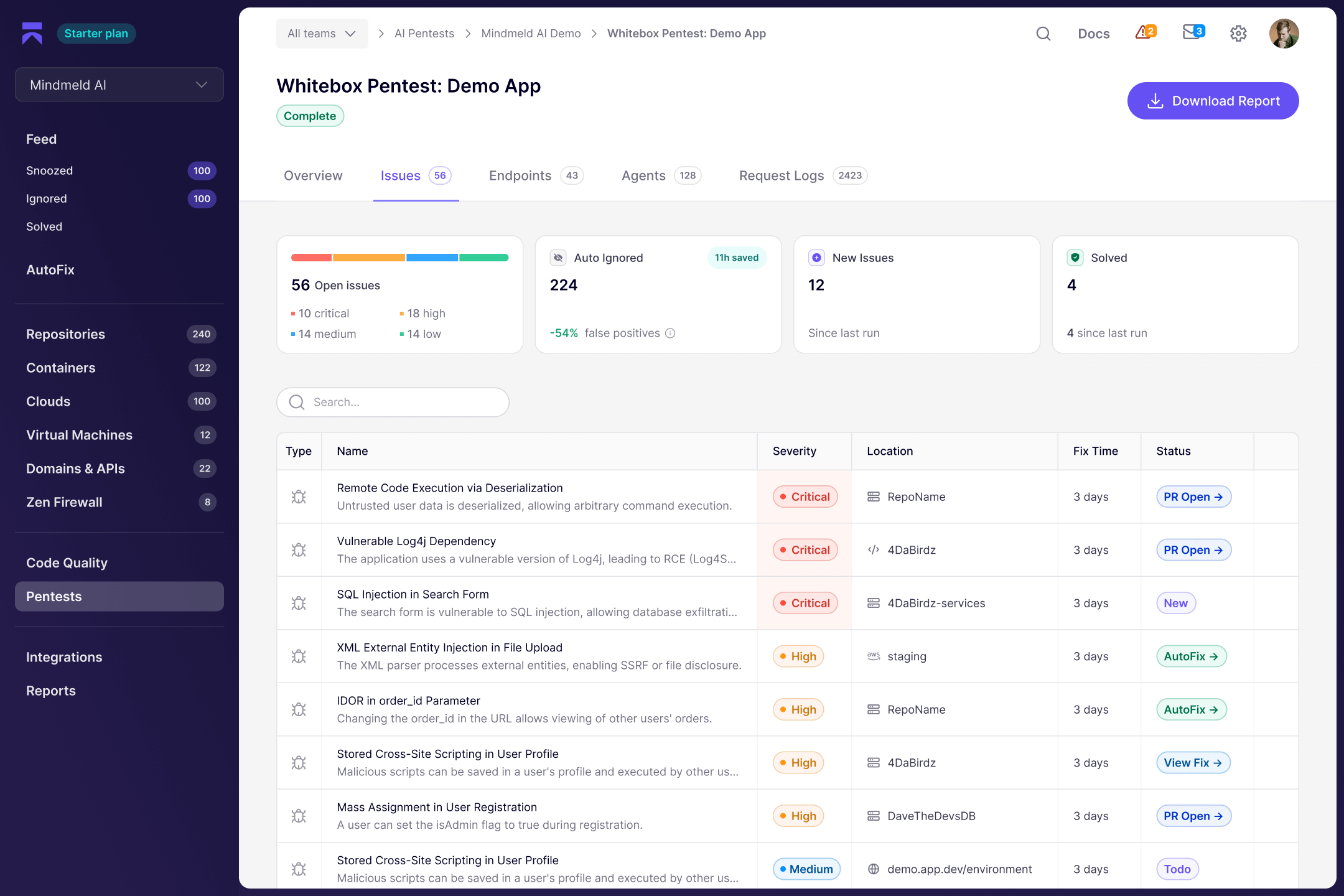
Ready to try Aikido? Here’s what the onboarding process looks like.
Step 1: Sign Up
Visit aikido.dev and create an account. No credit card required for the free tier. You can sign up with your GitHub, GitLab, or email.
Step 2: Connect Repositories
Authorize Aikido to access your code repositories. Select which repos to scan. You can start with a few and add more later.
Step 3: Initial Scan
Aikido runs an initial scan of your selected repositories. Depending on code size, this takes minutes to an hour. You’ll see findings appear in your dashboard.
Step 4: Review Findings
Browse the dashboard to see what Aikido found. The AutoTriage system has already filtered noise. Focus on the highest-priority items first.
Step 5: Configure Policies
Decide how strict you want to be. Set up CI/CD integration to catch new vulnerabilities. Define who gets notified about what.
Step 6: Start Fixing
Use AutoFix for easy wins. Create tickets for issues requiring manual work. Track progress over time.
Tips for Success
- Start with your most critical applications – Don’t try to scan everything at once
- Set realistic remediation goals – You won’t fix everything on day one
- Get developer buy-in – Show them how Aikido makes their life easier
- Use the integrations – Slack notifications and Jira tickets keep things moving
- Review regularly – Check the dashboard weekly to track progress
Aikido Security Strengths and Weaknesses Summary
Let’s summarize what Aikido does well and where it could improve.
Key Strengths
| Strength | Why It Matters |
|---|---|
| All-in-one platform | Eliminates tool sprawl and context switching |
| 95% noise reduction | Developers focus on real issues, not false positives |
| Flat-rate pricing | Costs don’t explode as teams grow |
| Developer-focused UX | Engineers actually use it without specialized training |
| Fast onboarding | Value within hours, not weeks |
| AutoFix capabilities | Faster remediation with less effort |
| Runtime protection | Covers production, not just code |
| Free tier available | Try before you buy, use for small projects |
Areas for Improvement
| Limitation | Context |
|---|---|
| Newer vendor | Less track record than established players |
| Enterprise features developing | Large orgs may need features still in development |
| Customization limits | Power users may want more rule control |
| No self-hosted option | Some organizations require on-premise deployment |
Final Verdict: Should You Use Aikido Security?
After this deep analysis, here’s the bottom line.
Aikido Is Ideal For:
- Development teams that want to own security without dedicated security staff
- Organizations tired of managing multiple security tools
- Companies seeking predictable security costs as they scale
- Teams drowning in false positives from existing tools
- Startups needing enterprise-grade security on a budget
Aikido May Not Be Right For:
- Large enterprises requiring extensive customization and on-premise deployment
- Organizations needing deep code quality analysis beyond security
- Teams locked into existing vendor ecosystems with no flexibility
The Verdict
Aikido Security represents a new approach to application security. It prioritizes developer experience without sacrificing coverage. The noise reduction alone makes it worth evaluating.
For most development teams, especially those in the SMB to mid-market range, Aikido offers excellent value. The all-in-one approach simplifies security operations. The pricing model supports growth. And the user experience means developers will actually use it.
Try the free tier. Connect a few repositories. See what Aikido finds. That hands-on experience will tell you more than any review can.
Conclusion
Aikido Security offers a fresh take on application security. It bundles SAST, DAST, SCA, container scanning, secrets detection, CSPM, IaC scanning, and runtime protection into one platform. The standout feature is AutoTriage, which cuts alert noise by 95%. With flat-rate pricing and unlimited users, it’s accessible for growing teams. Developer experience is clearly a priority. If you’re looking to consolidate your security tools and focus on actual vulnerabilities instead of sorting through false positives, Aikido deserves serious consideration. Try the free tier and see the results for yourself.
Frequently Asked Questions About Aikido Security
| What is Aikido Security? | Aikido Security is an all-in-one application security platform that combines SAST, DAST, SCA, container scanning, secrets detection, CSPM, IaC scanning, and runtime protection. Over 50,000 organizations use it to secure their code, cloud, and runtime environments. |
| Who should use Aikido Security? | Aikido is ideal for development teams that want comprehensive security without hiring dedicated security specialists. It works well for startups, scale-ups, and mid-market companies. Teams drowning in false positives from existing tools will particularly benefit. |
| How much does Aikido Security cost? | Aikido offers a free tier with no credit card required. Paid plans use flat-rate pricing with unlimited users, so costs don’t scale with team size. Contact Aikido directly for specific pricing quotes based on your organization’s needs. |
| How does Aikido reduce false positives by 95%? | Aikido’s AutoTriage system uses deduplication across scanners, reachability analysis, and context correlation. It determines if vulnerable code is actually reachable in your application and considers factors like internet exposure and compensating controls to prioritize real risks. |
| What code repositories does Aikido support? | Aikido integrates with GitHub, GitLab, Bitbucket, and Azure DevOps. You can connect multiple repository sources and scan them all from one platform. |
| What is Aikido’s Zen runtime protection? | Zen is an in-app firewall that provides runtime protection for applications in production. It blocks attacks like SQL injection and command injection in real-time without requiring code changes. It also monitors LLM usage for AI-enabled applications. |
| How long does it take to set up Aikido? | Most teams get meaningful results within hours. You connect your repositories, and Aikido begins scanning automatically. There’s no complex configuration required for basic functionality. Gartner reviewers specifically highlight the fast onboarding. |
| How does Aikido compare to Snyk? | Aikido offers broader coverage in one platform, including DAST and CSPM that Snyk charges separately for. Aikido uses flat-rate pricing versus Snyk’s per-developer model. Snyk has stronger brand recognition and ecosystem maturity. Both are solid choices depending on your priorities. |
| Does Aikido help with compliance? | Yes. Aikido maps findings to frameworks like SOC 2, ISO 27001, PCI DSS, and HIPAA. It maintains audit trails of scans, findings, and remediation. Reports demonstrate security posture and continuous monitoring for auditors and examiners. |
| Can I try Aikido Security for free? | Yes. Aikido offers a free tier with no credit card required. This lets you evaluate the platform on your own codebase before committing to paid plans. For small projects, the free tier may be sufficient ongoing. |






 Stack Insight is intended to support informed decision-making by providing independent information about business software and services. Some product details, including pricing, features, and promotional offers, may be supplied by vendors or partners and can change without notice.