
Semgrep Review


Semgrep Review 2026: The Complete Guide to Modern Static Analysis Security Testing
Finding security vulnerabilities in code before they hit production is a constant battle. Developers ship fast. Security teams scramble to keep up. Traditional static analysis tools? They’re slow, noisy, and often miss what matters. That’s where Semgrep comes in.
This Semgrep review breaks down everything you need to know about this static application security testing (SAST) tool. We’ll cover how it works, what makes it different from competitors, and whether it’s right for your team. From the free open-source CLI to the full AppSec Platform, we’ll dig into features, pricing tiers, real-world use cases, and honest limitations.
Whether you’re a solo developer, a security engineer at a Fortune 500, or somewhere in between, this guide will help you decide if Semgrep deserves a spot in your security stack.
What Is Semgrep and Why Does It Matter?
Semgrep is a static analysis tool that scans source code for security vulnerabilities, bugs, and coding standard violations. The name comes from “semantic grep.” It searches code based on meaning and structure, not just text patterns.
Traditional grep searches for strings. Semgrep understands code syntax.
Here’s why that matters. Say you want to find all instances where user input flows into a database query without sanitization. A text search can’t do that reliably. Semgrep can. It parses your code into an Abstract Syntax Tree (AST) and analyzes the actual structure.
The Core Philosophy Behind Semgrep
Semgrep was built with one guiding principle: make security scanning fast enough that developers actually use it. The tool runs in seconds, not hours. It integrates directly into CI/CD pipelines. And it lets you write custom rules in minutes.
Most SAST tools require dedicated security teams to configure and maintain. Semgrep flips that model. Developers can understand the rules, modify them, and even create new ones. The learning curve is shallow compared to tools like Checkmarx or Fortify.
Open Source Roots, Enterprise Ambitions
Semgrep started as an open-source project and that core remains free under LGPL-2.1. The company behind it, Semgrep Inc., built commercial products on top. This dual approach gives users flexibility:
- Semgrep Community Edition (CE): Free CLI tool with 3,000+ community rules covering 30+ languages
- Semgrep AppSec Platform: Paid cloud platform with advanced features like cross-file analysis, supply chain scanning, and AI-powered triage
You can start with the free version today and scale up when needed. No vendor lock-in from day one.
Semgrep Product Lineup: Understanding Your Options
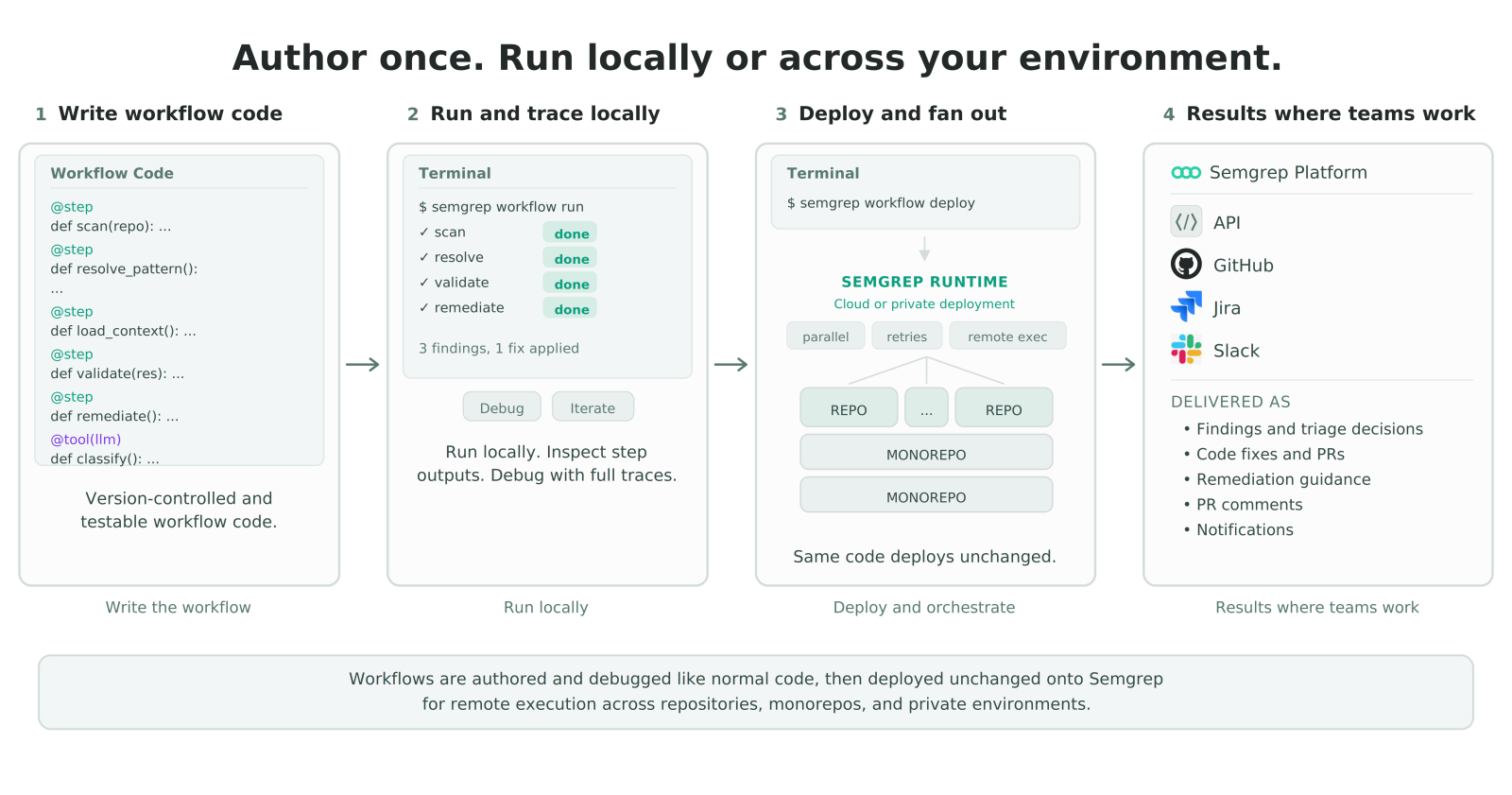
Semgrep isn’t just one product anymore. It’s grown into a full application security platform with multiple components. Let’s break down each piece.
Semgrep Community Edition (CE)
This is the free, open-source foundation. You run it locally or in CI. It scans single files and uses pattern matching to find issues.
Key characteristics:
- Supports 30+ programming languages
- Access to 3,000+ community-contributed rules
- Single-file analysis only (no cross-file dataflow)
- No account required
- Run anywhere: local machine, Docker, CI pipeline
Community Edition works great for individual projects, learning SAST concepts, or teams that want basic scanning without paying anything.
Semgrep Code
This is the commercial SAST engine. It builds on Community Edition but adds cross-file and cross-function dataflow analysis.
Why does cross-file analysis matter? Real vulnerabilities often span multiple files. User input enters in one file, gets processed in another, and hits a dangerous sink in a third. Single-file analysis misses these chains.
According to a benchmark Semgrep commissioned from Doyensec:
- Semgrep Code detected 72% of WebGoat vulnerabilities
- Semgrep CE detected only 48%
That’s a 50% improvement in detection. The benchmark used WebGoat, a deliberately vulnerable Java application used for security training. Keep in mind this was vendor-funded research, not an independent third-party comparison.
Semgrep Supply Chain
This handles Software Composition Analysis (SCA). It scans your dependencies for known vulnerabilities.
But here’s what makes it different from typical SCA tools: reachability analysis. Semgrep Supply Chain doesn’t just tell you that a vulnerable library exists in your codebase. It checks whether your code actually calls the vulnerable function.
This cuts down noise dramatically. Most SCA tools generate hundreds of alerts for vulnerabilities your code never triggers. Semgrep filters those out.
Semgrep Secrets
Secrets detection scans for hardcoded credentials, API keys, tokens, and other sensitive data in your codebase.
Features include:
- Detection of 700+ secret types
- Validation checks to confirm if secrets are still active
- Historical scanning to find secrets in git history
- Integration with secret management tools
Semgrep Guardian
This is Semgrep’s answer to AI-generated code risks. Launched in 2025, Guardian scans and fixes AI-generated code the moment it’s written.
With tools like GitHub Copilot and ChatGPT writing more code, new risks emerge. AI assistants don’t always follow security best practices. Guardian acts as a safety net, catching vulnerable patterns before they merge.
Semgrep Workflows
Workflows automate security processes across your organization. You can create custom automation rules that trigger actions based on findings.
Examples:
- Auto-assign critical vulnerabilities to specific team members
- Block merges when high-severity issues are found
- Send Slack notifications for new secrets detected
- Create Jira tickets automatically
Semgrep Multimodal
Announced at RSA 2026, Semgrep Multimodal combines AI reasoning with rule-based detection. This hybrid approach aims to get the best of both worlds.
Traditional rules are precise but rigid. AI is flexible but unpredictable. Multimodal uses rules for known patterns and AI for complex analysis and triage recommendations.
How Semgrep Actually Works: Technical Deep Dive
Understanding Semgrep’s internals helps you use it more effectively. Let’s look under the hood.
Abstract Syntax Tree Parsing
Every Semgrep scan starts with parsing. The tool reads your source code and converts it into an Abstract Syntax Tree (AST). This tree represents the code’s structure, not its text.
For example, these two code snippets are textually different:
result = foo(x, y)
result=foo( x,y )
But their ASTs are identical. Semgrep sees them as the same code, which is exactly what you want for security scanning.
Pattern Matching Language
Semgrep rules use a pattern language that looks like the code being scanned. This is the killer feature that makes rule writing accessible.
Want to find all calls to eval() in Python? The rule pattern is simply:
eval(...)
The ... is a wildcard that matches any arguments. Compare this to regex-based tools where you’d need complex expressions that break on edge cases.
Metavariables and Taint Tracking
Metavariables let you capture and reference parts of the matched code. They start with $ and work like variables in your patterns.
Example pattern to find SQL injection:
cursor.execute($QUERY)
Combined with taint tracking, Semgrep can follow data from sources (like user input) to sinks (like database queries). If untrusted data reaches a dangerous function without sanitization, Semgrep flags it.
Interfile Analysis in Semgrep Code
The paid Semgrep Code product adds cross-file analysis. Here’s how it works:
- Semgrep builds a project-wide call graph
- It tracks dataflow across function boundaries
- Taint information propagates through imports and exports
- The engine identifies complete vulnerability chains
This catches vulnerabilities that single-file analysis can’t see. Most real-world security bugs involve multiple files and functions.
Incremental Scanning
Semgrep supports incremental scanning in CI/CD. Instead of scanning the entire codebase on every commit, it only analyzes changed files and their dependencies.
This keeps scan times fast even as your codebase grows. A million-line project doesn’t mean million-line scans on every pull request.
Semgrep Rule System: Creating Custom Security Checks
Rules are the heart of Semgrep. Understanding them unlocks the tool’s full potential.
Rule Structure Basics
Every Semgrep rule is a YAML file with a few required fields:
| Field | Purpose | Example |
|---|---|---|
| id | Unique identifier for the rule | my-sql-injection-rule |
| pattern | The code pattern to match | cursor.execute($QUERY) |
| message | What to show when matched | “Possible SQL injection” |
| severity | ERROR, WARNING, or INFO | ERROR |
| languages | Which languages this applies to | [python] |
Advanced Pattern Operators
Beyond basic patterns, Semgrep offers operators for complex matching:
- pattern-either: Match any of several patterns (OR logic)
- pattern-inside: Match only when inside a specific context
- pattern-not: Exclude certain patterns from matches
- pattern-not-inside: Exclude based on surrounding context
- metavariable-regex: Apply regex to captured metavariables
- metavariable-comparison: Compare metavariable values
These let you write precise rules that minimize false positives.
Example: Building a Real Security Rule
Let’s create a rule that finds hardcoded passwords in Python config files.
Basic version:
rules:
  - id: hardcoded-password
    pattern: password = "..."
    message: "Hardcoded password detected"
    severity: ERROR
    languages: [python]
This catches password = "secret123" but also password = "" (empty string, probably fine).
Improved version with exclusions:
rules:
  - id: hardcoded-password-improved
    patterns:
      - pattern: $VAR = "..."
      - metavariable-regex:
          metavariable: $VAR
          regex: ".*(password|passwd|pwd|secret|key).*"
      - pattern-not: $VAR = ""
    message: "Hardcoded credential in $VAR"
    severity: ERROR
    languages: [python]
This version matches any variable containing password-related words, excludes empty strings, and works across more cases.
The Semgrep Registry
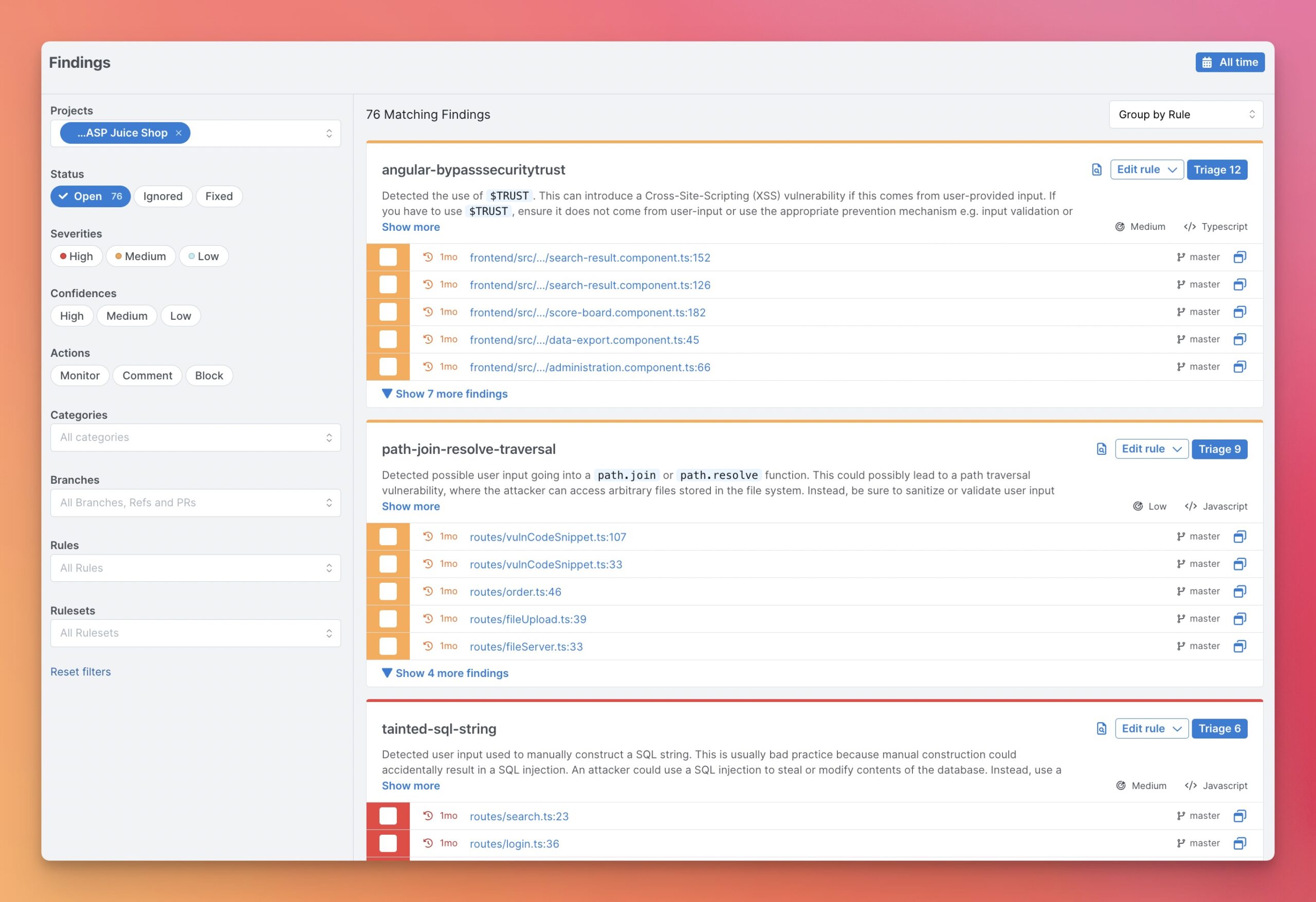
You don’t have to write rules from scratch. The Semgrep Registry contains thousands of pre-built rules:
- Community rules: Open source, contributed by users worldwide
- Pro rules: Written by Semgrep’s security team, available to paying customers
- Partner rules: Created by security vendors and organizations
Rules are organized by language, framework, and vulnerability type. You can mix registry rules with custom ones.
Semgrep Assistant: AI-Powered Security Triage
In 2025, Semgrep reported that their AI Assistant matches human security researcher triage decisions 96% of the time for true positives. That’s a bold claim worth examining.
What Semgrep Assistant Does
Assistant is an AI layer on top of scan results. It helps with:
- Triage: Determining if findings are real vulnerabilities or false positives
- Prioritization: Ranking findings by actual risk
- Remediation: Suggesting fixes for detected issues
- Explanation: Describing why something is flagged in plain language
How the AI Analysis Works
When you enable Assistant, here’s what happens:
- Semgrep runs its rule-based scan and finds potential issues
- For each finding, relevant code context is extracted
- The context is sent to an LLM (Large Language Model)
- The LLM analyzes whether the finding is a true vulnerability
- Assistant returns a verdict with confidence score and explanation
Semgrep limits how much code goes to the AI. Only relevant context around the finding is sent, not your entire codebase.
Automatic False Positive Handling
For findings that Assistant determines are likely false positives, the workflow is automated:
- The developer gets notified of the verdict
- The finding is automatically tagged as false positive in the platform
- Future scans remember this decision for similar patterns
This removes a huge burden from security teams. Manual triage of SAST findings eats up weeks of time. Automating the obvious false positives lets humans focus on real issues.
Trust But Verify
The 96% agreement rate sounds impressive, but context matters. This metric measures agreement on findings that are true positives. It doesn’t measure:
- False negative rate (vulnerabilities missed entirely)
- Agreement on false positive classifications
- Performance across different vulnerability types
AI triage is a helpful tool, not a replacement for security expertise. Treat Assistant recommendations as input, not gospel.
Semgrep vs. Competitors: Honest Comparison
How does Semgrep stack up against other SAST tools? Let’s compare across key dimensions.
Semgrep vs. SonarQube
| Factor | Semgrep | SonarQube |
|---|---|---|
| Primary Focus | Security vulnerabilities | Code quality + security |
| Rule Customization | Easy, pattern-based YAML | Complex, requires Java |
| Speed | Very fast (seconds) | Moderate (minutes) |
| Open Source Version | Full SAST engine | Community Edition available |
| Learning Curve | Low | Moderate |
| CI/CD Integration | Native, easy setup | Requires server setup |
Bottom line: Choose Semgrep for security-focused scanning with easy customization. Choose SonarQube if you want broader code quality metrics alongside security.
Semgrep vs. Checkmarx
| Factor | Semgrep | Checkmarx |
|---|---|---|
| Target Market | Startups to enterprise | Large enterprise |
| Deployment | SaaS or self-hosted | SaaS or on-premise |
| Pricing | Free tier available, transparent | Enterprise pricing, contact sales |
| Language Support | 30+ languages | 25+ languages |
| Scan Speed | Minutes | Hours for large codebases |
| Developer Experience | Developer-first design | Security team focused |
Bottom line: Semgrep wins on speed, developer experience, and pricing transparency. Checkmarx has deeper enterprise integrations and compliance certifications.
Semgrep vs. Snyk Code
| Factor | Semgrep | Snyk Code |
|---|---|---|
| SAST Approach | Rule-based + AI | AI-first |
| SCA Included | Yes (Supply Chain) | Yes (separate product) |
| Custom Rules | Full support, easy syntax | Limited customization |
| Free Tier | 10 contributors, 10 repos | Limited scans per month |
| IDE Integration | VS Code, IntelliJ, others | Strong IDE support |
Bottom line: Snyk Code is more AI-dependent with less rule transparency. Semgrep gives you more control over what gets flagged and why.
Semgrep vs. CodeQL (GitHub)
| Factor | Semgrep | CodeQL |
|---|---|---|
| Query Language | YAML patterns (simple) | QL language (complex but powerful) |
| Analysis Depth | Good with Pro version | Excellent for complex queries |
| GitHub Integration | Good | Native (owned by GitHub) |
| Scan Speed | Fast | Slower (builds database first) |
| Learning Time | Hours to days | Weeks to months |
Bottom line: CodeQL is more powerful for complex analysis but has a steep learning curve. Semgrep is faster to adopt and run.
Getting Started with Semgrep: Practical Setup Guide
Let’s walk through setting up Semgrep from scratch, covering both the free CLI and the managed platform.
Installing Semgrep CLI
The fastest way to try Semgrep is the command line tool. Installation options:
Using pip (Python):
pip install semgrep
Using Homebrew (macOS):
brew install semgrep
Using Docker:
docker run --rm -v "${PWD}:/src" returntocorp/semgrep semgrep --config auto
After installation, verify it works:
semgrep --version
Running Your First Scan
Navigate to a code repository and run:
semgrep --config auto .
The --config auto flag automatically selects relevant rules from the registry based on detected languages. Semgrep scans all files and reports findings in your terminal.
Choosing Rulesets
Instead of auto-config, you can specify exact rulesets:
semgrep --config p/security-audit– General security rulessemgrep --config p/owasp-top-ten– OWASP Top 10 coveragesemgrep --config p/python– Python-specific rulessemgrep --config path/to/rules.yaml– Your custom rules
Combine multiple configs:
semgrep --config p/security-audit --config p/secrets --config ./my-rules/
Setting Up Semgrep Managed Scans
For teams, Semgrep’s managed scanning is faster to deploy. Here’s the process:
- Create a free account at semgrep.dev
- Connect your source code manager (GitHub, GitLab, Bitbucket, Azure)
- Select repositories to scan
- Semgrep’s cloud runs scans automatically
Managed scans offer advantages:
- No CI/CD configuration needed
- Scans run on Semgrep’s infrastructure
- Results appear in the web dashboard
- No compute costs on your side
The trade-off is granting Semgrep code access. Some organizations prefer self-hosted scanning for compliance reasons.
CI/CD Integration Examples
GitHub Actions:
name: Semgrep
on: [push, pull_request]
jobs:
  semgrep:
    runs-on: ubuntu-latest
    steps:
      - uses: actions/checkout@v3
      - uses: returntocorp/semgrep-action@v1
        with:
          config: p/security-audit
GitLab CI:
semgrep:
  image: returntocorp/semgrep
  script:
    - semgrep --config auto --json --output semgrep-results.json .
  artifacts:
    paths:
      - semgrep-results.json
Jenkins Pipeline:
pipeline {
  agent any
  stages {
    stage('Semgrep Scan') {
      steps {
        sh 'pip install semgrep'
        sh 'semgrep --config auto --json -o results.json .'
      }
    }
  }
}
Semgrep Pricing and Plans: What You’ll Actually Pay
Semgrep’s pricing structure has evolved. Here’s the current breakdown for 2026.
Free Tier
Semgrep Community Edition:
- Free forever
- Unlimited scans
- 3,000+ community rules
- Single-file analysis only
- CLI and CI integration
Semgrep AppSec Platform Free:
- Up to 10 contributors
- Up to 10 private repositories
- Includes Semgrep Code (cross-file analysis)
- Includes Supply Chain and Secrets
- Web dashboard access
The free AppSec tier is generous. Small teams can get real value without paying anything.
Team Plan
For growing organizations:
- Unlimited contributors
- Priority support
- SSO authentication
- Custom rule support
- Detailed reporting
Pricing is typically per-developer or per-repository. Contact Semgrep for exact quotes.
Enterprise Plan
For large organizations:
- Self-hosted deployment options
- Advanced compliance features
- Dedicated support
- Custom integrations
- SLA guarantees
What Affects Your Cost
| Factor | Impact on Price |
|---|---|
| Number of developers | Primary pricing driver |
| Repository count | May affect higher tiers |
| Scan frequency | Usually unlimited |
| Support level | Premium support costs extra |
| Deployment model | Self-hosted may cost more |
Compared to enterprise SAST tools like Checkmarx or Veracode, Semgrep is typically 50-70% cheaper. The free tier also lets you evaluate properly before committing.
Language Support and Detection Capabilities
Semgrep supports over 30 programming languages. But support depth varies by language.
Tier 1 Languages (Best Support)
These languages have the most rules, best analysis, and widest coverage:
- Python – Excellent Django, Flask, FastAPI coverage
- JavaScript/TypeScript – React, Node.js, Express rules
- Java – Spring, Java EE, Android support
- Go – Strong standard library coverage
- Ruby – Rails-focused rules
Tier 2 Languages (Good Support)
- C and C++
- C#
- PHP
- Kotlin
- Scala
- Rust
- Swift
Tier 3 Languages (Basic Support)
- Bash
- Dockerfile
- JSON
- YAML
- Terraform (HCL)
- Solidity
Vulnerability Categories Detected
Semgrep covers the major vulnerability classes:
| Category | Examples | Coverage |
|---|---|---|
| Injection | SQL, Command, LDAP, XPath | Strong |
| XSS | Reflected, Stored, DOM-based | Strong |
| Authentication | Weak passwords, missing auth checks | Good |
| Cryptography | Weak algorithms, hardcoded keys | Strong |
| Deserialization | Unsafe deserialization | Good |
| Path Traversal | File inclusion, directory traversal | Strong |
| SSRF | Server-side request forgery | Good |
Real-World Use Cases: Who’s Using Semgrep and How
Theory is nice. Let’s look at how organizations actually use Semgrep.
Use Case 1: Startup Security Foundation
Scenario: A 20-person startup needs security scanning but has no dedicated security team.
Solution:
- Deploy Semgrep free tier with managed scans
- Enable OWASP Top 10 ruleset
- Block PRs with high-severity findings
- Developers fix issues before merge
Result: Security scanning in CI without hiring security engineers. Catches obvious vulnerabilities early.
Use Case 2: Enterprise Security Program
Scenario: A financial services company with 500 developers needs SAST that meets compliance requirements.
Solution:
- Deploy Semgrep Enterprise with self-hosted option
- Create custom rules for internal security standards
- Integrate with existing SIEM and ticketing systems
- Use Semgrep Assistant for triage at scale
Result: Consistent security scanning across all repositories. Custom rules catch company-specific anti-patterns. AI triage reduces manual review time by 60%.
Use Case 3: Open Source Project Security
Scenario: A popular open-source library wants to prevent security regressions.
Solution:
- Add Semgrep to GitHub Actions (free for public repos)
- Create rules specific to the project’s security model
- Require passing scans before merge
- Community contributors see security feedback instantly
Result: Security issues caught in PRs before they land. Maintainer burden reduced.
Use Case 4: DevSecOps Pipeline Integration
Scenario: A cloud platform company wants security gates throughout development.
Solution:
- IDE integration for real-time feedback while coding
- Pre-commit hooks for local scanning
- CI scanning on all pull requests
- Scheduled full scans of main branches
- Supply Chain scanning for dependency updates
Result: Multiple security touchpoints catch issues at different stages. Developers see feedback quickly, not days later.
Limitations and Honest Criticisms of Semgrep
No tool is perfect. Here’s where Semgrep falls short.
Single-File Analysis in Free Version
The free Community Edition only does single-file analysis. Cross-file dataflow requires paying for Semgrep Code.
For many real vulnerabilities, single-file analysis misses the full picture. If your budget is zero, you’re getting partial coverage.
Rule Quality Varies in Registry
The 3,000+ community rules vary in quality. Some are excellent. Some produce false positives. Some are outdated.
You’ll spend time tuning which rules to enable and which to skip. The “auto” config helps but isn’t always optimal.
Limited Support for Some Languages
While 30+ languages sounds impressive, support depth varies. If you’re using a less common language like Elixir, Haskell, or Clojure, you’ll find fewer rules and weaker analysis.
AI Features Require Cloud
Semgrep Assistant and other AI features require sending code to Semgrep’s cloud. Organizations with strict data policies may not be able to use these features.
Semgrep minimizes data sent and offers data retention controls, but some industries (healthcare, government) may still face compliance concerns.
Learning Curve for Advanced Rules
Basic rules are easy to write. Advanced rules using taint tracking, metavariable comparisons, and complex patterns take time to master.
The documentation is good but some edge cases require experimentation.
Not a Complete AppSec Solution
Semgrep covers SAST, SCA, and secrets. It doesn’t handle:
- Dynamic application security testing (DAST)
- Interactive application security testing (IAST)
- Penetration testing
- Runtime protection
You’ll need other tools to cover these areas.
Best Practices for Semgrep Deployment
Maximize your Semgrep ROI with these recommendations.
Start Small, Expand Gradually
Don’t enable every rule on day one. Start with high-confidence security rules:
- Begin with
p/security-auditruleset - Run on a few repositories first
- Tune out false positives
- Add more rules and repos over time
Fix Existing Issues Before Blocking
If you enable blocking mode immediately on a legacy codebase, developers will revolt. Better approach:
- Run in audit mode first (report but don’t block)
- Create a baseline of existing findings
- Require new code to be clean
- Gradually fix legacy issues
Customize Rules for Your Stack
Generic rules miss context. Create custom rules for:
- Your internal frameworks and libraries
- Company coding standards
- Past vulnerabilities you’ve found
- Patterns specific to your architecture
Integrate Into Developer Workflow
The closer to the developer, the better:
- IDE plugins: See issues while typing
- Pre-commit hooks: Catch issues before commit
- PR comments: Get feedback in code review
- Slack/Teams alerts: Notify on critical findings
Measure and Iterate
Track metrics over time:
- Findings per scan
- Mean time to remediation
- False positive rate
- Developer satisfaction scores
Use data to tune rules and improve the program.
Semgrep Multimodal: The Future of Detection
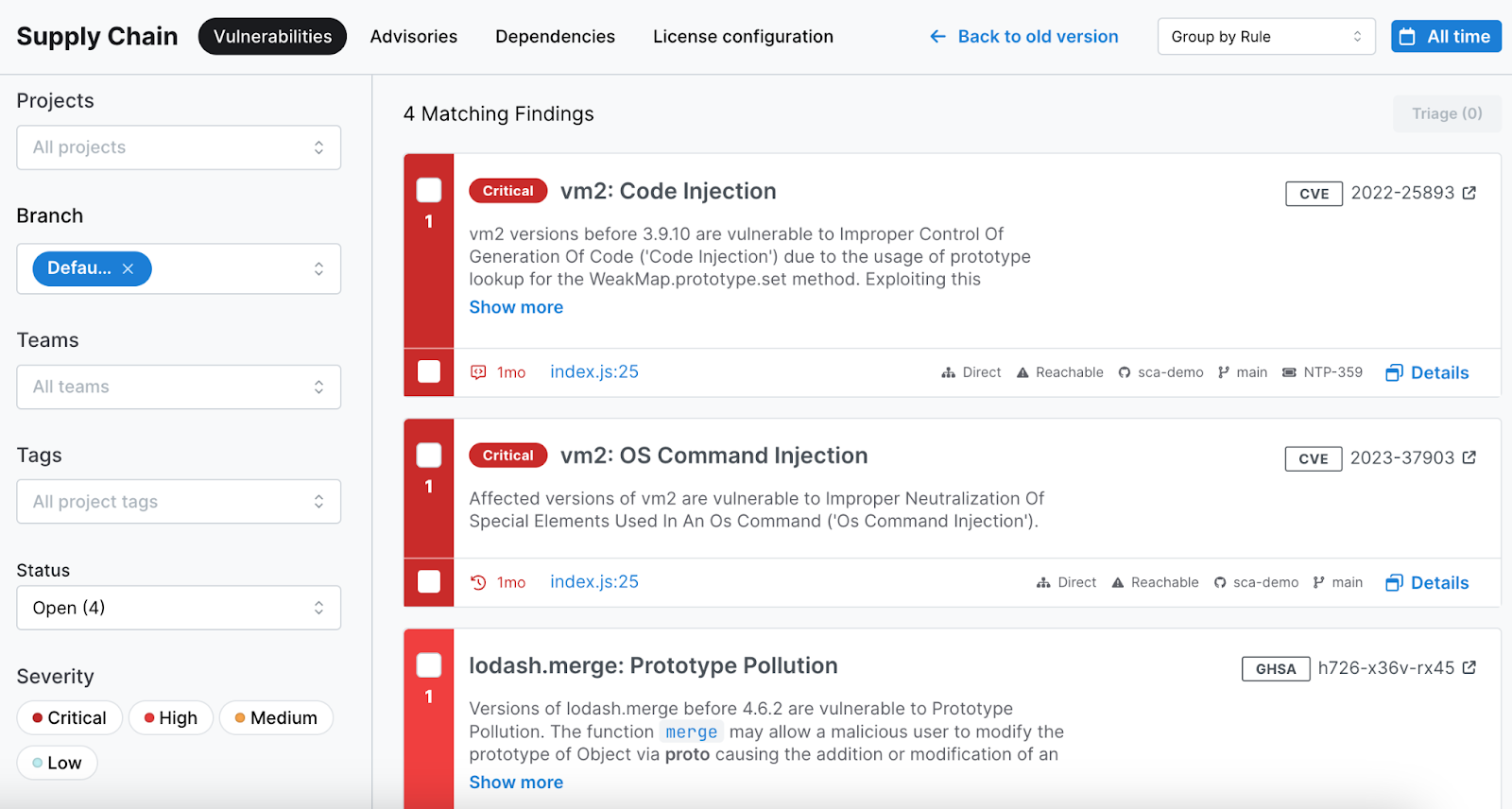
Launched at RSA 2026, Semgrep Multimodal represents the next generation of the platform. It combines two approaches:
Rule-Based Detection
Traditional Semgrep rules are precise and explainable. When a rule fires, you know exactly why. The pattern is documented. The match is deterministic.
But rules have limits. They can’t handle every variation of a vulnerability. Writing rules for every possible attack pattern is impossible.
AI Reasoning
AI models can understand code semantically. They can recognize dangerous patterns even without explicit rules. They adapt to new code patterns.
But AI has issues too. It can hallucinate. It lacks explainability. It may miss obvious things a simple rule catches.
The Multimodal Approach
Semgrep Multimodal uses both:
- Rules run first for known patterns
- AI analyzes ambiguous cases
- AI helps triage rule findings
- AI suggests fixes that rules can’t generate
- Rules provide ground truth that trains the AI
The goal: better detection and fewer false positives than either approach alone.
Early Results
Semgrep claims the multimodal approach improves detection rates while reducing false positives by 30% compared to rules alone. Independent validation is pending, but the direction is promising.
Integration Ecosystem and Extensibility
Semgrep works with the tools you already use.
Source Code Management
| Platform | Integration Level |
|---|---|
| GitHub | Native app, Actions, PR comments |
| GitLab | CI templates, MR integration |
| Bitbucket | Pipe available, PR comments |
| Azure DevOps | Pipeline integration |
CI/CD Platforms
- GitHub Actions (official action)
- GitLab CI (Docker image)
- Jenkins (plugin available)
- CircleCI (orb available)
- Travis CI (script integration)
- Azure Pipelines
- Buildkite
IDEs and Editors
- VS Code (official extension)
- IntelliJ IDEA (plugin)
- Vim/Neovim (via CLI)
- Emacs (via CLI)
Issue Tracking and Alerting
- Jira (automatic ticket creation)
- Slack (webhook notifications)
- Microsoft Teams
- PagerDuty
- Webhooks (custom integrations)
Security Platforms
- Defect Dojo
- OWASP Dependency-Track
- Various SIEM platforms via API
Conclusion: Is Semgrep Right for You?
Semgrep stands out in the crowded SAST market. It’s fast, developer-friendly, and actually usable without a PhD in security tooling. The free tier is generous enough for real work. The paid platform adds genuine value with cross-file analysis and AI triage.
For teams that want security scanning without the traditional SAST headaches, Semgrep is worth serious consideration. Start with the free version. Write a custom rule or two. See if it fits your workflow. The barrier to entry is low, and the potential payoff is high.
Frequently Asked Questions About Semgrep Review
| Who should use Semgrep? | Semgrep works for developers, security engineers, and DevOps teams of any size. It’s particularly good for organizations that want fast, developer-friendly security scanning. The free tier suits small teams and open-source projects. The paid platform fits companies needing enterprise features. |
| Is Semgrep free to use? | Yes, Semgrep has a genuine free tier. The Community Edition CLI is completely free and open source. The AppSec Platform is free for up to 10 contributors and 10 private repositories. Larger teams or those needing advanced features pay for Team or Enterprise plans. |
| How does Semgrep compare to SonarQube? | Semgrep focuses on security with fast scans and easy rule customization. SonarQube covers broader code quality metrics alongside security. Semgrep runs in seconds while SonarQube takes longer. Choose Semgrep for security-first scanning, SonarQube for combined quality and security. |
| Can Semgrep scan my language? | Semgrep supports 30+ languages including Python, JavaScript, TypeScript, Java, Go, Ruby, C, C++, PHP, Kotlin, Rust, and more. Support depth varies by language. Python, JavaScript, and Java have the best coverage. Less common languages have fewer pre-built rules. |
| How accurate is Semgrep at finding vulnerabilities? | In Semgrep’s commissioned benchmark using WebGoat, Semgrep Code detected 72% of vulnerabilities versus 48% for the free Community Edition. Real-world accuracy depends on your codebase, enabled rules, and configuration. Tuning rules reduces false positives over time. |
| Does Semgrep send my code to the cloud? | It depends on your setup. The CLI can run completely locally without any cloud connection. Managed Scans and AI features like Semgrep Assistant do send code context to Semgrep’s servers. You can disable these features if data residency is a concern. |
| How long does a Semgrep scan take? | Semgrep is designed for speed. Most scans complete in seconds to minutes, not hours. The managed scanning infrastructure handles large codebases without CI/CD bottlenecks. Incremental scanning on PRs is even faster since only changed files are analyzed. |
| Can I write custom Semgrep rules? | Yes, custom rules are a core strength of Semgrep. Rules use YAML syntax with patterns that look like the code being scanned. Most developers can write basic rules in minutes. Advanced features like taint tracking take more time to learn but enable powerful detection. |
| What’s the difference between Semgrep CE and Semgrep Code? | Semgrep Community Edition (CE) is free and does single-file analysis. Semgrep Code is the paid SAST engine with cross-file and cross-function dataflow analysis. This means Semgrep Code catches vulnerabilities spanning multiple files that CE would miss. |
| How does Semgrep Assistant AI triage work? | Semgrep Assistant uses AI to analyze scan findings and determine if they’re real vulnerabilities or false positives. It sends relevant code context to an LLM, which returns a verdict with confidence score. Semgrep reports 96% agreement with human security researchers on true positive classifications. |





 Stack Insight is intended to support informed decision-making by providing independent information about business software and services. Some product details, including pricing, features, and promotional offers, may be supplied by vendors or partners and can change without notice.