
OX Security vs SonarQube: A Complete Comparison Guide for 2026
Choosing the right security tool for your development pipeline can make or break your application security program. Two names that keep coming up in conversations are OX Security and SonarQube. They both aim to catch vulnerabilities in your code. But they do it in very different ways.
OX Security positions itself as a full Application Security Posture Management (ASPM) platform. It looks at the entire software supply chain. SonarQube focuses primarily on static code analysis and code quality. It’s been around longer and has a much bigger market presence.
In this comparison, we’ll break down everything you need to know about both tools. We’ll cover features, pricing, integrations, ease of use, and real user feedback. By the end, you’ll have a clear picture of which tool fits your team’s needs. Let’s get into it.
Understanding What Each Tool Actually Does
Before we compare OX Security and SonarQube head to head, let’s understand what each product actually does. They both fall under the Static Application Security Testing (SAST) category. But their approaches couldn’t be more different.
What Is OX Security?
OX Security is a newer player in the application security space. It launched with a focus on software supply chain security and comprehensive risk management. The platform goes beyond just scanning code for vulnerabilities.
OX Security provides context around each vulnerability it finds. This is one of its standout features. Instead of just flagging an issue, it tells you whether that vulnerability is likely to be exploited in the real world.
The platform covers your entire development pipeline. It monitors:
- Source code repositories
- CI/CD pipelines
- Third-party dependencies
- Container images
- Infrastructure as code
- Cloud configurations
This broad coverage makes OX Security an ASPM solution. It manages your overall application security posture rather than just finding code bugs.
What Is SonarQube?
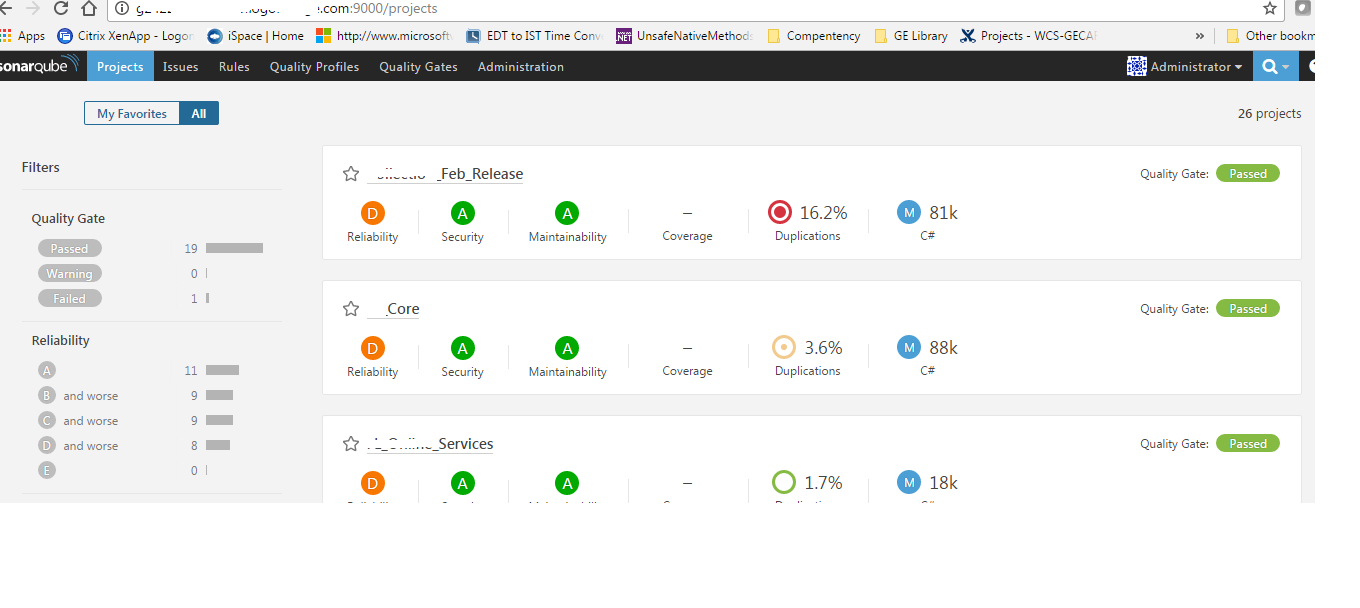
SonarQube has been around since 2007. It’s made by SonarSource and has become the go-to tool for code quality analysis. Many developers encounter SonarQube early in their careers. It’s almost a standard in many development shops.
The tool excels at static code analysis. It scans your codebase and identifies:
- Bugs and potential bugs
- Code smells (maintainability issues)
- Security vulnerabilities
- Code duplications
- Test coverage gaps
SonarQube supports over 30 programming languages. It integrates with most popular IDEs and CI/CD tools. The platform has both free and paid versions, making it accessible to teams of all sizes.
With a 14.2% mindshare in the SAST category, SonarQube is clearly the more established product. OX Security holds just 1.1% mindshare. But market share doesn’t always tell the whole story.
Core Feature Comparison: OX Security vs SonarQube
Let’s look at the core features of both platforms side by side. This comparison will help you understand what each tool brings to the table.
| Feature | OX Security | SonarQube |
|---|---|---|
| Primary Focus | Application Security Posture Management | Code Quality and Security Analysis |
| Static Code Analysis | Yes | Yes (core strength) |
| Supply Chain Security | Yes (comprehensive) | Limited |
| Vulnerability Context | Yes (exploitability analysis) | Basic |
| Code Quality Metrics | Limited | Extensive |
| Languages Supported | Multiple (growing) | 30+ languages |
| CI/CD Pipeline Security | Yes | No (integration only) |
| Container Security | Yes | No |
| Open Source Version | No | Yes (Community Edition) |
| Self-Hosted Option | Yes | Yes |
| Cloud Version | Yes | Yes (SonarCloud) |
Static Application Security Testing Capabilities
Both tools offer SAST capabilities. But they approach it differently. SonarQube has been refining its static analysis engine for nearly two decades. It catches bugs, vulnerabilities, and code quality issues with high accuracy.
OX Security includes SAST as part of its broader platform. It doesn’t just scan your code. It correlates findings with data from other sources. This gives you a fuller picture of actual risk.
For example, OX Security might find a vulnerability in your code. Then it checks if that vulnerable code path is actually reachable in production. It also checks if there are compensating controls in place. This context helps teams prioritize what to fix first.
SonarQube takes a more traditional approach. It flags issues based on rules and patterns. You get a list of problems sorted by severity. But you don’t always get context about real-world exploitability.
Supply Chain Security Coverage
This is where OX Security really shines compared to SonarQube. Modern applications rely heavily on open-source dependencies. Attackers know this. Supply chain attacks have become increasingly common.
OX Security monitors your entire software supply chain. It tracks:
- Direct dependencies in your code
- Transitive dependencies (dependencies of dependencies)
- CI/CD pipeline configurations
- Build process integrity
- Artifact registries
- Developer access and permissions
SonarQube doesn’t offer this level of supply chain visibility. It focuses on analyzing the code you write. It doesn’t deeply examine your build pipeline or dependency chain. For supply chain security, you’d need to add other tools to SonarQube.
Code Quality Beyond Security
Here’s where SonarQube has a clear advantage. Code quality isn’t just about security. It’s about maintainability, readability, and technical debt. SonarQube excels at measuring all of these.
SonarQube’s code quality features include:
- Code Smells Detection: Identifies patterns that make code hard to maintain
- Duplication Analysis: Finds repeated code blocks across your project
- Complexity Metrics: Measures cyclomatic and cognitive complexity
- Test Coverage: Shows which code paths lack test coverage
- Technical Debt Estimation: Calculates effort needed to fix issues
- Quality Gates: Blocks deployments that don’t meet standards
OX Security doesn’t focus on code quality metrics. It’s designed for security teams, not for measuring code maintainability. If code quality is your primary concern, SonarQube is the better choice.
Security Vulnerability Detection: Comparing Approaches
Both tools find security vulnerabilities. But they use different methods and provide different levels of insight. Let’s break down how each one handles vulnerability detection.
How OX Security Detects Vulnerabilities
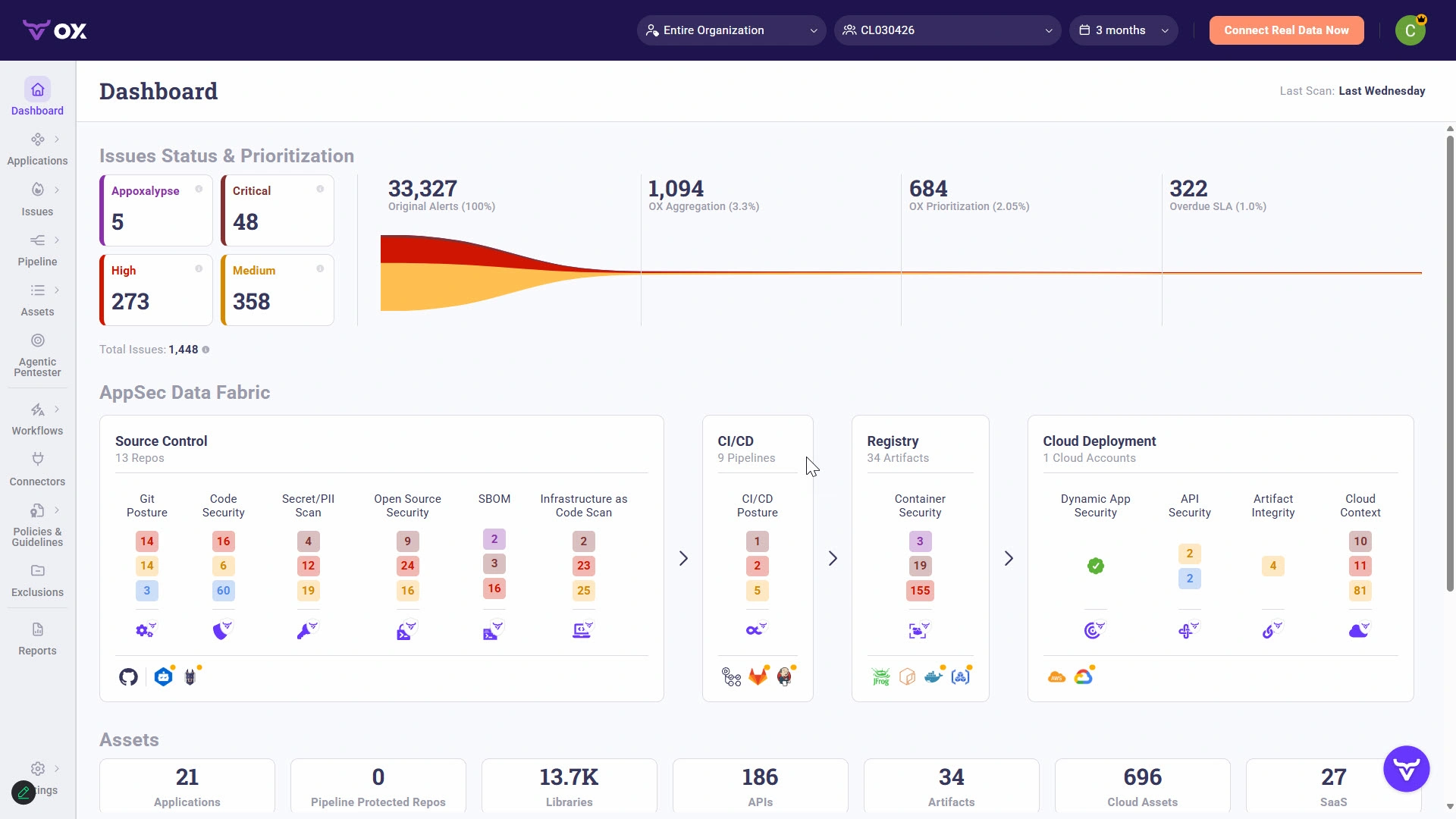
OX Security uses multiple detection methods. It doesn’t rely on a single approach. The platform combines:
- Static code analysis
- Software composition analysis (SCA)
- Secret scanning
- Infrastructure as code scanning
- Container image scanning
- Pipeline security analysis
The real differentiator is context. OX Security correlates findings from all these sources. It builds a graph of your entire application ecosystem. This helps identify which vulnerabilities pose real risk versus theoretical concerns.
One user review highlighted this feature specifically. They mentioned that “the best features OX Security offers are its ability to provide context to a vulnerability and determine if a vulnerability is likely to be exploited or not.”
This contextual analysis reduces false positives. Security teams waste less time chasing issues that don’t matter. They focus on vulnerabilities that attackers could actually exploit.
How SonarQube Detects Vulnerabilities
SonarQube uses pattern-based static analysis. It has thousands of rules for detecting vulnerabilities. These rules cover common issues like:
- SQL injection
- Cross-site scripting (XSS)
- Path traversal
- Hardcoded credentials
- Insecure cryptography
- Buffer overflows
- Race conditions
The platform categorizes findings using the OWASP Top 10 and CWE standards. This makes it easy to understand what type of vulnerability you’re dealing with.
SonarQube’s strength is depth of language support. With 30+ languages covered, it can analyze virtually any codebase. The rules are continuously updated as new vulnerability patterns emerge.
But SonarQube operates mainly at the code level. It doesn’t have visibility into your runtime environment. A vulnerability might be flagged even if it’s not exploitable in your specific deployment setup.
False Positive Rates and Accuracy
False positives are the bane of every security team’s existence. Too many false alarms and developers start ignoring security findings. Both tools try to minimize this, but they take different approaches.
SonarQube uses taint analysis and data flow tracking to reduce false positives. It traces how data moves through your application. If user input can reach a dangerous function, it flags it. This approach catches real issues but can still produce some noise.
OX Security’s context-aware approach aims to cut through the noise differently. By understanding your entire application ecosystem, it can determine:
- Is the vulnerable code reachable in production?
- Are there existing security controls mitigating the risk?
- Is this vulnerability being actively exploited in the wild?
- What’s the blast radius if exploited?
This contextual filtering helps prioritize real risks over theoretical ones. Teams can focus their limited time on issues that actually matter.
Integration Ecosystem: OX Security vs SonarQube Comparison
A security tool is only useful if it fits into your existing workflow. Both OX Security and SonarQube offer integrations. But their ecosystems differ in scope and depth.
SonarQube Integrations
SonarQube has been building its integration ecosystem for years. It connects with virtually every popular development tool. Key integrations include:
IDE Plugins:
- Visual Studio Code (SonarLint)
- IntelliJ IDEA
- Eclipse
- Visual Studio
- Atom
CI/CD Platforms:
- Jenkins
- GitHub Actions
- GitLab CI
- Azure DevOps
- CircleCI
- Bamboo
- TeamCity
Repository Platforms:
- GitHub
- GitLab
- Bitbucket
- Azure Repos
SonarLint deserves special mention. This IDE plugin provides instant feedback as you write code. Developers see issues before they even commit. This shifts security left in the truest sense.
OX Security Integrations
OX Security takes a broader approach to integrations. Since it covers the entire software supply chain, it needs to connect with more tool categories. Common integrations include:
Source Code Management:
- GitHub
- GitLab
- Bitbucket
- Azure Repos
CI/CD Platforms:
- Jenkins
- GitHub Actions
- GitLab CI
- CircleCI
- Azure Pipelines
Security Tools:
- Snyk
- Checkmarx
- Veracode
- Prisma Cloud
- Other SAST/DAST tools
Ticketing and Communication:
- Jira
- Slack
- Microsoft Teams
- ServiceNow
OX Security can aggregate findings from multiple security tools. If you’re already using SonarQube, you can feed its results into OX Security. This gives you consolidated visibility across all your security tools.
API and Automation Options
Both platforms offer APIs for custom integrations. SonarQube’s API is well documented and widely used. You can automate almost any action through it.
OX Security also provides API access. Since it’s a newer platform, the API ecosystem is still growing. But it covers core functionality like:
- Retrieving security findings
- Triggering scans
- Managing policies
- Exporting reports
For teams with existing automation, both tools can fit into your workflow. SonarQube has more community-built integrations. OX Security offers more built-in coverage for supply chain tools.
User Experience and Learning Curve
How easy is it to get started with each tool? What does the day-to-day experience look like? These questions matter, especially for teams new to application security.
Getting Started with SonarQube
SonarQube offers a free Community Edition. This makes it incredibly easy to try. You can download it and run it locally in minutes. Basic setup involves:
- Download and install SonarQube server
- Run your first scan using the scanner CLI
- View results in the web dashboard
The learning curve is gentle for basic usage. Most developers can start seeing results within an hour. Deeper configuration takes more time, but the documentation is extensive.
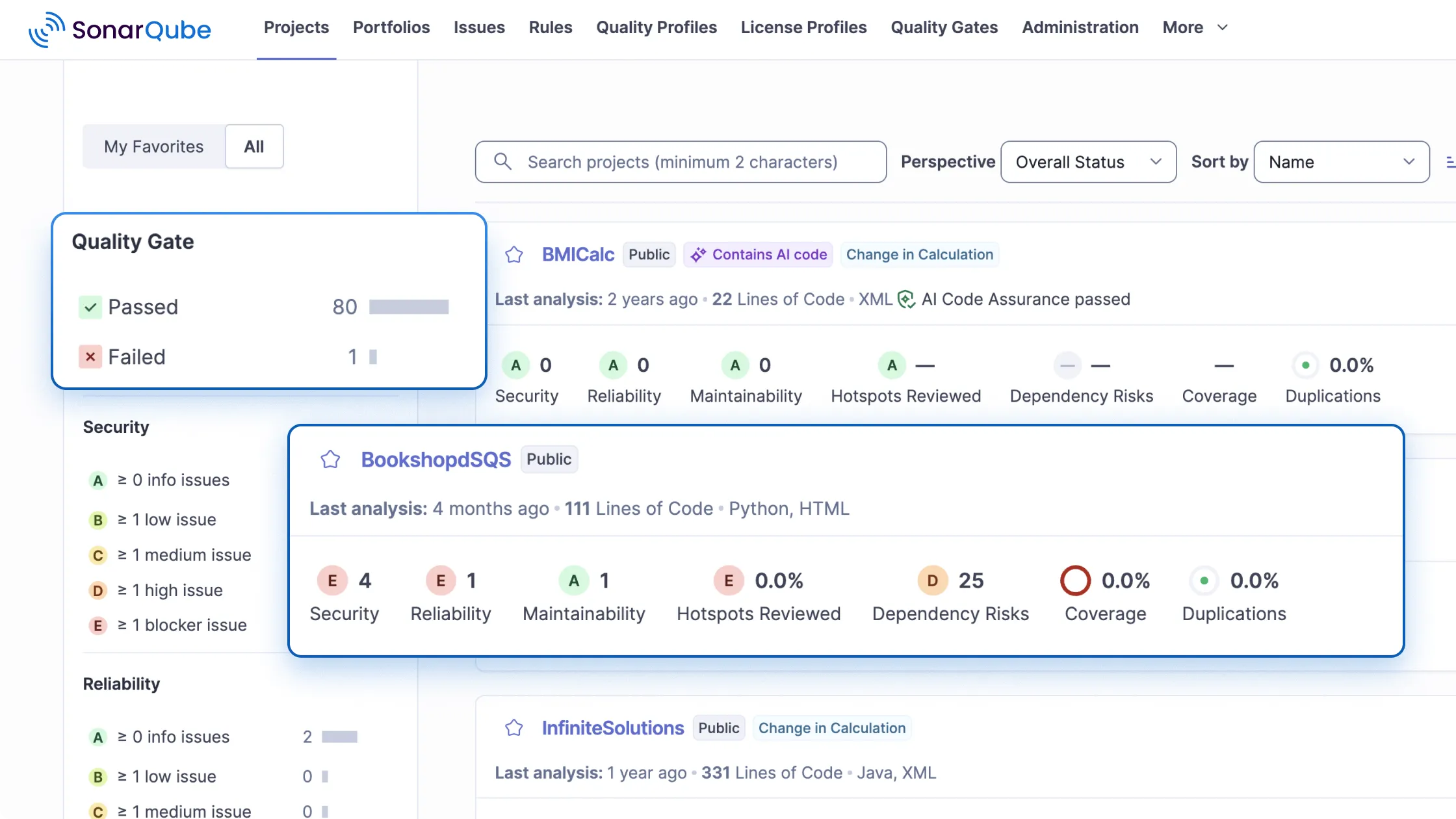
SonarQube’s interface is clean and familiar. The dashboard shows quality gates, coverage, and issue counts at a glance. Drilling into specific issues is straightforward. You click an issue and see the problematic code with explanation.
However, SonarQube can feel overwhelming at scale. When you’re scanning dozens of projects with thousands of issues, managing it all takes effort. Quality profiles and quality gates need careful tuning.
Getting Started with OX Security
OX Security doesn’t have a free edition. You’ll need to contact sales for access. This creates a higher barrier to entry. But it also means you get guided onboarding.
The initial setup involves connecting OX Security to your:
- Source code repositories
- CI/CD pipelines
- Cloud environments
- Existing security tools
This takes more time than a basic SonarQube setup. But once connected, OX Security automatically discovers your assets. It maps your software supply chain without manual configuration.
The interface focuses on security posture rather than individual code issues. You see a dashboard showing overall risk. Then you can drill down into specific areas. This top-down view works well for security teams but might feel unfamiliar to developers.
Daily Workflow Experience
For developers, SonarQube integrates more directly into daily coding. With SonarLint in your IDE, you see issues as you type. Quality gates block merges of code that doesn’t meet standards. The feedback loop is tight.
OX Security operates at a different level. It’s designed for security teams who need to manage risk across many applications. The daily experience involves:
- Reviewing new security findings
- Prioritizing based on risk context
- Assigning issues to development teams
- Tracking remediation progress
- Monitoring supply chain changes
Developers might interact with OX Security less frequently. They receive tickets or notifications about issues to fix. But they’re not using it constantly like they might use SonarQube.
Pricing and Cost Comparison
Let’s talk about money. Pricing can make or break a tool decision. Both OX Security and SonarQube have different pricing models.
SonarQube Pricing Structure
SonarQube offers multiple editions:
Community Edition (Free):
- 15+ languages supported
- Basic security analysis
- Code quality metrics
- Self-hosted only
- No support included
Developer Edition (Starting around $150/year per 100K lines of code):
- All Community features
- Branch analysis
- Pull request decoration
- Additional languages
- Basic support
Enterprise Edition (Custom pricing):
- All Developer features
- Portfolio management
- Executive reporting
- SAML authentication
- Premium support
Data Center Edition (Custom pricing):
- All Enterprise features
- High availability
- Horizontal scaling
- Designed for large organizations
SonarQube also offers SonarCloud, a hosted version. It’s free for public open-source projects. Private projects start at around $10/month for small teams.
OX Security Pricing Structure
OX Security doesn’t publish pricing publicly. You need to contact their sales team for a quote. This is typical for enterprise security platforms.
Based on industry norms for ASPM platforms, you can expect:
- Annual contracts
- Pricing based on number of developers or applications
- Enterprise-focused pricing (higher than basic SAST tools)
- Custom quotes based on your specific needs
The lack of a free tier makes it harder to evaluate OX Security. You’ll need to go through a sales process to see the product. This can be a barrier for smaller teams or those wanting to quickly test options.
Total Cost of Ownership
Comparing these tools isn’t just about license costs. You need to consider total cost of ownership.
For SonarQube, consider:
- Infrastructure costs (self-hosted requires servers)
- Administration time
- Training for developers
- Integration setup time
- Additional tools needed for supply chain security
For OX Security, consider:
- Higher base license cost
- Potentially lower need for additional tools
- Less infrastructure if using cloud version
- Time savings from consolidated security view
According to user reviews, SonarQube takes longer to reach ROI compared to OX Security. This suggests that while SonarQube might have lower upfront costs, OX Security might deliver value faster in some environments.
User Reviews and Satisfaction Ratings
What do actual users say about these tools? Let’s look at reviews and satisfaction metrics from trusted sources.
OX Security User Feedback
OX Security has fewer total reviews due to being newer. But the reviews it has are highly positive. 100% of OX Security users say they would recommend the solution. That’s an impressive satisfaction rate.
Common praise includes:
- Contextual vulnerability analysis saves time
- Comprehensive supply chain visibility
- Consolidated view across multiple tools
- Good risk prioritization
- Responsive customer support
Criticisms and concerns include:
- Newer product with less proven track record
- Smaller community and fewer resources
- Higher price point
- Less developer-facing features
The high satisfaction rate despite smaller market share is notable. Users who adopt OX Security tend to love it. But it’s not the right fit for every organization.
SonarQube User Feedback
SonarQube has far more reviews given its longer history. 84% of SonarQube users would recommend the solution. That’s still a strong number, though lower than OX Security.
Common praise includes:
- Excellent code quality analysis
- Wide language support
- Strong IDE integration with SonarLint
- Free Community Edition for getting started
- Large community and extensive documentation
- Established and trusted
Criticisms and concerns include:
- Can be noisy with false positives
- Limited supply chain security
- Configuration can be complex at scale
- Enterprise pricing can be expensive
- Performance issues with very large codebases
SonarQube’s 14.2% market share in SAST reflects its widespread adoption. But market share comes with more varied experiences. Not every user finds it perfect for their needs.
Head-to-Head User Sentiment
When users directly compare OX Security and SonarQube, a few themes emerge:
- OX Security is seen as more modern and comprehensive
- SonarQube is seen as more developer-friendly
- OX Security better serves security teams
- SonarQube better serves development teams
- OX Security provides better context for prioritization
- SonarQube provides better code quality insights
The choice often depends on your primary goal. If you want developers writing cleaner code, SonarQube wins. If you want security teams managing overall risk, OX Security wins.
Security Team vs Development Team Perspectives
The best tool depends partly on who will use it. Security teams and development teams have different priorities. Let’s explore how each tool serves these different audiences.
For Security Teams
Security teams need visibility across all applications. They need to prioritize risks and track remediation. They often manage multiple security tools.
OX Security is designed with security teams in mind. Its strengths for this audience include:
- Consolidated dashboard: See risks across all applications in one place
- Risk prioritization: Know which vulnerabilities to fix first
- Policy management: Set security standards across the organization
- Supply chain visibility: Understand risks beyond just code
- Compliance tracking: Map findings to regulatory requirements
- Tool aggregation: Bring findings from multiple tools together
SonarQube can serve security teams, but it’s not purpose-built for them. Security teams using SonarQube often need to:
- Export data to other systems for aggregation
- Manually correlate with other security findings
- Build custom reports for executive visibility
- Add other tools for supply chain coverage
For Development Teams
Developers want tools that integrate into their workflow. They need fast feedback that helps them write better code. They don’t want to constantly switch contexts.
SonarQube excels here. Its strengths for developers include:
- IDE integration: See issues as you code with SonarLint
- Pull request decoration: Get feedback directly in PRs
- Code quality focus: Not just security but maintainability too
- Educational explanations: Learn why something is a problem
- Quick setup: Start scanning in minutes with Community Edition
- Familiar interface: Dashboard feels like home to developers
OX Security isn’t as developer-centric. Developers interact with it mainly through tickets or notifications. They might not use the OX Security interface directly very often.
For teams wanting to improve developer security awareness, SonarQube’s approach works better. For teams wanting centralized security management, OX Security fits better.
Scalability and Enterprise Readiness
How do these tools perform at scale? Enterprise organizations have unique requirements. Let’s examine how OX Security and SonarQube handle large deployments.
SonarQube at Enterprise Scale
SonarQube has proven itself at enterprise scale. Organizations with thousands of developers use it. But scaling requires planning.
The Enterprise and Data Center editions offer features for scale:
- Portfolio management: Group projects logically
- Executive reporting: Roll up metrics for leadership
- High availability: Redundant deployment options
- Horizontal scaling: Add capacity as needed
- SAML integration: Enterprise authentication
Challenges at scale include:
- Database sizing and performance tuning
- Managing hundreds of quality profiles
- Coordinating standards across teams
- Infrastructure costs for self-hosted deployments
Organizations running SonarQube at scale typically have dedicated teams managing it. It’s not a set-and-forget tool at enterprise level.
OX Security at Enterprise Scale
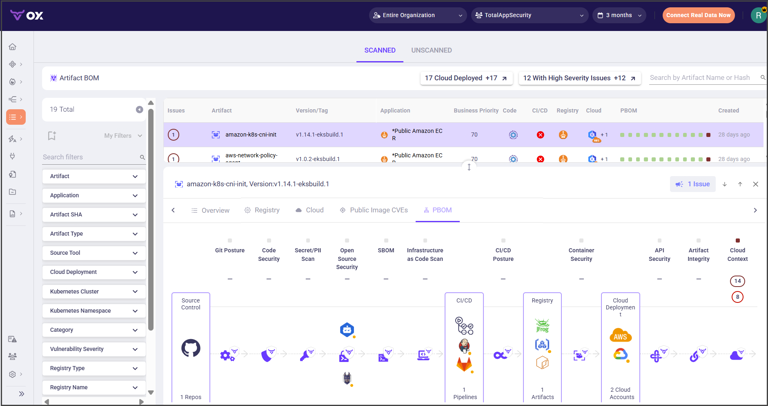
OX Security is built for enterprise from the start. It’s designed to manage security across large, complex organizations. Key enterprise features include:
- Automatic asset discovery: Finds all your applications and pipelines
- Policy-as-code: Define standards that apply everywhere
- Role-based access: Different views for different teams
- Multi-tenant support: Separate views for business units
- API-first design: Integrates with enterprise systems
As a cloud-native platform, OX Security handles much of the scaling automatically. You don’t manage infrastructure. The vendor handles availability and performance.
For large enterprises with many applications, OX Security’s comprehensive visibility becomes more valuable. Manually tracking supply chain risks across hundreds of applications is nearly impossible. Automation becomes necessary.
Compliance and Regulatory Considerations
Regulated industries have specific requirements. Both tools address compliance, but differently.
SonarQube supports compliance through:
- Mapping findings to CWE and OWASP
- Quality gates that enforce standards
- Audit logs for code analysis activities
- Reports showing security posture over time
OX Security provides:
- Framework mapping to regulations (SOC2, PCI-DSS, etc.)
- Supply chain security tracking
- Policy enforcement across all pipelines
- Compliance dashboards for auditors
For highly regulated industries like finance or healthcare, OX Security’s framework mapping and supply chain coverage may better meet compliance needs. SonarQube covers code-level compliance but may need supplements for broader requirements.
Use Cases: When to Choose Each Tool
Let’s get specific about when each tool makes sense. Different scenarios call for different solutions.
Choose SonarQube When:
Your primary goal is code quality improvement. If you want developers writing cleaner, more maintainable code, SonarQube is purpose-built for this. The code quality metrics go far beyond security.
You have a limited budget. The free Community Edition lets you start immediately. Even paid tiers are typically less expensive than enterprise ASPM platforms.
You want tight developer integration. SonarLint in the IDE is powerful. Pull request decoration keeps security in the developer workflow. Developers adopt SonarQube more readily.
You support many programming languages. With 30+ languages, SonarQube likely covers your entire tech stack. Language support is a clear strength.
You want a proven, established solution. SonarQube has been around since 2007. It’s battle-tested at scale. You know what you’re getting.
You’re a small to medium team. Smaller teams can get significant value from SonarQube without enterprise complexity. Setup and management are straightforward.
Choose OX Security When:
Your primary goal is overall security posture management. If you need to manage risk across your entire software supply chain, OX Security provides that visibility.
You’re concerned about supply chain security. Modern attacks often target dependencies, build pipelines, and CI/CD systems. OX Security monitors all of these.
You have too many security findings to manage. OX Security’s context-aware prioritization helps cut through the noise. You focus on what matters.
You’re using multiple security tools. OX Security can aggregate findings from many sources. It becomes your single pane of glass for security.
Your security team needs centralized visibility. Security teams managing many applications benefit from OX Security’s dashboard and reporting.
You’re in a highly regulated industry. OX Security’s framework mapping and comprehensive coverage support compliance requirements.
Use Both Together When:
Here’s a scenario many don’t consider: using both tools together. They can complement each other well.
SonarQube becomes your developer-facing tool. It sits in the IDE and CI pipeline. Developers get immediate feedback on code quality and security. They fix issues before they merge.
OX Security becomes your security team’s command center. It aggregates findings from SonarQube along with other tools. Security teams get consolidated visibility and better prioritization.
This combination gives you:
- Developer-friendly feedback loops
- Comprehensive code quality analysis
- Supply chain security coverage
- Centralized security management
- Context-aware prioritization
The cost is obviously higher. But for organizations serious about both code quality and security posture, this combination covers all bases.
Industry Recognition and Market Position
Where do these tools stand in the broader market? Let’s look at market share, analyst recognition, and industry positioning.
SonarQube’s Market Position
SonarQube commands a 14.2% mindshare in the SAST category. That’s a strong position. It’s one of the most recognized names in code quality and security analysis.
Factors contributing to this position:
- Nearly two decades in the market
- Free Community Edition driving adoption
- Strong developer community
- Extensive documentation and resources
- Integration with virtually all development tools
SonarQube is often a default choice. When teams first think about code quality tooling, SonarQube comes up. This brand recognition is valuable.
OX Security’s Market Position
OX Security holds a 1.1% mindshare in SAST, up from 0.6% the previous year. That’s significant growth, nearly doubling its position. But it remains a smaller player.
It’s worth noting that SAST mindshare might not fully represent OX Security. The platform is really an ASPM tool that includes SAST capabilities. Comparing it purely in SAST undersells its scope.
In the ASPM category, OX Security competes with players like:
- Legit Security
- Apiiro
- Cycode
- Endor Labs
ASPM is a newer category. There’s no single dominant player yet. OX Security is well positioned as the market grows.
Competitive Landscape
Both tools face competition from different angles.
SonarQube competes with:
- Checkmarx (enterprise SAST)
- Fortify (enterprise SAST)
- Veracode (cloud SAST)
- Semgrep (open-source focused)
- CodeClimate (code quality)
OX Security competes with:
- Legit Security (ASPM)
- Snyk (developer-first security)
- Apiiro (ASPM)
- Cycode (supply chain security)
The competitive positioning differs. SonarQube defends its code quality and SAST position. OX Security is carving out space in the growing ASPM market.
Deployment Options and Infrastructure Requirements
How you deploy these tools affects cost, control, and maintenance. Let’s compare deployment models.
SonarQube Deployment Options
Self-Hosted: The traditional approach. You install SonarQube on your own servers. This gives you full control but requires infrastructure management.
Self-hosted requirements include:
- Java runtime environment
- Supported database (PostgreSQL, SQL Server, or Oracle)
- Sufficient RAM (4GB minimum, more for large deployments)
- Storage for project data and analysis results
- Load balancer for Data Center Edition
SonarCloud: The hosted SaaS option. SonarSource manages everything. You connect your repositories and start scanning. No infrastructure to manage.
SonarCloud benefits include:
- No server management
- Automatic updates
- Free for public open-source projects
- Easy GitHub/GitLab/Bitbucket integration
Many organizations use SonarCloud for small projects and self-hosted SonarQube for large enterprise deployments.
OX Security Deployment Options
OX Security is primarily a cloud platform. The SaaS model is the standard deployment. You don’t manage servers. OX Security handles availability and scaling.
For organizations with strict requirements, OX Security may offer:
- Dedicated tenant options
- Data residency choices
- Private cloud deployment in some cases
The cloud-first approach simplifies adoption. But some organizations in regulated industries may need to verify compliance with their specific requirements.
Infrastructure Cost Comparison
Infrastructure costs differ significantly between models.
Self-hosted SonarQube requires:
- Server costs (compute, storage, networking)
- Database licensing or managed database costs
- Backup infrastructure
- Monitoring systems
- Administrative staff time
For large deployments, these costs add up. The Data Center Edition particularly requires significant infrastructure investment.
SonarCloud and OX Security (both SaaS) have simpler cost models:
- Subscription fees cover infrastructure
- No servers to manage
- No database to maintain
- Vendor handles scaling and availability
The total cost of ownership calculation should include these infrastructure factors beyond just license fees.
Support and Community Resources
When you hit problems, where do you turn? Support quality and community resources matter.
SonarQube Support and Community
SonarQube benefits from its long history and large user base. Support resources include:
Community Resources:
- Active community forum
- Extensive documentation
- Stack Overflow questions (thousands)
- Blog posts and tutorials from users
- Open-source plugins and extensions
Official Support:
- Email support for paid editions
- Premium support for Enterprise and Data Center
- SLA-backed response times
- Direct access to engineering team for critical issues
The community aspect is a real advantage. Most problems you encounter have been solved by someone else. A quick search often finds answers.
OX Security Support
OX Security is newer, so its community is smaller. But being enterprise-focused, it emphasizes direct support:
- Dedicated customer success managers
- Direct access to support team
- Guided onboarding assistance
- Regular check-ins and reviews
User reviews mention responsive customer support as a positive. When you’re paying enterprise prices, you expect enterprise support. OX Security appears to deliver on this.
The tradeoff is fewer community resources. If you have a question at 2 AM, you might need to wait for support response. With SonarQube, someone on Stack Overflow might have already answered it.
Future Direction and Roadmap
Where are these products heading? Understanding roadmap direction helps with long-term planning.
SonarQube’s Evolution
SonarQube continues to evolve its core capabilities. Recent and upcoming directions include:
- Improved cloud-native support
- Better integration with modern CI/CD pipelines
- AI-assisted code analysis
- Deeper security vulnerability detection
- Expanded language support
SonarSource is also investing in the SonarCloud platform. They see cloud as the future for many teams. Expect continued parity improvements between self-hosted and cloud versions.
OX Security’s Evolution
OX Security is rapidly expanding its platform. As a newer player, it’s adding capabilities quickly:
- Broader supply chain coverage
- More integrations with security tools
- Advanced AI for prioritization
- Deeper remediation guidance
- Expanded compliance framework mapping
The ASPM market is growing. OX Security is positioning itself as a leader in this emerging category. Expect continued innovation as they compete for market position.
Market Trends Affecting Both
Several trends will affect both tools:
- Supply chain security focus: After high-profile attacks, organizations care more about dependency and pipeline security. This benefits OX Security’s positioning.
- Shift-left security: Getting security feedback to developers earlier continues. SonarLint and similar tools benefit from this trend.
- Consolidation pressure: Organizations want fewer, more comprehensive tools. Both vendors may expand scope to address this.
- AI assistance: AI is transforming how security findings are analyzed and explained. Both vendors are investing here.
Making Your Decision: OX Security vs SonarQube
After all this analysis, how do you decide? Here’s a framework for making your choice.
Evaluation Criteria Summary
| Criteria | Better Choice | Notes |
|---|---|---|
| Code Quality Analysis | SonarQube | Purpose-built for this |
| Supply Chain Security | OX Security | Comprehensive coverage |
| Developer Experience | SonarQube | IDE integration is key |
| Security Team Visibility | OX Security | Designed for security teams |
| Risk Prioritization | OX Security | Context-aware analysis |
| Budget-Friendly | SonarQube | Free tier available |
| Ease of Getting Started | SonarQube | Download and run |
| Enterprise Scale | Tie | Both handle enterprise needs |
| Language Support | SonarQube | 30+ languages |
| Tool Consolidation | OX Security | Aggregates multiple tools |
| User Satisfaction | OX Security | 100% vs 84% recommendation |
| Market Presence | SonarQube | 14.2% vs 1.1% mindshare |
Questions to Ask Yourself
Answer these questions to guide your decision:
- What’s my primary goal: code quality or security posture?
- Who will use the tool: developers, security team, or both?
- Do I need supply chain security coverage?
- What’s my budget for tooling?
- Am I already using other security tools I want to consolidate?
- How important is getting started quickly with minimal cost?
- Do I need IDE integration for developer feedback?
- Am I in a regulated industry with specific compliance needs?
Your answers will point toward the right tool for your situation. There’s no universally correct choice. Context matters.
Recommended Evaluation Steps
Before committing, follow these steps:
For SonarQube:
- Download and install Community Edition
- Scan a few representative projects
- Install SonarLint in your IDE and test
- Evaluate quality of findings for your tech stack
- If promising, explore paid editions for branch analysis
For OX Security:
- Request a demo from sales
- Get a trial account if offered
- Connect it to a representative subset of your environment
- Evaluate the risk prioritization and context features
- Compare findings with your current tools
Hands-on evaluation beats reading comparisons. Both vendors will let you test their products. Take advantage of that.
Conclusion
OX Security and SonarQube serve different needs despite both touching application security. SonarQube excels at code quality and developer-focused SAST with its free tier and wide adoption. OX Security shines as an ASPM platform providing context-aware security visibility across the entire supply chain.
For most teams focused on code quality and working with limited budgets, SonarQube is the practical choice. For security teams needing to manage risk across complex environments, OX Security delivers more value. Consider using both together if your needs and budget allow.
Frequently Asked Questions About OX Security vs SonarQube
| What is the main difference between OX Security and SonarQube? |
| SonarQube focuses on code quality and static code analysis for developers. OX Security is an Application Security Posture Management (ASPM) platform that covers the entire software supply chain, including pipelines, dependencies, and infrastructure. SonarQube is developer-centric while OX Security is security team-centric. |
| Is there a free version of OX Security like SonarQube Community Edition? |
| No. OX Security doesn’t offer a free tier. You need to contact their sales team for pricing and access. SonarQube offers a fully functional Community Edition at no cost, making it easier to try and evaluate. |
| Which tool is better for small development teams? |
| SonarQube is generally better for small teams. The free Community Edition provides real value without budget requirements. IDE integration with SonarLint gives developers immediate feedback. OX Security’s enterprise focus and pricing make it less suitable for small teams. |
| Can I use OX Security and SonarQube together? |
| Yes. Many organizations use both tools together. SonarQube provides developer-facing code quality feedback. OX Security aggregates findings from SonarQube and other tools into a unified security dashboard. They complement each other well for teams with both code quality and security posture goals. |
| Which tool has better language support for code analysis? |
| SonarQube supports 30+ programming languages with deep analysis rules for each. This is one of its core strengths. OX Security supports multiple languages but its focus is broader than code analysis alone. For pure language coverage, SonarQube wins. |
| Does SonarQube provide supply chain security features? |
| No. SonarQube focuses on code you write, not your dependencies or build pipeline. For supply chain security, you’d need to add other tools like Snyk, Dependabot, or an ASPM platform like OX Security. |
| Why does OX Security have higher user satisfaction despite lower market share? |
| OX Security has 100% recommendation rate versus SonarQube’s 84%. This likely reflects OX Security’s newer, more targeted approach. Users who adopt OX Security have specific ASPM needs it serves well. SonarQube’s larger user base includes more varied use cases and experiences. |
| Which tool provides better vulnerability context and prioritization? |
| OX Security excels at providing context. It analyzes whether vulnerabilities are exploitable in your specific environment and correlates findings from multiple sources. SonarQube reports vulnerabilities based on code patterns without broader context about real-world exploitability. |
| How long does it take to see ROI from each tool? |
| User reviews indicate SonarQube takes longer to reach ROI compared to OX Security. This might seem counterintuitive given SonarQube’s lower cost. The difference likely comes from OX Security’s immediate visibility and prioritization benefits versus SonarQube’s gradual code quality improvements. |
| Which tool is better for regulated industries? |
| OX Security is often better for highly regulated industries due to its framework mapping, supply chain coverage, and compliance dashboards. SonarQube supports compliance through CWE and OWASP mapping but doesn’t provide the broader supply chain visibility that many regulations now require. |




 Stack Insight is intended to support informed decision-making by providing independent information about business software and services. Some product details, including pricing, features, and promotional offers, may be supplied by vendors or partners and can change without notice.